Windows not Asking for Password when Waking....

papaniz

New member
Member
Local time
1:58 PM
Messages
26
Location
Canada, Alberta
Hi there,

hope we're doing well today. I've had a problem lately with my Windows 7 HP Mini that has never happened up until now. For some reason when I close the lid of my netbook and reopen it, it does not ask for a password. I went to the "Change what closing the lid does" option and it says "Sleep" for closing the lid for both charging and battery state. And it also says on the bottom of the screen to ask for a password when Windows wakes. But when I close and open, it doesn't. It just goes back as if I set it to do nothing. I hear the computer sleep when I close the lid. But when opened, no password is being asked for. I set it to do nothing when the lid is closed before, but I set it back later on to sleep. I tried rebooting the netbook, but no luck was found. Is there a fix for this? Thanks for the help.
 

My Computer

Computer Manufacturer/Model Number
HP
OS
Windows 7 Home Premium 64 Bit
CPU
HP Pavilion DV7 Notebook PC
Memory
8GB RAM
Graphics Card(s)
AMD Radeon Graphics
Hard Drives
1TB Hard Drive

My Computer

Computer type
Laptop
Computer Manufacturer/Model Number
Sony Vaio VPCEB47GM Laptop
OS
Win 7 Pro 64-bit
CPU
Intel i5 2.4 Ghz
Memory
8GB DDR3
Graphics Card(s)
Intel HD 3000
Sound Card
IDT High Definition
Monitor(s) Displays
15.6 WGXA Anti-Glare LED
Screen Resolution
1280x800
Hard Drives
640Gb 7200rpm
Antivirus
MSE
Browser
Opera (primary) with IE9 backup
Hi there,

hope we're doing well today. I've had a problem lately with my Windows 7 HP Mini that has never happened up until now. For some reason when I close the lid of my netbook and reopen it, it does not ask for a password. I went to the "Change what closing the lid does" option and it says "Sleep" for closing the lid for both charging and battery state. And it also says on the bottom of the screen to ask for a password when Windows wakes. But when I close and open, it doesn't. It just goes back as if I set it to do nothing. I hear the computer sleep when I close the lid. But when opened, no password is being asked for. I set it to do nothing when the lid is closed before, but I set it back later on to sleep. I tried rebooting the netbook, but no luck was found. Is there a fix for this? Thanks for the help.


its not a very big problem,,, you might have done a small changes in the setting,,, you need to ensure that your computer sleeps only when you closes the lid else it can go for lock option or remain completely unchanged,,,

  1. go to control panel
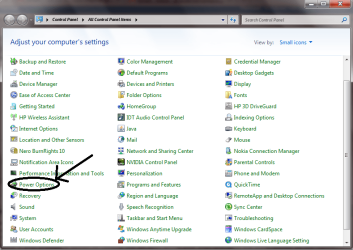
  2. select power options(as shown in attachment)
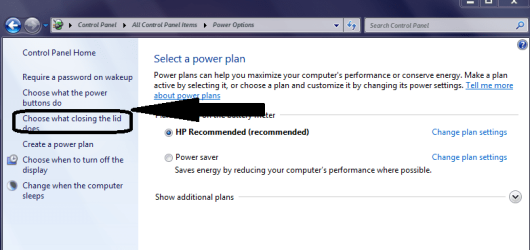
  3. select in the right pane "choose what closing lid does"(as shown in next attachment)
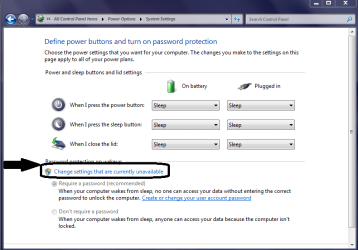
  4. click on "change settings that are currently unavailable" in the lower part as shown
  5. choose 1st option require password .....
  6. that's all your work is done
 

Attachments

  • Untitled.png
    Untitled.png
    41.9 KB · Views: 54
  • Screen Snaper Image.png
    Screen Snaper Image.png
    26.4 KB · Views: 70
  • Screen Snaper Image1.png
    Screen Snaper Image1.png
    27.7 KB · Views: 81

My Computer

Computer Manufacturer/Model Number
hp pavilion dv-4 1506TX
OS
windows7 home premium
Thanks for the help guys, it's working fine now.
 

My Computer

Computer Manufacturer/Model Number
HP
OS
Windows 7 Home Premium 64 Bit
CPU
HP Pavilion DV7 Notebook PC
Memory
8GB RAM
Graphics Card(s)
AMD Radeon Graphics
Hard Drives
1TB Hard Drive
Glad to hear it got sorted out! :thumbsup:
 

My Computer

Computer type
Laptop
Computer Manufacturer/Model Number
Sony Vaio VPCEB47GM Laptop
OS
Win 7 Pro 64-bit
CPU
Intel i5 2.4 Ghz
Memory
8GB DDR3
Graphics Card(s)
Intel HD 3000
Sound Card
IDT High Definition
Monitor(s) Displays
15.6 WGXA Anti-Glare LED
Screen Resolution
1280x800
Hard Drives
640Gb 7200rpm
Antivirus
MSE
Browser
Opera (primary) with IE9 backup
Back
Top