Solved Windows not booting due to bad display driver

reckonn

New member
Local time
9:09 AM
Messages
8
(important info in the last paragraph)

Hi! I recently got a used ATI Radeon HD 7350 1gb to replace my old Nvidia graphic card. Unfortunately, Windows 7 wouldn't detect it and only showed "Standard VGA card", which I assume is the one integrated in the motherboard. I tried to find a solution and read online that setting the ATI card as the default one in the BIOS could solve it, so I tried it.

Now the situation is even worse. In the BIOS I changed the default display from "Auto" to IGP (didn't work), PEG (didn't work), PCI (didn't work) and back to "Auto", and now the computer simply restarts when the "windows is starting" message and the rotating logo appear on screen.

I tried the old graphic card and got the same problem. Also tried a different hard disk with both a Windows 7 and a Windows XP partition, and even though Windows 7 won't start, windows XP does (though it doesn't detect the ATI card either). Also, the boot repair tool says it can't fix the problem but at least points out a reason: "baddriver". Safe mode won't initiate either.

Bottom line: I'm assuming the integrated card's default drivers for windows 7 got corrupt or something similar, but I have no idea how to replace them/fix them. Any suggestions? Thanks a lot!
 

My Computer My Computer

At a glance

Windows 7 Home Premium 32bit
OS
Windows 7 Home Premium 32bit
Is there an option in your BIOS to turn off the integrated graphics? Most BIOSes have an option to do this. That will force the computer to work with the graphics card.

It's not quite clear from your post, but can the computer boot with the integrated graphics without the video card installed?
 

My Computer My Computer

At a glance

Win 7 Pro x64/Win 10 Pro x64 dual bootAMD FX 8350 Vishera @ 420016 GB Mushkin Blackline DDR3-2400 @ 1866 (9-1...XFX Radeon R9 280 Double D Black Edition
Computer type
PC/Desktop
Computer Manufacturer/Model Number
Mellon Labs (custom build)
OS
Win 7 Pro x64/Win 10 Pro x64 dual boot
CPU
AMD FX 8350 Vishera @ 4200
Motherboard
ASUS M5A97 R2.0
Memory
16 GB Mushkin Blackline DDR3-2400 @ 1866 (9-10-10-10-31)
Graphics Card(s)
XFX Radeon R9 280 Double D Black Edition
Sound Card
Realtek HD Audio on MB. Sounds great.
Monitor(s) Displays
Acer 24", Acer 22"
Screen Resolution
3840 x 1080
Hard Drives
1 x Mushkin Chronos 120 GB SSD (Win 10)
1 x Samsung 850 EVO 250 GB SSD (Win 7)
1 x WD 1TB SATA Blue
1 x WD 1TB SATA Green
PSU
Corsair TX-750
Case
CoolerMaster HAF 912+
Cooling
Coolermaster Seidon 240M Liquid AIO. 6 case fans
Keyboard
Logitech G710+
Mouse
Logitech G500s
Internet Speed
Much better since I got fiber, but still way overpriced.
Antivirus
MSE, Malware Bytes for scanning
Browser
Firefox
Other Info
Corsair VOID USB headphones.

A Mellon Labs X-1 - LCD Smartie driven system status display.

Brought to you by the letter E
Thanks Mellon Head,

I can, indeed, select the option to disable the integrated graphics, but I'm afraid I might then ruin any possible way to access the computer, since the screen doesn't turn on if I try to start the computer with a VGA cable connected to the integrated card (the ATI uses a DVI). I actually found it very odd from the beginning that the computer would work with the monitor connected through DVI to the new ATI card, but would only recognize the integrated one.
 

My Computer My Computer

At a glance

Windows 7 Home Premium 32bit
OS
Windows 7 Home Premium 32bit
The computer was probably using a generic driver for the graphics card and that's what you saw when you saw "Standard VGA". Windows will use Standard VGA until you load the manufacturer's drivers (AMD/Nvidia).

Can you still see the BIOS with the graphics card installed, and when it's attached to the monitor? Without the integrated adapter connected? If you can, it should be safe to turn off the integrated graphics. It might boot then. If not, you can always reset the BIOS by removing the CMOS battery for a few minutes and re-inserting it.
 

My Computer My Computer

At a glance

Win 7 Pro x64/Win 10 Pro x64 dual bootAMD FX 8350 Vishera @ 420016 GB Mushkin Blackline DDR3-2400 @ 1866 (9-1...XFX Radeon R9 280 Double D Black Edition
Computer type
PC/Desktop
Computer Manufacturer/Model Number
Mellon Labs (custom build)
OS
Win 7 Pro x64/Win 10 Pro x64 dual boot
CPU
AMD FX 8350 Vishera @ 4200
Motherboard
ASUS M5A97 R2.0
Memory
16 GB Mushkin Blackline DDR3-2400 @ 1866 (9-10-10-10-31)
Graphics Card(s)
XFX Radeon R9 280 Double D Black Edition
Sound Card
Realtek HD Audio on MB. Sounds great.
Monitor(s) Displays
Acer 24", Acer 22"
Screen Resolution
3840 x 1080
Hard Drives
1 x Mushkin Chronos 120 GB SSD (Win 10)
1 x Samsung 850 EVO 250 GB SSD (Win 7)
1 x WD 1TB SATA Blue
1 x WD 1TB SATA Green
PSU
Corsair TX-750
Case
CoolerMaster HAF 912+
Cooling
Coolermaster Seidon 240M Liquid AIO. 6 case fans
Keyboard
Logitech G710+
Mouse
Logitech G500s
Internet Speed
Much better since I got fiber, but still way overpriced.
Antivirus
MSE, Malware Bytes for scanning
Browser
Firefox
Other Info
Corsair VOID USB headphones.

A Mellon Labs X-1 - LCD Smartie driven system status display.

Brought to you by the letter E
Thanks Mellon Head,

I tried that and indeed the computer boots with the ATI card connected and the integrated card deactivated, but still crashes when the Win7 logo shows up. Also, the monitor doesn't turn on when I connect it to the integrated card, so apparently it's been a problem with the ATI card all the time.

I suppose the thread could be updated to "computer crashes on win7 logo due to bad ATI driver", since it does start with Win XP.

Is there a way to fix the default VGA driver or install a Win7 compatible one?
 

My Computer My Computer

At a glance

Windows 7 Home Premium 32bit
OS
Windows 7 Home Premium 32bit
Now when you have the ATI card in and the IGP deactivated, can you get into safe mode? If you can, you can try to load the ATI driver while in safe mode. You can also try Windows Update in safe mode to try and let Windows find a compatible driver for the card. Once you have it working again, we can see about putting in the correct ATI drivers.
 

My Computer My Computer

At a glance

Win 7 Pro x64/Win 10 Pro x64 dual bootAMD FX 8350 Vishera @ 420016 GB Mushkin Blackline DDR3-2400 @ 1866 (9-1...XFX Radeon R9 280 Double D Black Edition
Computer type
PC/Desktop
Computer Manufacturer/Model Number
Mellon Labs (custom build)
OS
Win 7 Pro x64/Win 10 Pro x64 dual boot
CPU
AMD FX 8350 Vishera @ 4200
Motherboard
ASUS M5A97 R2.0
Memory
16 GB Mushkin Blackline DDR3-2400 @ 1866 (9-10-10-10-31)
Graphics Card(s)
XFX Radeon R9 280 Double D Black Edition
Sound Card
Realtek HD Audio on MB. Sounds great.
Monitor(s) Displays
Acer 24", Acer 22"
Screen Resolution
3840 x 1080
Hard Drives
1 x Mushkin Chronos 120 GB SSD (Win 10)
1 x Samsung 850 EVO 250 GB SSD (Win 7)
1 x WD 1TB SATA Blue
1 x WD 1TB SATA Green
PSU
Corsair TX-750
Case
CoolerMaster HAF 912+
Cooling
Coolermaster Seidon 240M Liquid AIO. 6 case fans
Keyboard
Logitech G710+
Mouse
Logitech G500s
Internet Speed
Much better since I got fiber, but still way overpriced.
Antivirus
MSE, Malware Bytes for scanning
Browser
Firefox
Other Info
Corsair VOID USB headphones.

A Mellon Labs X-1 - LCD Smartie driven system status display.

Brought to you by the letter E
Thank you! So, after several tries I managed to get the computer working, only with a clean Win7 installation (system repair, etc. didn't work). However, I'm back to the "Standard VGA Graphics Adapter" in the Device Manager. I've downloaded the appropriate ATI Catalyst software for the Radeon HD 7350. I'm just not sure if the right step here is to simply install it and pray for the ATI card to be recognized :/
 

My Computer My Computer

At a glance

Windows 7 Home Premium 32bit
OS
Windows 7 Home Premium 32bit
If you have the IGP turned off, you can run the ATI installer as Administrator and choose a Custom Install. It should detect your card, and you can avoid installing the bloatware from AMD. Make a restore point first.

BTW, where did you get the ATI driver from?
 

My Computer My Computer

At a glance

Win 7 Pro x64/Win 10 Pro x64 dual bootAMD FX 8350 Vishera @ 420016 GB Mushkin Blackline DDR3-2400 @ 1866 (9-1...XFX Radeon R9 280 Double D Black Edition
Computer type
PC/Desktop
Computer Manufacturer/Model Number
Mellon Labs (custom build)
OS
Win 7 Pro x64/Win 10 Pro x64 dual boot
CPU
AMD FX 8350 Vishera @ 4200
Motherboard
ASUS M5A97 R2.0
Memory
16 GB Mushkin Blackline DDR3-2400 @ 1866 (9-10-10-10-31)
Graphics Card(s)
XFX Radeon R9 280 Double D Black Edition
Sound Card
Realtek HD Audio on MB. Sounds great.
Monitor(s) Displays
Acer 24", Acer 22"
Screen Resolution
3840 x 1080
Hard Drives
1 x Mushkin Chronos 120 GB SSD (Win 10)
1 x Samsung 850 EVO 250 GB SSD (Win 7)
1 x WD 1TB SATA Blue
1 x WD 1TB SATA Green
PSU
Corsair TX-750
Case
CoolerMaster HAF 912+
Cooling
Coolermaster Seidon 240M Liquid AIO. 6 case fans
Keyboard
Logitech G710+
Mouse
Logitech G500s
Internet Speed
Much better since I got fiber, but still way overpriced.
Antivirus
MSE, Malware Bytes for scanning
Browser
Firefox
Other Info
Corsair VOID USB headphones.

A Mellon Labs X-1 - LCD Smartie driven system status display.

Brought to you by the letter E
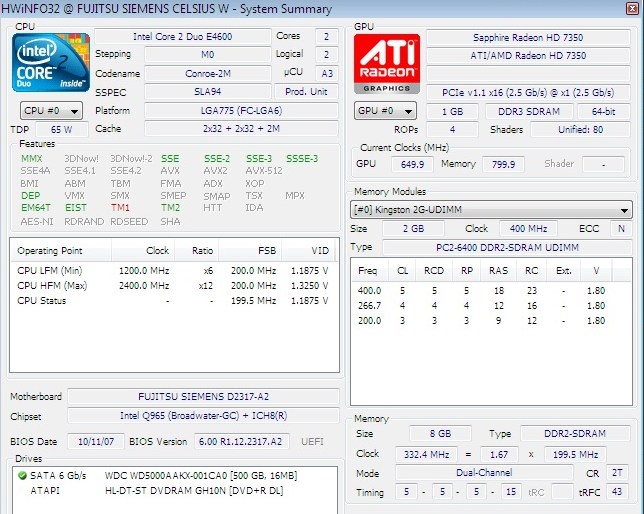
Ok, so no success, unfortunately. But I feel the solution is closer now. In the BIOS, the default graphics are set to PCI Express Graphics or "PEG", which is the ATI card, and the Integrated Graphics are disabled. Using the tool "hwinfo" I got to see that the system does detect de ATI card, but the driver is still set to Standard VGA Graphics. The installation of the ATI catalyst, which I got from the AMD website, fails repeatedly: it succeeds to install the ATI Audio driver but fails at the display driver.

I'm thinking that perhaps I could find just the driver, no catalyst, and install it manually. However, I've tried a couple of websites (Driverscape and Solvusoft) and they don't seem too reliable. Do you happen to know any good ones?

I also took a few screenshots:

Q8xH2YO.jpg

qdKzoo3.jpg

IKhOWUH.jpg
 

My Computer My Computer

At a glance

Windows 7 Home Premium 32bit
OS
Windows 7 Home Premium 32bit

My Computer My Computer

At a glance

Win 7 Pro x64/Win 10 Pro x64 dual bootAMD FX 8350 Vishera @ 420016 GB Mushkin Blackline DDR3-2400 @ 1866 (9-1...XFX Radeon R9 280 Double D Black Edition
Computer type
PC/Desktop
Computer Manufacturer/Model Number
Mellon Labs (custom build)
OS
Win 7 Pro x64/Win 10 Pro x64 dual boot
CPU
AMD FX 8350 Vishera @ 4200
Motherboard
ASUS M5A97 R2.0
Memory
16 GB Mushkin Blackline DDR3-2400 @ 1866 (9-10-10-10-31)
Graphics Card(s)
XFX Radeon R9 280 Double D Black Edition
Sound Card
Realtek HD Audio on MB. Sounds great.
Monitor(s) Displays
Acer 24", Acer 22"
Screen Resolution
3840 x 1080
Hard Drives
1 x Mushkin Chronos 120 GB SSD (Win 10)
1 x Samsung 850 EVO 250 GB SSD (Win 7)
1 x WD 1TB SATA Blue
1 x WD 1TB SATA Green
PSU
Corsair TX-750
Case
CoolerMaster HAF 912+
Cooling
Coolermaster Seidon 240M Liquid AIO. 6 case fans
Keyboard
Logitech G710+
Mouse
Logitech G500s
Internet Speed
Much better since I got fiber, but still way overpriced.
Antivirus
MSE, Malware Bytes for scanning
Browser
Firefox
Other Info
Corsair VOID USB headphones.

A Mellon Labs X-1 - LCD Smartie driven system status display.

Brought to you by the letter E
Thanks for your help Mellon Head. I actually managed to install the driver by manually selecting it from the device manager's update driver option. It took several tries, since just selecting the folder wouldn't work (Windows wouldn't find a more appropriate driver than the already installed "Standard VGA Graphics") and I ended up pointing to the "inf" driver file for Windows Vista.

Bottom line, the system now recognizes the card and I've successfully run a couple of programs that with the Standard VGA Graphics either didn't work or ran poorly. I also executed the Unigine video benchmark tool with rather poor results (10FPS on low graphics), but since it's a pretty demanding benchmark I'm not too upset. I suppose I could possibly get a better performance from the ATI, but at least it seems to be working!

Once again, thanks for everything!
 

My Computer My Computer

At a glance

Windows 7 Home Premium 32bit
OS
Windows 7 Home Premium 32bit
Glad you got it working.
 

My Computer My Computer

At a glance

Win 7 Pro x64/Win 10 Pro x64 dual bootAMD FX 8350 Vishera @ 420016 GB Mushkin Blackline DDR3-2400 @ 1866 (9-1...XFX Radeon R9 280 Double D Black Edition
Computer type
PC/Desktop
Computer Manufacturer/Model Number
Mellon Labs (custom build)
OS
Win 7 Pro x64/Win 10 Pro x64 dual boot
CPU
AMD FX 8350 Vishera @ 4200
Motherboard
ASUS M5A97 R2.0
Memory
16 GB Mushkin Blackline DDR3-2400 @ 1866 (9-10-10-10-31)
Graphics Card(s)
XFX Radeon R9 280 Double D Black Edition
Sound Card
Realtek HD Audio on MB. Sounds great.
Monitor(s) Displays
Acer 24", Acer 22"
Screen Resolution
3840 x 1080
Hard Drives
1 x Mushkin Chronos 120 GB SSD (Win 10)
1 x Samsung 850 EVO 250 GB SSD (Win 7)
1 x WD 1TB SATA Blue
1 x WD 1TB SATA Green
PSU
Corsair TX-750
Case
CoolerMaster HAF 912+
Cooling
Coolermaster Seidon 240M Liquid AIO. 6 case fans
Keyboard
Logitech G710+
Mouse
Logitech G500s
Internet Speed
Much better since I got fiber, but still way overpriced.
Antivirus
MSE, Malware Bytes for scanning
Browser
Firefox
Other Info
Corsair VOID USB headphones.

A Mellon Labs X-1 - LCD Smartie driven system status display.

Brought to you by the letter E
Hey, this message is for reckonn. When you finally managed to install "the driver" by using manual install, locating a certain folder, and using the "vista" version, what exact driver were you talking about, what folder name, and where did you get it? I have the exact same problem you were having and it's extremely annoying, so any help would be awesome.
 

My Computer My Computer

At a glance

Windows 7 Ultimate x64AMD FX-8120 3.1ghz
Computer type
PC/Desktop
Computer Manufacturer/Model Number
Acer
OS
Windows 7 Ultimate x64
CPU
AMD FX-8120 3.1ghz
Back
Top