Windows not recognizing NVidia GeForce 8400M GT

vaio77

New member
Local time
6:40 PM
Messages
4
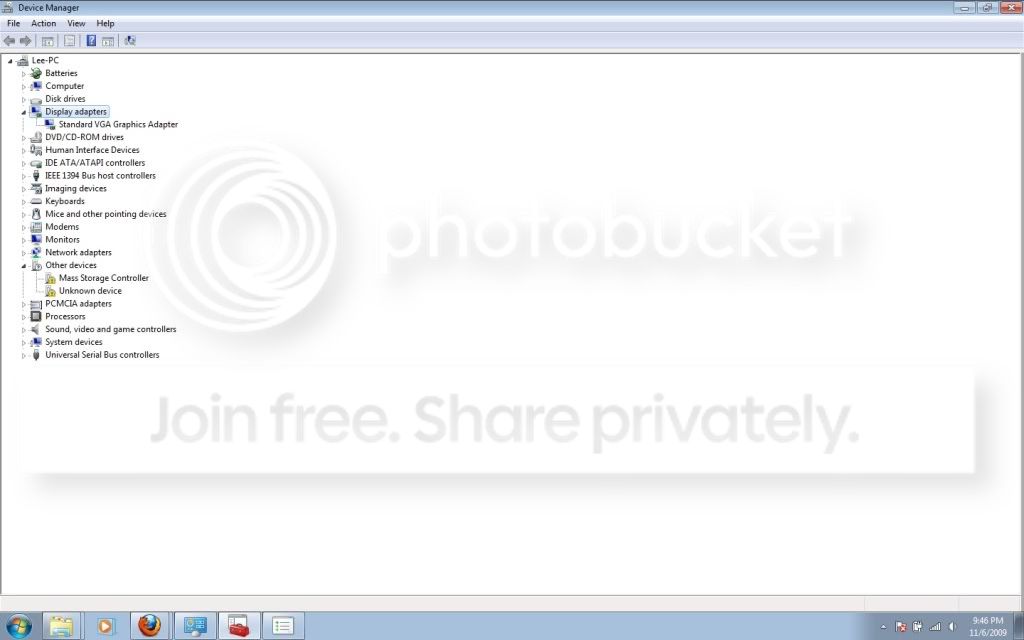
I just installed Windows 7 onto my Vaio Laptop AR630E. Windows 7 is not recognizing my video card (NVidia 8400M GT) at all. I can't find it in the device manager nor can I download new drivers for it. The Sony website has no new drivers for my notebook's model.

I tried to download from NVidia's website but it could not locate my video card either.
 

My Computer My Computer

OS
Windows 7
Memory
2GB
Graphics Card(s)
NVidia GeForce 8400M GT

My Computer My Computer

Computer Manufacturer/Model Number
self built
OS
7600.20510 x86
CPU
P4 550 3.4 GHz HT running at 3.5 GHz
Motherboard
MSI PM8M3-V (MS-7211 v1.x) Micro-ATX mainboard
Memory
OCZ 2 GB(2x1GB) DDR400mHz running @ 414 mHz
Graphics Card(s)
HIS Radeon HD 3850 IceQ 3 Turbo HDMI Dual DL-DVI AGP
Sound Card
MOTU Traveler firewire studio interface 192 kHz 24 bit
Monitor(s) Displays
22" widescreen Acer X223W LCD, 17" Compaq P75 CRT
Screen Resolution
1680x1050 and 1280x1024
Hard Drives
SATA I x2 WD, 400 GB and 120 GB, SATA 2 WD Caviar Black 1 TB
PSU
350W generic
Case
Cybertronpc, it glows blue
Cooling
stock cpu fan, Ice-Q 3 gpu and system, many case fans
Keyboard
Logitch Classical Keyboard 200
Mouse
Logitech Mediaplay cordless
Internet Speed
1792/448 kbits/sec
Other Info
SATA II PCI fake RAID adapter, 1 GB Readyboost, original ATI Remote Wonder (even works with WMC perfectly), Logitech Rumblepad 2 game controller x2
I actually just used that site and installed the driver and modded it following the instructions and it is still not appearing after reboot.

devicemanager.jpg
 

My Computer My Computer

OS
Windows 7
Memory
2GB
Graphics Card(s)
NVidia GeForce 8400M GT
Yeah, it's there. That's what standard vga is.

Here, let me make a custom install plan for you since you're having troubles with that.

Right click on standard vga. Properties. Details tab. Change dropdown to hardware ids. Copy and paste results here. Please no screenshots for this. Thanks.

x86 I hope?
 

My Computer My Computer

Computer Manufacturer/Model Number
self built
OS
7600.20510 x86
CPU
P4 550 3.4 GHz HT running at 3.5 GHz
Motherboard
MSI PM8M3-V (MS-7211 v1.x) Micro-ATX mainboard
Memory
OCZ 2 GB(2x1GB) DDR400mHz running @ 414 mHz
Graphics Card(s)
HIS Radeon HD 3850 IceQ 3 Turbo HDMI Dual DL-DVI AGP
Sound Card
MOTU Traveler firewire studio interface 192 kHz 24 bit
Monitor(s) Displays
22" widescreen Acer X223W LCD, 17" Compaq P75 CRT
Screen Resolution
1680x1050 and 1280x1024
Hard Drives
SATA I x2 WD, 400 GB and 120 GB, SATA 2 WD Caviar Black 1 TB
PSU
350W generic
Case
Cybertronpc, it glows blue
Cooling
stock cpu fan, Ice-Q 3 gpu and system, many case fans
Keyboard
Logitch Classical Keyboard 200
Mouse
Logitech Mediaplay cordless
Internet Speed
1792/448 kbits/sec
Other Info
SATA II PCI fake RAID adapter, 1 GB Readyboost, original ATI Remote Wonder (even works with WMC perfectly), Logitech Rumblepad 2 game controller x2
PCI\VEN_10DE&DEV_0426&SUBSYS_9016104D&REV_A1
PCI\VEN_10DE&DEV_0426&SUBSYS_9016104D
PCI\VEN_10DE&DEV_0426&CC_030000
PCI\VEN_10DE&DEV_0426&CC_0300

Here is what it says.Yes, sorry I am not entirely computer savvy when it comes to things like this. I did modify the drivers to that folder, but I wasn't sure that it had anything to do with the VGA because it usually displays both the VGA and my NVidia cards (in Vista).
 

My Computer My Computer

OS
Windows 7
Memory
2GB
Graphics Card(s)
NVidia GeForce 8400M GT
Download the latest driver for desktops. Tell it you have 8800 any kind, doesn't matter. For Windows 7.

Drivers - Download NVIDIA Drivers

Extract the download to C:\NVIDIA

Download my attachment and extract it. Copy and paste NV_DISP.inf directly over by overwriting existing one at C:\NVIDIA\DisplayDriver\191.07\WinVista_Win7\English

Right click standard vga in device manager. Update driver software. Browse. Let me pick. Have disk. Browse. Now navigate to the same folder as before and double click on NV_DISP.inf. Hit ok. Reboot when done, if necessary.

Run C:\NVIDIA\DisplayDriver\191.07\WinVista_Win7\English\setup.exe

now if you want the control panel.
 

Attachments

My Computer My Computer

Computer Manufacturer/Model Number
self built
OS
7600.20510 x86
CPU
P4 550 3.4 GHz HT running at 3.5 GHz
Motherboard
MSI PM8M3-V (MS-7211 v1.x) Micro-ATX mainboard
Memory
OCZ 2 GB(2x1GB) DDR400mHz running @ 414 mHz
Graphics Card(s)
HIS Radeon HD 3850 IceQ 3 Turbo HDMI Dual DL-DVI AGP
Sound Card
MOTU Traveler firewire studio interface 192 kHz 24 bit
Monitor(s) Displays
22" widescreen Acer X223W LCD, 17" Compaq P75 CRT
Screen Resolution
1680x1050 and 1280x1024
Hard Drives
SATA I x2 WD, 400 GB and 120 GB, SATA 2 WD Caviar Black 1 TB
PSU
350W generic
Case
Cybertronpc, it glows blue
Cooling
stock cpu fan, Ice-Q 3 gpu and system, many case fans
Keyboard
Logitch Classical Keyboard 200
Mouse
Logitech Mediaplay cordless
Internet Speed
1792/448 kbits/sec
Other Info
SATA II PCI fake RAID adapter, 1 GB Readyboost, original ATI Remote Wonder (even works with WMC perfectly), Logitech Rumblepad 2 game controller x2
I have almost no clue how that little file fixed it, but it did! Thank you so much for your help -- you saved me hours of hand wringing in just a few posts. Very much appreciated!

Cheers
 

My Computer My Computer

OS
Windows 7
Memory
2GB
Graphics Card(s)
NVidia GeForce 8400M GT
You're welcome. :D
 

My Computer My Computer

Computer Manufacturer/Model Number
self built
OS
7600.20510 x86
CPU
P4 550 3.4 GHz HT running at 3.5 GHz
Motherboard
MSI PM8M3-V (MS-7211 v1.x) Micro-ATX mainboard
Memory
OCZ 2 GB(2x1GB) DDR400mHz running @ 414 mHz
Graphics Card(s)
HIS Radeon HD 3850 IceQ 3 Turbo HDMI Dual DL-DVI AGP
Sound Card
MOTU Traveler firewire studio interface 192 kHz 24 bit
Monitor(s) Displays
22" widescreen Acer X223W LCD, 17" Compaq P75 CRT
Screen Resolution
1680x1050 and 1280x1024
Hard Drives
SATA I x2 WD, 400 GB and 120 GB, SATA 2 WD Caviar Black 1 TB
PSU
350W generic
Case
Cybertronpc, it glows blue
Cooling
stock cpu fan, Ice-Q 3 gpu and system, many case fans
Keyboard
Logitch Classical Keyboard 200
Mouse
Logitech Mediaplay cordless
Internet Speed
1792/448 kbits/sec
Other Info
SATA II PCI fake RAID adapter, 1 GB Readyboost, original ATI Remote Wonder (even works with WMC perfectly), Logitech Rumblepad 2 game controller x2
enable to install Nvdia driver on Sony vaio with 8400m

Hi this is for Torrentg. Can you please do a custom Inf for me. I did everything incl downloading MobilityModder but was still enable to install the lastest nvdia driver to my sony vaio running windows 7 with 8400M GS. Here are info on my card:
PCI\VEN_10DE&DEV_0427&SUBSYS_9008104D&REV_A1
PCI\VEN_10DE&DEV_0427&SUBSYS_9008104D
PCI\VEN_10DE&DEV_0427&CC_030000
PCI\VEN_10DE&DEV_0427&CC_0300

Your help is very much apreciate Torrentg
 

My Computer My Computer

Computer Manufacturer/Model Number
sony vaio vgn sz650n
OS
windows 7 home premium 64bit
CPU
intel core 2 duo
Memory
4gb
Graphics Card(s)
nvidia 8400m gs
Sound Card
realtek hd
Monitor(s) Displays
13.3 tft led
Hard Drives
160gb sata
Here you are daviddoo9988. You're welcome. Customized for you:
 

Attachments

My Computer My Computer

Computer Manufacturer/Model Number
self built
OS
7600.20510 x86
CPU
P4 550 3.4 GHz HT running at 3.5 GHz
Motherboard
MSI PM8M3-V (MS-7211 v1.x) Micro-ATX mainboard
Memory
OCZ 2 GB(2x1GB) DDR400mHz running @ 414 mHz
Graphics Card(s)
HIS Radeon HD 3850 IceQ 3 Turbo HDMI Dual DL-DVI AGP
Sound Card
MOTU Traveler firewire studio interface 192 kHz 24 bit
Monitor(s) Displays
22" widescreen Acer X223W LCD, 17" Compaq P75 CRT
Screen Resolution
1680x1050 and 1280x1024
Hard Drives
SATA I x2 WD, 400 GB and 120 GB, SATA 2 WD Caviar Black 1 TB
PSU
350W generic
Case
Cybertronpc, it glows blue
Cooling
stock cpu fan, Ice-Q 3 gpu and system, many case fans
Keyboard
Logitch Classical Keyboard 200
Mouse
Logitech Mediaplay cordless
Internet Speed
1792/448 kbits/sec
Other Info
SATA II PCI fake RAID adapter, 1 GB Readyboost, original ATI Remote Wonder (even works with WMC perfectly), Logitech Rumblepad 2 game controller x2
i have the same problem with my sony vaio fz460e. Windows 7 x64 do not recognize the NVidia 8400M GT. here are the informations about my card:

PCI\VEN_10DE&DEV_0426&SUBSYS_9005104D&REV_A1
PCI\VEN_10DE&DEV_0426&SUBSYS_9005104D
PCI\VEN_10DE&DEV_0426&CC_030000
PCI\VEN_10DE&DEV_0426&CC_0300
thx in advance:huh:
 

My Computer My Computer

OS
widosw 7
Can you please do a custom Inf for me too. I'm running windows 7 x64 with 8400M GT. Here are info on my card:
PCI\VEN_10DE&DEV_0426&SUBSYS_9005104D&REV_A1
PCI\VEN_10DE&DEV_0426&SUBSYS_9005104D
PCI\VEN_10DE&DEV_0426&CC_030000
PCI\VEN_10DE&DEV_0426&CC_0300

thx in advance
 

My Computer My Computer

OS
widosw 7
i have the same problem with my sony vaio fz460e. Windows 7 x64 do not recognize the NVidia 8400M GT. here are the informations about my card:

PCI\VEN_10DE&DEV_0426&SUBSYS_9005104D&REV_A1
PCI\VEN_10DE&DEV_0426&SUBSYS_9005104D
PCI\VEN_10DE&DEV_0426&CC_030000
PCI\VEN_10DE&DEV_0426&CC_0300
thx in advance:huh:
Sony eSupport - VGN-FZ460E/B - Software Updates & Drivers

If I make you an .inf, you will have trouble using it on x64 because of driver enforcement. So instead, install that using the device manager method I outline in many of my posts.
 

My Computer My Computer

Computer Manufacturer/Model Number
self built
OS
7600.20510 x86
CPU
P4 550 3.4 GHz HT running at 3.5 GHz
Motherboard
MSI PM8M3-V (MS-7211 v1.x) Micro-ATX mainboard
Memory
OCZ 2 GB(2x1GB) DDR400mHz running @ 414 mHz
Graphics Card(s)
HIS Radeon HD 3850 IceQ 3 Turbo HDMI Dual DL-DVI AGP
Sound Card
MOTU Traveler firewire studio interface 192 kHz 24 bit
Monitor(s) Displays
22" widescreen Acer X223W LCD, 17" Compaq P75 CRT
Screen Resolution
1680x1050 and 1280x1024
Hard Drives
SATA I x2 WD, 400 GB and 120 GB, SATA 2 WD Caviar Black 1 TB
PSU
350W generic
Case
Cybertronpc, it glows blue
Cooling
stock cpu fan, Ice-Q 3 gpu and system, many case fans
Keyboard
Logitch Classical Keyboard 200
Mouse
Logitech Mediaplay cordless
Internet Speed
1792/448 kbits/sec
Other Info
SATA II PCI fake RAID adapter, 1 GB Readyboost, original ATI Remote Wonder (even works with WMC perfectly), Logitech Rumblepad 2 game controller x2
thank you torrentg, but the drivers there are only for x32 systems
 

My Computer My Computer

OS
widosw 7
thank you torrentg, but the drivers there are only for x32 systems

That's Sony's way of telling you that you should be running x86 instead.
 

My Computer My Computer

Computer Manufacturer/Model Number
self built
OS
7600.20510 x86
CPU
P4 550 3.4 GHz HT running at 3.5 GHz
Motherboard
MSI PM8M3-V (MS-7211 v1.x) Micro-ATX mainboard
Memory
OCZ 2 GB(2x1GB) DDR400mHz running @ 414 mHz
Graphics Card(s)
HIS Radeon HD 3850 IceQ 3 Turbo HDMI Dual DL-DVI AGP
Sound Card
MOTU Traveler firewire studio interface 192 kHz 24 bit
Monitor(s) Displays
22" widescreen Acer X223W LCD, 17" Compaq P75 CRT
Screen Resolution
1680x1050 and 1280x1024
Hard Drives
SATA I x2 WD, 400 GB and 120 GB, SATA 2 WD Caviar Black 1 TB
PSU
350W generic
Case
Cybertronpc, it glows blue
Cooling
stock cpu fan, Ice-Q 3 gpu and system, many case fans
Keyboard
Logitch Classical Keyboard 200
Mouse
Logitech Mediaplay cordless
Internet Speed
1792/448 kbits/sec
Other Info
SATA II PCI fake RAID adapter, 1 GB Readyboost, original ATI Remote Wonder (even works with WMC perfectly), Logitech Rumblepad 2 game controller x2
ok thx again:cry:

Ya no prob. I mean, I can make you an .inf but what you do with it after I don't want to know anything about it.

It's all on you to find how to run it right.

Do you still want the .inf or are you migrating to x86? If you want x64 .inf, download latest driver package for desktop from NVidia's site. Then attach the .inf to a post after extracting and .raring so I can edit and attach in a new post.
 

My Computer My Computer

Computer Manufacturer/Model Number
self built
OS
7600.20510 x86
CPU
P4 550 3.4 GHz HT running at 3.5 GHz
Motherboard
MSI PM8M3-V (MS-7211 v1.x) Micro-ATX mainboard
Memory
OCZ 2 GB(2x1GB) DDR400mHz running @ 414 mHz
Graphics Card(s)
HIS Radeon HD 3850 IceQ 3 Turbo HDMI Dual DL-DVI AGP
Sound Card
MOTU Traveler firewire studio interface 192 kHz 24 bit
Monitor(s) Displays
22" widescreen Acer X223W LCD, 17" Compaq P75 CRT
Screen Resolution
1680x1050 and 1280x1024
Hard Drives
SATA I x2 WD, 400 GB and 120 GB, SATA 2 WD Caviar Black 1 TB
PSU
350W generic
Case
Cybertronpc, it glows blue
Cooling
stock cpu fan, Ice-Q 3 gpu and system, many case fans
Keyboard
Logitch Classical Keyboard 200
Mouse
Logitech Mediaplay cordless
Internet Speed
1792/448 kbits/sec
Other Info
SATA II PCI fake RAID adapter, 1 GB Readyboost, original ATI Remote Wonder (even works with WMC perfectly), Logitech Rumblepad 2 game controller x2
Here ya go. Replace this over original in C:\NVIDIA somewhere by overwriting. Right click video card in device manager. Update driver software. Browse. Let me pick. Have disk. Browse. Double click the .inf and let it install by hitting ok.

Use f8 to start the machine and choose not to check drivers. There is a way to permanently disable so that's not necessary but I'm not sure because I don't use x64.

Enjoy.
 

Attachments

My Computer My Computer

Computer Manufacturer/Model Number
self built
OS
7600.20510 x86
CPU
P4 550 3.4 GHz HT running at 3.5 GHz
Motherboard
MSI PM8M3-V (MS-7211 v1.x) Micro-ATX mainboard
Memory
OCZ 2 GB(2x1GB) DDR400mHz running @ 414 mHz
Graphics Card(s)
HIS Radeon HD 3850 IceQ 3 Turbo HDMI Dual DL-DVI AGP
Sound Card
MOTU Traveler firewire studio interface 192 kHz 24 bit
Monitor(s) Displays
22" widescreen Acer X223W LCD, 17" Compaq P75 CRT
Screen Resolution
1680x1050 and 1280x1024
Hard Drives
SATA I x2 WD, 400 GB and 120 GB, SATA 2 WD Caviar Black 1 TB
PSU
350W generic
Case
Cybertronpc, it glows blue
Cooling
stock cpu fan, Ice-Q 3 gpu and system, many case fans
Keyboard
Logitch Classical Keyboard 200
Mouse
Logitech Mediaplay cordless
Internet Speed
1792/448 kbits/sec
Other Info
SATA II PCI fake RAID adapter, 1 GB Readyboost, original ATI Remote Wonder (even works with WMC perfectly), Logitech Rumblepad 2 game controller x2
Back
Top