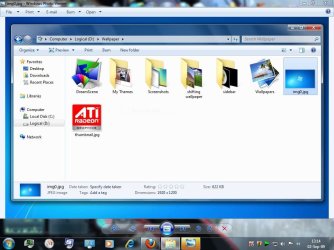
Windows Photo Viewer pops in the back layer.

MadMatt

New member
Local time
11:04 AM
Messages
51
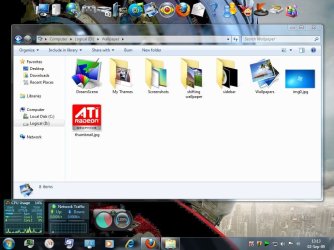
Windows Photo Viewer is the default handler of all pictures file extensions in my computer. But when I double-click any picture files; *.jpg, *.png, *.bmp etc, Windows Photo Viewer pops in the back layer of other windows and applications. You can see the screenshots to be clear.

It suppose to pop to the top layer, is it not? Please, how can I fix this, guys?
 

Attachments
  • Capture.JPG
    Capture.JPG
    102.8 KB · Views: 80
  • Capture2.JPG
    Capture2.JPG
    93.3 KB · Views: 96

My Computer My Computer

Computer Manufacturer/Model Number
custom built
OS
7600.16385 x86
CPU
Intel Pentium E8400
Motherboard
Gigabyte GA-X48T-DQ6
Graphics Card(s)
HIS 4890
Internet Speed
broadband 384kbps bandwidth
Welcome to SevenForums. ;)

That's a good question. Are you enforcing other windows to 'Stay on Top' somehow? A tweak program, perhaps?
 

My Computer My Computer

Computer type
PC/Desktop
Computer Manufacturer/Model Number
Custom Build/Mod
OS
Windows 7 Home Premium x64
CPU
Intel QX9650 Extreme 4.0 GHz
Motherboard
ASUS Rampage Extreme Rev2
Memory
8GB (4x2) Corsair Dominator DDR3
Graphics Card(s)
2x Radeon R390X [8GB]
Sound Card
SupremeFX X-Fi
Monitor(s) Displays
Dell 2408WFP 26" Panel
Screen Resolution
1920x1200
Hard Drives
4x WD 2TB (8TB+ Total)
2x Crucial SSD 128GB (RAID-0)
1x LG Blu-ray read/write
1x Phillips LightScribe DVD read/write
PSU
Corsair HX1000
Case
CoolerMaster - Cosmos S
Cooling
Custom Liquid - 320mm rad w/ 3x 80mm fans, CPU/NB/SB Blocks
Keyboard
Logitech Illuminater Pro
Mouse
Logitech
Internet Speed
Fractional T1 - 125Mbps
Antivirus
ESET Security Suite / Microsoft Security Essentials
Browser
Cyberfox Intel x64
Other Info
OC'd to 5.0GHz @ 44c under full load
Welcome to SevenForums. ;)

That's a good question. Are you enforcing other windows to 'Stay on Top' somehow? A tweak program, perhaps?
No no, you didn't get it, I don't want it. I want the photo viewer always comes on top.
 

My Computer My Computer

Computer Manufacturer/Model Number
custom built
OS
7600.16385 x86
CPU
Intel Pentium E8400
Motherboard
Gigabyte GA-X48T-DQ6
Graphics Card(s)
HIS 4890
Internet Speed
broadband 384kbps bandwidth
Can anybody help me please?
 

My Computer My Computer

Computer Manufacturer/Model Number
custom built
OS
7600.16385 x86
CPU
Intel Pentium E8400
Motherboard
Gigabyte GA-X48T-DQ6
Graphics Card(s)
HIS 4890
Internet Speed
broadband 384kbps bandwidth
Have you installed any tweak utility or registry cleanup tool?

If you have, that may be the issue. Registry cleaners a renound for screwing up your system (links, icons, services, folder behaviour).
 

My Computer My Computer

Computer Manufacturer/Model Number
Compaq Desktop
OS
Windows 7 Ultimate x64
CPU
AMD Sempron Dual Core
Memory
3GB
Graphics Card(s)
NVIDIA GeForce 6150SE nForce 430
Screen Resolution
1024x768
Hard Drives
150GB Sata
ah, no. I never used tweak or reg cleaner or defragger apps like that, never.
 

My Computer My Computer

Computer Manufacturer/Model Number
custom built
OS
7600.16385 x86
CPU
Intel Pentium E8400
Motherboard
Gigabyte GA-X48T-DQ6
Graphics Card(s)
HIS 4890
Internet Speed
broadband 384kbps bandwidth
No no, you didn't get it, I don't want it. I want the photo viewer always comes on top.

I "get it" just fine. My question was if you had somehow 'forced' other windows to remain on top, over your picture viewer. And since you stated that you didn't use any kind of 'tweak' program, I can't imagine what is causing this problem - there is no 'easy' option to enable

I can only recommend this free solution and see if it behaves the same way.
 

My Computer My Computer

Computer type
PC/Desktop
Computer Manufacturer/Model Number
Custom Build/Mod
OS
Windows 7 Home Premium x64
CPU
Intel QX9650 Extreme 4.0 GHz
Motherboard
ASUS Rampage Extreme Rev2
Memory
8GB (4x2) Corsair Dominator DDR3
Graphics Card(s)
2x Radeon R390X [8GB]
Sound Card
SupremeFX X-Fi
Monitor(s) Displays
Dell 2408WFP 26" Panel
Screen Resolution
1920x1200
Hard Drives
4x WD 2TB (8TB+ Total)
2x Crucial SSD 128GB (RAID-0)
1x LG Blu-ray read/write
1x Phillips LightScribe DVD read/write
PSU
Corsair HX1000
Case
CoolerMaster - Cosmos S
Cooling
Custom Liquid - 320mm rad w/ 3x 80mm fans, CPU/NB/SB Blocks
Keyboard
Logitech Illuminater Pro
Mouse
Logitech
Internet Speed
Fractional T1 - 125Mbps
Antivirus
ESET Security Suite / Microsoft Security Essentials
Browser
Cyberfox Intel x64
Other Info
OC'd to 5.0GHz @ 44c under full load
yes you did, sorry. fastpictureviewer, looks nice. I think I'll try it someday. Thanks for your time.
 

My Computer My Computer

Computer Manufacturer/Model Number
custom built
OS
7600.16385 x86
CPU
Intel Pentium E8400
Motherboard
Gigabyte GA-X48T-DQ6
Graphics Card(s)
HIS 4890
Internet Speed
broadband 384kbps bandwidth
Found "A" Fix

I had the same problem. I don't know why I even tried this but it seems to have worked.

After double-clicking the file I wanted to view and having it show up behind the window I clicked from, I noticed that the Photo Viewer was 'Maximized' to fill up my screen. I double-clicked the top window bar to 'Restore Down' which will show the window like it had been manually sized and placed where wanted on the screen. Doing that caused the window to become the top layer window as usual. Then, instead of using the red 'X' in the top right of the window to close it, I clicked on the top left of the window to bring up the window menu and clicked 'Close' from there. I double-clicked the exact same file and it suddenly opened up on top of all other windows. I closed it the same way and tested it again. It opened up again on top. I opened it and closed it using the red 'X'. It opened up again on top. So, after opening it once again, I double-clicked the top window bar to 'Maximize' the window to fill up the screen and closed using the top left window menu 'Close'. I opened the same file yet again and it opened on top of everything else as a maximized window.

I don't know enough about this stuff to figure out WHY it worked, but I thought I'd share the fact that it did work for me. Give it a shot.

Good luck.
 

My Computer My Computer

OS
7 Ultimate SE
Another great free photo viewer app (I use it as the default in my system) is Faststone Image Viewer. Blows windows photo viewer away, imo.
 

My Computer My Computer

Computer Manufacturer/Model Number
HP DV8t quad
OS
Windows 7 Ultimate x64 (Retail)
CPU
i7-Q 720
Motherboard
Motherboard Chipset Intel Ibex Peak-M PM55, Intel Lynnfield
Memory
6 GB
Graphics Card(s)
nVidia GeForce GT 230M (1GB)
Sound Card
IDT High Definition Audio CODEC
Monitor(s) Displays
18.4 inch HP Infinity FHD (Samsung 184HT03-001)
Screen Resolution
1920 x 1080
Hard Drives
Hitachi 500GB 7200 rpm (x2)
Seagate FreeAgent 1.5 TB External USB (x2)
Thermaltake BlacX eSATA/USB 2.0 3.5/2.5 HD dock
Cooling
Zalman NC-2000 notebook cooling pad
Keyboard
laptop
Mouse
Logitech VX Revolution
Other Info
Backup Unit: Lenovo T61p
Wicked thanks jsampsell works perfect been looking for a fix for this for ages
 

My Computer My Computer

Computer Manufacturer/Model Number
zoostorm
OS
Windows 7 Ultimate 32
CPU
Intel Core 2 Duo E6600 @ 2.40GHz
Motherboard
Gigabyte Technology Co., Ltd. G31M-S2L (Socket 775)
Memory
3.0GB Dual-Channel DDR2 @ 333MHz (5-5-5-15)
Graphics Card(s)
193SW @ 1440x900 512MB GeForce 7950 GT
Sound Card
Creative X-Fi Audio Processor (WDM)
Monitor(s) Displays
AOC
Hard Drives
WDC WD3200AAJS-00RYA0 ATA Device
Manufacturer Western Digital
Form Factor GB/3.5-inch
Business Unit/Brand Desktop/WD Caviar®
RPM/Buffer Size or Attribute 7200 RPM with 8 MB cache
Interface/Connector SATA 3 Gb/s with 22-pin SATA connector/SA
Case
cooler master
big thx jsampsell been trying to fix this for ages
 

My Computer My Computer

Computer Manufacturer/Model Number
zoostorm
OS
Windows 7 Ultimate 32
CPU
Intel Core 2 Duo E6600 @ 2.40GHz
Motherboard
Gigabyte Technology Co., Ltd. G31M-S2L (Socket 775)
Memory
3.0GB Dual-Channel DDR2 @ 333MHz (5-5-5-15)
Graphics Card(s)
193SW @ 1440x900 512MB GeForce 7950 GT
Sound Card
Creative X-Fi Audio Processor (WDM)
Monitor(s) Displays
AOC
Hard Drives
WDC WD3200AAJS-00RYA0 ATA Device
Manufacturer Western Digital
Form Factor GB/3.5-inch
Business Unit/Brand Desktop/WD Caviar®
RPM/Buffer Size or Attribute 7200 RPM with 8 MB cache
Interface/Connector SATA 3 Gb/s with 22-pin SATA connector/SA
Case
cooler master
Back
Top