
Solved Windows Photo Viewer very slow

Bernardus

New member
Member
VIP
Local time
7:49 AM
Messages
282
It's known that the Photo viewer in explorer of W7 is extremely slow with large files.
It takes forever since it time and again crawls trough the files.
The Firestone Viewer for instance is much faster.

However, if you like to upload to Photobucket, you are directed to that silly Windows routine that runs like an old snail.

Is there a way to speed up that proces?
Found somewhere the option to prevent the cache from being cleared.
But it won't work with conflicting permissions. The system may clear things and the user account may not?

(By the way, I haven't created any monitor profiles)
 

My Computer My Computer

At a glance

Microsoft Windows 7 Ultimate 64-bits 7601 Mul...Intel(R) Core(TM)2 Duo CPU E8400 @ 3.00GHz8,00 GB(1) Intel(R) G41 Express Chipset (2) Intel(R)...
Computer type
PC/Desktop
OS
Microsoft Windows 7 Ultimate 64-bits 7601 Multiprocessor Free Service Pack 1
CPU
Intel(R) Core(TM)2 Duo CPU E8400 @ 3.00GHz
Motherboard
ASRock G41MH/USB3.
Memory
8,00 GB
Graphics Card(s)
(1) Intel(R) G41 Express Chipset (2) Intel(R) G41 Express
Sound Card
(1) VIA High Definition Audio (2) Intel(R) High Definition
Monitor(s) Displays
S24B350 Samsung
Screen Resolution
1920 x 1080 x 32 bits (4294967296 colors) @ 60 Hz
Hard Drives
(1) ST31000528AS ATA Device (2) Generic- Compact Flash USB Device (3) Generic- MS/MS-Pro USB Device (4) Generic- SD/MMC USB Device (5) Generic- SM/xD-Picture USB Device
Antivirus
ZoneAlarm Free Antivirus + Firewall version: 12.0.104.000 Vs
Even of you havent created any monitor profiles... its good to check if the color management Device profile is set to the system default (sRGB IEC61966-2.1)..

do you have printers installed. ??? what color profile are they using....??

if you are trying to view RAW camera images... try to update photo viewer with the RAW support....
 

My Computer My Computer

At a glance

Windows 7 ultimate x64
Computer Manufacturer/Model Number
Nothing specific....what ever the clients provide for Repair
OS
Windows 7 ultimate x64
Thank you Centaur78 I checked the profiles (sorry it's in Dutch, but you may understand?) See the picture below. Since I use a laser-printer there is no color-profile set, for what I can see.
Colorprofile.jpg
Don't think I'm having RAW pictures? It's all .jpg from the camera. Furthermore only standardized .png of .bmp
 

My Computer My Computer

At a glance

Microsoft Windows 7 Ultimate 64-bits 7601 Mul...Intel(R) Core(TM)2 Duo CPU E8400 @ 3.00GHz8,00 GB(1) Intel(R) G41 Express Chipset (2) Intel(R)...
Computer type
PC/Desktop
OS
Microsoft Windows 7 Ultimate 64-bits 7601 Multiprocessor Free Service Pack 1
CPU
Intel(R) Core(TM)2 Duo CPU E8400 @ 3.00GHz
Motherboard
ASRock G41MH/USB3.
Memory
8,00 GB
Graphics Card(s)
(1) Intel(R) G41 Express Chipset (2) Intel(R) G41 Express
Sound Card
(1) VIA High Definition Audio (2) Intel(R) High Definition
Monitor(s) Displays
S24B350 Samsung
Screen Resolution
1920 x 1080 x 32 bits (4294967296 colors) @ 60 Hz
Hard Drives
(1) ST31000528AS ATA Device (2) Generic- Compact Flash USB Device (3) Generic- MS/MS-Pro USB Device (4) Generic- SD/MMC USB Device (5) Generic- SM/xD-Picture USB Device
Antivirus
ZoneAlarm Free Antivirus + Firewall version: 12.0.104.000 Vs
Hi bernardus

let troubleshoot it in different way..... You could do this yourself or if you prefer i could look into your system via Teamviewer..

DIY
1. First of download Process Monitor and run it.

2. You would see a stream of process activity going on ...or you will have an option of filtering the results.... We need to choose "Process name" from the first drop down is and in that textbox enter "DllHost.exe"... Click Ok

3. run Picture viewer and try browsing 2 or 3 images where it slows down.... You can watch process monitor windows what is happening.....

4. Now stop the scan (its a small magnifying glass) and then go to file and save using the default option mentioned there.

5. send the .pml file here to review.
 
Last edited:

My Computer My Computer

At a glance

Windows 7 ultimate x64
Computer Manufacturer/Model Number
Nothing specific....what ever the clients provide for Repair
OS
Windows 7 ultimate x64
That's funny, I can't find any DllHost.exe Adding that filter item in Process Monitor no process is shown anymore? Certainly doing something wrong. But in the unfiltered stream, can't find any DllHost.exe as well? Is it Dllhost or svchost? The last one I can see multiple times (about 12) in taskmanager.
 

My Computer My Computer

At a glance

Microsoft Windows 7 Ultimate 64-bits 7601 Mul...Intel(R) Core(TM)2 Duo CPU E8400 @ 3.00GHz8,00 GB(1) Intel(R) G41 Express Chipset (2) Intel(R)...
Computer type
PC/Desktop
OS
Microsoft Windows 7 Ultimate 64-bits 7601 Multiprocessor Free Service Pack 1
CPU
Intel(R) Core(TM)2 Duo CPU E8400 @ 3.00GHz
Motherboard
ASRock G41MH/USB3.
Memory
8,00 GB
Graphics Card(s)
(1) Intel(R) G41 Express Chipset (2) Intel(R) G41 Express
Sound Card
(1) VIA High Definition Audio (2) Intel(R) High Definition
Monitor(s) Displays
S24B350 Samsung
Screen Resolution
1920 x 1080 x 32 bits (4294967296 colors) @ 60 Hz
Hard Drives
(1) ST31000528AS ATA Device (2) Generic- Compact Flash USB Device (3) Generic- MS/MS-Pro USB Device (4) Generic- SD/MMC USB Device (5) Generic- SM/xD-Picture USB Device
Antivirus
ZoneAlarm Free Antivirus + Firewall version: 12.0.104.000 Vs
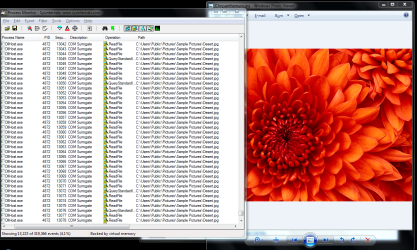
OK got it with opening a small picturefolder.
Did the attachment work?
 

My Computer My Computer

At a glance

Microsoft Windows 7 Ultimate 64-bits 7601 Mul...Intel(R) Core(TM)2 Duo CPU E8400 @ 3.00GHz8,00 GB(1) Intel(R) G41 Express Chipset (2) Intel(R)...
Computer type
PC/Desktop
OS
Microsoft Windows 7 Ultimate 64-bits 7601 Multiprocessor Free Service Pack 1
CPU
Intel(R) Core(TM)2 Duo CPU E8400 @ 3.00GHz
Motherboard
ASRock G41MH/USB3.
Memory
8,00 GB
Graphics Card(s)
(1) Intel(R) G41 Express Chipset (2) Intel(R) G41 Express
Sound Card
(1) VIA High Definition Audio (2) Intel(R) High Definition
Monitor(s) Displays
S24B350 Samsung
Screen Resolution
1920 x 1080 x 32 bits (4294967296 colors) @ 60 Hz
Hard Drives
(1) ST31000528AS ATA Device (2) Generic- Compact Flash USB Device (3) Generic- MS/MS-Pro USB Device (4) Generic- SD/MMC USB Device (5) Generic- SM/xD-Picture USB Device
Antivirus
ZoneAlarm Free Antivirus + Firewall version: 12.0.104.000 Vs
What attachment ??
 

My Computer My Computer

At a glance

Windows 7 ultimate x64
Computer Manufacturer/Model Number
Nothing specific....what ever the clients provide for Repair
OS
Windows 7 ultimate x64
Well the PML file.

Try it in IE again.
 

Attachments

My Computer My Computer

At a glance

Microsoft Windows 7 Ultimate 64-bits 7601 Mul...Intel(R) Core(TM)2 Duo CPU E8400 @ 3.00GHz8,00 GB(1) Intel(R) G41 Express Chipset (2) Intel(R)...
Computer type
PC/Desktop
OS
Microsoft Windows 7 Ultimate 64-bits 7601 Multiprocessor Free Service Pack 1
CPU
Intel(R) Core(TM)2 Duo CPU E8400 @ 3.00GHz
Motherboard
ASRock G41MH/USB3.
Memory
8,00 GB
Graphics Card(s)
(1) Intel(R) G41 Express Chipset (2) Intel(R) G41 Express
Sound Card
(1) VIA High Definition Audio (2) Intel(R) High Definition
Monitor(s) Displays
S24B350 Samsung
Screen Resolution
1920 x 1080 x 32 bits (4294967296 colors) @ 60 Hz
Hard Drives
(1) ST31000528AS ATA Device (2) Generic- Compact Flash USB Device (3) Generic- MS/MS-Pro USB Device (4) Generic- SD/MMC USB Device (5) Generic- SM/xD-Picture USB Device
Antivirus
ZoneAlarm Free Antivirus + Firewall version: 12.0.104.000 Vs
Hey Bernardus

You havent opened any images in photoviewer !!!

You would need to run the process monitor why ur viewing the images in photviewer .... and then try moving between 2 to 3 images....

then stop the scan... and then save the file
 

My Computer My Computer

At a glance

Windows 7 ultimate x64
Computer Manufacturer/Model Number
Nothing specific....what ever the clients provide for Repair
OS
Windows 7 ultimate x64
Perhaps this time?
 

Attachments

My Computer My Computer

At a glance

Microsoft Windows 7 Ultimate 64-bits 7601 Mul...Intel(R) Core(TM)2 Duo CPU E8400 @ 3.00GHz8,00 GB(1) Intel(R) G41 Express Chipset (2) Intel(R)...
Computer type
PC/Desktop
OS
Microsoft Windows 7 Ultimate 64-bits 7601 Multiprocessor Free Service Pack 1
CPU
Intel(R) Core(TM)2 Duo CPU E8400 @ 3.00GHz
Motherboard
ASRock G41MH/USB3.
Memory
8,00 GB
Graphics Card(s)
(1) Intel(R) G41 Express Chipset (2) Intel(R) G41 Express
Sound Card
(1) VIA High Definition Audio (2) Intel(R) High Definition
Monitor(s) Displays
S24B350 Samsung
Screen Resolution
1920 x 1080 x 32 bits (4294967296 colors) @ 60 Hz
Hard Drives
(1) ST31000528AS ATA Device (2) Generic- Compact Flash USB Device (3) Generic- MS/MS-Pro USB Device (4) Generic- SD/MMC USB Device (5) Generic- SM/xD-Picture USB Device
Antivirus
ZoneAlarm Free Antivirus + Firewall version: 12.0.104.000 Vs
nope still no sign of photoviwer... it will act as a COM Surrogate....and when you open an image... it shows it here

check this

Capture.PNG

If it still doesnt show.... try resetting your filter and use photoviewer while process monitor is running in the background.. and after a min or two... stop the capture and save
 

My Computer My Computer

At a glance

Windows 7 ultimate x64
Computer Manufacturer/Model Number
Nothing specific....what ever the clients provide for Repair
OS
Windows 7 ultimate x64
Well another try.
 

Attachments

My Computer My Computer

At a glance

Microsoft Windows 7 Ultimate 64-bits 7601 Mul...Intel(R) Core(TM)2 Duo CPU E8400 @ 3.00GHz8,00 GB(1) Intel(R) G41 Express Chipset (2) Intel(R)...
Computer type
PC/Desktop
OS
Microsoft Windows 7 Ultimate 64-bits 7601 Multiprocessor Free Service Pack 1
CPU
Intel(R) Core(TM)2 Duo CPU E8400 @ 3.00GHz
Motherboard
ASRock G41MH/USB3.
Memory
8,00 GB
Graphics Card(s)
(1) Intel(R) G41 Express Chipset (2) Intel(R) G41 Express
Sound Card
(1) VIA High Definition Audio (2) Intel(R) High Definition
Monitor(s) Displays
S24B350 Samsung
Screen Resolution
1920 x 1080 x 32 bits (4294967296 colors) @ 60 Hz
Hard Drives
(1) ST31000528AS ATA Device (2) Generic- Compact Flash USB Device (3) Generic- MS/MS-Pro USB Device (4) Generic- SD/MMC USB Device (5) Generic- SM/xD-Picture USB Device
Antivirus
ZoneAlarm Free Antivirus + Firewall version: 12.0.104.000 Vs
Nope

If you prefer i can show you via teamviewer.. PM me.
 

My Computer My Computer

At a glance

Windows 7 ultimate x64
Computer Manufacturer/Model Number
Nothing specific....what ever the clients provide for Repair
OS
Windows 7 ultimate x64
Thank Bernadus

The problem here is Windows 7 deletes and recreates the cache ... this is a problem with Windows 7 and hope microsoft releases a fix in the the next Service pack.

Here is a quick fix

You can always disable Windows 7 from deleting the cache, thus speeding up the loading time of your folders.

Go to C:\Users\{username}\AppData\Local\Microsoft\Windows\
where {username} is the name of user

Now right-click the thumbnail cache folder which is “Explorer” and click Properties. Head over to the security tab and then click Advanced.

Click Change Permissions and you will find all users who have access this this folder listed

For each user, click Edit and check the box under Deny for: ‘Delete subfolder and files’ and ‘Delete’

Doing this will create three new special permission entries at the Advance security settings. It is perfectly fine since you can always remove them later.

This procedure will deny the users(including System) from deleting any files inside this folder, thus, the cache will remain preserved and also speed up the loading of the folders that contain videos, music, photos, and documents.

Please note that once you prevent the delete operation of the files inside this folder, thumbnails will not be deleted if you run Disk Cleanup or any 3rd party cleanup tool.

PS: if you prefer me to do it. PM Me as before
 

My Computer My Computer

At a glance

Windows 7 ultimate x64
Computer Manufacturer/Model Number
Nothing specific....what ever the clients provide for Repair
OS
Windows 7 ultimate x64
Thank you Centaur. I hope that will help. Changed the permissions. (Got a map with some 8 small sub maps, altogether only 156 Mb of information in pictures. It tooks at least 5 minutes to scan this one and view the contents of only 24 simple pictures of about 2 mb each, so 50 MB total in the actual folder. The rest remained still not shown in the sub maps. It really took ages to crawl through it.) So you might be right about to prevent de cache being cleared. It's like re-inventing the wheel, after it's being destroyed time and again. Saw this also on another Windows 7 PC with a different version of the software. Firestone, once the folder having scanned or indexed, is blazingly faster than Windows.
 

My Computer My Computer

At a glance

Microsoft Windows 7 Ultimate 64-bits 7601 Mul...Intel(R) Core(TM)2 Duo CPU E8400 @ 3.00GHz8,00 GB(1) Intel(R) G41 Express Chipset (2) Intel(R)...
Computer type
PC/Desktop
OS
Microsoft Windows 7 Ultimate 64-bits 7601 Multiprocessor Free Service Pack 1
CPU
Intel(R) Core(TM)2 Duo CPU E8400 @ 3.00GHz
Motherboard
ASRock G41MH/USB3.
Memory
8,00 GB
Graphics Card(s)
(1) Intel(R) G41 Express Chipset (2) Intel(R) G41 Express
Sound Card
(1) VIA High Definition Audio (2) Intel(R) High Definition
Monitor(s) Displays
S24B350 Samsung
Screen Resolution
1920 x 1080 x 32 bits (4294967296 colors) @ 60 Hz
Hard Drives
(1) ST31000528AS ATA Device (2) Generic- Compact Flash USB Device (3) Generic- MS/MS-Pro USB Device (4) Generic- SD/MMC USB Device (5) Generic- SM/xD-Picture USB Device
Antivirus
ZoneAlarm Free Antivirus + Firewall version: 12.0.104.000 Vs
Your welcome

And hope this has shed some light into you problem...

Let us know if this has resolved your concern...
 

My Computer My Computer

At a glance

Windows 7 ultimate x64
Computer Manufacturer/Model Number
Nothing specific....what ever the clients provide for Repair
OS
Windows 7 ultimate x64
It's sad to say, but it didn't increase the speed of the picturebrowser. it's still s.l.o.w.l.y crawling. One thing could perhaps improve this event, by not indexing or crawling through unwanted subfolders. You can see actually that it does, so, waiting and hanging, indexing. The pictures won't keep shown, when you scroll through the folder, empty places (with actual names) or standard icons wait till the picture is thumb nailed, but could disappear again when you scroll further, until the whole folder is searched. I ordered much more memory hoping that it will help speeding up a bit. Yesterday I tried XP on these folders, and it runs quite faster. Firestone is still my favourite browser. Much faster and keeps the thumbnail pictures in mind.
 

My Computer My Computer

At a glance

Microsoft Windows 7 Ultimate 64-bits 7601 Mul...Intel(R) Core(TM)2 Duo CPU E8400 @ 3.00GHz8,00 GB(1) Intel(R) G41 Express Chipset (2) Intel(R)...
Computer type
PC/Desktop
OS
Microsoft Windows 7 Ultimate 64-bits 7601 Multiprocessor Free Service Pack 1
CPU
Intel(R) Core(TM)2 Duo CPU E8400 @ 3.00GHz
Motherboard
ASRock G41MH/USB3.
Memory
8,00 GB
Graphics Card(s)
(1) Intel(R) G41 Express Chipset (2) Intel(R) G41 Express
Sound Card
(1) VIA High Definition Audio (2) Intel(R) High Definition
Monitor(s) Displays
S24B350 Samsung
Screen Resolution
1920 x 1080 x 32 bits (4294967296 colors) @ 60 Hz
Hard Drives
(1) ST31000528AS ATA Device (2) Generic- Compact Flash USB Device (3) Generic- MS/MS-Pro USB Device (4) Generic- SD/MMC USB Device (5) Generic- SM/xD-Picture USB Device
Antivirus
ZoneAlarm Free Antivirus + Firewall version: 12.0.104.000 Vs
Well more memory is good to have... but... its more of Win 7 problem.... there is nothing much we can do here except... do optimization like doing a defrag (it could improve)

Other than that.... its best to use Firestone or any other third party one...
 

My Computer My Computer

At a glance

Windows 7 ultimate x64
Computer Manufacturer/Model Number
Nothing specific....what ever the clients provide for Repair
OS
Windows 7 ultimate x64
Your right Centaur, it's a windows 7 bug. I was checking the Thumbnail-cache en wondered, since this folder seems to have been unchanged for some time, where I add or delete or rework daily some pictures? Thank you for your help and if I find a resolution, I'll let you know.
 

My Computer My Computer

At a glance

Microsoft Windows 7 Ultimate 64-bits 7601 Mul...Intel(R) Core(TM)2 Duo CPU E8400 @ 3.00GHz8,00 GB(1) Intel(R) G41 Express Chipset (2) Intel(R)...
Computer type
PC/Desktop
OS
Microsoft Windows 7 Ultimate 64-bits 7601 Multiprocessor Free Service Pack 1
CPU
Intel(R) Core(TM)2 Duo CPU E8400 @ 3.00GHz
Motherboard
ASRock G41MH/USB3.
Memory
8,00 GB
Graphics Card(s)
(1) Intel(R) G41 Express Chipset (2) Intel(R) G41 Express
Sound Card
(1) VIA High Definition Audio (2) Intel(R) High Definition
Monitor(s) Displays
S24B350 Samsung
Screen Resolution
1920 x 1080 x 32 bits (4294967296 colors) @ 60 Hz
Hard Drives
(1) ST31000528AS ATA Device (2) Generic- Compact Flash USB Device (3) Generic- MS/MS-Pro USB Device (4) Generic- SD/MMC USB Device (5) Generic- SM/xD-Picture USB Device
Antivirus
ZoneAlarm Free Antivirus + Firewall version: 12.0.104.000 Vs
Your right Centaur, it's a windows 7 bug.
I was checking the Thumbnail-cache en wondered, since this folder seems to have been unchanged for some time, where I add or delete or rework daily some pictures?

Thank you for your help and if I find a resolution, I'll let you know.
 

My Computer My Computer

At a glance

Microsoft Windows 7 Ultimate 64-bits 7601 Mul...Intel(R) Core(TM)2 Duo CPU E8400 @ 3.00GHz8,00 GB(1) Intel(R) G41 Express Chipset (2) Intel(R)...
Computer type
PC/Desktop
OS
Microsoft Windows 7 Ultimate 64-bits 7601 Multiprocessor Free Service Pack 1
CPU
Intel(R) Core(TM)2 Duo CPU E8400 @ 3.00GHz
Motherboard
ASRock G41MH/USB3.
Memory
8,00 GB
Graphics Card(s)
(1) Intel(R) G41 Express Chipset (2) Intel(R) G41 Express
Sound Card
(1) VIA High Definition Audio (2) Intel(R) High Definition
Monitor(s) Displays
S24B350 Samsung
Screen Resolution
1920 x 1080 x 32 bits (4294967296 colors) @ 60 Hz
Hard Drives
(1) ST31000528AS ATA Device (2) Generic- Compact Flash USB Device (3) Generic- MS/MS-Pro USB Device (4) Generic- SD/MMC USB Device (5) Generic- SM/xD-Picture USB Device
Antivirus
ZoneAlarm Free Antivirus + Firewall version: 12.0.104.000 Vs
Back
Top