Windows Photo Viewer: why can't I rename *individual* images?????

Phil314

New member
Local time
4:52 AM
Messages
20
Location
Northwest England.
My previous pooter has died so I've just acquired a new one with Windows 7 Home Premium. I had thought, after the yesteryear horrors of the move from XP to Vista, that this latest transition of mine from Vista to Win7 would be, er, pleasurable. Tst tst tst: such naivety. Amongst a raft of disappointments arising from apparent changes by Microsoft to even the simplest things, I'm currently contending with Windows Photo Viewer (not Gallery) and its seeming failure to match the abilities of its Vista predecessor, specifically: there appears to be no way to quickly rename an individual image file.

Checking with Microsoft Support has harvested only some gibberish about how tedious it is to have to rename images on an individual basis when it's much better to batch rename (so that, for example, a set of images can be holiday 001, holiday 002, holiday 003 etc etc.) Well, doh. If I want to batch rename, I'll use Irfanview. In this case, though: I don't want to batch. At all.

A couple of times a month, I do some online checking of my financial affairs. I screenshot a bank statement or account summary; a credit card statement; a savings account statement. Stuff like that. In that same session, I might also want to send a meter reading for gas or electricity through to my supplier -- so I screenshot the supplier's acceptance of that. I might also have executed an online purchase for something, so yes, I screenshot that, too.

In Vista's Windows Photo Viewer, such a screenshot would appear with a righthand panel giving the name and details of image date / time. Changing the title from, say, Screenhunter 009.jpg to, let's say, Amazoncameraorder 001.jpg was a simple matter of right-clicking on the image and entering the new name in the live field of the righthand panel.

But now, now. . . Now, it's Windows 7. And there's no sign of any righthand panel on my screen. Not only that: there is no right-click menu option for renaming. I wondered if Microsoft had somehow buried a fairly standard hotkey, but no: hitting F2, which initiates the rename process in countless commercial image viewers and editors, achieves nothing.

Cynical though I am about Microsoft's track record of breaking stuff that never needed fixing, I do find it hard to believe that Redmond has gone so far as to deliberately strip Windows Photo Viewer of a fundamental option, and that it thinks I should batch name my bank statement, credit card report, Amazon purchase and gas meter reading as, er, Lotsafun 001, 002, 003 and 004.

Question: is Windows Photo Viewer failing to work properly on my Windows 7 computer? If so, how do I restore to it the simple right-click rename function that I was used to in Vista?

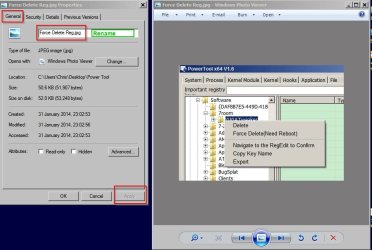
(Note: yup, I know how to go into image properties, then open the general tab, then find the file name there and then change it. . . but I can't believe that's what Microsoft seriously expects folks to have to do.) :confused:
 

My Computer My Computer

At a glance

Windows 7 Home Premium x64
Computer type
PC/Desktop
OS
Windows 7 Home Premium x64
Suggestion

Take a look at the following screenshots:

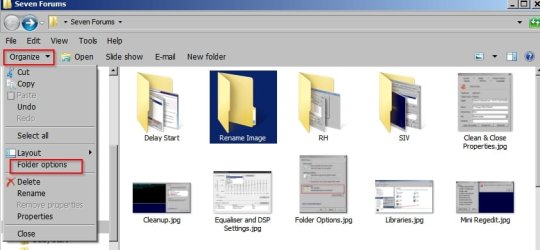
Open a folder

Choose Organize> Folder Options> View

Folder Options.jpg

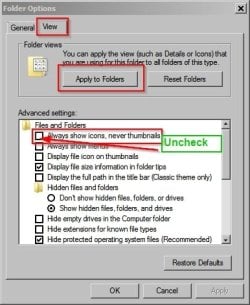
Uncheck "Always show icons never thumbnails" > "Apply to folders"

Folder Options 2.jpg

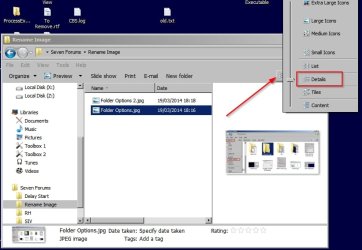
Click the slider where the arrow is pointing in the next screenshot and choose "Details"

Folder Options 3.jpg

Toggle the right hand preview pane to switch it on.

Folder Options 5.jpg


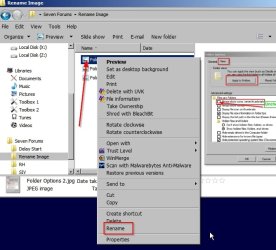
Highlight an image file name (or the image in the right pane) and right click to rename.

Folder Options 4.jpg

As for batch renaming in widows look at the post here:

http://www.sevenforums.com/music-pi...nge-sequential-indexing-pics-windows-7-a.html
 
Last edited:

My Computer My Computer

At a glance

Microsoft Windows 7 Home Premium 64-bit 7601 ...AMD C-60 APU with Radeon(tm) HD Graphics4.00 GBAMD Radeon HD 6290 Graphics
Computer type
Laptop
Computer Manufacturer/Model Number
ASUS
OS
Microsoft Windows 7 Home Premium 64-bit 7601 Multiprocessor Free Service Pack 1
CPU
AMD C-60 APU with Radeon(tm) HD Graphics
Motherboard
ASUSTeK COMPUTER INC. X501U
Memory
4.00 GB
Graphics Card(s)
AMD Radeon HD 6290 Graphics
Sound Card
(1) AMD High Definition Audio Device (2) Realtek High Defi
Screen Resolution
1366 x 768 x 32 bits (4294967296 colors) @ 60 Hz
Hard Drives
Hitachi HTS545050A7E380 SATA Disk Device
Antivirus
Comodo CIS & FW, SecureAplus App Whitelisting, Threatfire
Browser
Cyberfox 64bit, Opera 64bit, Airfox
Other Info
Spy-The-Spy, HitmanPro.Alert, Norton Connect Safe, MJRegWatcher, BitDefender TrafficLight, Voodoo Shield, Zemana AntiMalware
Callender: big BIG thanks for your timely assistance here -- and apologies for any inconvenience inadvertently caused, seeing as how you've obviously gone to some trouble to help me through the procedures involved.

And yes: your workaround works, and I can -- using the Windows Explorer Preview toggle -- rename a relatively tiny representation of an image originally displayed pretty much full-size in Microsoft Vista Windows Photo Viewer. . .

. . . which begs the question: WHY -- as seems to be the case here -- WHY has Microsoft stripped from the Windows 7 iteration of Windows Photo Viewer the ability to actually rename an image file?? What on earth did the development team think it was doing???? I doubt there's a single solitary image viewer out there that doesn't have a 'rename' option -- and yet Microsoft thinks it can just dump it?? No wonder Ballmer and most of the upper echelon at Redmond has either been dumped itself or reassigned to roles with longer titles but infinitely less influence.

Some time ago, I was told by someone who claimed to be far more computer knowledgable than I, how "superior" Windows 7 was to, er, anything else. Ye Gods. I can't even rename a simple image file in Windows Photo Viewer. I also have to go online to figure out how to restore the Quick Launch toolbar facility. And it takes me a week to get rid of the utterly AWFUL "Windows Live Mail" and substitute Vista's excellent Windows Mail instead, a client which not only doesn't plaster the identity of every email account I have all over the computer screen, but which actually allows me to go into 'source' and edit html. But apparently, that's not how Microsoft wishes me to live. It wants lots of my personal info splashed all over a large screen monitor and it wants to make it as difficult as possible to send and receive images and preview email text. And as for being able to simply rename a large on-screen image. . . dear oh dear, that's just so-ooo terribly Vista, isn't it?

The list grows ever longer of Microsoft's insane compulsion to replace functioning motor cars with glossy new ones in which the steering wheel is positioned in the back seat, the windshield wipers operate on the side windows only, and driver access is no longer via a door at the front but through the trunk at the back.

No wonder ordinary folks (like, er, me) won't go within a country mile of Windows 8 / 8.1 / 8.276v3 if this is how idiotically stupid Windows 7 is in terms of ease-of-use. Grrrrrr!!!!

ANYWAY . . . Sincere thanks again for your help: it's a relief to know that no, my new computer isn't malfunctioning after all. :) Merely Microsoft's development teams. As usual.
 

My Computer My Computer

At a glance

Windows 7 Home Premium x64
Computer type
PC/Desktop
OS
Windows 7 Home Premium x64
Renaming images

Well I posted an image renaming method that I find convenient to use rather than using Windows Photo Viewer to rename images.

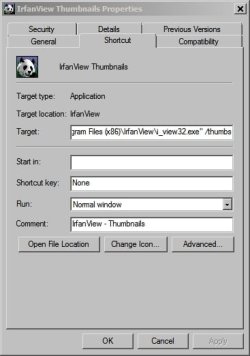
I see you're a fan of Irfanview and I also make use of it. You can launch the thumnail viewer/ browser and rename images.

The shortcut target is:

"C:\Program Files (x86)\IrfanView\i_view32.exe" /thumbs

IrfanView Thumbnails Properties.jpg

As for Windows Photo Viewer - it is possible to rename an image file but it's too much hassle for me so I don't use this method.

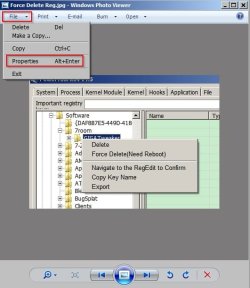
Anyway here's how:

Open an image in WPV. Click File > Properties.

WPV1.jpg

Then on the General tab type the new file name including the file extension (.jpg) or other supported image format then click Apply.

Personally I find this too much of an effort!

I think that Microsoft want to encourage users to make use of their own Photo Gallery that is part of their Windows Essentials range. That's why Windows Photo Viewer is limited to pretty basic features.

http://www.sevenforums.com/software/21530-latest-windows-essentials-version-released.html
 

Attachments

  • WPV2.jpg
    WPV2.jpg
    59.9 KB · Views: 0

My Computer My Computer

At a glance

Microsoft Windows 7 Home Premium 64-bit 7601 ...AMD C-60 APU with Radeon(tm) HD Graphics4.00 GBAMD Radeon HD 6290 Graphics
Computer type
Laptop
Computer Manufacturer/Model Number
ASUS
OS
Microsoft Windows 7 Home Premium 64-bit 7601 Multiprocessor Free Service Pack 1
CPU
AMD C-60 APU with Radeon(tm) HD Graphics
Motherboard
ASUSTeK COMPUTER INC. X501U
Memory
4.00 GB
Graphics Card(s)
AMD Radeon HD 6290 Graphics
Sound Card
(1) AMD High Definition Audio Device (2) Realtek High Defi
Screen Resolution
1366 x 768 x 32 bits (4294967296 colors) @ 60 Hz
Hard Drives
Hitachi HTS545050A7E380 SATA Disk Device
Antivirus
Comodo CIS & FW, SecureAplus App Whitelisting, Threatfire
Browser
Cyberfox 64bit, Opera 64bit, Airfox
Other Info
Spy-The-Spy, HitmanPro.Alert, Norton Connect Safe, MJRegWatcher, BitDefender TrafficLight, Voodoo Shield, Zemana AntiMalware
I've never used the image viewer (that I know of) I just view from the folder; right click the image and enter new name - simple!
 

My Computer My Computer

At a glance

Windows 7 Professional 64 bitIntel core i7 3820 @ 3.60 GHz32 Gb DDR IIINVIDIA GeForce GTX 680 (2 in parallel)
Computer type
PC/Desktop
Computer Manufacturer/Model Number
Custom Build, plus 3 additional HDs installed by hubby
OS
Windows 7 Professional 64 bit
CPU
Intel core i7 3820 @ 3.60 GHz
Motherboard
Gigabyte
Memory
32 Gb DDR III
Graphics Card(s)
NVIDIA GeForce GTX 680 (2 in parallel)
Sound Card
NVIDIA High Definition audio
Monitor(s) Displays
SAMSUNG 23" 3D USB 3 -connected monitor
Screen Resolution
1920 X 1080
Hard Drives
C: - 256Gb SSD
E: - 3Tb WD hard drive for video storage only
F: - 750Gb WD hard drive for music and sounds storage
G: - 1.5Tb WD hard drive for images
H: - 0.5Tb WD hard drive for document storage
J: - 3Tb WD external hard drive for imag
Case
Biggest full tower case I could find!
Cooling
3 x 8" fans
Keyboard
Microsoft Digital Media Keyboard 3000
Mouse
Logitech HID compliant G9X Laser Mouse
Internet Speed
SLOW - we allegedly have DSL but it's slow in the Boondocks
Antivirus
Nortons + Malwarebytes for malware
Browser
Chrome, Firefox
Other Info
Two LG Blu Ray burners; one is much newer but I didn't know what to do with the old one and there was a spare slot in my case, so they sit there together. 1 bank of card readers and USB ports below Blu Rays.
Back
Top