- Local time
- 10:25 PM
- Messages
- 138
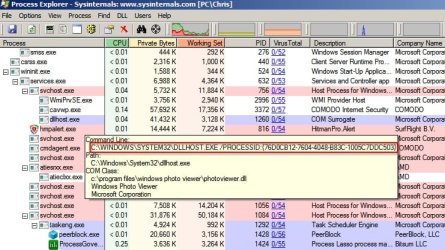
On my Windows 7 machine, Windows Photo Viewer will not open. I double click an image so I can view it but it will not open. I click it a number of times, it still won't open. At this point, I open the task manager and see that COM Surrogate (dllhost.exe) which houses Windows Photo Viewer is running only as a process with a process ID of 76D0CB12-7604-4048-B83C-1005C7DDC503. That process ID doesn't get any hits on Google. There is one Microsoft result, but that is dealing with multiple user accounts that are trying to use Windows Photo Viewer, I am the only account and nobody else is using Windows Photo Viewer on the computer but me, so that does not apply.
My Computer
- Computer type
- PC/Desktop
- Computer Manufacturer/Model Number
- Dell Optiplex 780
- OS
- Windows 7 Ultimate 64-bit SP1
- CPU
- Intel Core 2 Duo E8400 @ 3.00GHz
- Motherboard
- Dell Inc. 03NVJ6 (CPU)
- Memory
- 8.00GB Single-Channel DDR3 @ 531MHz (7-7-7-20)
- Graphics Card(s)
- Intel Q45/Q43 Express Chipset (Dell)
- Sound Card
- SoundMAX Integrated Digital High Definition Audio
- Monitor(s) Displays
- Viore
- Screen Resolution
- 1920x1080
- Hard Drives
- 149GB Seagate ST3160318AS (SATA)
- Keyboard
- Dell
- Mouse
- Dell
- Internet Speed
- up to 7 Mbps (average 3.2 Mbps)
- Antivirus
- AVG IS
- Browser
- Firefox, Chrome