Windows Restore erased my D drive

hajrb

New member
Local time
6:10 AM
Messages
7
I used the Lenovo factory restore on my desktop and it wiped a D drive still inside the box.
I had disconnected all external dries, backed up all I could think of, (which turns out to be Not Everything).
Somehow I never thought that Restore would even look at anything except the C drive. So I have a healthy 500 GB SSD that's blank. Whether that was a normal operation or not, I need the data back.
Anyone know if a SSD can have data recovered from it?
 

My Computer My Computer

Computer type
PC/Desktop
Computer Manufacturer/Model Number
Lenovo
OS
Win7 Pro 64 bit
Hard Drives
SSDs and external USBs
Welcome to the forum. Can you post a screenshot from disk management showing all the drive details. If it's blank it depends what it's done it may have formatted the drive
 

My Computer My Computer

Computer type
PC/Desktop
OS
win 8 32 bit
There are a ton of free data recovery programs out there that will do the trick and I have had great success with many of them but in some cases I have had to rely on commercial products due to recovery limits with some of the free versions. Luckily I have had access to all of them through various means for free.


That being said; the biggest issue will be if your drive supported TRIM and if it was enabled or not. If so, it's going to be a much bigger challenge.


Can you verify if TRIM was enabled on the D Drive?
 

My Computer My Computer

Computer type
PC/Desktop
OS
Windows 7 Ultimate x64
Thanks for getting back. I've been mired in reinstalling Windows.
No idea if the drive supports Trim. It's a Crucial MX500 2.5 SSD.
I didn't intentionally make any settings, it was just a remote drive where I stored important stuff that now seems gone.
 

My Computer My Computer

Computer type
PC/Desktop
Computer Manufacturer/Model Number
Lenovo
OS
Win7 Pro 64 bit
Hard Drives
SSDs and external USBs
We will wait for screenshot from post 2
 

My Computer My Computer

Computer type
PC/Desktop
OS
win 8 32 bit
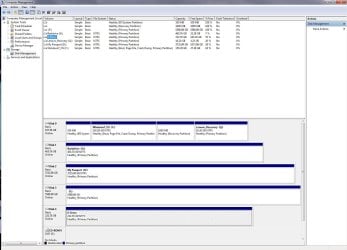
Disk Management

Here's Disk Management. It's the one marked 'D drive'.
Thanks for looking.
 

Attachments

  • DiskManagement.jpg
    DiskManagement.jpg
    153.1 KB · Views: 5

My Computer My Computer

Computer type
PC/Desktop
Computer Manufacturer/Model Number
Lenovo
OS
Win7 Pro 64 bit
Hard Drives
SSDs and external USBs
I'm looking at the picture on my computer and I don't see where any drives are offline. IN fact, I don't see the picture here.I've uploaded it again.
 

Attachments

  • DiskManagement.jpg
    DiskManagement.jpg
    153.1 KB · Views: 4

My Computer My Computer

Computer type
PC/Desktop
Computer Manufacturer/Model Number
Lenovo
OS
Win7 Pro 64 bit
Hard Drives
SSDs and external USBs
Aaannd now that I've uploaded it again, I see the original.
Still don't see one offline though. I Had high hopes there for a minute
 

My Computer My Computer

Computer type
PC/Desktop
Computer Manufacturer/Model Number
Lenovo
OS
Win7 Pro 64 bit
Hard Drives
SSDs and external USBs
I was on phone and couldnt see properley but at the top it says only 29% free so its seeing files. Is this in an enclosure have you tried another cable and port WD often encrpt the drive and if the interface has problems then you cant read it
 

My Computer My Computer

Computer type
PC/Desktop
OS
win 8 32 bit
Actually, it's 'My Passport" that's showing 29% free, and that drive is working fine. I should have disconnected those other WD drives, but I have a different issue with the 'My Book Duo' and it takes a while for the computer to recognize drives that big so I'm keeping them connected for now.
The 'D drive' shows 70 % free, so it looks like what you said also applies to this drive, although it is showing Online.
I somehow thought there was more on this D Drive than 30%, but I really need that stuff.
 

My Computer My Computer

Computer type
PC/Desktop
Computer Manufacturer/Model Number
Lenovo
OS
Win7 Pro 64 bit
Hard Drives
SSDs and external USBs
I've just read that changing a basic disk to dynamic won't delete anything, but I currently don't see anything on the disk anyway.
I wonder if I should I run some kind of "Deleted Disk" software first?
 

My Computer My Computer

Computer type
PC/Desktop
Computer Manufacturer/Model Number
Lenovo
OS
Win7 Pro 64 bit
Hard Drives
SSDs and external USBs
Hey hajrb,


Try This:


Right click D Drive and Assign a Drive Letter to it (let's say M:) by clicking "Change drive letter and paths...", then Add or Change and set it.....then check Windows Explorer and see if it's there and accessible....do you see your Data?
 

My Computer My Computer

Computer type
PC/Desktop
OS
Windows 7 Ultimate x64
Back
Top