
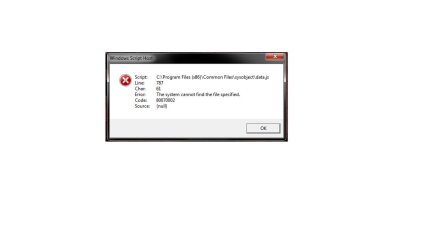
Windows Script Host Error (Image inside)

hmoodie

New member
Local time
9:48 PM
Messages
18
Location
Port Glasgow (Scotland)
Hi guys, can anyone help me get rid of the below pop up each time I start Windows. I've Google'd the error and code etc. but as you guys are aware it's pretty generic. I've also had a look in the event viewer to see if I get an event that ties in with this but there is nothing I can see.

Any help or suggestions would be great.

Thanks,
H
 

Attachments
  • Error.jpg
    Error.jpg
    16.6 KB · Views: 2
Last edited:

My Computer

Computer type
Laptop
Computer Manufacturer/Model Number
Asus G750JW
OS
Windows 7 Ultimate 64bit
CPU
Intel i7 4700HQ (2.4GHz)
Memory
8GB DDR3
Graphics Card(s)
2GB NVIDIA GeForce GTX 765M
Monitor(s) Displays
17.3” anti-glare FHD LED backlit (1920 x 1080)
Screen Resolution
1920 x 1080 x 32 bits (4294967296 colors) @ 60 Hz
Hard Drives
120GB SSD + 500GB HDD
Antivirus
BitDefender Total Security 2015
Browser
Google Chrome

My Computer

Computer type
Laptop
Computer Manufacturer/Model Number
Employer provided Dell Latitude
OS
W7 Pro SP1 64bit
CPU
i7
Memory
8GB
Graphics Card(s)
Intel HD Graphics
Hard Drives
crappy SSD
Antivirus
Employer mandated Symantec Endpoint Protection
Browser
Pale Moon 64bit, IE11 64bit & Chrome 64bit

My Computer

Computer type
Laptop
Computer Manufacturer/Model Number
Asus G750JW
OS
Windows 7 Ultimate 64bit
CPU
Intel i7 4700HQ (2.4GHz)
Memory
8GB DDR3
Graphics Card(s)
2GB NVIDIA GeForce GTX 765M
Monitor(s) Displays
17.3” anti-glare FHD LED backlit (1920 x 1080)
Screen Resolution
1920 x 1080 x 32 bits (4294967296 colors) @ 60 Hz
Hard Drives
120GB SSD + 500GB HDD
Antivirus
BitDefender Total Security 2015
Browser
Google Chrome
Anyone any idea how I would even begin to start troubleshooting or diagnosing?
 

My Computer

Computer type
Laptop
Computer Manufacturer/Model Number
Asus G750JW
OS
Windows 7 Ultimate 64bit
CPU
Intel i7 4700HQ (2.4GHz)
Memory
8GB DDR3
Graphics Card(s)
2GB NVIDIA GeForce GTX 765M
Monitor(s) Displays
17.3” anti-glare FHD LED backlit (1920 x 1080)
Screen Resolution
1920 x 1080 x 32 bits (4294967296 colors) @ 60 Hz
Hard Drives
120GB SSD + 500GB HDD
Antivirus
BitDefender Total Security 2015
Browser
Google Chrome
Are you using Firefox? This is usually associated with FF updates. Run the plugin check and see if any of your plugins is out of date

Plugin Check & Updates ? Mozilla

See if the updates, if any fix this. I believe it is the update check that causes this.

Navigate to C:\Program Files (x86)\Common Files\sysobject. See if there is a data.js file there. If it is missing, a uninstall of Firefox, and a reinstall may correct this. A Guy
 

My Computer

Computer type
PC/Desktop
OS
Windows 10 Home x64
CPU
INTEL Core i5-750 Quad-Core 3.37GHz
Motherboard
ASUS P7P55D
Memory
HyperX Fury Black Series 8GB (2 x 4GB) 1866Mhz
Graphics Card(s)
EVGA GeForce GTX 750 Superclocked 1GB 128-Bit GDDR5
Monitor(s) Displays
LG 32MA68HY 32" IPS
Screen Resolution
1920 x 1080
Hard Drives
Samsung 840 Evo 120GB, SEAGATE 500GB Barracuda® 7200.12, SATA 3 Gb/s, 7200 RPM, 16MB cache
PSU
ANTEC TruePower New TP-550, 80 PLUS, 550W
Case
ANTEC Three Hundred Illusion
Cooling
COOLER MASTER Hyper 212 Plus, 4 x 120mm 1 x 140mm Noctua's
Internet Speed
85 + Mbps
Antivirus
Avast
Browser
Vivaldi
Are you using Firefox? This is usually associated with FF updates. Run the plugin check and see if any of your plugins is out of date

Plugin Check & Updates ? Mozilla

See if the updates, if any fix this. I believe it is the update check that causes this.

Navigate to C:\Program Files (x86)\Common Files\sysobject. See if there is a data.js file there. If it is missing, a uninstall of Firefox, and a reinstall may correct this. A Guy

Thanks for this mate, it now makes sense I had an issue where the 'Firefox has stopped working' error kept appearing even though Firefox wasn't installed. I found a fix that meant deleting a couple of files in the folder you mentioned. Is there anyway to get rid of this without Firefox being re-installed and potentially bringing back the original error?

Thanks,
H
 

My Computer

Computer type
Laptop
Computer Manufacturer/Model Number
Asus G750JW
OS
Windows 7 Ultimate 64bit
CPU
Intel i7 4700HQ (2.4GHz)
Memory
8GB DDR3
Graphics Card(s)
2GB NVIDIA GeForce GTX 765M
Monitor(s) Displays
17.3” anti-glare FHD LED backlit (1920 x 1080)
Screen Resolution
1920 x 1080 x 32 bits (4294967296 colors) @ 60 Hz
Hard Drives
120GB SSD + 500GB HDD
Antivirus
BitDefender Total Security 2015
Browser
Google Chrome
I would reinstall FF, and then uninstall it using Revo Uninstaller Free , which should remove any leftovers. If your error returns, you could likely take ownership of the offending files, rather then deleting them. If you still have the data.js file in that folder, I would be recommending that for this issue. A Guy
 

My Computer

Computer type
PC/Desktop
OS
Windows 10 Home x64
CPU
INTEL Core i5-750 Quad-Core 3.37GHz
Motherboard
ASUS P7P55D
Memory
HyperX Fury Black Series 8GB (2 x 4GB) 1866Mhz
Graphics Card(s)
EVGA GeForce GTX 750 Superclocked 1GB 128-Bit GDDR5
Monitor(s) Displays
LG 32MA68HY 32" IPS
Screen Resolution
1920 x 1080
Hard Drives
Samsung 840 Evo 120GB, SEAGATE 500GB Barracuda® 7200.12, SATA 3 Gb/s, 7200 RPM, 16MB cache
PSU
ANTEC TruePower New TP-550, 80 PLUS, 550W
Case
ANTEC Three Hundred Illusion
Cooling
COOLER MASTER Hyper 212 Plus, 4 x 120mm 1 x 140mm Noctua's
Internet Speed
85 + Mbps
Antivirus
Avast
Browser
Vivaldi
Back
Top