Windows Search does not index emails in Outlook PST

rastamanx

New member
Local time
12:50 AM
Messages
10
Windows Search (and/or Outlook 2007 Instant Search) does not index emails from Outlook PST files

Hi Gang....so I'm having a similar problem trying to get Windows Search to index my emails.
I am currently running Windows 7 Pro 64-bit and Outlook 2007. Upgraded from Windows XP Pro (SP3) and Outlook 2003 doing a clean install and then migrating app data over using Windows EZ migration.

Windows Search (i.e. Federated Search) is able to index my local files, but does not show any email files.
I've tried all of the following:
* reindexing as described in Watch out for a Microsoft Outlook 2007 indexing issue in Windows Vista
* running Microsoft Digonistic
* running Windows 7 assist utility: Find and Fix Problems with Windows Search
* Creating new Outlook profile
* Running scanpst on outlook PST files
* Confirming that Outlook Instant Search is enabled
* making sure that Indexing Option File type RTF indicates Rich Text Format

I do note that, after trying the re-indexing (uncheck/recheck) fix, Windows Search IS able to index individual outlook messages which I have saved in My Documents folder(s), but it does not index my PST files.

Moreover, when I open up the Search Options in Outlook Instant Search, the "Indexing" and "Search" options are DISABLED/GREYED OUT! So, I am unable to select any PST files for indexing and/or customize search options.

Other details to consider which may be affecting:
* I'm running Office 2007 SP2
* I originally installed the Office Software under my Windows User Profile (w/ Administrator privileges) by launching the installer using "run as administrator"
* The PST files are stored on my D: drive (and outlook profile has been set up to do this)


Any help/assistance towards solving this problem would be greatly appreciated.

Thx!!
~Rx
 

Attachments

  • Outlook Instant Search Options Dialog Box.png
    Outlook Instant Search Options Dialog Box.png
    18.2 KB · Views: 156

My Computer My Computer

OS
Windows 7 64 Bit
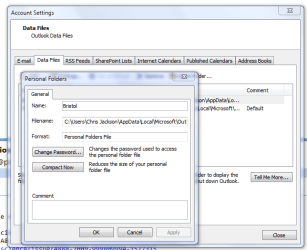
If you go File -> Data File Management... then select a data file (how many are listed?), then click on Settings... just above the list of data files, you should have a window open up like in the screenshot below.

Next to Format, does it say Personal Folders File or Personal Folders File (97-2002)? If the latter, that could be causing the problem.

Please post back and attempts to resolve will continue :)
 

Attachments

  • Capture.PNG
    Capture.PNG
    24.1 KB · Views: 315

My Computer My Computer

Computer Manufacturer/Model Number
Custom
OS
Windows 7 Enterprise x64
CPU
Intel i7 920
Motherboard
Asus P6T Deluxe v2
Memory
6 GB
Graphics Card(s)
nVidia GTX260 + nVidia 3D
Sound Card
Onboard
Monitor(s) Displays
Samsung SyncMaster 2233RZ
Screen Resolution
1680 x 1050
Hard Drives
1 x 64GB SSD primary
2 x 1 TB (mirrored)
PSU
700W
Other Info
Edimax 802.11n Wireless PCI Card
Netgear DG834G router
Thanks for the reply. I use several PST files including some POPs and some IMAPs.
My default PST file is a POP based file and settings indicate is a Personal Folders File. See attached.
 

Attachments

  • PST File Setting.png
    PST File Setting.png
    9.9 KB · Views: 65

My Computer My Computer

OS
Windows 7 64 Bit
Hmmm. OK, try this:


  1. Quit Outlook and make sure you're logged off (check the process list (accessed via Ctrl-Shift-Esc) and end Outlook.exe if it is still there).
  2. Click the Start Orb. In the Search programs and files box type "outlook /cleanfinders" without the quotes but with a space between outlook and /.
  3. Click on the Outlook /cleanfinders link that should appear at the top of the dialogue box.
  4. See if the search option is re-enabled in Outlook.
 

My Computer My Computer

Computer Manufacturer/Model Number
Custom
OS
Windows 7 Enterprise x64
CPU
Intel i7 920
Motherboard
Asus P6T Deluxe v2
Memory
6 GB
Graphics Card(s)
nVidia GTX260 + nVidia 3D
Sound Card
Onboard
Monitor(s) Displays
Samsung SyncMaster 2233RZ
Screen Resolution
1680 x 1050
Hard Drives
1 x 64GB SSD primary
2 x 1 TB (mirrored)
PSU
700W
Other Info
Edimax 802.11n Wireless PCI Card
Netgear DG834G router
Shut down Outlook. Found the Outlook /cleanfinders link and ran it...Outllook launched...but Indexing and Search are still disabled in Search Options :(


btw...what does /cleanfinders (option) do?
 

My Computer My Computer

OS
Windows 7 64 Bit
This sounds like it needs some deeper investigation.

I fixed some Outlook problems for JohnnyScience here a couple of days ago, but we needed to use TeamViewer to go into his PC to do it. I'd be happy to do that for you, but it involves you installing TeamViewer (free) and giving me access to your PC. You retain full control, can see what is happening, and can cut me off instantly, so there should be no risk (and hopefully JohnnyScience will vouch for my bona fides) but I realise that it is a bit nerve-wracking to let someone else look at your settings and control your PC...

BTW, the cleanfinders switch resets any Search Folders in case they are confusing the issue.
 

My Computer My Computer

Computer Manufacturer/Model Number
Custom
OS
Windows 7 Enterprise x64
CPU
Intel i7 920
Motherboard
Asus P6T Deluxe v2
Memory
6 GB
Graphics Card(s)
nVidia GTX260 + nVidia 3D
Sound Card
Onboard
Monitor(s) Displays
Samsung SyncMaster 2233RZ
Screen Resolution
1680 x 1050
Hard Drives
1 x 64GB SSD primary
2 x 1 TB (mirrored)
PSU
700W
Other Info
Edimax 802.11n Wireless PCI Card
Netgear DG834G router
Thanks for the offer of remote assistance. Most appreciated.
Before going down that road, I'd probably suggest to wait (e.g., at least a week or so) and see whether anyone else can offer a suggestion for fixing/resolving the issue....Hope that's ok w/ you. :)

Cheers,
~rx
 

My Computer My Computer

OS
Windows 7 64 Bit
No worries :)
 

My Computer My Computer

Computer Manufacturer/Model Number
Custom
OS
Windows 7 Enterprise x64
CPU
Intel i7 920
Motherboard
Asus P6T Deluxe v2
Memory
6 GB
Graphics Card(s)
nVidia GTX260 + nVidia 3D
Sound Card
Onboard
Monitor(s) Displays
Samsung SyncMaster 2233RZ
Screen Resolution
1680 x 1050
Hard Drives
1 x 64GB SSD primary
2 x 1 TB (mirrored)
PSU
700W
Other Info
Edimax 802.11n Wireless PCI Card
Netgear DG834G router
SOLUTION!!

After digging around for a week, I finally found the cause of the problem, and was able to fix it.
See: Microsoft Office Outlook Team Blog : Google Apps Sync Disables Outlook Search

Google Apps Sync Disables Outlook Search

The installation of the Google Apps Sync plugin disables Outlook’s ability to search any and all of your Outlook data. When a Google Apps user installs the sync plugin for Outlook, the plugin modifies a registry key which disables Windows Desktop Search from indexing and providing search functionality for all Outlook data, not just the Outlook data being synchronized from GMail. Because Outlook search relies upon the indexing performed by Windows Desktop Search, Outlook search functions are broken as a result. It is also important to note that uninstalling the plugin may not fix the issue. Outlook users who are considering the Google Apps Sync plugin should become aware of this issue. If you have already installed this plugin, please take note of the steps below to address the issue.
For Outlook users who have already installed this plugin or have experienced this issue, the only remedy is to change the registry key that was modified by the plugin (click the link for more detail on the registry key):
1) Press the Windows Key + R on your keyboard, and type “REGEDIT”. This will open the Windows Registry Editor.
2) Browse to the following: "HKEY_LOCAL_MACHINE\SOFTWARE\Policies\Microsoft\Windows\Windows Search"
3) You will manually have to reset the value of “PreventIndexingOutlook” to “0” (without the quotes). To do this, right click on the “PreventIndexingOutlook” key, select “Modify…”, then change the value data to “0”.
4) Close the registry editor.
The Outlook team has been made aware of a second issue that affects users of the Microsoft Office Outlook Connector which syncs Windows Live Hotmail with Outlook. When a user has the Outlook Connector installed, then installs the Google Apps Sync plugin, the next time Outlook is started an error message comes up stating that “some functionality will be disabled”. The Google Apps Sync plugin modifies a registry key that is used by the Outlook Connector, which results in users seeing this error message. When confronted with this error message, we recommend that users click “Yes” to enable functionality. The Outlook Connector will then continue to function normally. The Outlook Connector will reset this registry key to the correct value.
 

My Computer My Computer

OS
Windows 7 64 Bit
The last post is a good one, but im unabe to find the registry file mentioned in the post in my PC.
Is there any other registry value that can be modified.
 

My Computer My Computer

OS
Windows 7 Home basic 64 bit
Ancient thread revived!!!!

I just did a clean install of W7 and Office 2013. I do not have the google app nor the hotmail sync installed (AFAIK). Does anyone have any new info?

I've read that search does not work anymore with Outlook and I've read that people use it successfully. It also appears, in index options in the OS and Office, to be an option....
 

My Computer My Computer

Computer type
PC/Desktop
Computer Manufacturer/Model Number
need to update!
OS
7 Ultimate 64 bit
Memory
2x4Gb DDR3-SDRAM
Graphics Card(s)
t750
Monitor(s) Displays
AOC 24" yee haw and Dell 19"
Screen Resolution
1680 x 1050 @60hz
Hard Drives
Samsung 840EVO
Internet Speed
100/20
Antivirus
MSE
Browser
Firefox
Back
Top