Windows Search Not working.

firepro

New member
Local time
6:02 PM
Messages
5
Any help would be appreciated. Thanks

Windows Search will not work. First of all I have tried a bazillion things and its a miracle my computer works at all. I will list what could be the most important symptom first and then all the other stuff.

Under Indexing Applet it says indexing is turned off and also the Modify option does not work. The advance button appears to work and it will let me select rebuild. It doesnt appear to do anything.

If I go to services and tell wsearch to start it does start and goes off 1 second later. If i look at the event viewer it shows many errors in the last hour and when searching on these I have not been able to come to any conclusions.


The rest is some boring things that a person does when they have done a bazillion things.

Indexing for several months has always been reindexing in outlook, i dont know if indexing was off at that time however outlook says its indexing now even though indexing applett says indexing is off.

Replace hard drive and went to a bigger one and did a clone and played with the partition. My original drive was having errors but i think it was heat related because i did not get any logged read errors and only after i pulled it out and put a fan on it was i able to clone from it.

updated intel driver mentioned in a couple post, I did not have the latest version

ran malwarebytes and did find a couple things but they were removed. Could have been out there for months

ran chkdsk and finished without errors

ran sfc scannow from safe mode and got errors but could not figure out what they were. No details. I think i have the log and i remember right i looked at it but couldnt tell heads or tails

Turned indexing on everyway i could, but never would come on.

Messed with registry setting.

Messed with permissions but dont think i screwed any up but since you have to have a phd in computer science from MIT to understand permissions I really dont know for sure.

Tried the GODAWFUL, MULTI HOUR, UNINSTALL TONS OF PROGRAMS, POC rebuild option available for windows. After several hours went to bed woke up the next morning and was told that it would have to undo itself.

Maybe i am crazy but it seems like the fact that the modify option on the Index applett is not enabled that either i have a registry problem or somehow i should be able to reload the necessary software.
 
Last edited:

My Computer

Computer Manufacturer/Model Number
lenovo
OS
Windows 7 32 bit
CPU
8400
Memory
4g
Graphics Card(s)
intel on board
Hard Drives
hitachi 500g
Indexing doesnt stay on.

Anybody have any idea why the Modify button doesnt work on the Indexing applett or why Indexing(service for windows search) turns on and immediately goes off

Any suggestions would be greatly appreciated
 

My Computer

Computer Manufacturer/Model Number
lenovo
OS
Windows 7 32 bit
CPU
8400
Memory
4g
Graphics Card(s)
intel on board
Hard Drives
hitachi 500g
Hi firepro,

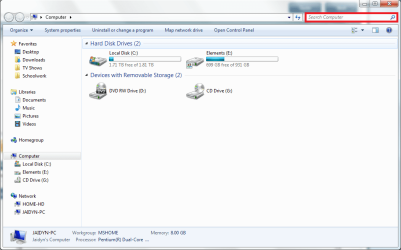
I'm assuming by Windows search you mean this?
Capture.PNG

I'm also assuming that you don't have a System Restore... but if you do, than definitely try it.
http://www.sevenforums.com/tutorials/700-system-restore.html

If that doesn't work, try a repair install. It will attempt to fix your version of Windows but also keep all of your documents, settings, drivers etc.
http://www.sevenforums.com/tutorials/3413-repair-install.html

Now, last resort is a clean install. It will wipe everything and then re-install Windows, so be sure to back up before you start.
http://www.sevenforums.com/tutorials/1649-clean-install-windows-7-a.html

Hope this helps,
Jaidyn
 

My Computer

Computer Manufacturer/Model Number
Custom Build
OS
Windows 7 Ultimate x64/Windows 8 Consumer Preview x64/Ubuntu 11.04
CPU
Intel Pentium Dual Core E6700 3.2GHz
Motherboard
ASUS P5G41T-M LX
Memory
Strontium 8192MB DDR3 1333Mhz
Graphics Card(s)
msi GeForce N560GTX-M2D1GD5 1GB
Sound Card
Realtek HD Audio
Monitor(s) Displays
CHIMEI CMV 221D 22"
Screen Resolution
1680x1050
Hard Drives
Seagate Barracuda LP Green 3.5'' 2TB Internal HDD 5900RPM + WD Elements Desktop 1TB External HDD 7200RPM
PSU
SHAW Viper-1500w Gaming PSU
Case
Black eMaxx ATX Mini Tower Case
Keyboard
Microsoft Wireless Keyboard 1000
Mouse
Microsoft Wireless Optical Mouse 2000
Internet Speed
100GB @ 4.76Mbps
Hi Jaidynm for taking the time and effort to respond. In response to your questions:

The screen you show is not what i am talking about. If you go to --control panel-- then select "indexing options" it should bring up the "index applett" . On mine it says indexing is not running and and the "modify" button is grayed out.

Also only had one level of system restore did not work, repair install did not work and I would like to avoid clean install if possible.
 

My Computer

Computer Manufacturer/Model Number
lenovo
OS
Windows 7 32 bit
CPU
8400
Memory
4g
Graphics Card(s)
intel on board
Hard Drives
hitachi 500g

My Computer

OS
Win7U 64 RTM
CPU
Q9550
Motherboard
GA-EP45-UD3R
Memory
8GB Gskill
Graphics Card(s)
ASUS|EAH4850/HTDI/1GD3/A
Sound Card
xfi Plat
Monitor(s) Displays
Dell 2405fpw
Screen Resolution
1920x1200
Hard Drives
Seagate & WD sata Drives
PSU
Antec
Case
Antec
Keyboard
MS Natural Ergonomic 4000
Mouse
Logitech MX610 USB Cordless
Still not working. Decided to do clean install. Everything was working perfect. Indexing was working like it should and somewhere in the lenovo driver install and window updates and pogoplug install it stopped working.
Did a restore about half way back still not working. Did restore all the way back and indexing does work. Any thoughts would be appreciated.
 

My Computer

Computer Manufacturer/Model Number
lenovo
OS
Windows 7 32 bit
CPU
8400
Memory
4g
Graphics Card(s)
intel on board
Hard Drives
hitachi 500g
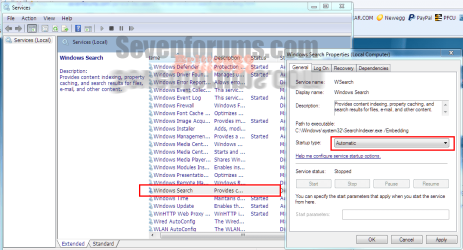
Welcome to Seven Forums firepro. Try this...Start|Admin Tools|Services, scroll to Windows Search and double click it. In the window that opens use the drop-down menu for start up type and set it to Automatic or Automatic (Delayed start), click start. Close all of that out and try the Indexing in control Panel again.
I just tried this and with Search disabled in services the Modify button was grayed out as you said.
Svcs.PNG
 

My Computer

Computer type
PC/Desktop
Computer Manufacturer/Model Number
Home Built Desktop By DataTech
OS
Windows 7 Ultimate X64 SP1
CPU
Intel i5-2550K, Differing ~4.4-4.8GHz No built in GPU
Motherboard
ASUS P8Z68-V PRO/GEN3
Memory
16GB G.Skill Sniper 1866MHz @ 2133MHz 2x8GB
Graphics Card(s)
ASUS GTX650TIB-DC2OC-2GD5, (650TI Boost)
Sound Card
Onboard Realtek 5-1
Monitor(s) Displays
Samsung P2570HD
Screen Resolution
1920x1080
Hard Drives
Samsung 840 Pro 256GB SSD for OS, 500GB Seagate Constellation (Enterprise drive) for Data
PSU
Corsair HX650W
Case
Inwin Dragon Rider
Cooling
Hyper 212 EVO w/two Noctua fans, push-pull, @1300 RPM
Keyboard
E-Z Eyes, bright yellow keys with large characters
Mouse
steelseries SENSEI Laser Pro Gaming
Internet Speed
48-51Mbs Mbs down, 11 Mbs up Xfinity Cable
Antivirus
Norton Internet Security 2013
Browser
IE 10, Opera, Pale Moon if needed
Other Info
4 case fans, LG BluRay-RE, ASUS DVD-RW, Mr. Fusion power supply, 1.21 gigawatts.
Thanks. I have done that. When i disable then re-enable it comes on for a second and then on its on it turns off. I think we are close but missing the magic bullet
 

My Computer

Computer Manufacturer/Model Number
lenovo
OS
Windows 7 32 bit
CPU
8400
Memory
4g
Graphics Card(s)
intel on board
Hard Drives
hitachi 500g
With a clean install it should be fine. What have you installed since the install?
 

My Computer

Computer type
PC/Desktop
Computer Manufacturer/Model Number
Home Built Desktop By DataTech
OS
Windows 7 Ultimate X64 SP1
CPU
Intel i5-2550K, Differing ~4.4-4.8GHz No built in GPU
Motherboard
ASUS P8Z68-V PRO/GEN3
Memory
16GB G.Skill Sniper 1866MHz @ 2133MHz 2x8GB
Graphics Card(s)
ASUS GTX650TIB-DC2OC-2GD5, (650TI Boost)
Sound Card
Onboard Realtek 5-1
Monitor(s) Displays
Samsung P2570HD
Screen Resolution
1920x1080
Hard Drives
Samsung 840 Pro 256GB SSD for OS, 500GB Seagate Constellation (Enterprise drive) for Data
PSU
Corsair HX650W
Case
Inwin Dragon Rider
Cooling
Hyper 212 EVO w/two Noctua fans, push-pull, @1300 RPM
Keyboard
E-Z Eyes, bright yellow keys with large characters
Mouse
steelseries SENSEI Laser Pro Gaming
Internet Speed
48-51Mbs Mbs down, 11 Mbs up Xfinity Cable
Antivirus
Norton Internet Security 2013
Browser
IE 10, Opera, Pale Moon if needed
Other Info
4 case fans, LG BluRay-RE, ASUS DVD-RW, Mr. Fusion power supply, 1.21 gigawatts.
Did restore all the way back and indexing does work.

It seems apparent that something you have installed is casuing your issue (app, driver or update). It may be a bit tedious, but I would restore back to the point where it works, then install one thing at a time, checking indexing in-between each, perhaps waiting a bit or at least restarting the machine before proceeding. Make sure that restore points are created before each item installed.

Eventually, you should discover what is 'breaking' indexing, and decide if you can live without whatever the culprit is.

You may also want to consider using a partition imaging program. I use Acronis True Image (on special right now for 29.99), which is paid software. Others here tout the free Macrium Reflect. Images must be written to a partition other than that being partitioned (i.e., an image of the C:\ partition cannot be written to C:\)
 

My Computer

OS
Win7U 64 RTM
CPU
Q9550
Motherboard
GA-EP45-UD3R
Memory
8GB Gskill
Graphics Card(s)
ASUS|EAH4850/HTDI/1GD3/A
Sound Card
xfi Plat
Monitor(s) Displays
Dell 2405fpw
Screen Resolution
1920x1200
Hard Drives
Seagate & WD sata Drives
PSU
Antec
Case
Antec
Keyboard
MS Natural Ergonomic 4000
Mouse
Logitech MX610 USB Cordless
Go to msconfig and uncheck all start up itmes, reboot and check indexing. Reenable start ups one at a time, with a reboot, and check each time.
 

My Computer

Computer type
PC/Desktop
Computer Manufacturer/Model Number
Home Built Desktop By DataTech
OS
Windows 7 Ultimate X64 SP1
CPU
Intel i5-2550K, Differing ~4.4-4.8GHz No built in GPU
Motherboard
ASUS P8Z68-V PRO/GEN3
Memory
16GB G.Skill Sniper 1866MHz @ 2133MHz 2x8GB
Graphics Card(s)
ASUS GTX650TIB-DC2OC-2GD5, (650TI Boost)
Sound Card
Onboard Realtek 5-1
Monitor(s) Displays
Samsung P2570HD
Screen Resolution
1920x1080
Hard Drives
Samsung 840 Pro 256GB SSD for OS, 500GB Seagate Constellation (Enterprise drive) for Data
PSU
Corsair HX650W
Case
Inwin Dragon Rider
Cooling
Hyper 212 EVO w/two Noctua fans, push-pull, @1300 RPM
Keyboard
E-Z Eyes, bright yellow keys with large characters
Mouse
steelseries SENSEI Laser Pro Gaming
Internet Speed
48-51Mbs Mbs down, 11 Mbs up Xfinity Cable
Antivirus
Norton Internet Security 2013
Browser
IE 10, Opera, Pale Moon if needed
Other Info
4 case fans, LG BluRay-RE, ASUS DVD-RW, Mr. Fusion power supply, 1.21 gigawatts.
Indexing is not running

Here's a variant of this indexing issue, combined with a search issue. When I look at indexing options, it says indexing is not running - and there are no locations etc - the modify button is grey, if you rebuild, nothiung happens . I activate under Programs and Features to no avail. Of further interest - I cannot search in my own libraries, documents etc, however I can search if I approach it from users\name\my documents. Trying to enable Wsearch in processes ends with a stop.

this is driving me nuts! Help!
 
Last edited:

My Computer

Computer Manufacturer/Model Number
Dell
OS
Win 7 - 32 bit
CPU
core duo
If you've tried everything else, and Search programs and files is still coming up empty…
Right-click on Start>Click Properties>Start Menu>Customize...>Slide down and Tick “Search Programs and Control Panel”>OK>OK Give it a try.

Optionally, while inside Customize...>Slide down to “Search other files and libraries”
It's probably set to "Don't search" Try “Search with public folders”s
This will cause the search to include directories that are indexed.
 

My Computer

OS
Windows 7 Pro x64
Back
Top