Windows Sidebar

DaRonRon

New member
Power User
VIP
Local time
7:06 PM
Messages
250
I just wanted to ask if there's a simple way of closing the windows 7 sidebar without actually having to close each gadget. This is because if i was to close each gadget to lets say to play a game, and then when i open them up again all my settings are lost (e.g I have to chose my counrty for the weather gadget).

Thanks in advance
 

My Computer My Computer

At a glance

Main OS: Windows 7 64 bit, Secondary: Vista 3...Intel Core 2 Duo P8400 @ 2.26 Ghz4GB DDR2ATI Radeon Mobility HD3470
Computer Manufacturer/Model Number
Sony
OS
Main OS: Windows 7 64 bit, Secondary: Vista 32 bit
CPU
Intel Core 2 Duo P8400 @ 2.26 Ghz
Motherboard
Intel PM45
Memory
4GB DDR2
Graphics Card(s)
ATI Radeon Mobility HD3470
Sound Card
Integrated Realtek
Monitor(s) Displays
Integrated (Laptop) 16.4 inch
Screen Resolution
1600x900
Hard Drives
320 GB
Mouse
Logitech
Internet Speed
1 Mb/s
just right click on the empty area of the side bar and select "close sidebar"

thanks,
 
Last edited by a moderator:

My Computer My Computer

At a glance

Windows 7 ultimate 7260 x32
OS
Windows 7 ultimate 7260 x32
just right click on the empty area of the side bar and select "close sidebar"

thanks,

This is Windows 7, not Windows Vista, there is no sidebar. :confused:

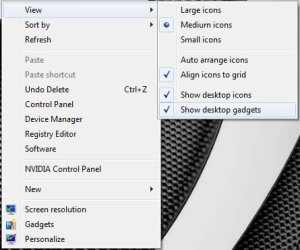
If you want to close your gadgets just right click on the desktop, go to the view tab and deselect show desktop gadgets, and to get them back you can just tick them again or just select gadgets from the context menu.

2009-06-29_163158.jpg
 
Last edited by a moderator:

My Computer My Computer

At a glance

Windows 7 Ultimate Vista Ultimate x64Core 2 Duo E8500 3.16Ghz @ 3.8Ghz2x2Gigs Patriot PC2-6400 LLInno3D GeForce GTX260 216 SP
Computer Manufacturer/Model Number
Home Brew
OS
Windows 7 Ultimate Vista Ultimate x64
CPU
Core 2 Duo E8500 3.16Ghz @ 3.8Ghz
Motherboard
eVGA 750i FTW
Memory
2x2Gigs Patriot PC2-6400 LL
Graphics Card(s)
Inno3D GeForce GTX260 216 SP
Monitor(s) Displays
ASUS VW222U 22" 2ms Response time
Screen Resolution
1680x1050
Hard Drives
SATA 150GB
SATA II 250GB
USB IDE 750GB Ext.
PSU
HYTEC 600W & Thermaltake 650W Toughpower Power Exp
Case
Thermaltake Armor LCS (Liquid Cooling System)
Cooling
Liquid Cooling System
Keyboard
Logitech G15 Gaming Keyboard
Mouse
Logitech G9 Gaming Mouse
This is Windows 7, not Windows Vista, there is no sidebar. :confused:

If you want to close your gadgets just right click on the desktop, go to the view tab and deselect show desktop gadgets, and to get them back you can just tick them again or just select gadgets from the context menu.

View attachment 15987
ok sorry,,,my mistake :(
 

My Computer My Computer

At a glance

Windows 7 ultimate 7260 x32
OS
Windows 7 ultimate 7260 x32
This is Windows 7, not Windows Vista, there is no sidebar. :confused:

If you want to close your gadgets just right click on the desktop, go to the view tab and deselect show desktop gadgets, and to get them back you can just tick them again or just select gadgets from the context menu.

View attachment 15987

Thank you so much!!! This is gonna save me a lot of time and effort :)

Repped :D

@bankerrahul,

dont worry i'll rep u too, at least u tried :P
 

My Computer My Computer

At a glance

Main OS: Windows 7 64 bit, Secondary: Vista 3...Intel Core 2 Duo P8400 @ 2.26 Ghz4GB DDR2ATI Radeon Mobility HD3470
Computer Manufacturer/Model Number
Sony
OS
Main OS: Windows 7 64 bit, Secondary: Vista 32 bit
CPU
Intel Core 2 Duo P8400 @ 2.26 Ghz
Motherboard
Intel PM45
Memory
4GB DDR2
Graphics Card(s)
ATI Radeon Mobility HD3470
Sound Card
Integrated Realtek
Monitor(s) Displays
Integrated (Laptop) 16.4 inch
Screen Resolution
1600x900
Hard Drives
320 GB
Mouse
Logitech
Internet Speed
1 Mb/s
This is Windows 7, not Windows Vista, there is no sidebar. :confused:

If you want to close your gadgets just right click on the desktop, go to the view tab and deselect show desktop gadgets, and to get them back you can just tick them again or just select gadgets from the context menu.

View attachment 15987

Does unchecking the 'show desktop gadgets' end their processes as well? Or do they continue to take up whatever resources they were?
 

My Computer My Computer

At a glance

Windows 7 Ultimate retail // Windows 7 build ...Intel Core i7 920 // Intel Core2Duo T-5550 1....12 GB Corsair XMS3 Tri-channel 1333 // 4 GB DDR2EVGA GTX 295 // Nvidia GeForce 8800 GTS
Computer Manufacturer/Model Number
Self-built // Gateway FX P-6860
OS
Windows 7 Ultimate retail // Windows 7 build 7264 x64, Vista Home Premium SP2 x64
CPU
Intel Core i7 920 // Intel Core2Duo T-5550 1.86x1.86
Motherboard
EVGA x58 SLI LE //
Memory
12 GB Corsair XMS3 Tri-channel 1333 // 4 GB DDR2
Graphics Card(s)
EVGA GTX 295 // Nvidia GeForce 8800 GTS
Sound Card
Integrated Realtek // RealTek HD integrated sound
Monitor(s) Displays
19" Acer flatpanel // Laptop Display, Secondary CRT
Screen Resolution
1440 x 900 1152x864 // 1440x900, 1152x864
Hard Drives
750 GB WD Caviar Black 7200 RPM - in desktop
320 GB -laptop
80 GB - laptop secondary drive
PSU
Corsair HX1000w // Laptop PSU?
Case
Thermaltake Armor+
Cooling
Assload of fans, intel stock cpu cooler // GearHead Fan dock
Keyboard
Razer Lycosa // laptop keyboard
Mouse
Razer DeathAdder // Logitech Laser
Internet Speed
3.0 MB down/ 768 Kb up
Other Info
Just built my computer in 12/09
Does unchecking the 'show desktop gadgets' end their processes as well? Or do they continue to take up whatever resources they were?

No it will actually close them I just checked. :)
 

My Computer My Computer

At a glance

Windows 7 Ultimate Vista Ultimate x64Core 2 Duo E8500 3.16Ghz @ 3.8Ghz2x2Gigs Patriot PC2-6400 LLInno3D GeForce GTX260 216 SP
Computer Manufacturer/Model Number
Home Brew
OS
Windows 7 Ultimate Vista Ultimate x64
CPU
Core 2 Duo E8500 3.16Ghz @ 3.8Ghz
Motherboard
eVGA 750i FTW
Memory
2x2Gigs Patriot PC2-6400 LL
Graphics Card(s)
Inno3D GeForce GTX260 216 SP
Monitor(s) Displays
ASUS VW222U 22" 2ms Response time
Screen Resolution
1680x1050
Hard Drives
SATA 150GB
SATA II 250GB
USB IDE 750GB Ext.
PSU
HYTEC 600W & Thermaltake 650W Toughpower Power Exp
Case
Thermaltake Armor LCS (Liquid Cooling System)
Cooling
Liquid Cooling System
Keyboard
Logitech G15 Gaming Keyboard
Mouse
Logitech G9 Gaming Mouse

My Computer My Computer

At a glance

Windows 7 Ultimate retail // Windows 7 build ...Intel Core i7 920 // Intel Core2Duo T-5550 1....12 GB Corsair XMS3 Tri-channel 1333 // 4 GB DDR2EVGA GTX 295 // Nvidia GeForce 8800 GTS
Computer Manufacturer/Model Number
Self-built // Gateway FX P-6860
OS
Windows 7 Ultimate retail // Windows 7 build 7264 x64, Vista Home Premium SP2 x64
CPU
Intel Core i7 920 // Intel Core2Duo T-5550 1.86x1.86
Motherboard
EVGA x58 SLI LE //
Memory
12 GB Corsair XMS3 Tri-channel 1333 // 4 GB DDR2
Graphics Card(s)
EVGA GTX 295 // Nvidia GeForce 8800 GTS
Sound Card
Integrated Realtek // RealTek HD integrated sound
Monitor(s) Displays
19" Acer flatpanel // Laptop Display, Secondary CRT
Screen Resolution
1440 x 900 1152x864 // 1440x900, 1152x864
Hard Drives
750 GB WD Caviar Black 7200 RPM - in desktop
320 GB -laptop
80 GB - laptop secondary drive
PSU
Corsair HX1000w // Laptop PSU?
Case
Thermaltake Armor+
Cooling
Assload of fans, intel stock cpu cooler // GearHead Fan dock
Keyboard
Razer Lycosa // laptop keyboard
Mouse
Razer DeathAdder // Logitech Laser
Internet Speed
3.0 MB down/ 768 Kb up
Other Info
Just built my computer in 12/09
Back
Top