Windows Startup Takes Ages Depending on the Boot Drive

vynbos

New member
Local time
7:04 PM
Messages
7
Location
CAPE TOWN, SOUTH AFRICA
Please help with a strange problem. If I start Windows 7 with only one drive attached (a 2Terabyte SATA with Win7 on the 1st partition) it sits for 20 minutes on the 'Starting Windows' screen, then opens as normal (the event viewer 'performance diagnostics' doesn't even register a 'Event ID 100' so it is of no help). There seems to be little or no HDD or CPU activity during this long waiting period. If I boot with my second hard drive also present and use it as my first boot device (my old XP installation, that is on the 1st partition of that drive, begins the boot process), Windows 7 loads in less than a minute, and Disk Management flags the XP partition as 'system'. So it seems to me that all the usual trouble-shooting approaches for a slow startup (de-frag, clean-boot, disable security software, check disk errors, check for faulty RAM, remove all peripherals etc) do not apply (though I have tried all this). My bios is up to date. I have rebuilt my BCD using Bootrec.exe. I have tried the start up dozens of times and, without fail, I get the same outcome. Less than 1 minute with 2 HDs, 20 minutes with 1 HD. OS Version: Microsoft Windows 7 Ultimate , Service Pack 1, 32 bit Processor: Intel(R) Pentium(R) 4 CPU 3.00GHz, x64 Family 15 Model 4 Stepping 3 Processor Count: 1 RAM: 3454 Mb Graphics Card: NVIDIA GeForce 6600 GT , 128 Mb Hard Drives: C: Total - 60651 MB, Free - 28105 MB; D: Total - 1847733 MB, Free - 952140 MB; Motherboard: MICRO-STAR INTERNATIONAL CO., LTD, MS-7176, REV:A, Antivirus: Microsoft Security Essentials, Disabled
 

My Computer My Computer

At a glance

Windows 7 Ultimate x64 UEFIIntel® Core i7 2600 3.40GHZ 8MB Cache SKT 11552x Transcend 4GB Jetram DDR3 1333 DIMM 9-9-9NVIDIA GeForce 6600 GT , 128 Mb
Computer Manufacturer/Model Number
Gigabyte
OS
Windows 7 Ultimate x64 UEFI
CPU
Intel® Core i7 2600 3.40GHZ 8MB Cache SKT 1155
Motherboard
GIGABYTE H77M-D3H IVY BRIDGE SERIES
Memory
2x Transcend 4GB Jetram DDR3 1333 DIMM 9-9-9
Graphics Card(s)
NVIDIA GeForce 6600 GT , 128 Mb
Sound Card
On Board Realtek
Monitor(s) Displays
Sony 22" Widescreen
Screen Resolution
1280x960
Hard Drives
Transcend 2.5" SATA3 SSD MLC Sandforce cntrl
PSU
Gigabyte Odin 720W Power Supply
Case
GIGABYTE SETTO II 142 BLACK EDITION (MESH SIDE)
Cooling
PSU&Case Fans
Keyboard
MS COMFORT CURVE 3000
Mouse
MS COMFORT CURVE 3000
Internet Speed
386kbps ADSL
I think you need help from member Cluberti.
 

My Computer My Computer

At a glance

Windows 7 Home Premium SP1, 64-bitIntel Skylake i5-6600K, not overclocked8 GB HyperX DDR4-2666 (2 x 4 GB)none; graphics are integrated on CPU
Computer type
PC/Desktop
Computer Manufacturer/Model Number
Ignatz Special; 4 speed manual gearbox; factory air conditioning; one of one
OS
Windows 7 Home Premium SP1, 64-bit
CPU
Intel Skylake i5-6600K, not overclocked
Motherboard
AsRock Z170M Extreme 4, micro ATX
Memory
8 GB HyperX DDR4-2666 (2 x 4 GB)
Graphics Card(s)
none; graphics are integrated on CPU
Sound Card
onboard: Realtek ALC1150; external: USB Behringer UF0-202
Monitor(s) Displays
Dell S2340M 23 inch IPS
Screen Resolution
1600 x 900
Hard Drives
System: Crucial MX100 series SSD, 128 GB;
Data: Samsung Spinpoint 103SJ, 1 TB;
Backup: WD Caviar Green WD30EZRX-00D8PB0, 3 TB
PSU
Rosewill SilentNight 500 watt fanless, semi-modular
Case
Antec Solo II
Cooling
Noctua NH-U12S; Noctua F12 intake, Noctua S12A exhaust
Keyboard
Microsoft 200 6JH-00001 USB
Mouse
Dell or Microsoft optical wired; USB
Antivirus
Microsoft Security Essentials and Malwarebytes Premium
Browser
Pale Moon
Other Info
All fans PWM; speeds at idle: CPU circa 500 rpm; intake circa 600 rpm; exhaust circa 600 rpm; CPU temps 27 idle and 47 C load in a warm room (27 C/81 F) when running Intel Extreme Tuning Utility stress test.
Sounds like the bios is having a hard time finding the boot partition info.... How is the boot order setup in your bios? And how are you selecting the boot drive, bios boot menu, or just unplugging drives?

Sounds like the bios is looking for other boot info before settling on the drive.... If your motherboard has a boot menu, usually ESC, F10 or F12, then select the drive you want....
 

My Computer My Computer

At a glance

Windows 7 Ultimate SP1 x64i7 950 4ghz6GB G.Skill pc12800EVGA GTX 580 SC
Computer Manufacturer/Model Number
Custom build
OS
Windows 7 Ultimate SP1 x64
CPU
i7 950 4ghz
Motherboard
EVGA x58 FTW3
Memory
6GB G.Skill pc12800
Graphics Card(s)
EVGA GTX 580 SC
Sound Card
Xfi Titanium
Monitor(s) Displays
Samsung 24"
Screen Resolution
1920x1200
Hard Drives
Vertex 3 SSD 120Gb x2 RAID 0
4 x 1TB WD Black RAID 0
PSU
Thermaltake 850
Case
Mountain Mods U2-UFO Horizon
Cooling
Custom watercooling
Internet Speed
100 down 5 up
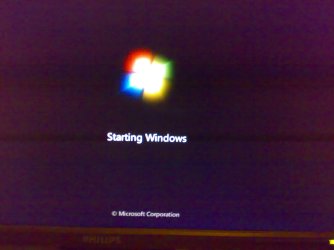
Hi Sedril Thanks for the response. I do simply plug/unplug the drives, but I always check the bios menu. the bios has never had a problem seeing every drive that is present. Tomorrow I'll try selecting a drive with the F10 boot as you suggest. But I don't think the issue is with bios, as it hangs after the boot process. The blobs of light have already swirled and turned into the window logo with the 'starting windows' message. It is at that point that it hangs.
 

My Computer My Computer

At a glance

Windows 7 Ultimate x64 UEFIIntel® Core i7 2600 3.40GHZ 8MB Cache SKT 11552x Transcend 4GB Jetram DDR3 1333 DIMM 9-9-9NVIDIA GeForce 6600 GT , 128 Mb
Computer Manufacturer/Model Number
Gigabyte
OS
Windows 7 Ultimate x64 UEFI
CPU
Intel® Core i7 2600 3.40GHZ 8MB Cache SKT 1155
Motherboard
GIGABYTE H77M-D3H IVY BRIDGE SERIES
Memory
2x Transcend 4GB Jetram DDR3 1333 DIMM 9-9-9
Graphics Card(s)
NVIDIA GeForce 6600 GT , 128 Mb
Sound Card
On Board Realtek
Monitor(s) Displays
Sony 22" Widescreen
Screen Resolution
1280x960
Hard Drives
Transcend 2.5" SATA3 SSD MLC Sandforce cntrl
PSU
Gigabyte Odin 720W Power Supply
Case
GIGABYTE SETTO II 142 BLACK EDITION (MESH SIDE)
Cooling
PSU&Case Fans
Keyboard
MS COMFORT CURVE 3000
Mouse
MS COMFORT CURVE 3000
Internet Speed
386kbps ADSL
Ahh, ok, if it's past the boot process and into the logo screen, it very well may not be a bios issue.... I still wouldn't rule it out tho..
 

My Computer My Computer

At a glance

Windows 7 Ultimate SP1 x64i7 950 4ghz6GB G.Skill pc12800EVGA GTX 580 SC
Computer Manufacturer/Model Number
Custom build
OS
Windows 7 Ultimate SP1 x64
CPU
i7 950 4ghz
Motherboard
EVGA x58 FTW3
Memory
6GB G.Skill pc12800
Graphics Card(s)
EVGA GTX 580 SC
Sound Card
Xfi Titanium
Monitor(s) Displays
Samsung 24"
Screen Resolution
1920x1200
Hard Drives
Vertex 3 SSD 120Gb x2 RAID 0
4 x 1TB WD Black RAID 0
PSU
Thermaltake 850
Case
Mountain Mods U2-UFO Horizon
Cooling
Custom watercooling
Internet Speed
100 down 5 up

My Computer My Computer

At a glance

Windows 7 Home Professional 64 bitIntel Core i7 9206 GB(3x2GB) MushkinNvidia Gtx 570
Computer Manufacturer/Model Number
Desktop.
OS
Windows 7 Home Professional 64 bit
CPU
Intel Core i7 920
Motherboard
Evga 141-BL-E757
Memory
6 GB(3x2GB) Mushkin
Graphics Card(s)
Nvidia Gtx 570
Sound Card
Integrated
Monitor(s) Displays
Asus VH236H
Screen Resolution
1920x1080
Hard Drives
OCZ Vertex Turbo - Boot Drive
Western Digital 1TB - Storage Drive d
PSU
Corsair 850
Case
Corsair 800D
Keyboard
Logitech G15
Mouse
Razer Deathadder
Internet Speed
Cable
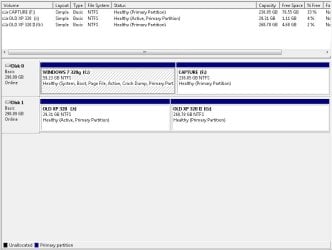
Please post back a screenshot of your maximized Disk Mgmt drive map with listings showing all columns, with all drives attached, using the Snipping Tool in Start Menu.

You're still booting off the XP partition when it's HD is attached successfully, but the System boot files written to Win7 partition likely need Repair. We'll give you the exact steps when we see the picture.
 
@Nyto: Good point, the problem OS is a clone of my original installation.
I have reverted to the original Win7 installation (on a 320G HDD) and formatted the problem OS on my 2T drive. I cloned the XP drive to my 2T drive it to see what would happen. The 2T drive boots into XP just fine on its own.
Now it gets a bit weirder. I have attached the requested screenshots for Gregrocker

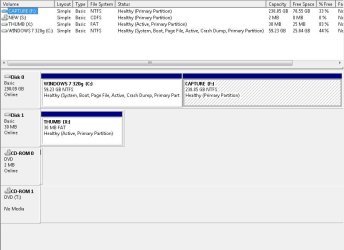
SENARIO 1: The original Win7 is fine on its own:
SENARIO1 No Problem.jpg
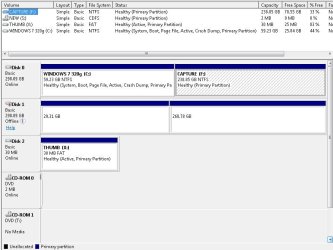
SENARIO 2: No problems with the XP drive present:
SENARIO2 No Problem.jpg
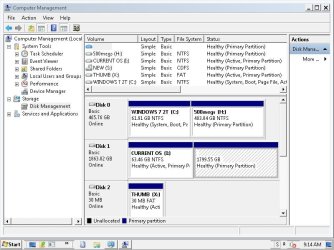
SENARIO 3: Slow Startup (21minutes) with my 2T drive present:
SENARIO3 21minutes.jpg
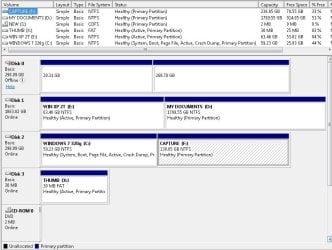
SENARIO 4: No Problems with the old XP drive and my 2T drive present:
SENARIO4 No Problem.jpg
As you will see from the screenshots, no other drive is involved in the boot, in fact I have tried booting with both drives offline with the same results.
Here is a picture of the starting windows screen under SENARIO 3 when it hangs:
Windows Starting Screen.jpg
I have done a safe mode boot under SENARIO 3 and it reaches the line
"windows\system32\drivers\CLASSPNP.sys" before starting the 21minute delay.
(There is no noticeable HDD or CPU activity during this period)
Safeboot menu.jpg

I suspect that my Win7 installation is struggling with the 2T drive under certain conditions.
What if I delete all the entries under [HKEY_LOCAL_MACHINE\SYSTEM\MountedDevices] and let Windows build a new drive base?
 

My Computer My Computer

At a glance

Windows 7 Ultimate x64 UEFIIntel® Core i7 2600 3.40GHZ 8MB Cache SKT 11552x Transcend 4GB Jetram DDR3 1333 DIMM 9-9-9NVIDIA GeForce 6600 GT , 128 Mb
Computer Manufacturer/Model Number
Gigabyte
OS
Windows 7 Ultimate x64 UEFI
CPU
Intel® Core i7 2600 3.40GHZ 8MB Cache SKT 1155
Motherboard
GIGABYTE H77M-D3H IVY BRIDGE SERIES
Memory
2x Transcend 4GB Jetram DDR3 1333 DIMM 9-9-9
Graphics Card(s)
NVIDIA GeForce 6600 GT , 128 Mb
Sound Card
On Board Realtek
Monitor(s) Displays
Sony 22" Widescreen
Screen Resolution
1280x960
Hard Drives
Transcend 2.5" SATA3 SSD MLC Sandforce cntrl
PSU
Gigabyte Odin 720W Power Supply
Case
GIGABYTE SETTO II 142 BLACK EDITION (MESH SIDE)
Cooling
PSU&Case Fans
Keyboard
MS COMFORT CURVE 3000
Mouse
MS COMFORT CURVE 3000
Internet Speed
386kbps ADSL
Where is the XP drive shown in Scenario #2? I dont' see XP HD there, only in #3, in the first partition on the the 2tb labeled "XP" which you said in your OP contains Win7.

Whatever drive you attached in #2 and again in #4 is not showing in the drive listings yet. What is on it exactly? If you can't Explore its contents in Disk Mgmt, try free Partition Wizard bootable CD which will also give a definitive picture of Disks.

Assuming the label is incorrect and as stated in your OP the first partition shown on 2tb is Win7, it doesn't have it's System flag so should not be able to boot on its own anyway. It needs to be marked Active to write the System boot files onto it by running Startup Repair 3 Separate Times while all other HD"s are unplugged and it's set first to boot in BIOS setup.

Once Win7 on 2tb has its System boot files, choose which OS to boot by setting preferred HD to boot first in BIOS setup, then boot others using the one-time BIOS Boot Menu key. I assume you have 2 Win7's now based on what I see since you apparently presented your Disk Mgmt here with the drive mislabeled not bothering to tell us, and your stated XP HD has no content showing anywhere.
 
Last edited:
@Gregrocker
I must apologise, in my effort to find solutions, I’ve changed my set up a number of times, and the OP does not reflect my current configuration.
To simplify (hopefully):
The Win7 OS on the 2T drive was a clone, so, to remove that possibility that cloning was causing my problem, I decided to wipe the Win7 clone, and re-introduce a 320G HDD which has my original Win7 installation on it (i.e. it is not a clone).

Now the following is where I am at:
Senario 1: The 320gig HDD(DriveAA) with Win7. No problems with start-up
1Win7 NP.jpg
Senario 2: DriveAA with a 320gig drive(DriveBB) containing an old XP OS. No problems
2Win7 with XP NP.jpg
Senario 3: DriveAA with my 2T HDD(DriveCC) (with its first partition now wiped clean). 21minute start-up.
3Win7 320 with 2T   21min.jpg
Senario 4: DriveAA with DriveBB and DriveCC. No problems
4Win7 with 2T and XP NP.jpg

Extra info: I’ve tried a clean Win7 install on the 2T drive and it starts up with no problems on its own. It would seem that the problem lies with my Win7 OS which is having some form of conflict between it and my 2T drive, but the conflict only appears under certain configurations.
 

My Computer My Computer

At a glance

Windows 7 Ultimate x64 UEFIIntel® Core i7 2600 3.40GHZ 8MB Cache SKT 11552x Transcend 4GB Jetram DDR3 1333 DIMM 9-9-9NVIDIA GeForce 6600 GT , 128 Mb
Computer Manufacturer/Model Number
Gigabyte
OS
Windows 7 Ultimate x64 UEFI
CPU
Intel® Core i7 2600 3.40GHZ 8MB Cache SKT 1155
Motherboard
GIGABYTE H77M-D3H IVY BRIDGE SERIES
Memory
2x Transcend 4GB Jetram DDR3 1333 DIMM 9-9-9
Graphics Card(s)
NVIDIA GeForce 6600 GT , 128 Mb
Sound Card
On Board Realtek
Monitor(s) Displays
Sony 22" Widescreen
Screen Resolution
1280x960
Hard Drives
Transcend 2.5" SATA3 SSD MLC Sandforce cntrl
PSU
Gigabyte Odin 720W Power Supply
Case
GIGABYTE SETTO II 142 BLACK EDITION (MESH SIDE)
Cooling
PSU&Case Fans
Keyboard
MS COMFORT CURVE 3000
Mouse
MS COMFORT CURVE 3000
Internet Speed
386kbps ADSL
A few things: It is a brand new Seagate drive (not that that means it can't be faulty). I have done a dskchk of the first 60G partition of the 2T HDD with no errors found and the most recent scenarios follow a complete wipe of the 60G partition with Easeus. None of which proves that it can't be the 2T drive, but it makes it seem less likely.
And it's odd that, if it is the drive that is faulty, why Win7 hangs every time under Scenario 3, and never under Scenario 4 (which has the 2T drive present).
But you are right, I do need to do a complete diskpart and check to be sure it is not the drive. I'll only get a chance to do that next week as I've got a deadline for Friday.
In the meantime I'll try tinkering with this Win7 installation to see if it is the source of the problem.
 

My Computer My Computer

At a glance

Windows 7 Ultimate x64 UEFIIntel® Core i7 2600 3.40GHZ 8MB Cache SKT 11552x Transcend 4GB Jetram DDR3 1333 DIMM 9-9-9NVIDIA GeForce 6600 GT , 128 Mb
Computer Manufacturer/Model Number
Gigabyte
OS
Windows 7 Ultimate x64 UEFI
CPU
Intel® Core i7 2600 3.40GHZ 8MB Cache SKT 1155
Motherboard
GIGABYTE H77M-D3H IVY BRIDGE SERIES
Memory
2x Transcend 4GB Jetram DDR3 1333 DIMM 9-9-9
Graphics Card(s)
NVIDIA GeForce 6600 GT , 128 Mb
Sound Card
On Board Realtek
Monitor(s) Displays
Sony 22" Widescreen
Screen Resolution
1280x960
Hard Drives
Transcend 2.5" SATA3 SSD MLC Sandforce cntrl
PSU
Gigabyte Odin 720W Power Supply
Case
GIGABYTE SETTO II 142 BLACK EDITION (MESH SIDE)
Cooling
PSU&Case Fans
Keyboard
MS COMFORT CURVE 3000
Mouse
MS COMFORT CURVE 3000
Internet Speed
386kbps ADSL
Back
Top