Solved Windows stays at startscreen about 30 sec before desktop

Presac

New member
Local time
12:50 AM
Messages
17
As in title, windows stays at the start up screen about 30 seconds before going to the desktop. On each and every startup, it always take this time. I have searched a bit around and found that it usually is caused by some solid color thing, but I have a custom background. I have still tried changing/adding the DelayedDesktopSwitchTimeout key in registry (weren't any there before), but the only change is that instead of showing the start screen, it shows a black screen for 30 seconds.

I have tried sfc /scannow, but no errors where found.

I know I could just wait the 30 seconds and live with it, but I want to know why it do it. I know for certain it can boot faster, so something is causing this.


Edit: I found a solution. For anyone who have the same problem, here is what I did.
Using "Process Monitor" from Sysinternals, I found GBTUpd running for all 30 seconds. Using Autoruns from Sysinternals, I disabled the key under logon (HKLM\SOFTWARE\Wow6432Node\Microsoft\Windows\CurrentVersion\RunOnce). The startup screen is now only shown in less than a second.
Apparently, there are some problems with the utility software for Gigabyte motherboards.
 
Last edited:

My Computer My Computer

At a glance

Windows 7 Professional x64Intel Core i7 3770K CPU @ 3.50GHz 3.90GHz8,00GB Kingston Dual-Channel DDR3NVIDIA GeForce GTX 660
Computer type
PC/Desktop
Computer Manufacturer/Model Number
Vision Computer
OS
Windows 7 Professional x64
CPU
Intel Core i7 3770K CPU @ 3.50GHz 3.90GHz
Motherboard
Gigabyte Technology Co., Ltd. Z77X-D3H
Memory
8,00GB Kingston Dual-Channel DDR3
Graphics Card(s)
NVIDIA GeForce GTX 660
Hard Drives
1TB Seagate ST1000DM ST1000DM003-1CH1 SCSI Disk Device (SATA)
120GB Samsung SSD 840 Series SCSI Disk Device (SSD)
Antivirus
Bullguard
Browser
Chrome
I have now tried doing a clean boot. There weren't any difference in start up time.
 

My Computer My Computer

At a glance

Windows 7 Professional x64Intel Core i7 3770K CPU @ 3.50GHz 3.90GHz8,00GB Kingston Dual-Channel DDR3NVIDIA GeForce GTX 660
Computer type
PC/Desktop
Computer Manufacturer/Model Number
Vision Computer
OS
Windows 7 Professional x64
CPU
Intel Core i7 3770K CPU @ 3.50GHz 3.90GHz
Motherboard
Gigabyte Technology Co., Ltd. Z77X-D3H
Memory
8,00GB Kingston Dual-Channel DDR3
Graphics Card(s)
NVIDIA GeForce GTX 660
Hard Drives
1TB Seagate ST1000DM ST1000DM003-1CH1 SCSI Disk Device (SATA)
120GB Samsung SSD 840 Series SCSI Disk Device (SSD)
Antivirus
Bullguard
Browser
Chrome
have you installed anything around the time you notice the longer start time?
 

My Computer My Computer

At a glance

win 10
Computer type
PC/Desktop
Computer Manufacturer/Model Number
dell xps 9000
OS
win 10
I did a clean install of windows a month ago. I just can't remember if it was like that from the beginning, as I were away in the Christmas holidays. I probably just didn't take much notice of it at the time.
 

My Computer My Computer

At a glance

Windows 7 Professional x64Intel Core i7 3770K CPU @ 3.50GHz 3.90GHz8,00GB Kingston Dual-Channel DDR3NVIDIA GeForce GTX 660
Computer type
PC/Desktop
Computer Manufacturer/Model Number
Vision Computer
OS
Windows 7 Professional x64
CPU
Intel Core i7 3770K CPU @ 3.50GHz 3.90GHz
Motherboard
Gigabyte Technology Co., Ltd. Z77X-D3H
Memory
8,00GB Kingston Dual-Channel DDR3
Graphics Card(s)
NVIDIA GeForce GTX 660
Hard Drives
1TB Seagate ST1000DM ST1000DM003-1CH1 SCSI Disk Device (SATA)
120GB Samsung SSD 840 Series SCSI Disk Device (SSD)
Antivirus
Bullguard
Browser
Chrome
Is windows fully updated
 

My Computer My Computer

At a glance

win 10
Computer type
PC/Desktop
Computer Manufacturer/Model Number
dell xps 9000
OS
win 10
whats here

Hi Presac,
What are your settings here.

Roy
 

Attachments

  • 30secs.PNG
    30secs.PNG
    74.7 KB · Views: 0

My Computer My Computer

At a glance

W7 home premium 32bit/W7HP 64bit/w10 tp insid...E5300 dual core3gbNvidia Geforce 7100 Nforce 630i
Computer type
PC/Desktop
Computer Manufacturer/Model Number
medionl/Aspire 6930G/acer x55a
OS
W7 home premium 32bit/W7HP 64bit/w10 tp insider ring
CPU
E5300 dual core
Motherboard
medion MS7366
Memory
3gb
Graphics Card(s)
Nvidia Geforce 7100 Nforce 630i
Monitor(s) Displays
avixc
Internet Speed
n (isp resticted to 72)
Antivirus
mse/pands
Browser
palemoon
Other Info
Belkin Fd7050 n USB using Railink RT2870 drivers, more upto date
The "Time to display list of operating system" was set checked and set to 3 seconds. The "Write debugging information" has something with kernel memory (mine is in danish). No other differences compared to yours.
 

My Computer My Computer

At a glance

Windows 7 Professional x64Intel Core i7 3770K CPU @ 3.50GHz 3.90GHz8,00GB Kingston Dual-Channel DDR3NVIDIA GeForce GTX 660
Computer type
PC/Desktop
Computer Manufacturer/Model Number
Vision Computer
OS
Windows 7 Professional x64
CPU
Intel Core i7 3770K CPU @ 3.50GHz 3.90GHz
Motherboard
Gigabyte Technology Co., Ltd. Z77X-D3H
Memory
8,00GB Kingston Dual-Channel DDR3
Graphics Card(s)
NVIDIA GeForce GTX 660
Hard Drives
1TB Seagate ST1000DM ST1000DM003-1CH1 SCSI Disk Device (SATA)
120GB Samsung SSD 840 Series SCSI Disk Device (SSD)
Antivirus
Bullguard
Browser
Chrome
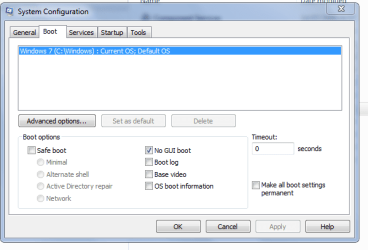
gui

Hi Again,
Reading your post again, 30 seconds from boot to Desktop its Not bad for a hard drive SSD might be quicker.

The black screen is/can be set using these settings.

Roy
 

Attachments

  • nogui.PNG
    nogui.PNG
    13.9 KB · Views: 19

My Computer My Computer

At a glance

W7 home premium 32bit/W7HP 64bit/w10 tp insid...E5300 dual core3gbNvidia Geforce 7100 Nforce 630i
Computer type
PC/Desktop
Computer Manufacturer/Model Number
medionl/Aspire 6930G/acer x55a
OS
W7 home premium 32bit/W7HP 64bit/w10 tp insider ring
CPU
E5300 dual core
Motherboard
medion MS7366
Memory
3gb
Graphics Card(s)
Nvidia Geforce 7100 Nforce 630i
Monitor(s) Displays
avixc
Internet Speed
n (isp resticted to 72)
Antivirus
mse/pands
Browser
palemoon
Other Info
Belkin Fd7050 n USB using Railink RT2870 drivers, more upto date
The start up, from the moment I push the power button till the desktop is shown, takes approximately 54 seconds.
The only difference the "No GUI boot" does is just showing a black screen instead of the windows logo. The start up time and "Preparing Desktop" is the same for both.

I just thought the "Preparing Desktop" shouldn't take 30 seconds.

btw, I tried following Boot Times - Monitor with Event, and this is noted as an error for the last boot with ID 100. I don't know if it is relevant, but here is it.


BootTsVersion 2

BootStartTime 2016-01-21T10:49:01.593600100Z

BootEndTime 2016-01-21T10:50:38.003985500Z

SystemBootInstance 84

UserBootInstance 61

BootTime 96228

MainPathBootTime 38973

BootKernelInitTime 20

BootDriverInitTime 351

BootDevicesInitTime 841

BootPrefetchInitTime 9348

BootPrefetchBytes 1104748544

BootAutoChkTime 0

BootSmssInitTime 2475

BootCriticalServicesInitTime 269

BootUserProfileProcessingTime 167

BootMachineProfileProcessingTime 9

BootExplorerInitTime 34304

BootNumStartupApps 19

BootPostBootTime 57255

BootIsRebootAfterInstall false

BootRootCauseStepImprovementBits 0

BootRootCauseGradualImprovementBits 0

BootRootCauseStepDegradationBits 0

BootRootCauseGradualDegradationBits 0

BootIsDegradation false

BootIsStepDegradation false

BootIsGradualDegradation false

BootImprovementDelta 0

BootDegradationDelta 0

BootIsRootCauseIdentified false

OSLoaderDuration 781

BootPNPInitStartTimeMS 20

BootPNPInitDuration 862

OtherKernelInitDuration 340

SystemPNPInitStartTimeMS 1192

SystemPNPInitDuration 330

SessionInitStartTimeMS 1532

Session0InitDuration 838

Session1InitDuration 455

SessionInitOtherDuration 1180

WinLogonStartTimeMS 4008

OtherLogonInitActivityDuration 483

UserLogonWaitDuration 182
 

My Computer My Computer

At a glance

Windows 7 Professional x64Intel Core i7 3770K CPU @ 3.50GHz 3.90GHz8,00GB Kingston Dual-Channel DDR3NVIDIA GeForce GTX 660
Computer type
PC/Desktop
Computer Manufacturer/Model Number
Vision Computer
OS
Windows 7 Professional x64
CPU
Intel Core i7 3770K CPU @ 3.50GHz 3.90GHz
Motherboard
Gigabyte Technology Co., Ltd. Z77X-D3H
Memory
8,00GB Kingston Dual-Channel DDR3
Graphics Card(s)
NVIDIA GeForce GTX 660
Hard Drives
1TB Seagate ST1000DM ST1000DM003-1CH1 SCSI Disk Device (SATA)
120GB Samsung SSD 840 Series SCSI Disk Device (SSD)
Antivirus
Bullguard
Browser
Chrome
Back
Top