Windows switches to Basic Desktop theme automatically: necessary?

ixodid

New member
Member
Local time
4:44 PM
Messages
54
When I use Team Viewer to connect to my home PC from my remote laptop, the Windows Desktop theme on my home PC often changes to Basic. I'm not very technical, but I understand this has something to do with system resources.

My questions:

1) Is it necessary that my home PC switch to Basic? If it makes Team Viewer perform better, than that's fine and I shall live with it. But if it's something that Windows does for the sole purpose of making me frustrated, I'd like to adjust the settings so it does not do this.

2) When the Desktop theme goes to Basic, is there a quick way to switch it back to the way I had it other than going to Start > Control Panel > Personalization?
 

My Computer

Computer Manufacturer/Model Number
HP p6350z
OS
Windows 7 Professional x64
Memory
8 GB
Monitor(s) Displays
2 x Dell 2007WFPb
Your home pc should automatically switch back to Aero as soon as you are no longer using the program.

I've never used this program you mention, but every other program I've used to remotely access my pc has always caused the pc being accessed to switch to Basic view. I used UltraVNC on my Vista computer some time ago and there was a setting to keep desktop composition enabled (if I remember correctly), but keeping that enabled (along with the wallpaper enabled) cause the program to lag greatly.
 

My Computer

Computer Manufacturer/Model Number
Rig 1
OS
Windows 7 Ultimate x64
CPU
AMD Phenom II X4 940 Black Edition @ 3.4GHz (AM2+)
Motherboard
Gigabyte GA-MA790X-UD4P (AM2+)
Memory
Corsair CM2X4096-8500C5 (4 X 2GB)
Graphics Card(s)
XFX Radeon HD 5770 / Diamond Radeon HD 5770 CrossFireX
Sound Card
Asus Xonar DS (PCI)
Monitor(s) Displays
Samsung SyncMaster 932bw+ (3)
Screen Resolution
4320x900
Hard Drives
OCZ Vertex 2 80 GB - Windows 7 System --
WD Caviar Black 1TB - Music, Movies, Vids, Pics --
WD Caviar Black 640GB - User Profiles & Games --
WD My Book 320GB external
PSU
Corsair CMPSU-750TX
Case
Cooler Master HAF 932
Cooling
Corsair Hydro Series H50
Keyboard
Logitech Desktop Wave
Mouse
Logitech LX8 Laser
Internet Speed
20 down / 2 up
Other Info
LG GGC-H20L Blu-Ray / HDDVD combo --
Hauppauge HVR-1250 --
Silverstone MFP-51 --
Logitech Webcam C600
If team viewer disables aero, it is better to remain without aero .

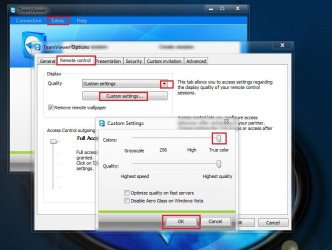
Anyway, Extras > Option > remote Control > Quality > Custom settings > True Color may enable aero in remote desktop .
 

Attachments

  • Capture.JPG
    Capture.JPG
    61.8 KB · Views: 74

My Computer

Computer type
PC/Desktop
Computer Manufacturer/Model Number
Self Assembled
OS
Microsoft Windows 10 Pro Insider Preview 64-bit
CPU
Intel(R) Core(TM) i3-4130 CPU @ 3.40GHz
Motherboard
Gigabyte Technology Co., Ltd. B85M-D3H
Memory
Corsair Vengence 4GB x2 (8.00GB Dual-Channel DDR3 @ 798MHz)
Graphics Card(s)
2047MB GeForce GTS 450 (ZOTAC International)
Sound Card
Onboard (Realtek High Definition Audio)
Monitor(s) Displays
LG Flatron E2040T
Screen Resolution
1600x900
Hard Drives
Western Digital 1 TB
Seagate 500 GB
PSU
Corsair VS550
Case
Cooler Master K380
Cooling
Cooler Master Seidon 120V Plus
Keyboard
Logitech MK260r
Mouse
Logitech MK260r
Internet Speed
PMPL Broadband
Antivirus
Windows Defender + MBAM
Browser
Firefox
Other Info
Dell Studio 15" Laptop
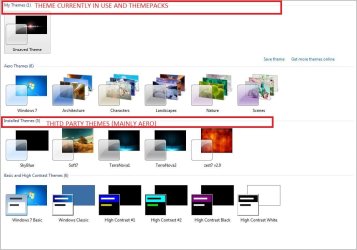
The theme I have been using is not listed under Aero in the themes list. It is listed under My Themes and it is called Unsaved Theme. I don't remember ever setting this theme.

Is the theme not switching back from Basic to what it normally is after my remote connection is finished becasue it is not Aero?
 

My Computer

Computer Manufacturer/Model Number
HP p6350z
OS
Windows 7 Professional x64
Memory
8 GB
Monitor(s) Displays
2 x Dell 2007WFPb
In My Themes, the theme in ues at present with custom wallpaper and window color etc, and installed themepacks are listed .

As you use windows 7 professional, it may ge guessed easily that the theme is in use atm uses aero features , and so it is called an aero theme . In personalization window, only the default aero themes are listed under aero . So the themepacks and third party themes are aero themes , I guessed .
 

Attachments

  • Capture.JPG
    Capture.JPG
    75.6 KB · Views: 47

My Computer

Computer type
PC/Desktop
Computer Manufacturer/Model Number
Self Assembled
OS
Microsoft Windows 10 Pro Insider Preview 64-bit
CPU
Intel(R) Core(TM) i3-4130 CPU @ 3.40GHz
Motherboard
Gigabyte Technology Co., Ltd. B85M-D3H
Memory
Corsair Vengence 4GB x2 (8.00GB Dual-Channel DDR3 @ 798MHz)
Graphics Card(s)
2047MB GeForce GTS 450 (ZOTAC International)
Sound Card
Onboard (Realtek High Definition Audio)
Monitor(s) Displays
LG Flatron E2040T
Screen Resolution
1600x900
Hard Drives
Western Digital 1 TB
Seagate 500 GB
PSU
Corsair VS550
Case
Cooler Master K380
Cooling
Cooler Master Seidon 120V Plus
Keyboard
Logitech MK260r
Mouse
Logitech MK260r
Internet Speed
PMPL Broadband
Antivirus
Windows Defender + MBAM
Browser
Firefox
Other Info
Dell Studio 15" Laptop
Back
Top