Windows Temporary Directory automatic cleanup

MPREv

New member
Hi!

Is there somehow a mechanism that automatic cleaning the temporary directories?
Is there any? Is it Default turned off? Or when dies it clean? And how? Files oder than x days?

Somehow my temp directories Are getting bigger ans bigger .. So I think they had to ne cleaned.
Is there really no Windows built in feature to Do so?
How so I get such thing?
 

My Computer

OS
Windows 7
Most folks install a program like CCLeaner then run it nightly or weekly.
 

My Computer

Computer type
PC/Desktop
Computer Manufacturer/Model Number
Lenovo IdeaCenter 450
OS
Windows 10 Pro X64
CPU
Intel Quad Core i7-4770 @ 3.4Ghz
Memory
16.0GB PC3-12800 DDR3 SDRAM 1600 MHz
Graphics Card(s)
Intel Integrated HD Graphics
Sound Card
Realtek HD Audio
Monitor(s) Displays
HP 22" LCD
Screen Resolution
1680 x 1050
Hard Drives
250GB Samsung EVO SATA-3 SSD
2TB Seagate ST2000DM001 SATA-2
1.5TB Seagate ST3150041AS SATA
Keyboard
Dell USB
Mouse
Lenovo USB
Internet Speed
Cable via Road Runner 3MB Upload, 30MB Download
Antivirus
Windows Defender, MBAM Pro, MBAE
Browser
Seamonkey
Other Info
UEFI/GPT
PLDS DVD-RW DH16AERSH
Suggestion

If you just want to use Windows to clean up try:

Open an elevated command prompt

http://www.sevenforums.com/tutorials/783-elevated-command-prompt.html

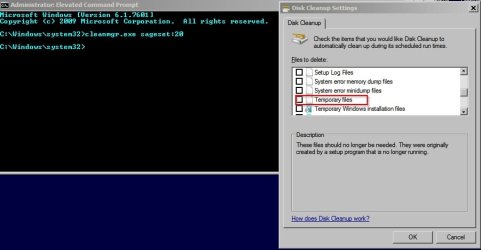
In the command prompt window type cleanmgr.exe sageset:20

Press Enter

(The number 20 can be any number. It's the number that will be used to remember the settings that you apply next).

Cleanup.jpg

On the screen that opens up -choose your cleanup options. It's safe to tick all checkboxes but just tick the Temporary Files box if it suits your needs. Then click OK.

In the command prompt window type:

cleanmgr.exe sagerun20

Windows will run advanced disk cleanup as per your specified choices.


There are other ways to clean up temp files but cleaning all temp files can sometimes cause problems. I regularly use a tool called D7 to delete all temp and zero byte files on a partition but it's not a wise move without having a system image backup in place.

Another good tool is Temp File Cleaner by Old Timer. It's mentioned often on this forum.

TFC - Temp File Cleaner by OldTimer - Geeks to Go Forums
 
Last edited:

My Computer

Computer type
Laptop
Computer Manufacturer/Model Number
ASUS
OS
Microsoft Windows 7 Home Premium 64-bit 7601 Multiprocessor Free Service Pack 1
CPU
AMD C-60 APU with Radeon(tm) HD Graphics
Motherboard
ASUSTeK COMPUTER INC. X501U
Memory
4.00 GB
Graphics Card(s)
AMD Radeon HD 6290 Graphics
Sound Card
(1) AMD High Definition Audio Device (2) Realtek High Defi
Screen Resolution
1366 x 768 x 32 bits (4294967296 colors) @ 60 Hz
Hard Drives
Hitachi HTS545050A7E380 SATA Disk Device
Antivirus
Comodo CIS & FW, SecureAplus App Whitelisting, Threatfire
Browser
Cyberfox 64bit, Opera 64bit, Airfox
Other Info
Spy-The-Spy, HitmanPro.Alert, Norton Connect Safe, MJRegWatcher, BitDefender TrafficLight, Voodoo Shield, Zemana AntiMalware
Windows has no automatic facility for deleting temp files. It can be done manually with disk cleanup or other utilities. An automatic facility could cause problems for some programs and that is likely why there is none.
 

My Computer

Computer type
PC/Desktop
Computer Manufacturer/Model Number
HP
OS
Windows 7 Pro 64 bit
CPU
Xeon W3520
Memory
8 GB
Graphics Card(s)
Nvidia Geforce 210
I'm realy a bit irritated that there is no real onboard solution ...

As for the "problem" of removing files:
From my point of view there should be no problem by removing the files by some restrictions:
- delet files older than X Days
- keep only the newest file up to 1 GB

As Applications only store temporary files in the temp directories there should not be any problems.
 

My Computer

OS
Windows 7
Changing Windows disk cleanup options

I'm realy a bit irritated that there is no real onboard solution ...

As for the "problem" of removing files:
From my point of view there should be no problem by removing the files by some restrictions:
- delet files older than X Days
- keep only the newest file up to 1 GB

As Applications only store temporary files in the temp directories there should not be any problems.

Hi,

Well windows disk cleanup excludes temp files that are newer than 7 days old but it's done that way so that it won't cause problems.

You could change this setting with a registry hack:

HKEY_LOCAL_MACHINE\SOFTWARE\Microsoft\Windows\CurrentVersion\Explorer\VolumeCaches\Temporary Files

by setting a lower value for "last access" but personally I leave it set to 1 - in other words 24 hours.

As for excluding files over a certain size - I don't know of a way in Windows. As you say, that feature doesn't seem to be included.

A user could waste a lot of time and effort attempting to clean "system clutter" for a minimal performance benefit when most of the time the tools built into windows are adequate.

However my personal preference is to get rid of anything that's not needed where possible and I'm sorry to say that it requires third party software and in some cases writing custom scripts!
 
Last edited:

My Computer

Computer type
Laptop
Computer Manufacturer/Model Number
ASUS
OS
Microsoft Windows 7 Home Premium 64-bit 7601 Multiprocessor Free Service Pack 1
CPU
AMD C-60 APU with Radeon(tm) HD Graphics
Motherboard
ASUSTeK COMPUTER INC. X501U
Memory
4.00 GB
Graphics Card(s)
AMD Radeon HD 6290 Graphics
Sound Card
(1) AMD High Definition Audio Device (2) Realtek High Defi
Screen Resolution
1366 x 768 x 32 bits (4294967296 colors) @ 60 Hz
Hard Drives
Hitachi HTS545050A7E380 SATA Disk Device
Antivirus
Comodo CIS & FW, SecureAplus App Whitelisting, Threatfire
Browser
Cyberfox 64bit, Opera 64bit, Airfox
Other Info
Spy-The-Spy, HitmanPro.Alert, Norton Connect Safe, MJRegWatcher, BitDefender TrafficLight, Voodoo Shield, Zemana AntiMalware
As Applications only store temporary files in the temp directories there should not be any problems.

The problem is in how you define "temporary". Some applications have a rather different view of temporary than many users and if they are prematurely deleted there can be problems. Any automatic deletion of these files could cause problems. Remember that temporary files are for the most part created by applications for application use. It is a very sensitive matter for Windows to delete files created by applications and Windows tends toward a very conservative view. And knowing what I know of temporary files I think it the right approach.
 

My Computer

Computer type
PC/Desktop
Computer Manufacturer/Model Number
HP
OS
Windows 7 Pro 64 bit
CPU
Xeon W3520
Memory
8 GB
Graphics Card(s)
Nvidia Geforce 210
CCleaner has an option, which is on by default, to only delete files older than 24 hours. You can also automate CCleaner using the Windows task scheduler. You can exclude specific files from deletion if it is causing problems.
 

My Computer

Computer type
Laptop
Computer Manufacturer/Model Number
Hewlett-Packard/G62-107SA Notebook
OS
Microsoft Windows 7 Home Premium 64-bit Service Pack 1
CPU
Intel(R) Core(TM) i3 CPU M 330 @ 2.13GHz
Motherboard
Hewlett-Packard 1425
Memory
8 GB DDR3
Graphics Card(s)
Intel(R) HD Graphics
Sound Card
Realtek High Definition Audio
Monitor(s) Displays
Builtin
Screen Resolution
1366 x 768 x 32 bits (4294967296 colors) @ 60 Hz
Hard Drives
250 GB SATA Hard Disk Drive 7200 rpm
2TB Seagate GoFlex USB 2 Drive
1TB Iomega Prestige USB 2 Drive
1.5TB Iomega Prestige USB 2 Drive (Samsung)
2TB WD MyBook Live NAS.
Mouse
Logitech Anywhere MX
Internet Speed
152 Mbs download 10 Mbs upload
Antivirus
Norton 360
Browser
Chrome
Well windows disk cleanup excludes temp files that are newer than 7 days old but it's done that way so that it won't cause problems.
That sounds good!


There's an interesting article here that does indicate that a user could waste a lot of time and effort attempting to clean "system clutter" for a minimal performance benefit when most of the time the tools biult into windows are adequate.

Thats not a matter of performance, its a matter of disc space ;)
 

My Computer

OS
Windows 7
If you are so tight on disk space that cleaning out temp files makes a difference, you need a larger hard drive.
 

My Computer

Computer type
PC/Desktop
Computer Manufacturer/Model Number
Lenovo IdeaCenter 450
OS
Windows 10 Pro X64
CPU
Intel Quad Core i7-4770 @ 3.4Ghz
Memory
16.0GB PC3-12800 DDR3 SDRAM 1600 MHz
Graphics Card(s)
Intel Integrated HD Graphics
Sound Card
Realtek HD Audio
Monitor(s) Displays
HP 22" LCD
Screen Resolution
1680 x 1050
Hard Drives
250GB Samsung EVO SATA-3 SSD
2TB Seagate ST2000DM001 SATA-2
1.5TB Seagate ST3150041AS SATA
Keyboard
Dell USB
Mouse
Lenovo USB
Internet Speed
Cable via Road Runner 3MB Upload, 30MB Download
Antivirus
Windows Defender, MBAM Pro, MBAE
Browser
Seamonkey
Other Info
UEFI/GPT
PLDS DVD-RW DH16AERSH
If you are so tight on disk space that cleaning out temp files makes a difference, you need a larger hard drive.
No, thats definitely NOT the case.
Temp files are not limited in size ... they could reach 1 TB if not cleaned up by the programms creating them or by the system / user.
To reason it only to the size of a hard drive would be to easy
 

My Computer

OS
Windows 7
1TB?? I find that hard to believe, though I suppose if you are recording TV continuously it could.

I'm not against cleaning up temp files. I run CCleaner every day or two for that reason.

In this case, he has a 450GB drive and only has 13GB free. I doubt temp files occupy much space, maybe a few gig. What is using the rest of the drive? Movies, music, games, ??? If so, a larger drive would solve the problem.
 

My Computer

Computer type
PC/Desktop
Computer Manufacturer/Model Number
Lenovo IdeaCenter 450
OS
Windows 10 Pro X64
CPU
Intel Quad Core i7-4770 @ 3.4Ghz
Memory
16.0GB PC3-12800 DDR3 SDRAM 1600 MHz
Graphics Card(s)
Intel Integrated HD Graphics
Sound Card
Realtek HD Audio
Monitor(s) Displays
HP 22" LCD
Screen Resolution
1680 x 1050
Hard Drives
250GB Samsung EVO SATA-3 SSD
2TB Seagate ST2000DM001 SATA-2
1.5TB Seagate ST3150041AS SATA
Keyboard
Dell USB
Mouse
Lenovo USB
Internet Speed
Cable via Road Runner 3MB Upload, 30MB Download
Antivirus
Windows Defender, MBAM Pro, MBAE
Browser
Seamonkey
Other Info
UEFI/GPT
PLDS DVD-RW DH16AERSH
1TB?? I find that hard to believe, ...

1T is just a number.
But everything is relative.
A c-drive with about 65GB total and about 20GB free ... but temp files are growing and growing so that only 3MB are free (this comes due to the special usage of the PC I guess). Cleaning up is everything what was needed, no new hard drive.
I also have had now also a similar issue on a server PC (not "temp" files like in one of the temp directories, but also not needed after a few days ...). Cleaning up every week keeping files younger than 30 days saves hd-space, money and oure environment ;)

If the HDD have had more free space the temp files could also reach 1TB without anybody even noticed.
 

My Computer

OS
Windows 7
SSD

I have to agree with MPREv on this one.

I have a 60GB SSD for my OS which takes up about 29GB (with additional Programs). In one week I collected enough Temp data (no video) to trigger the Red HDD alert..!
 

My Computer

Computer type
PC/Desktop
OS
Windows 7 Home Premium 32bit
Install and run CCleaner nightly to cleanup any accumulation of temp files. That's what I do and it typically deletes 300 to 500 MB.
 

My Computer

Computer type
PC/Desktop
Computer Manufacturer/Model Number
Lenovo IdeaCenter 450
OS
Windows 10 Pro X64
CPU
Intel Quad Core i7-4770 @ 3.4Ghz
Memory
16.0GB PC3-12800 DDR3 SDRAM 1600 MHz
Graphics Card(s)
Intel Integrated HD Graphics
Sound Card
Realtek HD Audio
Monitor(s) Displays
HP 22" LCD
Screen Resolution
1680 x 1050
Hard Drives
250GB Samsung EVO SATA-3 SSD
2TB Seagate ST2000DM001 SATA-2
1.5TB Seagate ST3150041AS SATA
Keyboard
Dell USB
Mouse
Lenovo USB
Internet Speed
Cable via Road Runner 3MB Upload, 30MB Download
Antivirus
Windows Defender, MBAM Pro, MBAE
Browser
Seamonkey
Other Info
UEFI/GPT
PLDS DVD-RW DH16AERSH
Back
Top