- Local time
- 6:28 AM
- Messages
- 203
Hi Folks,
Tried umpteen things in the last 24hrs to resolve a problem I'm experiencing with Windows Update - so I'm hoping that the good folks at SevenForums might be able to help....
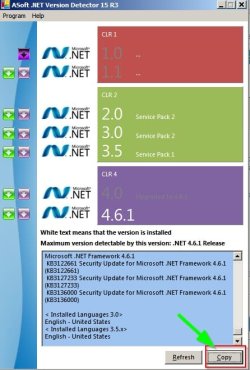
I have managed to manually install the .NET Framework 4.6.1 (via this link to KB 3102438: https://www.microsoft.com/en-us/download/details.aspx?id=49981).
I have run the Windows Update Troubleshooter several times (link: http://go.microsoft.com/?linkid=9830262) and I always get the same error - see image below.

I have also run the System Update Readiness Tool (KB947821) from here: https://www.microsoft.com/en-us/download/details.aspx?id=20858 several times and also the EasyFix 50205.msi
When I run Windows Update - all I get is the following (and after an hour of "no progress", I give up).

I ran a full AV scan yesterday after updating the definitions files (Kaspersky Total Security 16.0.0.614e) and a Malwarebytes scan - again after updating - both found no threat.
I have also run sfc (System File Checker) three times from an elevated command prompt (after re-boot each time) and have no reported "integrity violations".
Getting short of things to try.
Machine details:
CPU: Core 2 Duo T5800 2GHz with 4GB RAM.
HDD: WD Black 750GB with 222GB free
Windows OS: Windows 7 64-bit Home Premium SP1.
Any help gratefully accepted - thanks in anticipation.
Zaph
BTW, I DO NOT want any update to do with Windows 10 carp
(e.g. KB2952664 / KB2990214 / KB3022345 / KB3035503 / KB3035583 / KB3123862)
Tried umpteen things in the last 24hrs to resolve a problem I'm experiencing with Windows Update - so I'm hoping that the good folks at SevenForums might be able to help....
I have managed to manually install the .NET Framework 4.6.1 (via this link to KB 3102438: https://www.microsoft.com/en-us/download/details.aspx?id=49981).
I have run the Windows Update Troubleshooter several times (link: http://go.microsoft.com/?linkid=9830262) and I always get the same error - see image below.
I have also run the System Update Readiness Tool (KB947821) from here: https://www.microsoft.com/en-us/download/details.aspx?id=20858 several times and also the EasyFix 50205.msi
When I run Windows Update - all I get is the following (and after an hour of "no progress", I give up).
I ran a full AV scan yesterday after updating the definitions files (Kaspersky Total Security 16.0.0.614e) and a Malwarebytes scan - again after updating - both found no threat.
I have also run sfc (System File Checker) three times from an elevated command prompt (after re-boot each time) and have no reported "integrity violations".
Getting short of things to try.
Machine details:
CPU: Core 2 Duo T5800 2GHz with 4GB RAM.
HDD: WD Black 750GB with 222GB free
Windows OS: Windows 7 64-bit Home Premium SP1.
Any help gratefully accepted - thanks in anticipation.
Zaph
BTW, I DO NOT want any update to do with Windows 10 carp
(e.g. KB2952664 / KB2990214 / KB3022345 / KB3035503 / KB3035583 / KB3123862)
My Computer
At a glance
Windows 7 Home Premium SP1 64-bit (now lookin...Core2 Duo T5750 2GHz/Core2 Duo T5800 2GHz/Cor...4Gb / 4Gb / 8GbIntel 965 Express/ATi Mob Radeon HD 3400/AMD ...
- Computer type
- Laptop
- Computer Manufacturer/Model Number
- DELL Inspiron 1525 / Sony VAIO VGN FW21L / Zoostorm 7877-0095
- OS
- Windows 7 Home Premium SP1 64-bit (now looking at Linux Mint!)
- CPU
- Core2 Duo T5750 2GHz/Core2 Duo T5800 2GHz/Core i5 3300 3.1GH
- Motherboard
- DELL 0U990C / "SONY Corp VAIO" (??) / GA-H61M-DS2 DVI
- Memory
- 4Gb / 4Gb / 8Gb
- Graphics Card(s)
- Intel 965 Express/ATi Mob Radeon HD 3400/AMD Radeon R7 200
- Hard Drives
- WD 750Gb Black (WD7500BPKT) - DELL
WD 1Tb Black (WD10JPLX) - SONY
ST 2Tb Barracuda (2000DM001) - Zoostorm
- Internet Speed
- VM Fibre 100 Mbps
- Antivirus
- Kaspersky IS 2019 / Kaspersky IS 2019 / Kaspersky IS 2019
- Browser
- Chrome 76.0.3809 / Chrome 79.0.3945 / Chrome 76.0.3809