windows update and firewall stops

jsk4224

New member
Local time
5:54 PM
Messages
37
suddenly when I turn computer on, a pop-up says windows update and firewall has stopped working. I click on each and turn on with no problems. next time computer is turned on, same pop-up appears.

is there anything I can do to keep these programs running?
please advise,
thanks,
john
 

My Computer

Computer Manufacturer/Model Number
gateway dx4860-ub20p
OS
windows 7 64 bit
Memory
6gb
Graphics Card(s)
hd intel
Hello,

What might have happened here is the Windows services for these programs have been disabled. This is an easy fix. Follow my steps below:

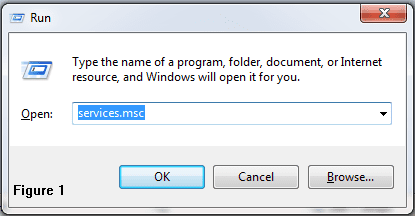
1. Press the Windows Key + R to open the Run dialog.
2. In the dialog, type "services.msc" (without the quotes). Figure 1
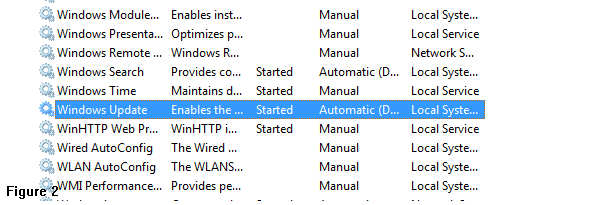
3. Locate Windows Update... Figure 2
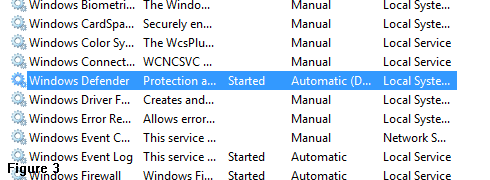
3. ...and Windows Defender. Figure 3
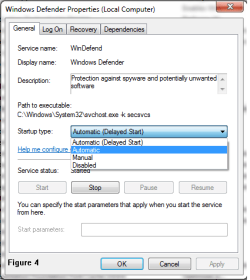
4. Right-click on Windows Defender and select Properties.
5. Under Startup Type, select Automatic. Figure 4
6. Do the same for Windows Update. Figure 5

Restart your computer and you should be good to go.
If you are still getting the message, reply to this message.

EDIT: Woah sorry, instead of Windows Defender, find Windows Firewall instead and do step 5 for it too.

If you find my posts helpful, please help me out by pressing the little "Add to techhead287's Reputation" button at the top of this post. Thanks!
 

Attachments

  • services.png
    services.png
    6.3 KB · Views: 50
  • windowsupdate.png
    windowsupdate.png
    5.9 KB · Views: 50
  • windefend.png
    windefend.png
    5.3 KB · Views: 50
  • winefend2.png
    winefend2.png
    16 KB · Views: 50
  • winupdate2.png
    winupdate2.png
    17.1 KB · Views: 50
Last edited:

My Computer

Computer type
PC/Desktop
Computer Manufacturer/Model Number
Custom Build
OS
Windows 7 Ultimate 64-bit
CPU
Intel Core i7
Motherboard
ASUS
Memory
32GB RAM
Monitor(s) Displays
2
Hard Drives
1TB HDD
160GB SSD
2TB HDD
Cooling
3 Fans, water cooling
Keyboard
Microsoft
Mouse
Microsoft
Internet Speed
Around 70mbps
Antivirus
AVG Internet Security 2014
Browser
IE11, Google Chrome (default browser is Chrome)
thank-you for your advise. I solved the windows update problem. but, firewall issue still exists. I have Norton 360 program w/firewall. and have been playing around w/their settings. tried to shut off Norton and turn on windows firewall, that didn't work either, oh well.

again thanks for your input and have a wonderful day.
john
 

My Computer

Computer Manufacturer/Model Number
gateway dx4860-ub20p
OS
windows 7 64 bit
Memory
6gb
Graphics Card(s)
hd intel
just found remote procedures on services msc. apparently this program runs for Norton 360 and it's set at manual. I changed to auto. now i'll see if that fixes the problem.

thanks again,
john
 

My Computer

Computer Manufacturer/Model Number
gateway dx4860-ub20p
OS
windows 7 64 bit
Memory
6gb
Graphics Card(s)
hd intel
just found remote procedures on services msc. apparently this program runs for Norton 360 and it's set at manual. I changed to auto. now i'll see if that fixes the problem.

thanks again,
john

Hello John,

Sorry for the trouble. Is your problem with Norton 360 fixed now? If not, please let me know the details. I can help you fix the problem.

Thanks!

Vineeth
Norton Support
 

My Computer

Computer type
PC/Desktop
OS
Windows 7 Ultimate x64
I was hoping it was fixed, but it still exists. the Norton 360 firewall is turned on and working. icon on taskbar blinks, I click on it and click to turn on nortton firewall then it disappears
it's just a nun cense. guess I will just live w/it. .
 

My Computer

Computer Manufacturer/Model Number
gateway dx4860-ub20p
OS
windows 7 64 bit
Memory
6gb
Graphics Card(s)
hd intel

My Computer

Computer type
PC/Desktop
Computer Manufacturer/Model Number
Bruce ... somewhere in his 40's
OS
Windows 7 Ultimate 32bit SP1
CPU
Intel(R) Core(TM)2 Quad CPU @ 2.40GHz, 2400 MHz
Motherboard
INTEL/D975XBX2
Memory
4 GB
Graphics Card(s)
ATI Radeon HD 2600 Pro
Monitor(s) Displays
Samsung SyncMaster 914v
Screen Resolution
1280 x 1024
Hard Drives
2/500GB each ... ST3500630AS ATA Device.
One is not connected
PSU
Rocketfish 700 W
Case
G.Skill Gigabyte Chassis
Keyboard
Standard PS/2 Keyboard
Mouse
Microsoft PS/2 Mouse
Internet Speed
DSL
Antivirus
Avira Internet Security
Browser
IE 11
Other Info
ATI HDMI Audio
I was hoping it was fixed, but it still exists. the Norton 360 firewall is turned on and working. icon on taskbar blinks, I click on it and click to turn on nortton firewall then it disappears
it's just a nun cense. guess I will just live w/it. .

Can you check the status of the following services & make sure that it is Started-Automatic?
Base Filtering Engine
Security Center
Windows Firewall

You may also try uninstalling/reinstalling Norton 360 once using Norton Remove & Reinstall Tool:
http://www.norton.com/nrnr

Let me know the results.

Thanks!
Harry
Norton Support
 

My Computer

Computer type
PC/Desktop
OS
Windows 7 Ultimate x64
all three of the services were set on auto. used norton tool, deleted and added. restarted, now back to square one, windows auto and norton firewall needs to be turned on. after restarting, checked and three services are set on auto.
 

My Computer

Computer Manufacturer/Model Number
gateway dx4860-ub20p
OS
windows 7 64 bit
Memory
6gb
Graphics Card(s)
hd intel
You don't need Windows firewall running, when you have Norton's firewall. That's just going to slow your computer down!
 

My Computer

Computer type
PC/Desktop
Computer Manufacturer/Model Number
Bruce ... somewhere in his 40's
OS
Windows 7 Ultimate 32bit SP1
CPU
Intel(R) Core(TM)2 Quad CPU @ 2.40GHz, 2400 MHz
Motherboard
INTEL/D975XBX2
Memory
4 GB
Graphics Card(s)
ATI Radeon HD 2600 Pro
Monitor(s) Displays
Samsung SyncMaster 914v
Screen Resolution
1280 x 1024
Hard Drives
2/500GB each ... ST3500630AS ATA Device.
One is not connected
PSU
Rocketfish 700 W
Case
G.Skill Gigabyte Chassis
Keyboard
Standard PS/2 Keyboard
Mouse
Microsoft PS/2 Mouse
Internet Speed
DSL
Antivirus
Avira Internet Security
Browser
IE 11
Other Info
ATI HDMI Audio
I understand, windows firewall has been down since I installed norton
 

My Computer

Computer Manufacturer/Model Number
gateway dx4860-ub20p
OS
windows 7 64 bit
Memory
6gb
Graphics Card(s)
hd intel
I understand, windows firewall has been down since I installed norton

When you open Norton product, does it show that Smart Firewall is turned off? Does the Norton icon in system tray shows red status?

If the problem is only with the Windows Action Center falsely reporting that firewall is turned off, unregistering and re-registering WMIUTILS.DLL file may be able to fix this issue.1. Click the Start button, and then click All Programs > Accessories > Run.
2. In the Run dialog box, type the following text:
regsvr32 /u WMIUTILS.DLL
3. Click OK.
4. Restart the computer.
5. Click the Start button, and then click All Programs > Accessories > Run.
6. In the Run dialog box, type the following text:
regsvr32 WMIUTILS.DLL
7. Click OK.
8. Restart the computer.


Let me know if this works.


Thanks!
Harry
Norton Support
 

My Computer

Computer type
PC/Desktop
OS
Windows 7 Ultimate x64
followed your instructions to the t. issue remains.
 

My Computer

Computer Manufacturer/Model Number
gateway dx4860-ub20p
OS
windows 7 64 bit
Memory
6gb
Graphics Card(s)
hd intel

My Computer

Computer type
PC/Desktop
OS
Windows 7 Ultimate x64
thank-you, but issue remains
 

My Computer

Computer Manufacturer/Model Number
gateway dx4860-ub20p
OS
windows 7 64 bit
Memory
6gb
Graphics Card(s)
hd intel
thank-you, but issue remains

Sorry to hear!

Can you please let me know the version of Norton 360 you have? To find the version, open your Norton product, and then click Support > About.

meanwhile, I suggest you to try these steps:


  • Click on Start Menu and type CMD in search, from the results right-click on command prompt and select 'Run as Administrator'.
  • Type the following command:

    winmgmt /verifyrepository
  • If you get a message "WMI repository is not consistent", run the following command:

    winmgmt /salvagerepository
  • This will perform a consistency check on the WMI repository
  • Restart the computer.
Thanks!


Vineeth
Norton Support
 

My Computer

Computer type
PC/Desktop
OS
Windows 7 Ultimate x64
Norton 360 version 21.1.018
ran program, WMI repository is consistent.
issue remains
 

My Computer

Computer Manufacturer/Model Number
gateway dx4860-ub20p
OS
windows 7 64 bit
Memory
6gb
Graphics Card(s)
hd intel
Norton 360 version 21.1.018
ran program, WMI repository is consistent.
issue remains

Let us try uninstalling and reinstalling the Norton product. Please download and run the Norton Remove & Reinstall Tool to uninstall and reinstall the Norton product: http://www.Norton.com/nrnr

Thanks!

Vineeth
Norton Support
 

My Computer

Computer type
PC/Desktop
OS
Windows 7 Ultimate x64
I forgot to tell you, I did that yesterday.
 

My Computer

Computer Manufacturer/Model Number
gateway dx4860-ub20p
OS
windows 7 64 bit
Memory
6gb
Graphics Card(s)
hd intel
Back
Top