
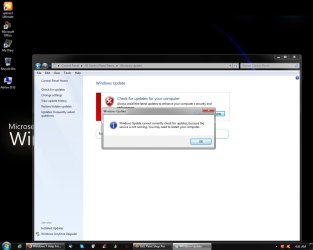
"Windows update cannot currently check for updates, because the servic

Eddie Methot

New member
Local time
10:40 AM
Messages
2
Location
Dalhousie,New Brunswick
"Windows update cannot currently check for updates, because the servic

"Windows update cannot currently check for updates, because the service is not running, You my need to restart your computer"
Avast for some reason deleted an update or updater file,preventing me from downloading any updates.I get the same message as member
WinningWith7.Is there any place where I can replace this crutual fileImage1.jpg
 

My Computer

Computer type
PC/Desktop
Computer Manufacturer/Model Number
custom build
OS
Windows 7 professional 32 bit
CPU
Athlon II X3 2.9ghz
Motherboard
Gigabyte M68MT-S2
Memory
4GB DDR3 single channel 669mhz
Graphics Card(s)
Asus GT 640 2GB DDR3
Monitor(s) Displays
NEC Opticlear 90gx
Screen Resolution
1280X1024x32
Hard Drives
Western Digital 640gb sata
Western Digital 1TB sata
Seagate Backup Plus 2 TB USB
PSU
Cooler Master 1KW
Keyboard
HP
Mouse
Logitech M310
Internet Speed
Fiberoptic 300dn/100up
Antivirus
Avast Premium
Browser
Firefox Quantum
Welcome to the forum. Have you tried starting the service and setting to auto? If avast has deleted a file you should be able to reinstate it in avast
 

My Computer

Computer type
PC/Desktop
OS
win 8 32 bit
Have you tried sfc /scannow from ADMIN CMD?
May have to run it 2-3 times
SFCFix.exe by niemiero repairs some issues that sfc /scannow hasn't
 

My Computer

Computer type
PC/Desktop
Computer Manufacturer/Model Number
HP Desktop & Compaq Laptop
OS
Win 10 x64, Linux Lite, Win 7 x64, BlackArch, & Kali
Hard Drives
Samsung 850 Pro 256Gb,
Hitachi HDD 1Tb,
Crucial MX SSD 250Gb
Segate 3Tb USB 3.0 Ext. Backup HDD
Internet Speed
150Mbps dn, 20Mbps up
Antivirus
Avast Free, Malwarebytes Anti-Exploit & Anti-Ransomware
Browser
Firefox, Chrome, Opera, & VPN
Eddie. This was a problem early in December 2017 for a lot of users & the solution below did fix it for a lot of people. You may have to try a different date if this has only recently become a problem.

"Windows update cannot currently check for updates, because the service is not running, You may need to restart your computer".

This is exactly the message you get when the AuthCab has expired. Doing the following seems to fix it:

The date on the computer has to be reset & to do that follow this:

To reset the date on the computer Right Click on the Clock at bottom RH corner of the screen, select Change Date & Time Settings, when that opens click on the Internet Time tab, Then select Change Settings, then untick Synchronise with Internet Time Server, be sure to tick OK, then select the Date & Time tab, Then select Change Date & Time & set the date back to 3 Dec.

Then reboot the computer & then run Check for Updates in Windows Update, it should update to the 3 Dec. In some cases you may need to try an earlier date if the 2nd doesn't work.

Then reboot, reset Internet time Synch, change computer date to today's date, re run Check for Updates in Windows Update & it should check for Updates & came back with Windows is up to date, with the latest updates installed.

This method should retain all your Update History as well.


The reason for this procedure, is that Windows accesses an AuthCab during the start-up procedure that Authorises access to the Windows Update download site. This authorisation expired on 3 Dec for a lot of users & access get blocked to the Windows Update site.

By running the repair I listed above, resetting the computer date & rebooting provides access to Update site at which MS have now reset the expiry of that AuthCab which gets installed on your computer, so it can now download & install Updates. Of course it is then necessary to reset the date on the computer & re run Check for Updates to bring it completely up to date.
 

My Computer

Computer type
PC/Desktop
Computer Manufacturer/Model Number
Self built using existing case
OS
Windows 7 Home Premium 64 bit sp1
CPU
Intel i5 3570 3.4Ghz Ivy Bridge SKT 1155 quad core
Motherboard
Gigabyte Z77-HD3 SKT 1155 2xSata 3, 4x USB 3.0
Memory
G-Skill Rip Jaws 16Gb (8x2) DDR3 -1600 PC3 12800 CL 10 red
Graphics Card(s)
Gigabyte NVIDIA GT610 1Gb DDR3 810/1200 PCI-E 2.0 Silent
Sound Card
NVIDIA High Definition & Realtech High Definition Audio
Monitor(s) Displays
2 x Philips 226V4L 16:9 aspect ratio
Screen Resolution
1920 x 1080 HD
Hard Drives
Samsung 840 Pro 256gb SSD, SATA 3.
Hitachi Touro Portable 1tb, USB 3.0 HDD used for image b/ups.
PSU
Corsair VS450
Case
Codeng
Cooling
PSU fan & CPU fan
Keyboard
Logitech
Mouse
Logitech Wireless trackball M570
Internet Speed
Wireless 3G. 3mg down & 550kb up.
Antivirus
Bitdefender Internet Security 2020
Browser
Opera (Current Version) & Firefox
Other Info
MS Office 2013 Pro. Davis weather station software. MGE Nova 600 avr UPS.
Back
Top