Solved Windows Update Error 0x800b0100

Andy 01

New member
Member
Local time
12:58 PM
Messages
47
Location
Colchester Essex
Can anyone help with this please ?
Its actually got me beat !

Noticed that MSE failed to start.
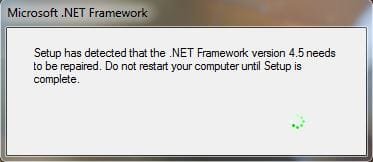
Then a box appeared stating that it was repairing .Net 4.5 !

The repair completed with no change.
A restart starts the whole procedure again.

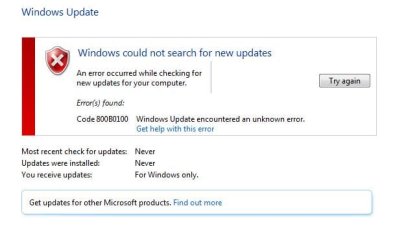
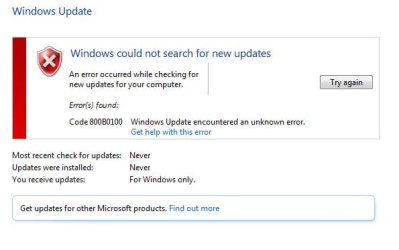
I then noted that Windows Update will not run, reporting the error 0x800b0100

I followed various fixes found online, with no change.
I ran SFC and CHKDSK with no change.
Malwarebytes gave a clean pass.

Getting hung up on the .Net error, I attempted its own repair procedure with no change.
I uninstalled the .Net, restarted, and installed again.
This failed reporting:

Returning IDOK. INSTALLMESSAGE_ERROR [Could not write value Version to key \SOFTWARE\Microsoft\NET Framework Setup\NDP\v4\Client. Verify that you have sufficient access to that key, or contact your support personnel.]

Do I concentrate on the .Net error, or the Windows update error code ?
Any suggestions how to proceed ?
System restore made no difference, and I even imaged back to my full backup from a couple of days ago, but the error must have been present prior to the backup !

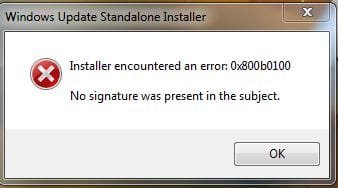
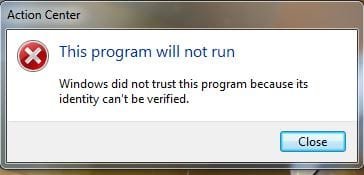
If I attempt to update MSE, I get the following error below:
This is a genuine W7 installation, that has been active for about 5 years !


Can anyone save my sanity please.

Thanks,
Andy
 

Attachments
  • Capture.JPG
    Capture.JPG
    19.2 KB · Views: 50

My Computer

Computer type
PC/Desktop
Computer Manufacturer/Model Number
Mesh XGS I7
OS
Windows 7 Professional 64 Bit
CPU
Intel® Core™ i7 860 Quad Core Processor (2.80GHz, 8MB Cache)
Motherboard
ASUS P7P55 LX Mainboard - Intel Core™ i5 / i7 - LGA 1156 / A
Memory
16GB 1600MHz Dual Channel DDR3 SDRAM, Corsair XMS3
Graphics Card(s)
1GB ATI Radeon HD5750
Sound Card
7.1 High Definition onboard sound card
Monitor(s) Displays
22" LG FULL HD Monitor
Screen Resolution
1920x1080
Hard Drives
2 x 1TB Serial ATA 2 Hard Drive with 32MB Buffer
PSU
550W
Case
XGS Gaming Chassis - Midi Tower
Cooling
Standard fans
Keyboard
Logitech Deluxe Keyboard
Mouse
Logitech MX620 Cordless mouse
Internet Speed
60 meg
Antivirus
MSE
Browser
IE11

My Computer

Computer type
PC/Desktop
Computer Manufacturer/Model Number
Home made Desktop
OS
Windows 10 Pro. 64/ version 1709 Windows 7 Pro/64
CPU
Intel i7-6800K @ 4.3
Motherboard
ASUS X-99 Deluxe II
Memory
Corsair Platinum 16 gig @2400
Graphics Card(s)
EVGA GTX 1070 OC
Monitor(s) Displays
Asus 27" LED LCD/VE278Q
Screen Resolution
1920-1080 or 1280-720 HDMI
Hard Drives
INTEL SSD 730-240 Gb Sata 3.0/
PSU
EVGA Platium 1200W
Case
Phanteks Luxe Tempered Glass 8 fans/ one radiator
Cooling
XSPC/ Water Cooled CPU
Keyboard
Das 4 Professional
Mouse
Logitech M705/MX Anywhere 2-S
Internet Speed
100 mbits
Antivirus
Microsoft Security Essentials/ Malwarebytes Premium 3.0/ SAS
Browser
I.E. 11 default/Firefox/ ISP Time Warner Cable/Spectrum
Other Info
LG BluRay Burner/
Sound system-KLipsch-THX/
Icy Dock ssd Hot Swap bays.
On it :)
Thanks for the reply and heads up on what to provide.

1) SURT.
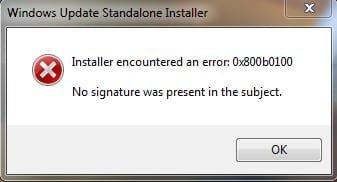
Hmm, bad start. Downloaded to desktop, but not able to launch the application.
It fails stating the following:

SRT Install.JPG


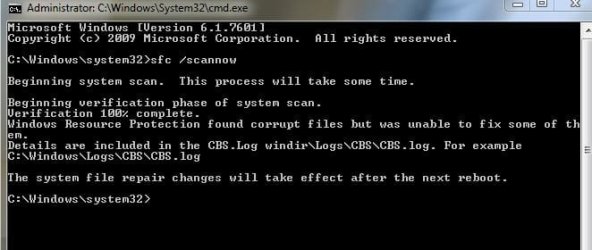
2) SFC scan actually ran this time, stating the following:

SFC.JPG

3) Windows Update Error Codes

Windows Update.JPG

This system was fully updated up to this issue, and I note it now states windows updates have never been checked or installed. Not so !


4) Log Collection
(Hope this is correct :o)

View attachment 374144


As an additional, every time I reboot the system I get the following come up:

.Net.JPG

Many thanks.
Andy
 

My Computer

Computer type
PC/Desktop
Computer Manufacturer/Model Number
Mesh XGS I7
OS
Windows 7 Professional 64 Bit
CPU
Intel® Core™ i7 860 Quad Core Processor (2.80GHz, 8MB Cache)
Motherboard
ASUS P7P55 LX Mainboard - Intel Core™ i5 / i7 - LGA 1156 / A
Memory
16GB 1600MHz Dual Channel DDR3 SDRAM, Corsair XMS3
Graphics Card(s)
1GB ATI Radeon HD5750
Sound Card
7.1 High Definition onboard sound card
Monitor(s) Displays
22" LG FULL HD Monitor
Screen Resolution
1920x1080
Hard Drives
2 x 1TB Serial ATA 2 Hard Drive with 32MB Buffer
PSU
550W
Case
XGS Gaming Chassis - Midi Tower
Cooling
Standard fans
Keyboard
Logitech Deluxe Keyboard
Mouse
Logitech MX620 Cordless mouse
Internet Speed
60 meg
Antivirus
MSE
Browser
IE11
SFC Found the following unfixable problems...
Code:
	Line 4659: 2015-10-21 22:28:06, Info                  CSI    000003a7 [SR] Repairing 12 (0x000000000000000c) components
	Line 4660: 2015-10-21 22:28:06, Info                  CSI    000003a8 [SR] Beginning Verify and Repair transaction
	Line 4663: 2015-10-21 22:28:06, Info                  CSI    000003aa [SR] Cannot repair member file [l:18{9}]"GWXUI.dll" of Microsoft-Windows-GWX, Version = 6.1.7601.19020, pA = PROCESSOR_ARCHITECTURE_AMD64 (9), Culture neutral, VersionScope = 1 nonSxS, PublicKeyToken = {l:8 b:31bf3856ad364e35}, Type neutral, TypeName neutral, PublicKey neutral in the store, hash mismatch
	Line 4668: 2015-10-21 22:28:06, Info                  CSI    000003ad [SR] Cannot verify component files for Microsoft-Windows-SystemRestore-Main, Version = 6.1.7601.18939, pA = PROCESSOR_ARCHITECTURE_AMD64 (9), Culture neutral, VersionScope = 1 nonSxS, PublicKeyToken = {l:8 b:31bf3856ad364e35}, Type neutral, TypeName neutral, PublicKey neutral, manifest is damaged (TRUE)
	Line 4671: 2015-10-21 22:28:06, Info                  CSI    000003af [SR] Cannot repair member file [l:14{7}]"VAN.dll" of Microsoft-Windows-VAN, Version = 6.1.7601.17514, pA = PROCESSOR_ARCHITECTURE_AMD64 (9), Culture neutral, VersionScope = 1 nonSxS, PublicKeyToken = {l:8 b:31bf3856ad364e35}, Type neutral, TypeName neutral, PublicKey neutral in the store, hash mismatch
	Line 4674: 2015-10-21 22:28:07, Info                  CSI    000003b1 [SR] Cannot repair member file [l:20{10}]"authui.dll" of Microsoft-Windows-Authentication-AuthUI, Version = 6.1.7601.18906, pA = PROCESSOR_ARCHITECTURE_INTEL (0), Culture neutral, VersionScope = 1 nonSxS, PublicKeyToken = {l:8 b:31bf3856ad364e35}, Type neutral, TypeName neutral, PublicKey neutral in the store, hash mismatch

It managed to fix the others.

I'll post a fix protocol for the above errors when I can find the time!
 

My Computer

Computer type
Laptop
Computer Manufacturer/Model Number
Asus K52F or Lenovo B51-80
OS
Win 7 x64 Home Premium (and x86 VirtualBox VM)/Win10
CPU
i3 370M/i7 6500U
Motherboard
Asus/Lenovo
Memory
8GB - finally :)/8GB
Graphics Card(s)
it's an i3, dude!/dual Intel&nVidia
Sound Card
onboard
Monitor(s) Displays
15.6" built-in
Screen Resolution
1366x768/1920x1080
Hard Drives
750GB Seagate internal
Sundry external drives attached to other computers on the local network
1TB SSD on the Lenovo
PSU
n/a
Internet Speed
as much as I can get - usually on a dongle/phone, so <1MB/s
Antivirus
MSE/Defender
Browser
IE11/12/Edge/Chrome/FF(if I must)
Thanks for taking a look.
I'll wait till you have some more time. :)
 

My Computer

Computer type
PC/Desktop
Computer Manufacturer/Model Number
Mesh XGS I7
OS
Windows 7 Professional 64 Bit
CPU
Intel® Core™ i7 860 Quad Core Processor (2.80GHz, 8MB Cache)
Motherboard
ASUS P7P55 LX Mainboard - Intel Core™ i5 / i7 - LGA 1156 / A
Memory
16GB 1600MHz Dual Channel DDR3 SDRAM, Corsair XMS3
Graphics Card(s)
1GB ATI Radeon HD5750
Sound Card
7.1 High Definition onboard sound card
Monitor(s) Displays
22" LG FULL HD Monitor
Screen Resolution
1920x1080
Hard Drives
2 x 1TB Serial ATA 2 Hard Drive with 32MB Buffer
PSU
550W
Case
XGS Gaming Chassis - Midi Tower
Cooling
Standard fans
Keyboard
Logitech Deluxe Keyboard
Mouse
Logitech MX620 Cordless mouse
Internet Speed
60 meg
Antivirus
MSE
Browser
IE11
Can I cheekily bump back up.
Thanks.

:)
 

My Computer

Computer type
PC/Desktop
Computer Manufacturer/Model Number
Mesh XGS I7
OS
Windows 7 Professional 64 Bit
CPU
Intel® Core™ i7 860 Quad Core Processor (2.80GHz, 8MB Cache)
Motherboard
ASUS P7P55 LX Mainboard - Intel Core™ i5 / i7 - LGA 1156 / A
Memory
16GB 1600MHz Dual Channel DDR3 SDRAM, Corsair XMS3
Graphics Card(s)
1GB ATI Radeon HD5750
Sound Card
7.1 High Definition onboard sound card
Monitor(s) Displays
22" LG FULL HD Monitor
Screen Resolution
1920x1080
Hard Drives
2 x 1TB Serial ATA 2 Hard Drive with 32MB Buffer
PSU
550W
Case
XGS Gaming Chassis - Midi Tower
Cooling
Standard fans
Keyboard
Logitech Deluxe Keyboard
Mouse
Logitech MX620 Cordless mouse
Internet Speed
60 meg
Antivirus
MSE
Browser
IE11
No prob - sorry about the wait (bad weekend)

I've uploaded a file - a01aa.zip - to my OneDrive at Noel's OneDrive
Please download and save it.

Right-click on the saved file and select Extract all...
Change the target to C:\ and click on Extract
Close all windows (it would be a good idea to print these instructions!)

Now reboot to the Repair Environment - as soon as the machine restarts, start tapping F8 - this should bring up the Advanced Boot Menu, at the top of which should be the option 'Repair my Computer'
Pick that
You'll have to log in with your username and password.

Pick the option to use a Command Prompt
At the prompt type
DIR C:\a01aa
hit the enter key - if you get a 'Not Found' error try
DIR D:\a01aa
or
DIR E:\a01aa

The drive letter in use when you find the folder will need to be substituted (for<drive>) into the following command...

XCOPY <drive>:\a01aa <drive>:\windows\winsxs /y /i /s /v /h

(e.g. XCOPY P:\wfire P:\windows\winsxs /y /i /s /v /h )

run the command (it should take almost no time) and when the prompt returns, type
EXIT
and hit the Enter key to exit Command Prompt - reboot to Normal Mode Windows.

Now run SFC /SCANNOW in an Elevated Command Prompt
then reboot and upload the new CBS.log file to your reply
 

My Computer

Computer type
Laptop
Computer Manufacturer/Model Number
Asus K52F or Lenovo B51-80
OS
Win 7 x64 Home Premium (and x86 VirtualBox VM)/Win10
CPU
i3 370M/i7 6500U
Motherboard
Asus/Lenovo
Memory
8GB - finally :)/8GB
Graphics Card(s)
it's an i3, dude!/dual Intel&nVidia
Sound Card
onboard
Monitor(s) Displays
15.6" built-in
Screen Resolution
1366x768/1920x1080
Hard Drives
750GB Seagate internal
Sundry external drives attached to other computers on the local network
1TB SSD on the Lenovo
PSU
n/a
Internet Speed
as much as I can get - usually on a dongle/phone, so <1MB/s
Antivirus
MSE/Defender
Browser
IE11/12/Edge/Chrome/FF(if I must)
Many thanks Noel :D

Will be a job for tomorrow evening now.
Will post back with the results.

Andy
 

My Computer

Computer type
PC/Desktop
Computer Manufacturer/Model Number
Mesh XGS I7
OS
Windows 7 Professional 64 Bit
CPU
Intel® Core™ i7 860 Quad Core Processor (2.80GHz, 8MB Cache)
Motherboard
ASUS P7P55 LX Mainboard - Intel Core™ i5 / i7 - LGA 1156 / A
Memory
16GB 1600MHz Dual Channel DDR3 SDRAM, Corsair XMS3
Graphics Card(s)
1GB ATI Radeon HD5750
Sound Card
7.1 High Definition onboard sound card
Monitor(s) Displays
22" LG FULL HD Monitor
Screen Resolution
1920x1080
Hard Drives
2 x 1TB Serial ATA 2 Hard Drive with 32MB Buffer
PSU
550W
Case
XGS Gaming Chassis - Midi Tower
Cooling
Standard fans
Keyboard
Logitech Deluxe Keyboard
Mouse
Logitech MX620 Cordless mouse
Internet Speed
60 meg
Antivirus
MSE
Browser
IE11
Think it all went as you instructed :huh:
Still a mess on re-boot.

New log attached.

Thanks as always.
Andy

View attachment 374586
 

My Computer

Computer type
PC/Desktop
Computer Manufacturer/Model Number
Mesh XGS I7
OS
Windows 7 Professional 64 Bit
CPU
Intel® Core™ i7 860 Quad Core Processor (2.80GHz, 8MB Cache)
Motherboard
ASUS P7P55 LX Mainboard - Intel Core™ i5 / i7 - LGA 1156 / A
Memory
16GB 1600MHz Dual Channel DDR3 SDRAM, Corsair XMS3
Graphics Card(s)
1GB ATI Radeon HD5750
Sound Card
7.1 High Definition onboard sound card
Monitor(s) Displays
22" LG FULL HD Monitor
Screen Resolution
1920x1080
Hard Drives
2 x 1TB Serial ATA 2 Hard Drive with 32MB Buffer
PSU
550W
Case
XGS Gaming Chassis - Midi Tower
Cooling
Standard fans
Keyboard
Logitech Deluxe Keyboard
Mouse
Logitech MX620 Cordless mouse
Internet Speed
60 meg
Antivirus
MSE
Browser
IE11
Another cheeky bump :o
 

My Computer

Computer type
PC/Desktop
Computer Manufacturer/Model Number
Mesh XGS I7
OS
Windows 7 Professional 64 Bit
CPU
Intel® Core™ i7 860 Quad Core Processor (2.80GHz, 8MB Cache)
Motherboard
ASUS P7P55 LX Mainboard - Intel Core™ i5 / i7 - LGA 1156 / A
Memory
16GB 1600MHz Dual Channel DDR3 SDRAM, Corsair XMS3
Graphics Card(s)
1GB ATI Radeon HD5750
Sound Card
7.1 High Definition onboard sound card
Monitor(s) Displays
22" LG FULL HD Monitor
Screen Resolution
1920x1080
Hard Drives
2 x 1TB Serial ATA 2 Hard Drive with 32MB Buffer
PSU
550W
Case
XGS Gaming Chassis - Midi Tower
Cooling
Standard fans
Keyboard
Logitech Deluxe Keyboard
Mouse
Logitech MX620 Cordless mouse
Internet Speed
60 meg
Antivirus
MSE
Browser
IE11
PLEASE don't run the CLeanup tool - or any other tool - during this period. It can cause problems.

Having said that -SFC is now clear.

I haven't yet seen the report from the CheckSUR/SURT tool?
Please post that.
 

My Computer

Computer type
Laptop
Computer Manufacturer/Model Number
Asus K52F or Lenovo B51-80
OS
Win 7 x64 Home Premium (and x86 VirtualBox VM)/Win10
CPU
i3 370M/i7 6500U
Motherboard
Asus/Lenovo
Memory
8GB - finally :)/8GB
Graphics Card(s)
it's an i3, dude!/dual Intel&nVidia
Sound Card
onboard
Monitor(s) Displays
15.6" built-in
Screen Resolution
1366x768/1920x1080
Hard Drives
750GB Seagate internal
Sundry external drives attached to other computers on the local network
1TB SSD on the Lenovo
PSU
n/a
Internet Speed
as much as I can get - usually on a dongle/phone, so <1MB/s
Antivirus
MSE/Defender
Browser
IE11/12/Edge/Chrome/FF(if I must)
Still get the same error, the application will not launch :huh:


Error.JPG


Andy
 

My Computer

Computer type
PC/Desktop
Computer Manufacturer/Model Number
Mesh XGS I7
OS
Windows 7 Professional 64 Bit
CPU
Intel® Core™ i7 860 Quad Core Processor (2.80GHz, 8MB Cache)
Motherboard
ASUS P7P55 LX Mainboard - Intel Core™ i5 / i7 - LGA 1156 / A
Memory
16GB 1600MHz Dual Channel DDR3 SDRAM, Corsair XMS3
Graphics Card(s)
1GB ATI Radeon HD5750
Sound Card
7.1 High Definition onboard sound card
Monitor(s) Displays
22" LG FULL HD Monitor
Screen Resolution
1920x1080
Hard Drives
2 x 1TB Serial ATA 2 Hard Drive with 32MB Buffer
PSU
550W
Case
XGS Gaming Chassis - Midi Tower
Cooling
Standard fans
Keyboard
Logitech Deluxe Keyboard
Mouse
Logitech MX620 Cordless mouse
Internet Speed
60 meg
Antivirus
MSE
Browser
IE11
Strange - it's not an error I would expect from the tool.
All I can think is that the certificate store is corrupt in some odd way.
Try this...

This could be due to corruption in the SoftwareDistribution folder - the problem with that*the conventional cure *can lead to problems later on, if not handled properly, and you will lose your Update history (but the updates will still be installed, and viewable in the Installed Updates listing).
*
Open an Elevated Command Prompt
Run the following commands
*
NET STOP WUAUSERV
REN C:\WINDOWS\SoftwareDistribution SDOLD
NET START WUAUSERV
*
reboot
then wait 10 minutes, and open Windows Updates, and run a Check for Updates. (it could take a loooong while!)
*
DO NOT install any updates yet - but try the CheckSUR/SURT tool again and see if it behaves now
 

My Computer

Computer type
Laptop
Computer Manufacturer/Model Number
Asus K52F or Lenovo B51-80
OS
Win 7 x64 Home Premium (and x86 VirtualBox VM)/Win10
CPU
i3 370M/i7 6500U
Motherboard
Asus/Lenovo
Memory
8GB - finally :)/8GB
Graphics Card(s)
it's an i3, dude!/dual Intel&nVidia
Sound Card
onboard
Monitor(s) Displays
15.6" built-in
Screen Resolution
1366x768/1920x1080
Hard Drives
750GB Seagate internal
Sundry external drives attached to other computers on the local network
1TB SSD on the Lenovo
PSU
n/a
Internet Speed
as much as I can get - usually on a dongle/phone, so <1MB/s
Antivirus
MSE/Defender
Browser
IE11/12/Edge/Chrome/FF(if I must)
Thanks.
Still the same error :cry:

Error 2.JPG
 

My Computer

Computer type
PC/Desktop
Computer Manufacturer/Model Number
Mesh XGS I7
OS
Windows 7 Professional 64 Bit
CPU
Intel® Core™ i7 860 Quad Core Processor (2.80GHz, 8MB Cache)
Motherboard
ASUS P7P55 LX Mainboard - Intel Core™ i5 / i7 - LGA 1156 / A
Memory
16GB 1600MHz Dual Channel DDR3 SDRAM, Corsair XMS3
Graphics Card(s)
1GB ATI Radeon HD5750
Sound Card
7.1 High Definition onboard sound card
Monitor(s) Displays
22" LG FULL HD Monitor
Screen Resolution
1920x1080
Hard Drives
2 x 1TB Serial ATA 2 Hard Drive with 32MB Buffer
PSU
550W
Case
XGS Gaming Chassis - Midi Tower
Cooling
Standard fans
Keyboard
Logitech Deluxe Keyboard
Mouse
Logitech MX620 Cordless mouse
Internet Speed
60 meg
Antivirus
MSE
Browser
IE11
Let's have a look at a few other logs...

Please post the C:\Windows\windowsupdate.log file
Also...
Open Event Viewer
click on the Windows logs entry in the left pane to expand it.
Now click on the Application entry - wait while it loads.
Click on 'File' in the menu bar and select Save...
Save the file as Appevt.evtx
Repeat for the System log
then zip both, and upload them.
 

My Computer

Computer type
Laptop
Computer Manufacturer/Model Number
Asus K52F or Lenovo B51-80
OS
Win 7 x64 Home Premium (and x86 VirtualBox VM)/Win10
CPU
i3 370M/i7 6500U
Motherboard
Asus/Lenovo
Memory
8GB - finally :)/8GB
Graphics Card(s)
it's an i3, dude!/dual Intel&nVidia
Sound Card
onboard
Monitor(s) Displays
15.6" built-in
Screen Resolution
1366x768/1920x1080
Hard Drives
750GB Seagate internal
Sundry external drives attached to other computers on the local network
1TB SSD on the Lenovo
PSU
n/a
Internet Speed
as much as I can get - usually on a dongle/phone, so <1MB/s
Antivirus
MSE/Defender
Browser
IE11/12/Edge/Chrome/FF(if I must)

My Computer

Computer type
PC/Desktop
Computer Manufacturer/Model Number
Mesh XGS I7
OS
Windows 7 Professional 64 Bit
CPU
Intel® Core™ i7 860 Quad Core Processor (2.80GHz, 8MB Cache)
Motherboard
ASUS P7P55 LX Mainboard - Intel Core™ i5 / i7 - LGA 1156 / A
Memory
16GB 1600MHz Dual Channel DDR3 SDRAM, Corsair XMS3
Graphics Card(s)
1GB ATI Radeon HD5750
Sound Card
7.1 High Definition onboard sound card
Monitor(s) Displays
22" LG FULL HD Monitor
Screen Resolution
1920x1080
Hard Drives
2 x 1TB Serial ATA 2 Hard Drive with 32MB Buffer
PSU
550W
Case
XGS Gaming Chassis - Midi Tower
Cooling
Standard fans
Keyboard
Logitech Deluxe Keyboard
Mouse
Logitech MX620 Cordless mouse
Internet Speed
60 meg
Antivirus
MSE
Browser
IE11
You appear to be having problems with multiple disks/partitions.
Drive D: has 8 bad blocks
Drive F: has had to be repaired multiple times recently
Drive C; has also been repaired a few times.

It's likely that this has introduced errors into the system in the registry, if not elsewhere, and I suspect that you need to think seriously about replacing at least drive D before attempting a repair install, to fix the system problems.
 

My Computer

Computer type
Laptop
Computer Manufacturer/Model Number
Asus K52F or Lenovo B51-80
OS
Win 7 x64 Home Premium (and x86 VirtualBox VM)/Win10
CPU
i3 370M/i7 6500U
Motherboard
Asus/Lenovo
Memory
8GB - finally :)/8GB
Graphics Card(s)
it's an i3, dude!/dual Intel&nVidia
Sound Card
onboard
Monitor(s) Displays
15.6" built-in
Screen Resolution
1366x768/1920x1080
Hard Drives
750GB Seagate internal
Sundry external drives attached to other computers on the local network
1TB SSD on the Lenovo
PSU
n/a
Internet Speed
as much as I can get - usually on a dongle/phone, so <1MB/s
Antivirus
MSE/Defender
Browser
IE11/12/Edge/Chrome/FF(if I must)
Yea, don't worry about the multiple drives.

Side is open and I'm switching drives about all the time at the moment to ensure data is safe, and setting up a clean install on another drive if this one is not recoverable. Its just that I would like to get this installation back :mad:

Most of the drive errors I think have been set through this mucking about.
One of the drives I'm using I removed previously for bad blocks.
Its just back in at the moment to hold yet another copy of my data while this is going on :o
 

My Computer

Computer type
PC/Desktop
Computer Manufacturer/Model Number
Mesh XGS I7
OS
Windows 7 Professional 64 Bit
CPU
Intel® Core™ i7 860 Quad Core Processor (2.80GHz, 8MB Cache)
Motherboard
ASUS P7P55 LX Mainboard - Intel Core™ i5 / i7 - LGA 1156 / A
Memory
16GB 1600MHz Dual Channel DDR3 SDRAM, Corsair XMS3
Graphics Card(s)
1GB ATI Radeon HD5750
Sound Card
7.1 High Definition onboard sound card
Monitor(s) Displays
22" LG FULL HD Monitor
Screen Resolution
1920x1080
Hard Drives
2 x 1TB Serial ATA 2 Hard Drive with 32MB Buffer
PSU
550W
Case
XGS Gaming Chassis - Midi Tower
Cooling
Standard fans
Keyboard
Logitech Deluxe Keyboard
Mouse
Logitech MX620 Cordless mouse
Internet Speed
60 meg
Antivirus
MSE
Browser
IE11
Repair install appears to have resolved the concern.

Thank you for your kind assistance :D
 

My Computer

Computer type
PC/Desktop
Computer Manufacturer/Model Number
Mesh XGS I7
OS
Windows 7 Professional 64 Bit
CPU
Intel® Core™ i7 860 Quad Core Processor (2.80GHz, 8MB Cache)
Motherboard
ASUS P7P55 LX Mainboard - Intel Core™ i5 / i7 - LGA 1156 / A
Memory
16GB 1600MHz Dual Channel DDR3 SDRAM, Corsair XMS3
Graphics Card(s)
1GB ATI Radeon HD5750
Sound Card
7.1 High Definition onboard sound card
Monitor(s) Displays
22" LG FULL HD Monitor
Screen Resolution
1920x1080
Hard Drives
2 x 1TB Serial ATA 2 Hard Drive with 32MB Buffer
PSU
550W
Case
XGS Gaming Chassis - Midi Tower
Cooling
Standard fans
Keyboard
Logitech Deluxe Keyboard
Mouse
Logitech MX620 Cordless mouse
Internet Speed
60 meg
Antivirus
MSE
Browser
IE11
Great! - good luck.
 

My Computer

Computer type
Laptop
Computer Manufacturer/Model Number
Asus K52F or Lenovo B51-80
OS
Win 7 x64 Home Premium (and x86 VirtualBox VM)/Win10
CPU
i3 370M/i7 6500U
Motherboard
Asus/Lenovo
Memory
8GB - finally :)/8GB
Graphics Card(s)
it's an i3, dude!/dual Intel&nVidia
Sound Card
onboard
Monitor(s) Displays
15.6" built-in
Screen Resolution
1366x768/1920x1080
Hard Drives
750GB Seagate internal
Sundry external drives attached to other computers on the local network
1TB SSD on the Lenovo
PSU
n/a
Internet Speed
as much as I can get - usually on a dongle/phone, so <1MB/s
Antivirus
MSE/Defender
Browser
IE11/12/Edge/Chrome/FF(if I must)
Back
Top