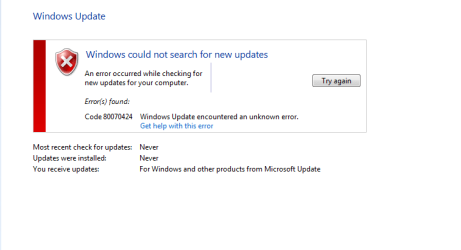
Windows update error 80070424

jigneshdgreat

New member
Local time
3:54 PM
Messages
6
Location
Mumbai
I am getting this error
 

Attachments

  • finalll.png
    finalll.png
    28 KB · Views: 843
Last edited:

My Computer

Computer Manufacturer/Model Number
INTEL/DG31PR
OS
Windows 7 Ultimate x32
CPU
Intel(R) Pentium(R) Dual 2 Core
Motherboard
INTEL DG31PR
Memory
2 GB
attachment.php

Hello, and welcome to the Seven Forums!

Can I please ask you to work through the steps, or run the Fix-It here please: Windows Update error 80070424

Thanks a lot!

Richard
 

My Computer

Computer Manufacturer/Model Number
Dell XPS 420
OS
Vista Home Premium x86 SP2
CPU
Intel Core 2 Quad Q9300 2.50GHz
Motherboard
Stock Dell 0TP406
Memory
4 gb (DDR2 800) 400MHz
Graphics Card(s)
ATI Radeon HD 3870 (512 MBytes)
Monitor(s) Displays
1 x Dell 2007FP and 1 x (old) Sonic flat screen
Screen Resolution
1600 x 1200 and 1280 x 1204
Hard Drives
1 x 640Gb (SATA 300) Western Digital: WDC WD6400AAKS-75A7B0 1 x 1Tb (SATA 600) Western Digital: Caviar Black, SATA 6GB/S, 64Mb cache, 8ms Western Digital: WDC WD1002FAEX-00Z3A0 ATA Device
Case
Dell XPS 420
Cooling
Stock Fan
Keyboard
Dell Bluetooth
Mouse
Advent Optical ADE-WG01 (colour change light up)
Internet Speed
Varies from 10kb/s to 170kb/s. So unreliable it is not funny
Other Info
ASUS USB 3.0 5Gbps/SATA 6Gbps - PCI-Express Combo Controller Card (U3S6)
dat fix isnt working
 

My Computer

Computer Manufacturer/Model Number
INTEL/DG31PR
OS
Windows 7 Ultimate x32
CPU
Intel(R) Pentium(R) Dual 2 Core
Motherboard
INTEL DG31PR
Memory
2 GB
I suspect that you have other problems also - the error means that a service is no longer installed.
HAve you been using a Registry Cleaner of some kind? - If so, then that's the cause of your problems. You need to UNDO anything it's done recently, and then attempt WU again.
It may help to identify the actual problem to run an MGADiag report.

To properly analyse and solve problems with Activation and Validation, we need to see a full copy of the report produced by the MGADiag tool (download and save to desktop - http://go.microsoft.com/fwlink/?linkid=52012 )
Once saved, run the tool.
Click on the Continue button, which will produce the report.
To copy the report to your response, click on the Copy button in the tool (ignore any error messages at this point), and then paste (using either r-click/Paste, or Ctrl+V ) into your response.

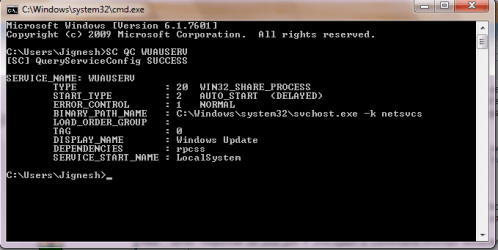
Also - what response do you get if you open a Command Prompt window, and issue the following commands.
SC QC BITS
SC QC WUAUSERV
SC QC MSISERVER
 

My Computer

Computer type
Laptop
Computer Manufacturer/Model Number
Asus K52F or Lenovo B51-80
OS
Win 7 x64 Home Premium (and x86 VirtualBox VM)/Win10
CPU
i3 370M/i7 6500U
Motherboard
Asus/Lenovo
Memory
8GB - finally :)/8GB
Graphics Card(s)
it's an i3, dude!/dual Intel&nVidia
Sound Card
onboard
Monitor(s) Displays
15.6" built-in
Screen Resolution
1366x768/1920x1080
Hard Drives
750GB Seagate internal
Sundry external drives attached to other computers on the local network
1TB SSD on the Lenovo
PSU
n/a
Internet Speed
as much as I can get - usually on a dongle/phone, so <1MB/s
Antivirus
MSE/Defender
Browser
IE11/12/Edge/Chrome/FF(if I must)
dat fix isnt working

Hello again!

Please follow the advice of NoelDP above. I too would be very interested to see that MGADiag report.

Did you find all of the services? Were all of them present? Also, did any of them fail to start? Any error messages?


Curiously, your copy of Windows claims that it has never been updated. Is this true?

Thanks a lot!

Richard
 

My Computer

Computer Manufacturer/Model Number
Dell XPS 420
OS
Vista Home Premium x86 SP2
CPU
Intel Core 2 Quad Q9300 2.50GHz
Motherboard
Stock Dell 0TP406
Memory
4 gb (DDR2 800) 400MHz
Graphics Card(s)
ATI Radeon HD 3870 (512 MBytes)
Monitor(s) Displays
1 x Dell 2007FP and 1 x (old) Sonic flat screen
Screen Resolution
1600 x 1200 and 1280 x 1204
Hard Drives
1 x 640Gb (SATA 300) Western Digital: WDC WD6400AAKS-75A7B0 1 x 1Tb (SATA 600) Western Digital: Caviar Black, SATA 6GB/S, 64Mb cache, 8ms Western Digital: WDC WD1002FAEX-00Z3A0 ATA Device
Case
Dell XPS 420
Cooling
Stock Fan
Keyboard
Dell Bluetooth
Mouse
Advent Optical ADE-WG01 (colour change light up)
Internet Speed
Varies from 10kb/s to 170kb/s. So unreliable it is not funny
Other Info
ASUS USB 3.0 5Gbps/SATA 6Gbps - PCI-Express Combo Controller Card (U3S6)
I suspect that you have other problems also - the error means that a service is no longer installed.
HAve you been using a Registry Cleaner of some kind? - If so, then that's the cause of your problems. You need to UNDO anything it's done recently, and then attempt WU again.
It may help to identify the actual problem to run an MGADiag report.

To properly analyse and solve problems with Activation and Validation, we need to see a full copy of the report produced by the MGADiag tool (download and save to desktop - http://go.microsoft.com/fwlink/?linkid=52012 )
Once saved, run the tool.
Click on the Continue button, which will produce the report.
To copy the report to your response, click on the Copy button in the tool (ignore any error messages at this point), and then paste (using either r-click/Paste, or Ctrl+V ) into your response.

Also - what response do you get if you open a Command Prompt window, and issue the following commands.
SC QC BITS
SC QC WUAUSERV
SC QC MSISERVER
Diagnostic Report (1.9.0027.0):
-----------------------------------------
Windows Validation Data-->

Validation Code: 0x8004FE21
Cached Online Validation Code: N/A, hr = 0x80070424
Windows Product Key: *****-*****-X92GV-V7DCV-P4K27
Windows Product Key Hash: aU2z1/fnhnLHmhBm699qYZT2E6s=
Windows Product ID: 00426-OEM-8992662-00400
Windows Product ID Type: 2
Windows License Type: OEM SLP
Windows OS version: 6.1.7601.2.00010100.1.0.001
ID: {AFA8C6B4-5F7E-49C9-A513-8808FBDE5817}(1)
Is Admin: Yes
TestCab: 0x0
LegitcheckControl ActiveX: N/A, hr = 0x80070002
Signed By: N/A, hr = 0x80070002
Product Name: Windows 7 Ultimate
Architecture: 0x00000000
Build lab: 7601.win7sp1_gdr.110622-1506
TTS Error:
Validation Diagnostic:
Resolution Status: N/A

Vista WgaER Data-->
ThreatID(s): N/A, hr = 0x80070002
Version: N/A, hr = 0x80070002

Windows XP Notifications Data-->
Cached Result: N/A, hr = 0x80070002
File Exists: No
Version: N/A, hr = 0x80070002
WgaTray.exe Signed By: N/A, hr = 0x80070002
WgaLogon.dll Signed By: N/A, hr = 0x80070002

OGA Notifications Data-->
Cached Result: N/A, hr = 0x80070002
Version: N/A, hr = 0x80070002
OGAExec.exe Signed By: N/A, hr = 0x80070002
OGAAddin.dll Signed By: N/A, hr = 0x80070002

OGA Data-->
Office Status: 103 Blocked VLK
Microsoft Office Enterprise 2007 - 103 Blocked VLK
OGA Version: N/A, 0x80070002
Signed By: N/A, hr = 0x80070002
Office Diagnostics: 025D1FF3-364-80041010_025D1FF3-229-80041010_025D1FF3-230-1_025D1FF3-517-80040154_025D1FF3-237-80040154_025D1FF3-238-2_025D1FF3-244-80070002_025D1FF3-258-3

Browser Data-->
Proxy settings: N/A
User Agent: Mozilla/4.0 (compatible; MSIE 8.0; Win32)
Default Browser: C:\Program Files\Mozilla Firefox\firefox.exe
Download signed ActiveX controls: Prompt
Download unsigned ActiveX controls: Disabled
Run ActiveX controls and plug-ins: Allowed
Initialize and script ActiveX controls not marked as safe: Disabled
Allow scripting of Internet Explorer Webbrowser control: Disabled
Active scripting: Allowed
Script ActiveX controls marked as safe for scripting: Allowed

File Scan Data-->
File Mismatch: C:\Windows\system32\sppuinotify.dll[Hr = 0x80070002]
File Mismatch: C:\Windows\system32\slui.exe[Hr = 0x80070002]
File Mismatch: C:\Windows\system32\sppsvc.exe[Hr = 0x80070002]

Other data-->
Office Details: <GenuineResults><MachineData><UGUID>{AFA8C6B4-5F7E-49C9-A513-8808FBDE5817}</UGUID><Version>1.9.0027.0</Version><OS>6.1.7601.2.00010100.1.0.001</OS><Architecture>x32</Architecture><PKey>*****-*****-*****-*****-P4K27</PKey><PID>00426-OEM-8992662-00400</PID><PIDType>2</PIDType><SID>S-1-5-21-526888513-3890315754-3416430141</SID><SYSTEM><Manufacturer>INTEL</Manufacturer><Model>DG31PR</Model></SYSTEM><BIOS><Manufacturer>Intel Corp.</Manufacturer><Version>PRG3110H.86A.0047.2008.0227.1745</Version><SMBIOSVersion major="2" minor="4"/><Date>20080227000000.000000+000</Date></BIOS><HWID>00BA3107018400FA</HWID><UserLCID>0409</UserLCID><SystemLCID>0409</SystemLCID><TimeZone>India Standard Time(GMT+05:30)</TimeZone><iJoin>0</iJoin><SBID><stat>3</stat><msppid></msppid><name></name><model></model></SBID><OEM><OEMID>LENOVO</OEMID><OEMTableID>TP-7X </OEMTableID></OEM><GANotification/></MachineData><Software><Office><Result>103</Result><Products><Product GUID="{90120000-0030-0000-0000-0000000FF1CE}"><LegitResult>103</LegitResult><Name>Microsoft Office Enterprise 2007</Name><Ver>12</Ver><Val>ACD7202654E586</Val><Hash>fFic3JgCreGGRxyF8uMWB4R4Jcg=</Hash><Pid>89388-707-1528066-65100</Pid><PidType>14</PidType></Product></Products><Applications><App Id="15" Version="12" Result="103"/><App Id="16" Version="12" Result="103"/><App Id="18" Version="12" Result="103"/><App Id="19" Version="12" Result="103"/><App Id="1A" Version="12" Result="103"/><App Id="1B" Version="12" Result="103"/><App Id="44" Version="12" Result="103"/><App Id="A1" Version="12" Result="103"/><App Id="BA" Version="12" Result="103"/></Applications></Office></Software></GenuineResults>

Spsys.log Content: 0x80070002

Licensing Data-->
On a computer running Microsoft Windows non-core edition, run 'slui.exe 0x2a 0x80070424' to display the error text.
Error: 0x80070424

Windows Activation Technologies-->
HrOffline: 0x8004FE21
HrOnline: N/A
HealthStatus: 0x0001000000008C00
Event Time Stamp: 7:20:2011 12:11
ActiveX: Registered, Version: 7.1.7600.16395
Admin Service: Registered, Version: 7.1.7600.16395
HealthStatus Bitmask Output:
Tampered File: %systemroot%\system32\sppuinotify.dll|sppuinotify.dll.mui
Tampered File: %systemroot%\system32\slui.exe|slui.exe.mui|COM Registration
Tampered File: %systemroot%\system32\sppsvc.exe|sppsvc.exe.mui
Tampered Service: sppsvc


HWID Data-->
HWID Hash Current: MAAAAAEABAABAAEAAAABAAAAAQABAAEAJJQMgHCGKvFI5Kp21i2AcTojymGa+CqF

OEM Activation 1.0 Data-->
N/A

OEM Activation 2.0 Data-->
BIOS valid for OA 2.0: yes
Windows marker version: 0x20001
OEMID and OEMTableID Consistent: yes
BIOS Information:
ACPI Table Name OEMID Value OEMTableID Value
APIC INTEL DG31PR
FACP INTEL DG31PR
HPET INTEL ICH7HPET
MCFG INTEL DG31PR
SLIC LENOVO TP-7X

 

My Computer

Computer Manufacturer/Model Number
INTEL/DG31PR
OS
Windows 7 Ultimate x32
CPU
Intel(R) Pentium(R) Dual 2 Core
Motherboard
INTEL DG31PR
Memory
2 GB
Response to SC QC BITS
 

Attachments

  • sc qc bits.png
    sc qc bits.png
    85.6 KB · Views: 53

My Computer

Computer Manufacturer/Model Number
INTEL/DG31PR
OS
Windows 7 Ultimate x32
CPU
Intel(R) Pentium(R) Dual 2 Core
Motherboard
INTEL DG31PR
Memory
2 GB
Response to SC QC WUAUSERV
 

Attachments

  • SC Q.png
    SC Q.png
    60 KB · Views: 20

My Computer

Computer Manufacturer/Model Number
INTEL/DG31PR
OS
Windows 7 Ultimate x32
CPU
Intel(R) Pentium(R) Dual 2 Core
Motherboard
INTEL DG31PR
Memory
2 GB
Response to SC QC MSISERVER
 

Attachments

  • SC.png
    SC.png
    63.8 KB · Views: 18

My Computer

Computer Manufacturer/Model Number
INTEL/DG31PR
OS
Windows 7 Ultimate x32
CPU
Intel(R) Pentium(R) Dual 2 Core
Motherboard
INTEL DG31PR
Memory
2 GB
I suspect that you've been using WiseFixer?

The immediate problem of the failing service it with the Software Protection Servise - whic is commonly deleted by WiseFixer.

First make sure that Notepad is configured NOT to wrap! (click on View - UNcheck 'Wrap') then make sure that there are only 4 lines of code, all beginning with 'sc ', each followed by a single blank line.
If that's not the case, then you may have a corrupt file, so try downloading it again.
Highlight ALL the text in the Code box - select Copy
****************************************************
Code:
sc create sppsvc binPath= %SystemRoot%\System32\sppsvc.exe DisplayName= "Software Protection" depend= Rpcss start= delayed-auto obj= "NT AUTHORITY\NetworkService" password= ""
sc privs sppsvc SeAuditPrivilege/SeChangeNotifyPrivilege/SeCreateGlobalPrivilege/SeImpersonatePrivilege
sc sdset sppsvc D:(A;;CCLCSWRPWPDTLOCRRC;;;SY)(A;;CCDCLCSWRPWPDTLOCRSDRCWDWO;;;BA)(A;;CCLCSWRPLOCRRC;;;IU)(A;;CCLCSWRPLOCRRC;;;SU)(A;;LCRP;;;AU)S:(AU;FA;CCDCLCSWRPWPDTLOCRSDRCWDWO;;;WD)
sc sidtype sppsvc UNRESTRICTED
****************************************************

Open an Elevated Command Prompt window - click on the Start button, and in the Search box, type CMD. wait for the system to find the one file, then right-click on that and select Run as Administrator. Accept the UAC prompt if you get one
Right-click on the C:\ icon (top left of the window) and select Edit... >Paste
You should get Success responses after each line of code
when complete, reboot

test the outcome, by running another MGAdiag report - there are other errors presnet which will also require fixing.

I Just noticed - this installation of Windows is NON_GENUINE - it is using an OEM_SLP Key on a motherboard which cannot possibly support such an installation.
Whatever we do will NOT fix that!
You need to revert back t o your original OS, and then upgrade to Windows 7 using a legitimate Upgrade, or purchase a FULL Retail License for Win 7, and install that.
 
Last edited:

My Computer

Computer type
Laptop
Computer Manufacturer/Model Number
Asus K52F or Lenovo B51-80
OS
Win 7 x64 Home Premium (and x86 VirtualBox VM)/Win10
CPU
i3 370M/i7 6500U
Motherboard
Asus/Lenovo
Memory
8GB - finally :)/8GB
Graphics Card(s)
it's an i3, dude!/dual Intel&nVidia
Sound Card
onboard
Monitor(s) Displays
15.6" built-in
Screen Resolution
1366x768/1920x1080
Hard Drives
750GB Seagate internal
Sundry external drives attached to other computers on the local network
1TB SSD on the Lenovo
PSU
n/a
Internet Speed
as much as I can get - usually on a dongle/phone, so <1MB/s
Antivirus
MSE/Defender
Browser
IE11/12/Edge/Chrome/FF(if I must)
I suspect that you've been using WiseFixer?

The immediate problem of the failing service it with the Software Protection Servise - whic is commonly deleted by WiseFixer.

First make sure that Notepad is configured NOT to wrap! (click on View - UNcheck 'Wrap') then make sure that there are only 4 lines of code, all beginning with 'sc ', each followed by a single blank line.
If that's not the case, then you may have a corrupt file, so try downloading it again.
Highlight ALL the text in the Code box - select Copy
****************************************************
Code:
sc create sppsvc binPath= %SystemRoot%\System32\sppsvc.exe DisplayName= "Software Protection" depend= Rpcss start= delayed-auto obj= "NT AUTHORITY\NetworkService" password= ""
sc privs sppsvc SeAuditPrivilege/SeChangeNotifyPrivilege/SeCreateGlobalPrivilege/SeImpersonatePrivilege
sc sdset sppsvc D:(A;;CCLCSWRPWPDTLOCRRC;;;SY)(A;;CCDCLCSWRPWPDTLOCRSDRCWDWO;;;BA)(A;;CCLCSWRPLOCRRC;;;IU)(A;;CCLCSWRPLOCRRC;;;SU)(A;;LCRP;;;AU)S:(AU;FA;CCDCLCSWRPWPDTLOCRSDRCWDWO;;;WD)
sc sidtype sppsvc UNRESTRICTED
****************************************************

Open an Elevated Command Prompt window - click on the Start button, and in the Search box, type CMD. wait for the system to find the one file, then right-click on that and select Run as Administrator. Accept the UAC prompt if you get one
Right-click on the C:\ icon (top left of the window) and select Edit... >Paste
You should get Success responses after each line of code
when complete, reboot

test the outcome, by running another MGAdiag report - there are other errors presnet which will also require fixing.

I Just noticed - this installation of Windows is NON_GENUINE - it is using an OEM_SLP Key on a motherboard which cannot possibly support such an installation.
Whatever we do will NOT fix that!
You need to revert back t o your original OS, and then upgrade to Windows 7 using a legitimate Upgrade, or purchase a FULL Retail License for Win 7, and install that.

+1 for the final diagnosis. I have seen very, very similar logs before, with those three missing tampered files, that service missing, and a dodgy SLIC (and I have had them coming to me for update support as well, in the past :))
 

My Computer

Computer Manufacturer/Model Number
Dell XPS 420
OS
Vista Home Premium x86 SP2
CPU
Intel Core 2 Quad Q9300 2.50GHz
Motherboard
Stock Dell 0TP406
Memory
4 gb (DDR2 800) 400MHz
Graphics Card(s)
ATI Radeon HD 3870 (512 MBytes)
Monitor(s) Displays
1 x Dell 2007FP and 1 x (old) Sonic flat screen
Screen Resolution
1600 x 1200 and 1280 x 1204
Hard Drives
1 x 640Gb (SATA 300) Western Digital: WDC WD6400AAKS-75A7B0 1 x 1Tb (SATA 600) Western Digital: Caviar Black, SATA 6GB/S, 64Mb cache, 8ms Western Digital: WDC WD1002FAEX-00Z3A0 ATA Device
Case
Dell XPS 420
Cooling
Stock Fan
Keyboard
Dell Bluetooth
Mouse
Advent Optical ADE-WG01 (colour change light up)
Internet Speed
Varies from 10kb/s to 170kb/s. So unreliable it is not funny
Other Info
ASUS USB 3.0 5Gbps/SATA 6Gbps - PCI-Express Combo Controller Card (U3S6)
Heh! - I was so focussed on the error messages that I didn't even look elsewhere untill after I'd posted my initial response,
FWIW, I've seen these file mismatches in what appear to be perfectly genuine systems - and the 424 error is most often caused by using WiseFixer to trash^H^H^H^H^H 'clean' the registry,
 

My Computer

Computer type
Laptop
Computer Manufacturer/Model Number
Asus K52F or Lenovo B51-80
OS
Win 7 x64 Home Premium (and x86 VirtualBox VM)/Win10
CPU
i3 370M/i7 6500U
Motherboard
Asus/Lenovo
Memory
8GB - finally :)/8GB
Graphics Card(s)
it's an i3, dude!/dual Intel&nVidia
Sound Card
onboard
Monitor(s) Displays
15.6" built-in
Screen Resolution
1366x768/1920x1080
Hard Drives
750GB Seagate internal
Sundry external drives attached to other computers on the local network
1TB SSD on the Lenovo
PSU
n/a
Internet Speed
as much as I can get - usually on a dongle/phone, so <1MB/s
Antivirus
MSE/Defender
Browser
IE11/12/Edge/Chrome/FF(if I must)
Back
Top