Windows Update Error 80072EE2

LumpyMoose

New member
Local time
7:53 AM
Messages
28
Hey im new here ;D,

Anyway im having problems with windows update, it wont update i get the error message "80072EE2" and i dont know how to fix it, i read something about adding like

"http://*.update.microsoft.com" to a firewall exception list BUT i use windows firewall so it should already be configured that way, and in anycase i dont kno how to add a HTTP:// exception :S

Anyway can anyone help? :D much obliged,

LumpyMoose
 

My Computer

Computer Manufacturer/Model Number
Acer Aspire 6935G
OS
Windows 7
Graphics Card(s)
Nvidia Geforce 9600M GS
I found this try it out and see if it works: [FONT=Verdana, Arial, Helvetica]Error 0x80072EE2 is: ERROR_INTERNET_TIMEOUT - The request has timed out.

You may encounter temporary connection-related errors when you use Windows Update or Microsoft Update to install updates
You receive an "Error 0x80072EE2" or "Error 0x80072EFD" error message when you try to
use Windows Update

See also:
When searching for available updates on the Windows Update site, you
receive the 0x8024402C, 0x80240030 or 0x8024502d error.
Microsoft Update

also another user’s solution: "GK" wrote:

Here is how I was able to work around the problem.
Using command prompt
1. proxycfg -d (to clear proxy cache)
2. net stop wuauserv (to stop Automatic updates service)

Using Windows Explorer
3. Delete all files and folders in
C:\WINDOWS\SoftwareDistribution (your windows folder may vary)

Again using command prompt
4. net start wuauserv (to start Automatic updates service)

Try now going back to Windows Update web page.
[/FONT]
 

My Computer

OS
Windows 7 Ultimate x64 Service Pack 1 (Build 6.1.7601)
CPU
Intel Core 2 Quad Q6600 (G0 Kentsfield) LGA775 (FC-LGA6)
Motherboard
GIGABYTE GA-EP35C-DS3R (Rev. 2.1)
Memory
Corsair TW3X4G1333C9A 4GB PC-10600 (2x XMS3 2GB)
Graphics Card(s)
ASUS nVIDIA GeForce 560
Sound Card
RealTek ALC885/889A/890
Monitor(s) Displays
ChiMei CMV CT-730D 17inch (LCD Monitor)
Screen Resolution
1280-1024 60Hertz (Ture Colour 32bit)
Hard Drives
2x Barracuda 7200.10 SATA 3.0Gb/s 160-GB Hard Drive ST3160815AS (AHCI)
PSU
ANTEC 750w Earthwatts
Case
Thermaltake Shark (VA7000SWA ATX) Full Tower
Cooling
Front 120mm fan (1400 RPM) /Rear 120mm (1400 RPM) blue LED
Keyboard
Labtec Media Desktop Y-SAD65
Mouse
Razer DeathAdder 3G Infrared Sensor (1800DPI)
Internet Speed
Telstra BigPond Elite Liberty ADSL2+ 24Mbps/256kbps
Other Info
ASUS PCE-N13 802.11n Wireless LAN card
I found this try it out and see if it works: [FONT=Verdana, Arial, Helvetica]Error 0x80072EE2 is: ERROR_INTERNET_TIMEOUT - The request has timed out.

You may encounter temporary connection-related errors when you use Windows Update or Microsoft Update to install updates
You receive an "Error 0x80072EE2" or "Error 0x80072EFD" error message when you try to
use Windows Update

See also:
When searching for available updates on the Windows Update site, you
receive the 0x8024402C, 0x80240030 or 0x8024502d error.
Microsoft Update

also another user’s solution: "GK" wrote:

Here is how I was able to work around the problem.
Using command prompt
1. proxycfg -d (to clear proxy cache)
2. net stop wuauserv (to stop Automatic updates service)

Using Windows Explorer
3. Delete all files and folders in
C:\WINDOWS\SoftwareDistribution (your windows folder may vary)

Again using command prompt
4. net start wuauserv (to start Automatic updates service)

Try now going back to Windows Update web page.
[/FONT]
Cheers mate! :D, however, its been "Checking For Updates" since you posted it and i did it, thats about 25 minutes :S? is this normal?
 

My Computer

Computer Manufacturer/Model Number
Acer Aspire 6935G
OS
Windows 7
Graphics Card(s)
Nvidia Geforce 9600M GS
Oh, sorry for the double post, its still not workin =/ 80072EE2 =/


Edit: Can anyone help? T_T
 
Last edited:

My Computer

Computer Manufacturer/Model Number
Acer Aspire 6935G
OS
Windows 7
Graphics Card(s)
Nvidia Geforce 9600M GS
i REALLY hate to do this, but.. bump.. ? :(
 

My Computer

Computer Manufacturer/Model Number
Acer Aspire 6935G
OS
Windows 7
Graphics Card(s)
Nvidia Geforce 9600M GS
Windows Update error 80072ee2

If you receive Windows Update error 80072ee2 while checking for updates, the Windows Update servers might be experiencing an unusually high number of requests for updates. Close Windows Update, wait 10 to 15 minutes, and then run Windows Update again. You can also wait for Windows Automatic Update to run at its next scheduled time.
If you continue to receive error 80072ee2, you might need to add some Windows Update website addresses to your firewall's exceptions or "allow" list.
To add the Windows Update websites to a firewall exceptions list


If the problem persists after you have followed the steps above, see this Knowledge Base article on the Microsoft Help and Support website or go to the Windows Update Support Center website to request support by e‑mail.
Error codes this applies to:

  • WindowsUpdate_80072ee2
  • 0x80072ee2
Link: Windows Update error 80072ee2
Here is another one I found: http://support.microsoft.com/kb/836941/en-au
 

My Computer

OS
Windows 7 Ultimate x64 Service Pack 1 (Build 6.1.7601)
CPU
Intel Core 2 Quad Q6600 (G0 Kentsfield) LGA775 (FC-LGA6)
Motherboard
GIGABYTE GA-EP35C-DS3R (Rev. 2.1)
Memory
Corsair TW3X4G1333C9A 4GB PC-10600 (2x XMS3 2GB)
Graphics Card(s)
ASUS nVIDIA GeForce 560
Sound Card
RealTek ALC885/889A/890
Monitor(s) Displays
ChiMei CMV CT-730D 17inch (LCD Monitor)
Screen Resolution
1280-1024 60Hertz (Ture Colour 32bit)
Hard Drives
2x Barracuda 7200.10 SATA 3.0Gb/s 160-GB Hard Drive ST3160815AS (AHCI)
PSU
ANTEC 750w Earthwatts
Case
Thermaltake Shark (VA7000SWA ATX) Full Tower
Cooling
Front 120mm fan (1400 RPM) /Rear 120mm (1400 RPM) blue LED
Keyboard
Labtec Media Desktop Y-SAD65
Mouse
Razer DeathAdder 3G Infrared Sensor (1800DPI)
Internet Speed
Telstra BigPond Elite Liberty ADSL2+ 24Mbps/256kbps
Other Info
ASUS PCE-N13 802.11n Wireless LAN card
Still no joy =/ i tried those alternate methods, but i dont know how to add http to a firewall exception, could someone tell me how? i know how to add anything else as an exception, but not http.. =/


Many thanks
LumpyMoose
 

My Computer

Computer Manufacturer/Model Number
Acer Aspire 6935G
OS
Windows 7
Graphics Card(s)
Nvidia Geforce 9600M GS

My Computer

Computer type
PC/Desktop
Computer Manufacturer/Model Number
Bruce ... somewhere in his 40's
OS
Windows 7 Ultimate 32bit SP1
CPU
Intel(R) Core(TM)2 Quad CPU @ 2.40GHz, 2400 MHz
Motherboard
INTEL/D975XBX2
Memory
4 GB
Graphics Card(s)
ATI Radeon HD 2600 Pro
Monitor(s) Displays
Samsung SyncMaster 914v
Screen Resolution
1280 x 1024
Hard Drives
2/500GB each ... ST3500630AS ATA Device.
One is not connected
PSU
Rocketfish 700 W
Case
G.Skill Gigabyte Chassis
Keyboard
Standard PS/2 Keyboard
Mouse
Microsoft PS/2 Mouse
Internet Speed
DSL
Antivirus
Avira Internet Security
Browser
IE 11
Other Info
ATI HDMI Audio
Still no luck... =/ :(
 

My Computer

Computer Manufacturer/Model Number
Acer Aspire 6935G
OS
Windows 7
Graphics Card(s)
Nvidia Geforce 9600M GS
What anti-virus program are you running? It's possible that it could be the cause.
 

My Computer

Computer type
PC/Desktop
Computer Manufacturer/Model Number
Bruce ... somewhere in his 40's
OS
Windows 7 Ultimate 32bit SP1
CPU
Intel(R) Core(TM)2 Quad CPU @ 2.40GHz, 2400 MHz
Motherboard
INTEL/D975XBX2
Memory
4 GB
Graphics Card(s)
ATI Radeon HD 2600 Pro
Monitor(s) Displays
Samsung SyncMaster 914v
Screen Resolution
1280 x 1024
Hard Drives
2/500GB each ... ST3500630AS ATA Device.
One is not connected
PSU
Rocketfish 700 W
Case
G.Skill Gigabyte Chassis
Keyboard
Standard PS/2 Keyboard
Mouse
Microsoft PS/2 Mouse
Internet Speed
DSL
Antivirus
Avira Internet Security
Browser
IE 11
Other Info
ATI HDMI Audio
Vipre Antivirus + Antispyware :P
 

My Computer

Computer Manufacturer/Model Number
Acer Aspire 6935G
OS
Windows 7
Graphics Card(s)
Nvidia Geforce 9600M GS
Try uninstalling it and reinstalling.
 

My Computer

OS
Windows 7 Ultimate x64 Service Pack 1 (Build 6.1.7601)
CPU
Intel Core 2 Quad Q6600 (G0 Kentsfield) LGA775 (FC-LGA6)
Motherboard
GIGABYTE GA-EP35C-DS3R (Rev. 2.1)
Memory
Corsair TW3X4G1333C9A 4GB PC-10600 (2x XMS3 2GB)
Graphics Card(s)
ASUS nVIDIA GeForce 560
Sound Card
RealTek ALC885/889A/890
Monitor(s) Displays
ChiMei CMV CT-730D 17inch (LCD Monitor)
Screen Resolution
1280-1024 60Hertz (Ture Colour 32bit)
Hard Drives
2x Barracuda 7200.10 SATA 3.0Gb/s 160-GB Hard Drive ST3160815AS (AHCI)
PSU
ANTEC 750w Earthwatts
Case
Thermaltake Shark (VA7000SWA ATX) Full Tower
Cooling
Front 120mm fan (1400 RPM) /Rear 120mm (1400 RPM) blue LED
Keyboard
Labtec Media Desktop Y-SAD65
Mouse
Razer DeathAdder 3G Infrared Sensor (1800DPI)
Internet Speed
Telstra BigPond Elite Liberty ADSL2+ 24Mbps/256kbps
Other Info
ASUS PCE-N13 802.11n Wireless LAN card
Ive changed my AV now, but now the error is 80072EFD.. :S i read about it, again its like telling to add those http things to a firewall my new AV uses a different firewall, so could someone tell me how to add those HTTP's to the exception list? :)

P.S, im using Avira Premium Suite :P
 

My Computer

Computer Manufacturer/Model Number
Acer Aspire 6935G
OS
Windows 7
Graphics Card(s)
Nvidia Geforce 9600M GS
Anyone? :confused:
 

My Computer

Computer Manufacturer/Model Number
Acer Aspire 6935G
OS
Windows 7
Graphics Card(s)
Nvidia Geforce 9600M GS
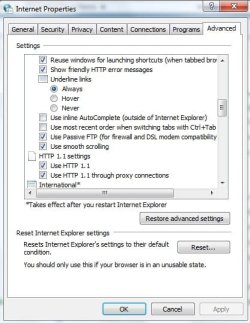
Click on Internet Options in the Control Panel, then click on the 'Advanced' tab .... are these HTTP settings checked?
 

Attachments

  • Internet properties.jpg
    Internet properties.jpg
    35.9 KB · Views: 149

My Computer

Computer type
PC/Desktop
Computer Manufacturer/Model Number
Bruce ... somewhere in his 40's
OS
Windows 7 Ultimate 32bit SP1
CPU
Intel(R) Core(TM)2 Quad CPU @ 2.40GHz, 2400 MHz
Motherboard
INTEL/D975XBX2
Memory
4 GB
Graphics Card(s)
ATI Radeon HD 2600 Pro
Monitor(s) Displays
Samsung SyncMaster 914v
Screen Resolution
1280 x 1024
Hard Drives
2/500GB each ... ST3500630AS ATA Device.
One is not connected
PSU
Rocketfish 700 W
Case
G.Skill Gigabyte Chassis
Keyboard
Standard PS/2 Keyboard
Mouse
Microsoft PS/2 Mouse
Internet Speed
DSL
Antivirus
Avira Internet Security
Browser
IE 11
Other Info
ATI HDMI Audio
Yup, they already were
 

My Computer

Computer Manufacturer/Model Number
Acer Aspire 6935G
OS
Windows 7
Graphics Card(s)
Nvidia Geforce 9600M GS
Anynbody any other ideas..? ive even tried disabling Avira (premium suite) to get updates and still just error 80072EFD it's really irritating me now... anything else i can do..?
 

My Computer

Computer Manufacturer/Model Number
Acer Aspire 6935G
OS
Windows 7
Graphics Card(s)
Nvidia Geforce 9600M GS
try this ... Remove any Internet Explorer proxy server settings
  1. In Internet Explorer, click Tools and then click Internet Options.
  2. In the Internet Options dialog box, go to the Connections tab.
  3. Click LAN Settings…
  4. Untick the Use a proxy server for your LAN (These settings will not apply to dial-up or VPN connections) checkbox.
  5. Click OK and OK again Internet Options
 

My Computer

Computer type
PC/Desktop
Computer Manufacturer/Model Number
Bruce ... somewhere in his 40's
OS
Windows 7 Ultimate 32bit SP1
CPU
Intel(R) Core(TM)2 Quad CPU @ 2.40GHz, 2400 MHz
Motherboard
INTEL/D975XBX2
Memory
4 GB
Graphics Card(s)
ATI Radeon HD 2600 Pro
Monitor(s) Displays
Samsung SyncMaster 914v
Screen Resolution
1280 x 1024
Hard Drives
2/500GB each ... ST3500630AS ATA Device.
One is not connected
PSU
Rocketfish 700 W
Case
G.Skill Gigabyte Chassis
Keyboard
Standard PS/2 Keyboard
Mouse
Microsoft PS/2 Mouse
Internet Speed
DSL
Antivirus
Avira Internet Security
Browser
IE 11
Other Info
ATI HDMI Audio
try this ... Remove any Internet Explorer proxy server settings
  1. In Internet Explorer, click Tools and then click Internet Options.
  2. In the Internet Options dialog box, go to the Connections tab.
  3. Click LAN Settings…
  4. Untick the Use a proxy server for your LAN (These settings will not apply to dial-up or VPN connections) checkbox.
  5. Click OK and OK again Internet Options
It was already unticked dude >.<

EDIT : Now its gone back to the original error 80072EE2 >.<
 
Last edited:

My Computer

Computer Manufacturer/Model Number
Acer Aspire 6935G
OS
Windows 7
Graphics Card(s)
Nvidia Geforce 9600M GS
Any ideas... its gone back to being 80072EE2.. (btw im not using avira anymore, im using Kaspersky Pure)
 

My Computer

Computer Manufacturer/Model Number
Acer Aspire 6935G
OS
Windows 7
Graphics Card(s)
Nvidia Geforce 9600M GS
Back
Top