
Windows update error 80244004?

cypherprops

New member
Local time
8:44 AM
Messages
14
I recently installed Eset Nod32 Smart Security 5 which have inbuilt antispyware and Firewall.
I never had a problem with it because i have been using it for awhile. But just today when i tried to update windows i get this error
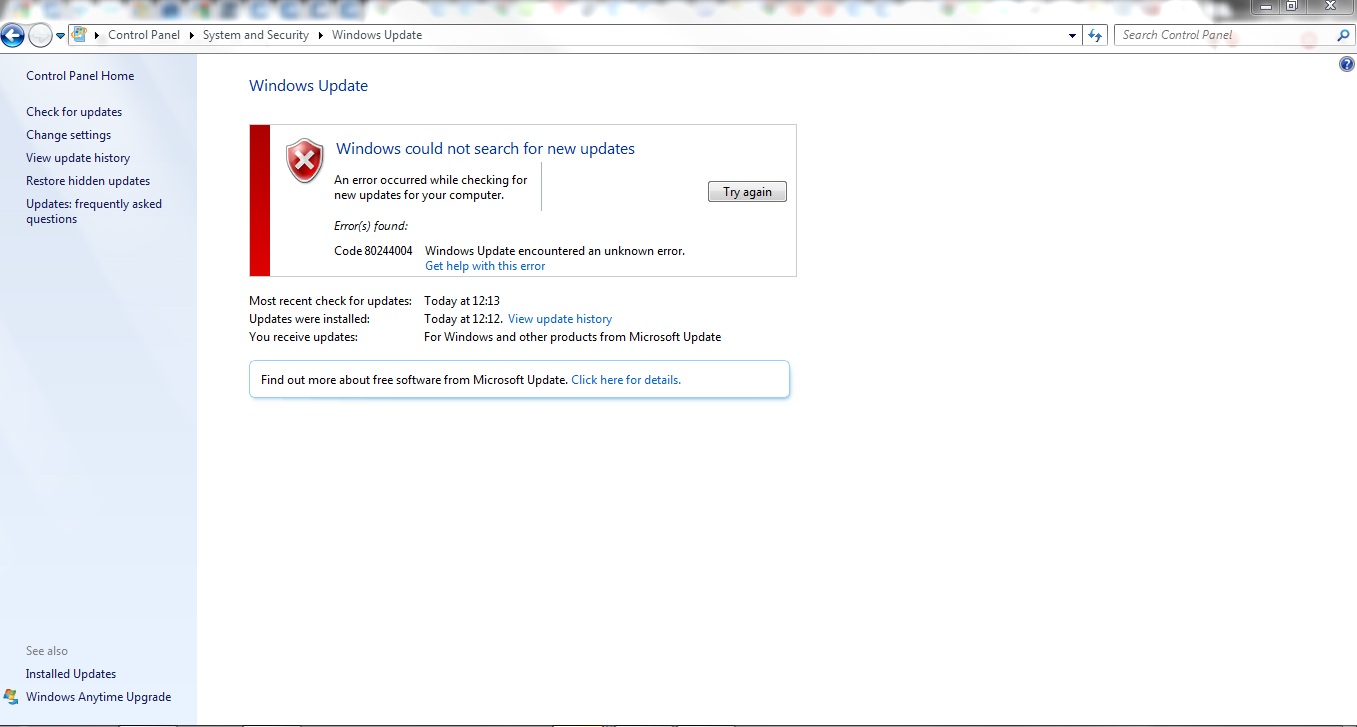

GJrli.jpg


I am confused why this error?

Ps- I did some search on google and tried the Ms Fixit and didnt work, and on some forum someone said to uninstall Eset nod32 Antivirus and then try to update. And I tried it and it WORKED!!

And the updates were basically (Windows defendor new definition as IMP and Microsoft Security essential as optional)

I dont get it.. is it Nod32 antivirus or the Nod32's Firewall?
And if it is then why am i getting this error now? I never got this error before?

Plz help :confused:
 

My Computer

OS
Windows 8
Hi,

I just encountered the same problem today and did the following, that worked:

1) I have uninstalled Eset + Malwarebytes
2) Re-booted Windows
3) Applied Windows "Fix It" "reset Windows Update"
4) Went to http://www.pcsozluk.com/dosyalar/allupdate.zip and downloaded the zip file "allupdate.zip", unpacked it (just on my desktop) and clicked the file "allupdate.bat" which was inside
5) now everything seems back to normal
 

My Computer

OS
W 7 x64
My problem solved by changing some settings in ESET SMART SECURITY : In ESET I went to :
Setup > Enter advanced setup... > Web and email > Web access and antiphishing protection > HTTP, HTTPS
then in HTTPS scanner setup tab and in HTTPS filtering mode tab :
check the Do not use HTTPS protocol checking
Then the problem solves.


Ref. Super User
 

My Computer

Computer Manufacturer/Model Number
HP dv5-1155ee
OS
Windows 7 Ultimate x64
CPU
2.53 Core 2 Duo
Had the same problem.
If you have ESET Smart Security 5, disable the HTTPS protocol checking in advanced setup.
I didn't even need to reboot.
 

My Computer

OS
windows 7 home premium 32bit
I solved this problem today by updating through MS Security Essentials.
 

My Computer

Computer type
PC/Desktop
Computer Manufacturer/Model Number
Home Built
OS
Windows 7 Ultimate SP1 64- bit
CPU
Intel Core i7-3770K @3.50ghz
Motherboard
EVGA Z77 FTW
Memory
Kingston Technology 16GB (2x 8GB) 2133MHz DDR3 Non-ECC
Graphics Card(s)
EVGA GTX 670 4gb SC
Sound Card
Nil
Monitor(s) Displays
Samsung 22"
Screen Resolution
1920 x 1080 60hz
Hard Drives
OCZ Vertex 4 SSD 128GB
SAMSUNG Spinpoint F3 HD502HJ 500GB 7200 RPM
PSU
Enermax Platinax EPM1000EWT Special OC Edition
Case
Cooler Master HAF Full Tower nVIDIA Edition
Cooling
CoolerMaster Hyper 212 Plus
Keyboard
HP Wireless Keyboard
Mouse
Corsair Vengeance M90
Internet Speed
20 Mb
Other Info
ASUS DRW-24B1ST/BLK/B/AS Black SATA 24X DVD Burner
@cypherprops: There is a "Try again" button on the right hand side, what happens if you click that?

I recall working on a WU error (I forget the exact #), and that was the solution - right in front of me. I don't think the button appears for every error code. Give it a shot. post back with your results, good luck.

If that doesn't work, please post the updates WU is trying to apply. Thanks.


edit: I should really get stronger glasses. You already stated what you did to fix it and what was being downloaded - sorry 'bout that.

Two anti-virus apps (MSE and ESET) is a bad idea anyway. But it would be nice to know if the "Try again" button did work in this case. I'm not sure if you want to go through the exercise just to satisfy my curiosity. - end of edit
 

My Computer

Computer type
Laptop
Computer Manufacturer/Model Number
HP Pavilion dv6-6c10us
OS
x64 (6.3.9600) Win8.1 Pro & soon dual boot x64 (6.1.7601) Win7_SP1 HomePrem
CPU
AMD A6-3420M APU with Radeon(tm) HD Graphics
Motherboard
Hewlett-Packard 1805
Memory
6.00 GB
Graphics Card(s)
AMD Radeon(TM) HD 6520G
Sound Card
(1) AMD High Definition Audio Device (2) IDT High Definiti
Monitor(s) Displays
HP W2072a 20" LCD (1600 x 900) @ 60 Hz
Screen Resolution
1366 x 768 x 32 bits (4294967296 colors) @ 60 Hz
Hard Drives
ST640LM0 00 HM641JI SATA Disk Device
Keyboard
Logitech k520 wireless KB
Mouse
Logitech m320 wireless mouse (bundled with KB)
Internet Speed
15/5 | 54 MB Wireless 'n'
Antivirus
Realtime: Defender or Avast | On-demand: Malwarebytes, ESET
Browser
IE 11 on Win8, IE 10 on win 7
Other Info
Media: [Gimp, Audacity, VLC] || Comm: [WEmail 2012, Skype] || Productivity: [OpenOffice,| Textpad] || Utils: [Sysinternals, cCleaner, Speccy, Defraggler]
Try again did not work...initially.
I always use the 'try again' option. Given the state of internet in my area, you can assume a problem, so always try to reload, retry, duplicate , or whatever.
ESET 5 apparently decoded the SSL, examines it, recodes it, and hands it off to your program. No surprise update is having a problem with it. The surprise is that more problems aren't and now that I think about it, I've been having many more notices about site certificates recently than normal.
Actually, the problem may also be the web hosting company used at my workplace. I use the same version of ESET at home my desktop with no major problems. Including Windows Update. I just checked.
In any case turning off the HTTPS protocol checking for port 443 took care of it...for now.
Afterwords, yes, the try again button did wonders.
 

My Computer

OS
windows 7 home premium 32bit
Good work figuring out port 443. This information might help others with similar issues.

Glad you got it fixed.

Could you mark this thread as solved (at the top of this thread) - thanks.
 

My Computer

Computer type
Laptop
Computer Manufacturer/Model Number
HP Pavilion dv6-6c10us
OS
x64 (6.3.9600) Win8.1 Pro & soon dual boot x64 (6.1.7601) Win7_SP1 HomePrem
CPU
AMD A6-3420M APU with Radeon(tm) HD Graphics
Motherboard
Hewlett-Packard 1805
Memory
6.00 GB
Graphics Card(s)
AMD Radeon(TM) HD 6520G
Sound Card
(1) AMD High Definition Audio Device (2) IDT High Definiti
Monitor(s) Displays
HP W2072a 20" LCD (1600 x 900) @ 60 Hz
Screen Resolution
1366 x 768 x 32 bits (4294967296 colors) @ 60 Hz
Hard Drives
ST640LM0 00 HM641JI SATA Disk Device
Keyboard
Logitech k520 wireless KB
Mouse
Logitech m320 wireless mouse (bundled with KB)
Internet Speed
15/5 | 54 MB Wireless 'n'
Antivirus
Realtime: Defender or Avast | On-demand: Malwarebytes, ESET
Browser
IE 11 on Win8, IE 10 on win 7
Other Info
Media: [Gimp, Audacity, VLC] || Comm: [WEmail 2012, Skype] || Productivity: [OpenOffice,| Textpad] || Utils: [Sysinternals, cCleaner, Speccy, Defraggler]
Eset Nod32 Smart Security 5 WTF

yes, me too,i got this problem yesterday ..... why Eset Nod32 Smart Security 5 block windows update .....and also when i wanna play CS1.6 with my friend use LAN,,, he can not find service because Eset Nod32 Smart Security 5....firewall.....wtf ~~~~~~:cry:
 

My Computer

OS
Windows 7 Home Premium 64bit

My Computer

Computer type
Laptop
Computer Manufacturer/Model Number
HP Pavilion dv6-6c10us
OS
x64 (6.3.9600) Win8.1 Pro & soon dual boot x64 (6.1.7601) Win7_SP1 HomePrem
CPU
AMD A6-3420M APU with Radeon(tm) HD Graphics
Motherboard
Hewlett-Packard 1805
Memory
6.00 GB
Graphics Card(s)
AMD Radeon(TM) HD 6520G
Sound Card
(1) AMD High Definition Audio Device (2) IDT High Definiti
Monitor(s) Displays
HP W2072a 20" LCD (1600 x 900) @ 60 Hz
Screen Resolution
1366 x 768 x 32 bits (4294967296 colors) @ 60 Hz
Hard Drives
ST640LM0 00 HM641JI SATA Disk Device
Keyboard
Logitech k520 wireless KB
Mouse
Logitech m320 wireless mouse (bundled with KB)
Internet Speed
15/5 | 54 MB Wireless 'n'
Antivirus
Realtime: Defender or Avast | On-demand: Malwarebytes, ESET
Browser
IE 11 on Win8, IE 10 on win 7
Other Info
Media: [Gimp, Audacity, VLC] || Comm: [WEmail 2012, Skype] || Productivity: [OpenOffice,| Textpad] || Utils: [Sysinternals, cCleaner, Speccy, Defraggler]
Everytime i click on install updates, all the updates that windows update needed me to install, Failed.
It's ridiculous if you ask me, i don't know what else to do, and when i click try again they fail AGAIN!
 

My Computer

OS
Windows home premium 64bit

My Computer

Computer type
Laptop
Computer Manufacturer/Model Number
HP Pavilion dv6-6c10us
OS
x64 (6.3.9600) Win8.1 Pro & soon dual boot x64 (6.1.7601) Win7_SP1 HomePrem
CPU
AMD A6-3420M APU with Radeon(tm) HD Graphics
Motherboard
Hewlett-Packard 1805
Memory
6.00 GB
Graphics Card(s)
AMD Radeon(TM) HD 6520G
Sound Card
(1) AMD High Definition Audio Device (2) IDT High Definiti
Monitor(s) Displays
HP W2072a 20" LCD (1600 x 900) @ 60 Hz
Screen Resolution
1366 x 768 x 32 bits (4294967296 colors) @ 60 Hz
Hard Drives
ST640LM0 00 HM641JI SATA Disk Device
Keyboard
Logitech k520 wireless KB
Mouse
Logitech m320 wireless mouse (bundled with KB)
Internet Speed
15/5 | 54 MB Wireless 'n'
Antivirus
Realtime: Defender or Avast | On-demand: Malwarebytes, ESET
Browser
IE 11 on Win8, IE 10 on win 7
Other Info
Media: [Gimp, Audacity, VLC] || Comm: [WEmail 2012, Skype] || Productivity: [OpenOffice,| Textpad] || Utils: [Sysinternals, cCleaner, Speccy, Defraggler]
You can fix this error by open eset product you installed it in your pc
Go to setup – enter advanced setup – web and email – protocol filtiring – unchek the box of enable application protocol content filtering – click ok
Update your windows
go to setup – enter advanced setup – web and email – protocol filtiring – chek the box of enable application protocol content filtering – click ok
every time you update windows disable
application protocol content
by Go to setup – enter advanced setup – web and email – protocol filtiring – unchek the box of enable application protocol content filtering – click ok
 

My Computer

Computer type
Laptop
Computer Manufacturer/Model Number
hp
OS
windows 7 basic
tks a lot Ozmanguday,
I solved on Win XP 32 vmware
...4) Went to http://www.pcsozluk.com/dosyalar/allupdate.zip and downloaded the zip file "allupdate.zip", unpacked it (just on my desktop) and clicked the file "allupdate.bat" which was inside
 

My Computer

Computer type
PC/Desktop
Computer Manufacturer/Model Number
HP
OS
XP 32
Back
Top