Windows Update error message 0x800B0100

logrady

New member
Local time
3:05 PM
Messages
6
Hi all,

I had this error on my two laptops and desktop at the same time! I was able to get one laptop and the desktop working by repeatedly running the WindowsUpdateDiagnostic.diagcab until all the errors were gone and updates would work. Can't get seem to get it to work on the other laptop. I have run WindowsUpdateDiagnostic.diagcab to the point were there are no errors but Windows Update hangs on the updates. Now I'm back to getting the errors in WindowsUpdateDiagnostic.diagcab as follows:

Windows Update Error 0x800b0100
Cryptographic service components are not registered

Attached the following files included in report: CheckSUR.log, dism.log and output.txt

I've now spent DAYS fixing these three computers. Any help with this last one very much appreciated.

Thanks.
 

Attachments

My Computer

Computer type
PC/Desktop
OS
Windows 7 Professional 64bit
Hello Logrady,
Part of the package for KB2929437,
Follow link No2 in this link, obviously use KB2929437 not the 1 in the link.
https://support.microsoft.com/en-us/kb/2700601.

Or if your not really happy using that method
Uninstal it, from an elevated command mode

wusa /uninstall /kb:2929437

Then install using the standalone method.


Roy
 

My Computer

Computer type
PC/Desktop
Computer Manufacturer/Model Number
medionl/Aspire 6930G/acer x55a
OS
W7 home premium 32bit/W7HP 64bit/w10 tp insider ring
CPU
E5300 dual core
Motherboard
medion MS7366
Memory
3gb
Graphics Card(s)
Nvidia Geforce 7100 Nforce 630i
Monitor(s) Displays
avixc
Internet Speed
n (isp resticted to 72)
Antivirus
mse/pands
Browser
palemoon
Other Info
Belkin Fd7050 n USB using Railink RT2870 drivers, more upto date
Hi Roy,

Thanks for your response.

I checked the link you provided and there isn't a No2 link in the URL you provided. I'm assuming you mean this, which is the download page for KB2929437 for a 64 bit computer running Windows 7 Home Premium with Service Pack 1 installed:

https://www.manageengine.com/produc...11-for-x64/IE11-Windows6.1-KB2929437-x64.html

And that I should then follow these instructions (found at the link you gave):

Steps to resolve this issue

  1. Download the package that contains the missing files. For this example you should download the Windows6.0-KB958690-x64.msu.
  2. Copy the Windows6.0-KB958690-x64.msu to the Packages folder under %WinDir%\Temp\CheckSUR. You may need to create the directory.
  3. Re-run the System Update Readiness tool.
  4. If it is not obvious what package the missing files came from, you will need to get these files from another machine. Make sure the machine you are copying files from is the same OS version and system architecture.
  5. Copy the files to the %WinDir%\Temp\CheckSUR directory of the corrupted computer in the following subdirectory format and then re-run the System Update Readiness tool:
    • All files of type *.mum and *.cat should be placed in the %WinDir%\Temp\CheckSUR\Packages directory
    • All files of type *.manifest should be placed in the %windir%\temp\CheckSUR\manifests directory
Thanks,

Laura

Edit to add this link, which is directly from Microsoft for the download of Cumulative Security Update for Internet Explorer 11 in Windows 7 x64 Edition (KB2929437) rather than the link I provided above, which looks like some kind of shady web site:

https://www.microsoft.com/en-ca/download/details.aspx?id=42482
 

My Computer

Computer type
PC/Desktop
OS
Windows 7 Professional 64bit
Hi Laura,
Yep thats the one dont know why the link went screwy!, still got it open in my other browser.

Roy
 

My Computer

Computer type
PC/Desktop
Computer Manufacturer/Model Number
medionl/Aspire 6930G/acer x55a
OS
W7 home premium 32bit/W7HP 64bit/w10 tp insider ring
CPU
E5300 dual core
Motherboard
medion MS7366
Memory
3gb
Graphics Card(s)
Nvidia Geforce 7100 Nforce 630i
Monitor(s) Displays
avixc
Internet Speed
n (isp resticted to 72)
Antivirus
mse/pands
Browser
palemoon
Other Info
Belkin Fd7050 n USB using Railink RT2870 drivers, more upto date
Hi Ron,

The Windows6.1-KB947821-v34-x86.msu update has been running for about the past 2 hours with the IE11-Windows6.1-KB2929437-x64.msu in the C:\Windows\Temp\CheckSUR directory. No change, still “searching for updates on this computer…”

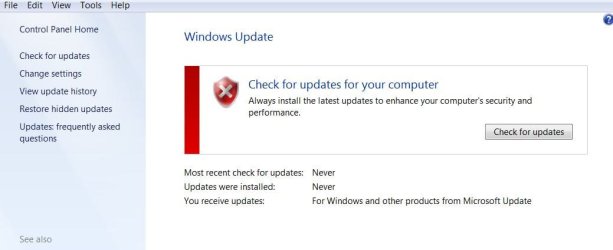
Since I posted the message last night asking for help and before reading your response today I re-ran the WindowsUpdateDiagnostic.diagcab and got no error messages (see attached output_12.txt). When I open the Windows Update I get the red symbol, “Check for updates on your computer” (see attached windows_update.jpg). I tried to check for updates but it just hangs.

So I went ahead with your suggested fix as I already know there is something wrong with IE so I figured installing that patch wouldn’t hurt.

Some other background information: When the problem first occurred I tried various troubleshooting techniques as follows:

[FONT=&quot]1. [/FONT]Changed the update settings to “Never”, turn computer off then on and change settings back to “Check for updates but let me choose…” with the four boxes below that checked off. Windows Updates would just hang
[FONT=&quot]2. [/FONT]Ran “FixIt” at Microsoft site (Troubleshoot problems with installing updates - Windows Help) – nothing changed. Windows Update hangs on “checking…”
[FONT=&quot]3. [/FONT]Tried SFC /scannow as Administrator. Got "Windows Resource Protection did not find any integrity violations". Windows Update hangs.
[FONT=&quot]4. [/FONT]At some point I opened services.msc, used various combinations of changed settings for BITS and Microsoft Update (e.g., shut MS Update before changing something, checked that both services were running). Nothing happened so I didn’t save the link to where I found these instructions.
[FONT=&quot]5. [/FONT]Ran Deployment Image Servicing and Management (DISM) tool as Administrator using the following commands:

DISM.exe /Online /Cleanup-image /scanhealth – returned with an “the operation completed successfully”

DISM.exe /Online /Cleanup-image /Restorehealth – returned with an “Error 87”, searched online but couldn’t find anything.

[FONT=&quot]6. [/FONT]As per a suggestion in this forum I changed the laptop to a wired connection from wireless.

Have not tried:

[FONT=&quot]1. [/FONT]Removing/renaming "Software Distribution" folder

Any other suggestions?
Thanks,

Laura
 

Attachments

  • output_12.txt
    output_12.txt
    620 bytes · Views: 1
  • windows_update.jpg
    windows_update.jpg
    40.4 KB · Views: 0

My Computer

Computer type
PC/Desktop
OS
Windows 7 Professional 64bit
Hi Laura,
Because of the nature of this failure it is only correctable using either of the 2 "fix's" mentioned above.
SURT (KB947821) can take a LONG while to run.

As for ALL windowsUpdates, there taking even longer, MS doesn't like us W7 users anymore, you will find loads of postings all over the web about this and numerous fix's, everybody seems to be affected differently.

Roy
 

My Computer

Computer type
PC/Desktop
Computer Manufacturer/Model Number
medionl/Aspire 6930G/acer x55a
OS
W7 home premium 32bit/W7HP 64bit/w10 tp insider ring
CPU
E5300 dual core
Motherboard
medion MS7366
Memory
3gb
Graphics Card(s)
Nvidia Geforce 7100 Nforce 630i
Monitor(s) Displays
avixc
Internet Speed
n (isp resticted to 72)
Antivirus
mse/pands
Browser
palemoon
Other Info
Belkin Fd7050 n USB using Railink RT2870 drivers, more upto date
Hi Ron,

Thanks for your reply. I was starting to gather that this was an issue for many. I'm guessing that like most others here our diligent checking that blocked any Windows 10 updates to sneak through may be haunting us now.

I stopped it after about 5 hours as the laptop was getting very hot. I will try again to let the it run overnight when the server is less busy and use a cooling pad. Will report back.

If update issues persist for Windows 7 I'd be curious to know how others feel about continuing to use it (even with AVS/firewall).

Laura

Hi Laura,
Because of the nature of this failure it is only correctable using either of the 2 "fix's" mentioned above.
SURT (KB947821) can take a LONG while to run.

As for ALL windowsUpdates, there taking even longer, MS doesn't like us W7 users anymore, you will find loads of postings all over the web about this and numerous fix's, everybody seems to be affected differently.

Roy
 

My Computer

Computer type
PC/Desktop
OS
Windows 7 Professional 64bit
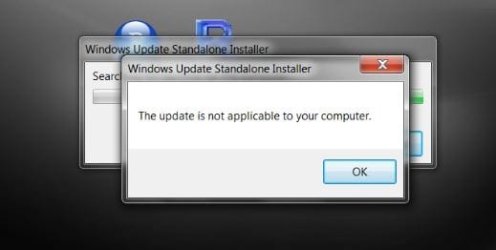
Seven hours later and I got this (at least they let me know!):
 

Attachments

  • not_applicable.jpg
    not_applicable.jpg
    19.5 KB · Views: 10

My Computer

Computer type
PC/Desktop
OS
Windows 7 Professional 64bit
Hi Roy,

I'm thinking of trying this:

https://blogs.technet.microsoft.com...17/simplifying-updates-for-windows-7-and-8-1/

Any thoughts?

Thanks.

Laura

Hi Laura,
Because of the nature of this failure it is only correctable using either of the 2 "fix's" mentioned above.
SURT (KB947821) can take a LONG while to run.

As for ALL windowsUpdates, there taking even longer, MS doesn't like us W7 users anymore, you will find loads of postings all over the web about this and numerous fix's, everybody seems to be affected differently.

Roy
 

My Computer

Computer type
PC/Desktop
OS
Windows 7 Professional 64bit
Back
Top