

Microsoft produces two to three updates per supported Windows platform monthly. This results in a backlog of updates and potentially increases the size of update packages. Many of these updates, however, are cumulative and include all earlier updates that have been published for that platform. That means, when older packages expire, you still receive the updates contained in those packages by installing the cumulative update.
By expiring older, redundant packages, you get better performance, shorter scan times, a faster user experience, and reduced risk of deploying older updates which have been superseded with newer, more secure ones. Here are answers to common questions we receive about our Windows update expiration policy.
How often are update packages expired?
Our published packages are evaluated for expiration on a regular basis. Once a large enough quantity of candidates have been found, an expiration will take place.
Why aren't older updates expired?
Some older packages may not yet have been evaluated or may not have met the criteria for expiration. It is also possible that they have not yet expired because of existing dependencies on that specific update.
Are there any packages that cannot be expired?
Security-only update packages for Windows 8.1, Windows Server 2012 SP2, Windows Server 2012, Windows 7 SP1, Windows Server 2008 R2, and Windows Server 2008 SP2 do not expire as they are not cumulative and hold only one month worth of fixes. Additionally, if a more recent update package has a dependency on an older package, the older package will not expire until it has been superseded by a newer package.
How can find out if my update has expired?
If an update has expired, you will see the word "EXPIRED" appended to the title of the release note article associated with that specific update on support.microsoft.com.
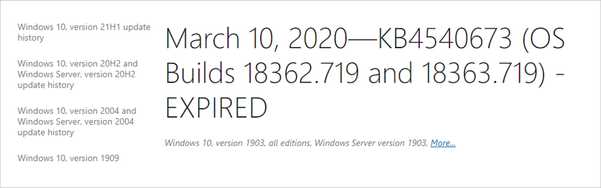
There will also be an expiration notice at the top of the article.

If you are using Windows Server Update Services (WSUS), you will see a banner at the top of the details pane if a given update has expired.
Note: This policy only applies to Windows updates. Updates for other Microsoft software or firmware may have different policies and should be considered separately.
Source: Windows update expiration policy explained - Microsoft Tech Community
My Computer
- Computer type
- PC/Desktop
- Computer Manufacturer/Model Number
- Self built custom
- OS
- 64-bit Windows 11 Pro for Workstations
- CPU
- Intel i7-8700K OC'd to 5 GHz
- Motherboard
- ASUS ROG Maximus XI Formula Z390
- Memory
- 64 GB (4x16GB) G.SKILL TridentZ RGB DDR4 3600 MHz
- Graphics Card(s)
- ASUS ROG-STRIX-GTX1080TI-O11G-GAMING
- Sound Card
- Integrated
- Monitor(s) Displays
- 2 x Samsung Odyssey G7 27"
- Screen Resolution
- 2560x1440
- Hard Drives
- 1TB Samsung 990 PRO M.2,
4TB Samsung 990 PRO PRO M.2,
TerraMaster F8 SSD Plus NAS
- PSU
- Seasonic Prime Titanium 850W
- Case
- Thermaltake Core P3
- Cooling
- Corsair Hydro H115i
- Keyboard
- Logitech wireless K800
- Mouse
- Logitech MX Master 4
- Internet Speed
- 2 Gb/s Download and 100 Mb/s Upload
- Antivirus
- Malwarebyte Anti-Malware Premium
- Browser
- Google Chrome
- Other Info
- Logitech Z625 speaker system,
Logitech BRIO 4K Pro webcam,
HP Color LaserJet Pro MFP M477fdn,
APC SMART-UPS RT 1000 XL - SURT1000XLI,
Galaxy S23 Plus phone


