Solved Windows Update Failing, error code 80073712

gwmnova

New member
Local time
11:44 AM
Messages
11
Windows Update Failing, error code 80073712, and Corrupt Manifest

Hello.

I've never posted before; I hope you can help me. But I'm not an advanced user therefore I might need some patient assistance, if possible.

Windows update is not succeeding. Getting error code 80073712 when trying to install the following updates:
KB3060716
KB3071756
KB3083992

However my Microsoft Security Essentials updates still install successfully from the Windows Update panel.

sfc /scannow for many months has been giving the following error: "Windows Resource Protection found corrupt files but was unable to fix some of them."

Some background information:
1. Sony Vaio laptop (2009)
2. Original operating system was Vista, but after purchase I upgraded to Win 7 Home Professional by using Sony's upgrade disk (2010)
3. Now running Win 7 Home Professional SP 1
4. Three years ago I replaced original HDD with a Crucial M4 SSD (128GB)
5. System Restore has not worked since SSD was installed, so I don't depend on it. Therefore every month or so I clone SSD in case of a major failure.
6. I rely on the computer for my photography and for more than 10 years' worth of Quicken data and for syncing iPhone and iPad with iTunes software
7. I have already hidden some of the Windows Updates that are notorious for causing false SFC errors (e.g., KB3035583 and KB3068708.

Attachment: Windows error code screenshot. But CBS zip file is too large (44MB for folder or 10MB for single text file).
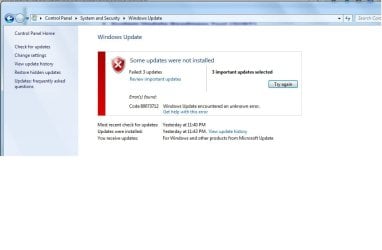
WindowsUpdateError.jpg
 
Last edited:

My Computer

Computer type
Laptop
Computer Manufacturer/Model Number
Sony Vaio VGN-FW465J
OS
Windows 7 Home Premium, SP 1 64bit
CPU
Intel Core 2 Duo P8700 @2.53 GHz
Memory
RAM 4GB
Graphics Card(s)
ATI Radeon
Hard Drives
Crucial MX200 SSD 256 GB
Antivirus
MSE
Browser
Firefox

My Computer

Computer type
Laptop
Computer Manufacturer/Model Number
Sony Vaio VGN-FW465J
OS
Windows 7 Home Premium, SP 1 64bit
CPU
Intel Core 2 Duo P8700 @2.53 GHz
Memory
RAM 4GB
Graphics Card(s)
ATI Radeon
Hard Drives
Crucial MX200 SSD 256 GB
Antivirus
MSE
Browser
Firefox
About Windows Corrupt Manifest and Windows Update Errors

Do I need to post any additional information?
 

My Computer

Computer type
Laptop
Computer Manufacturer/Model Number
Sony Vaio VGN-FW465J
OS
Windows 7 Home Premium, SP 1 64bit
CPU
Intel Core 2 Duo P8700 @2.53 GHz
Memory
RAM 4GB
Graphics Card(s)
ATI Radeon
Hard Drives
Crucial MX200 SSD 256 GB
Antivirus
MSE
Browser
Firefox
Sorry - not been well this week :(

Here's the errors that CheckSUR couldn't fix...
Code:
Summary:
Seconds executed: 663
 Found 56 errors
 Fixed 11 errors
  CSI Manifest All Zeros Total count: 33
  CSI Catalog Corrupt Total count: 4
  Fixed: CSI Catalog Corrupt.  Total count: 4
  CBS MUM Corrupt Total count: 6
  CBS Catalog Corrupt Total count: 6
  CSI Catalog Thumbprint Invalid Total count: 7
  Fixed: CSI Catalog Thumbprint Invalid.  Total count: 7

Unavailable repair files:
	winsxs\manifests\amd64_microsoft-windows-w..ient-core.resources_31bf3856ad364e35_7.6.7601.19016_en-us_3cd9180199b08dda.manifest
	winsxs\manifests\amd64_microsoft-windows-minkernelapinamespace_31bf3856ad364e35_6.1.7601.23049_none_6945eaeaaba13425.manifest
	winsxs\manifests\x86_microsoft-windows-minkernelapinamespace_31bf3856ad364e35_6.1.7601.23049_none_0d274f66f343c2ef.manifest
	winsxs\manifests\wow64_microsoft-windows-winsrv_31bf3856ad364e35_6.1.7601.23049_none_1f673be90087388f.manifest
	winsxs\manifests\wow64_microsoft-windows-kernelbase_31bf3856ad364e35_6.1.7601.23049_none_8feb1d9a18c6137e.manifest
	winsxs\manifests\wow64_microsoft-windows-wow64_31bf3856ad364e35_6.1.7601.23049_none_d10e6d503b8134ad.manifest
	winsxs\manifests\wow64_microsoft-windows-kernel32_31bf3856ad364e35_6.1.7601.23049_none_fca68a87ba7d8b92.manifest
	winsxs\manifests\amd64_microsoft-windows-minkernelapinamespace_31bf3856ad364e35_6.1.7601.18847_none_68ba756992852e6b.manifest
	winsxs\manifests\x86_microsoft-windows-minkernelapinamespace_31bf3856ad364e35_6.1.7601.18847_none_0c9bd9e5da27bd35.manifest
	winsxs\manifests\amd64_microsoft-windows-w..lient-aux.resources_31bf3856ad364e35_7.6.7601.19016_en-us_e70677b0145846df.manifest
	winsxs\manifests\amd64_microsoft-windows-w..pdate-adm.resources_31bf3856ad364e35_7.6.7601.19016_en-us_969048897e3f5440.manifest
	winsxs\manifests\amd64_microsoft-windows-w..client-ui.resources_31bf3856ad364e35_7.6.7601.19016_en-us_4e311f0c275e855b.manifest
	winsxs\manifests\amd64_microsoft-windows-wow64_31bf3856ad364e35_6.1.7601.23049_none_c6b9c2fe072072b2.manifest
	winsxs\manifests\amd64_microsoft-windows-consolehost_31bf3856ad364e35_6.1.7601.23049_none_d2efc24531eb069c.manifest
	winsxs\manifests\amd64_microsoft-windows-kernel32_31bf3856ad364e35_6.1.7601.23049_none_f251e035861cc997.manifest
	winsxs\manifests\amd64_microsoft-windows-winsrv_31bf3856ad364e35_6.1.7601.23049_none_15129196cc267694.manifest
	winsxs\manifests\amd64_microsoft-windows-kernelbase_31bf3856ad364e35_6.1.7601.23049_none_85967347e4655183.manifest
	winsxs\manifests\amd64_microsoft-windows-winsetupui_31bf3856ad364e35_6.1.7601.19016_none_bd33fc6bdc48cd95.manifest
	winsxs\manifests\wow64_microsoft-windows-wow64_31bf3856ad364e35_6.1.7601.18847_none_d082f7cf22652ef3.manifest
	winsxs\manifests\wow64_microsoft-windows-kernel32_31bf3856ad364e35_6.1.7601.18847_none_fc1b1506a16185d8.manifest
	winsxs\manifests\wow64_microsoft-windows-winsrv_31bf3856ad364e35_6.1.7601.18847_none_1edbc667e76b32d5.manifest
	winsxs\manifests\wow64_microsoft-windows-kernelbase_31bf3856ad364e35_6.1.7601.18847_none_8f5fa818ffaa0dc4.manifest
	winsxs\manifests\amd64_microsoft-windows-w..owsupdateclient-aux_31bf3856ad364e35_7.6.7601.19016_none_cd75e4c678d73716.manifest
	winsxs\manifests\amd64_microsoft-windows-w..ent-internalupgrade_31bf3856ad364e35_7.6.7601.19016_none_2b9dce5e886875d7.manifest
	winsxs\manifests\amd64_microsoft-windows-consolehost_31bf3856ad364e35_6.1.7601.18847_none_d2644cc418cf00e2.manifest
	winsxs\manifests\amd64_microsoft-windows-kernel32_31bf3856ad364e35_6.1.7601.18847_none_f1c66ab46d00c3dd.manifest
	winsxs\manifests\amd64_microsoft-windows-winsrv_31bf3856ad364e35_6.1.7601.18847_none_14871c15b30a70da.manifest
	winsxs\manifests\amd64_microsoft-windows-kernelbase_31bf3856ad364e35_6.1.7601.18847_none_850afdc6cb494bc9.manifest
	winsxs\manifests\amd64_microsoft-windows-wow64_31bf3856ad364e35_6.1.7601.18847_none_c62e4d7cee046cf8.manifest
	winsxs\manifests\amd64_microsoft-windows-w..pdateclient-activex_31bf3856ad364e35_7.6.7601.19016_none_7780a5071e8e6912.manifest
	winsxs\manifests\amd64_microsoft-windows-windowsupdate-adm_31bf3856ad364e35_7.6.7601.19016_none_a3f6615fce3c0c7b.manifest
	winsxs\manifests\amd64_microsoft-windows-w..wsupdateclient-core_31bf3856ad364e35_7.6.7601.19016_none_e764aa7a6516de13.manifest
	winsxs\manifests\amd64_microsoft-windows-windowsupdateclient-ui_31bf3856ad364e35_7.6.7601.19016_none_6511ce25051b20c4.manifest
	servicing\packages\Package_13_for_KB3083710~31bf3856ad364e35~amd64~~6.1.1.4.mum
	servicing\packages\Package_13_for_KB3083710~31bf3856ad364e35~amd64~~6.1.1.4.mum
	servicing\packages\Package_14_for_KB3083710~31bf3856ad364e35~amd64~~6.1.1.4.mum
	servicing\packages\Package_14_for_KB3083710~31bf3856ad364e35~amd64~~6.1.1.4.mum
	servicing\packages\Package_73_for_KB3083710~31bf3856ad364e35~amd64~~6.1.1.4.mum
	servicing\packages\Package_73_for_KB3083710~31bf3856ad364e35~amd64~~6.1.1.4.mum
	servicing\packages\Package_74_for_KB3083710~31bf3856ad364e35~amd64~~6.1.1.4.mum
	servicing\packages\Package_74_for_KB3083710~31bf3856ad364e35~amd64~~6.1.1.4.mum
	servicing\packages\Package_for_KB3083710_SP1~31bf3856ad364e35~amd64~~6.1.1.4.mum
	servicing\packages\Package_for_KB3083710_SP1~31bf3856ad364e35~amd64~~6.1.1.4.mum
	servicing\packages\Package_for_KB3083710~31bf3856ad364e35~amd64~~6.1.1.4.mum
	servicing\packages\Package_for_KB3083710~31bf3856ad364e35~amd64~~6.1.1.4.mum

I'll post a fix protocol when I can!
 

My Computer

Computer type
Laptop
Computer Manufacturer/Model Number
Asus K52F or Lenovo B51-80
OS
Win 7 x64 Home Premium (and x86 VirtualBox VM)/Win10
CPU
i3 370M/i7 6500U
Motherboard
Asus/Lenovo
Memory
8GB - finally :)/8GB
Graphics Card(s)
it's an i3, dude!/dual Intel&nVidia
Sound Card
onboard
Monitor(s) Displays
15.6" built-in
Screen Resolution
1366x768/1920x1080
Hard Drives
750GB Seagate internal
Sundry external drives attached to other computers on the local network
1TB SSD on the Lenovo
PSU
n/a
Internet Speed
as much as I can get - usually on a dongle/phone, so <1MB/s
Antivirus
MSE/Defender
Browser
IE11/12/Edge/Chrome/FF(if I must)
Thank you ... and I'm patient

Thank you, Noel.

Please take your time; I really hope you feel better soon.

Also, if you want me to run any of those tools again and then post the most recent results (since several additional Windows 7 updates have installed after I posted my original message), please let me know.

Many updates do install properly, however the list of the ones that cannot install (with error 80073712) keeps growing.

I'll wait to hear from you and I'll try to follow your directions to a "t".
 

My Computer

Computer type
Laptop
Computer Manufacturer/Model Number
Sony Vaio VGN-FW465J
OS
Windows 7 Home Premium, SP 1 64bit
CPU
Intel Core 2 Duo P8700 @2.53 GHz
Memory
RAM 4GB
Graphics Card(s)
ATI Radeon
Hard Drives
Crucial MX200 SSD 256 GB
Antivirus
MSE
Browser
Firefox
Here we go...
I've uploaded a file - gwmaa.zip - to my OneDrive at Noel's OneDrive
Please download and save it.

Right-click on the downloaded file, and select Extract all…
Extract to the default location - which will create a new folder gwmaa in the same place.
Open this folder - there should be two folders inside it (Manifests, and Packages)

Copy the content of the Packages folder to the folder
C:\Windows\Temp\CheckSur\Servicing\Packages

And the content of the manifests folder (.manifest files) into this folder:
C:\Windows\Temp\CheckSur\Winsxs\Manifests

Now run the CheckSUR tool again (it may take a while)

Post the new CheckSUR.log file, and the CheckSUR.persist.log file.
 

My Computer

Computer type
Laptop
Computer Manufacturer/Model Number
Asus K52F or Lenovo B51-80
OS
Win 7 x64 Home Premium (and x86 VirtualBox VM)/Win10
CPU
i3 370M/i7 6500U
Motherboard
Asus/Lenovo
Memory
8GB - finally :)/8GB
Graphics Card(s)
it's an i3, dude!/dual Intel&nVidia
Sound Card
onboard
Monitor(s) Displays
15.6" built-in
Screen Resolution
1366x768/1920x1080
Hard Drives
750GB Seagate internal
Sundry external drives attached to other computers on the local network
1TB SSD on the Lenovo
PSU
n/a
Internet Speed
as much as I can get - usually on a dongle/phone, so <1MB/s
Antivirus
MSE/Defender
Browser
IE11/12/Edge/Chrome/FF(if I must)
I'll now do what you said, Noel.

I noticed that you are giving me something related to KB3083710 in one of the folders. Does it matter that I see I've hidden that update, among others?

I might have hidden it because of the 80073712 error or I might have hidden it because I'm trying to avoid all the Windows 10 Upgrade notifications. I don't really recall why it's in my hidden list.
 

My Computer

Computer type
Laptop
Computer Manufacturer/Model Number
Sony Vaio VGN-FW465J
OS
Windows 7 Home Premium, SP 1 64bit
CPU
Intel Core 2 Duo P8700 @2.53 GHz
Memory
RAM 4GB
Graphics Card(s)
ATI Radeon
Hard Drives
Crucial MX200 SSD 256 GB
Antivirus
MSE
Browser
Firefox
OK, let's see what happened. Here are the two files you requested after I completed your steps.

And by the way, after putting the files into the appropriate Packages and Manifest temp folders and then running the CheckSUR tool - I have not restarted the computer or used CCleaner or attempted to install any updates or even run sfc /scannow. I didn't want to do anything else until you had a chance to review my new logs.
 

Attachments

Last edited:

My Computer

Computer type
Laptop
Computer Manufacturer/Model Number
Sony Vaio VGN-FW465J
OS
Windows 7 Home Premium, SP 1 64bit
CPU
Intel Core 2 Duo P8700 @2.53 GHz
Memory
RAM 4GB
Graphics Card(s)
ATI Radeon
Hard Drives
Crucial MX200 SSD 256 GB
Antivirus
MSE
Browser
Firefox
Summary:
Seconds executed: 236
Found 39 errors
Fixed 39 errors
CSI Manifest All Zeros Total count: 33
Fixed: CSI Manifest All Zeros. Total count: 33
CBS MUM Corrupt Total count: 6
Fixed: CBS MUM Corrupt. Total count: 6
Fixed: CBS Paired File. Total count: 6

so, it's all fixed apparently, reboot, and do a Check for Updates - then try installing just the oldest update found.
If it goes in OK, try the rest.
If it fails, post the C:\Windows\windowsupdate.log file.
 

My Computer

Computer type
Laptop
Computer Manufacturer/Model Number
Asus K52F or Lenovo B51-80
OS
Win 7 x64 Home Premium (and x86 VirtualBox VM)/Win10
CPU
i3 370M/i7 6500U
Motherboard
Asus/Lenovo
Memory
8GB - finally :)/8GB
Graphics Card(s)
it's an i3, dude!/dual Intel&nVidia
Sound Card
onboard
Monitor(s) Displays
15.6" built-in
Screen Resolution
1366x768/1920x1080
Hard Drives
750GB Seagate internal
Sundry external drives attached to other computers on the local network
1TB SSD on the Lenovo
PSU
n/a
Internet Speed
as much as I can get - usually on a dongle/phone, so <1MB/s
Antivirus
MSE/Defender
Browser
IE11/12/Edge/Chrome/FF(if I must)
Oh my goodness, thank you so much, Noel. The updates installed successfully! I really appreciate your time and effort. You are incredible!

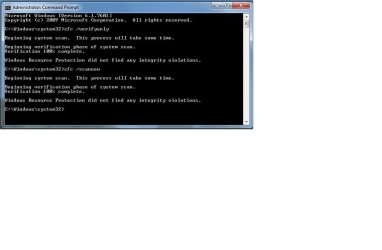
And for the first time in many, many months, the sfc /scannow came up clean (see attachment).

However there are several questions I have that maybe you could answer so I could avoid having this problem again, therefore …

1. The fixes you sent to me were copied and pasted into some Windows temp folders. What happens when those temp folders are later cleaned out? Are those fixes now permanently installed elsewhere?

2. Is it okay to continue to use CCleaner?

3. Is it okay to continue to use the registry cleaner in CCleaner?

4. Is it okay to continue to use Windows 7’s Disk Cleanup utility to clean up System Files? (My SSD is about 80% filled.)

5. Was my corrupted manifest possibly caused by my hiding some Windows 10 upgrade updates rather than letting them get installed?

6. How often should I run sfc /scannow?

7. How often should I run CheckSUR?

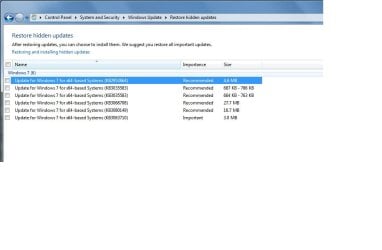
8. I want to avoid the Windows 10 upgrade notifications. Are there individual updates I should hide so I won’t get those notices? Attached are the ones currently hidden. Should I install any of these?

9. Any ideas on why my System Restore does not work after I installed an SSD several years ago? Because of that, I do a full clone of my hard drive approximately once a month so I’ll have some way to “turn back the clock” if necessary.

Sorry for all my questions, but I'm one of those people who likes to know specifics so I can be more informed next time.

Thank you yet again.


SFCscan.jpg

HiddenUpdates.jpg
 

My Computer

Computer type
Laptop
Computer Manufacturer/Model Number
Sony Vaio VGN-FW465J
OS
Windows 7 Home Premium, SP 1 64bit
CPU
Intel Core 2 Duo P8700 @2.53 GHz
Memory
RAM 4GB
Graphics Card(s)
ATI Radeon
Hard Drives
Crucial MX200 SSD 256 GB
Antivirus
MSE
Browser
Firefox
CCleaner is fine - but avoid using the registry cleaner (and DEFINITELY avoid using any other registry cleaner!)
The uploaded fixes have now been properly applied and installed where they belong - you can do what you like with the stuff you downloaded, and with the TEMP files.
I don't believe there's really much benefit to be gained from repeatedly running the disk cleanup tool to remove old patch files - once a year should be enough. If you're running short on space then that's a good reason to get a new HD ;)

Generally, ONLY run SFC and/or CheckSUR when you have reason to suspect problems - they are purely error-fix tools, and will do nothing for a healthy system.

It's more likely that these problems were caused by a power-outage at a critical time in an update process than anything else - and they are certainly not caused by hiding any update.

As for System Restore... You need to check its settings first to ensure that it, and its feeder services, are properly set, and that there is enough space available on the drive (it will switch itself off if the available space goes below a certain level - in XP that space was 400MB, but I'm not certain how much is required in 7). If you want to get it working again, I suggest posting a new thread in the Performance section.
 

My Computer

Computer type
Laptop
Computer Manufacturer/Model Number
Asus K52F or Lenovo B51-80
OS
Win 7 x64 Home Premium (and x86 VirtualBox VM)/Win10
CPU
i3 370M/i7 6500U
Motherboard
Asus/Lenovo
Memory
8GB - finally :)/8GB
Graphics Card(s)
it's an i3, dude!/dual Intel&nVidia
Sound Card
onboard
Monitor(s) Displays
15.6" built-in
Screen Resolution
1366x768/1920x1080
Hard Drives
750GB Seagate internal
Sundry external drives attached to other computers on the local network
1TB SSD on the Lenovo
PSU
n/a
Internet Speed
as much as I can get - usually on a dongle/phone, so <1MB/s
Antivirus
MSE/Defender
Browser
IE11/12/Edge/Chrome/FF(if I must)
Again, I thank you. I will keep your information for further reference - and I hope my questions and your answers might be helpful to others who aren't as computer savvy as you are.
 

My Computer

Computer type
Laptop
Computer Manufacturer/Model Number
Sony Vaio VGN-FW465J
OS
Windows 7 Home Premium, SP 1 64bit
CPU
Intel Core 2 Duo P8700 @2.53 GHz
Memory
RAM 4GB
Graphics Card(s)
ATI Radeon
Hard Drives
Crucial MX200 SSD 256 GB
Antivirus
MSE
Browser
Firefox
Back
Top