Windows update failre / endless search for updates

Hopey

New member
Local time
7:05 PM
Messages
17
Hi,
I have Windows 7 Home Premium 64-bit, SP1, on a Compaq Presario CQ57 laptop.

On 11th May Windows tried to download updates but something went wrong, laptop froze for over an hour and didn't respond - so I held the power button and forced restart. I thought updates had failed but when I turned the laptop back on it said it was finishing installing updates.

However when I logged back in the popup in system tray said updates were available, but would just search endlessly without finding anything.

I ran Windows update diagnostic tool, at first it kept finding error 0x80070057 and 80070005, and "Service registration is missing or corrupt". The diagnostic tool said fixed each time but when i re-ran the tool the same errors were reported and it still won't update.

I tried to use system restore but strangely I only had 1 restore point - 11th May when the updates failed - i have never seen this before how can all my previous restore points be deleted? I restored to 11th May but Windows update is still the same not working.

I have tried the following:

Manually resetting windows update components using the Microsoft article.
Running sfc /scannow (no problems found).
Running extended chkdisk with both options ticked.
Microsoft fixit 50123.

I have also ran the Microsoft Fixit 50202 in both normal and aggressive mode several times.

I am still getting the windows 10 update icon in the system tray. But I'm reluctant to try and upgrade until Windows 7 is fixed in case i want to revert back or the windows 10 upgrade fails and forces it to revert back.

Can anyone help?

Thanks.
 

My Computer

Computer type
PC/Desktop
OS
Windows 7 Home Premium 64bit
Hi Hopey,
What do you do, Upgrade or not?
Your choice, depending on your reply we can go both ways
upgrade to W10 or fix W7,
Either way it will rely upon the results from this tool please copy/paste the results
http://go.microsoft.com/fwlink/?LinkID=52012


Roy
 

My Computer

Computer type
PC/Desktop
Computer Manufacturer/Model Number
medionl/Aspire 6930G/acer x55a
OS
W7 home premium 32bit/W7HP 64bit/w10 tp insider ring
CPU
E5300 dual core
Motherboard
medion MS7366
Memory
3gb
Graphics Card(s)
Nvidia Geforce 7100 Nforce 630i
Monitor(s) Displays
avixc
Internet Speed
n (isp resticted to 72)
Antivirus
mse/pands
Browser
palemoon
Other Info
Belkin Fd7050 n USB using Railink RT2870 drivers, more upto date
Thanks for the quick reply. I'd prefer to fix W7 first.

Here are the results:

Diagnostic Report (1.9.0027.0):
-----------------------------------------
Windows Validation Data-->

Validation Code: 0
Cached Online Validation Code: 0x0
Windows Product Key: *****-*****-73CQT-WMF7J-3Q6C9
Windows Product Key Hash: KaFG+RmurcM3ZxzWyfEP9WtPUJw=
Windows Product ID: 00359-OEM-8992687-00010
Windows Product ID Type: 2
Windows License Type: OEM SLP
Windows OS version: 6.1.7601.2.00010300.1.0.003
ID: {B50D5D6F-395F-477D-BA32-D72C9480B327}(1)
Is Admin: Yes
TestCab: 0x0
LegitcheckControl ActiveX: N/A, hr = 0x80070002
Signed By: N/A, hr = 0x80070002
Product Name: Windows 7 Home Premium
Architecture: 0x00000009
Build lab: 7601.win7sp1_gdr.160211-0600
TTS Error:
Validation Diagnostic:
Resolution Status: N/A

Vista WgaER Data-->
ThreatID(s): N/A, hr = 0x80070002
Version: N/A, hr = 0x80070002

Windows XP Notifications Data-->
Cached Result: N/A, hr = 0x80070002
File Exists: No
Version: N/A, hr = 0x80070002
WgaTray.exe Signed By: N/A, hr = 0x80070002
WgaLogon.dll Signed By: N/A, hr = 0x80070002

OGA Notifications Data-->
Cached Result: N/A, hr = 0x80070002
Version: N/A, hr = 0x80070002
OGAExec.exe Signed By: N/A, hr = 0x80070002
OGAAddin.dll Signed By: N/A, hr = 0x80070002

OGA Data-->
Office Status: 109 N/A
OGA Version: N/A, 0x80070002
Signed By: N/A, hr = 0x80070002
Office Diagnostics: 025D1FF3-364-80041010_025D1FF3-229-80041010_025D1FF3-230-1_025D1FF3-517-80040154_025D1FF3-237-80040154_025D1FF3-238-2_025D1FF3-244-80070002_025D1FF3-258-3

Browser Data-->
Proxy settings: N/A
User Agent: Mozilla/4.0 (compatible; MSIE 8.0; Win32)
Default Browser: C:\Program Files (x86)\Mozilla Firefox\firefox.exe
Download signed ActiveX controls: Prompt
Download unsigned ActiveX controls: Disabled
Run ActiveX controls and plug-ins: Allowed
Initialize and script ActiveX controls not marked as safe: Disabled
Allow scripting of Internet Explorer Webbrowser control: Disabled
Active scripting: Allowed
Script ActiveX controls marked as safe for scripting: Allowed

File Scan Data-->

Other data-->
Office Details: <GenuineResults><MachineData><UGUID>{B50D5D6F-395F-477D-BA32-D72C9480B327}</UGUID><Version>1.9.0027.0</Version><OS>6.1.7601.2.00010300.1.0.003</OS><Architecture>x64</Architecture><PKey>*****-*****-*****-*****-3Q6C9</PKey><PID>00359-OEM-8992687-00010</PID><PIDType>2</PIDType><SID>S-1-5-21-1327127725-3850345040-2025450725</SID><SYSTEM><Manufacturer>Hewlett-Packard</Manufacturer><Model>Presario CQ57 Notebook PC</Model></SYSTEM><BIOS><Manufacturer>Hewlett-Packard</Manufacturer><Version>F.43</Version><SMBIOSVersion major="2" minor="7"/><Date>20111213000000.000000+000</Date></BIOS><HWID>5C303D07018400F2</HWID><UserLCID>0809</UserLCID><SystemLCID>0409</SystemLCID><TimeZone>GMT Standard Time(GMT+00:00)</TimeZone><iJoin>0</iJoin><SBID><stat>3</stat><msppid></msppid><name></name><model></model></SBID><OEM><OEMID>HPQOEM</OEMID><OEMTableID>SLIC-MPC</OEMTableID></OEM><GANotification/></MachineData><Software><Office><Result>109</Result><Products/><Applications/></Office></Software></GenuineResults>

Spsys.log Content: 0x80070002

Licensing Data-->
C:\Windows\system32\slmgr.vbs(22, 1) Microsoft VBScript runtime error: ActiveX component can't create object: 'Scripting.Dictionary'

Windows Activation Technologies-->
HrOffline: 0x00000000
HrOnline: 0x00000000
HealthStatus: 0x0000000000000000
Event Time Stamp: 5:18:2016 20:25
ActiveX: Registered, Version: 7.1.7600.16395
Admin Service: Registered, Version: 7.1.7600.16395
HealthStatus Bitmask Output:


HWID Data-->
HWID Hash Current: LAAAAAEAAQABAAEAAAABAAAAAgABAAEA6GFYRgB3jBvqnJqGHhxw/4IvUF4=

OEM Activation 1.0 Data-->
N/A

OEM Activation 2.0 Data-->
BIOS valid for OA 2.0: yes
Windows marker version: 0x20001
OEMID and OEMTableID Consistent: yes
BIOS Information:
ACPI Table Name OEMID Value OEMTableID Value
APIC HP INSYDE
FACP HPQOEM SLIC-MPC
HPET HP INSYDE
BOOT HP INSYDE
MCFG HP INSYDE
ASF! HP INSYDE
SLIC HPQOEM SLIC-MPC
SSDT HP INSYDE
SSDT HP INSYDE
 

My Computer

Computer type
PC/Desktop
OS
Windows 7 Home Premium 64bit
Hi Hopey,
from the Mgadiag
Licensing Data-->
C:\Windows\system32\slmgr.vbs(22, 1) Microsoft VBScript runtime error: ActiveX component can't create object: 'Scripting.Dictionary'

couple of actions
1) re-register the dll using an elevated command mode

C:\Windows\SysWOW64\REGSVR32 C:\Windows\SysWOW64\wshcon.dll
C:\Windows\SysWOW64\REGSVR32 C:\Windows\SysWOW64\scrrun.dll


2) reset your IE options
control panel > internet options > Advanced > restore advanced settings

3) please run KB971033, dont worry if it states allready installed, it will update files anyway.

REBOOT

Then rerun the Mgadiag.

Roy
 
Last edited:

My Computer

Computer type
PC/Desktop
Computer Manufacturer/Model Number
medionl/Aspire 6930G/acer x55a
OS
W7 home premium 32bit/W7HP 64bit/w10 tp insider ring
CPU
E5300 dual core
Motherboard
medion MS7366
Memory
3gb
Graphics Card(s)
Nvidia Geforce 7100 Nforce 630i
Monitor(s) Displays
avixc
Internet Speed
n (isp resticted to 72)
Antivirus
mse/pands
Browser
palemoon
Other Info
Belkin Fd7050 n USB using Railink RT2870 drivers, more upto date
Hi,
I've done those 3 actions - I got message that the .dll successfully registered and that KB971033 was already installed.

New log:

Diagnostic Report (1.9.0027.0):
-----------------------------------------
Windows Validation Data-->

Validation Code: 0
Cached Online Validation Code: 0x0
Windows Product Key: *****-*****-73CQT-WMF7J-3Q6C9
Windows Product Key Hash: KaFG+RmurcM3ZxzWyfEP9WtPUJw=
Windows Product ID: 00359-OEM-8992687-00010
Windows Product ID Type: 2
Windows License Type: OEM SLP
Windows OS version: 6.1.7601.2.00010300.1.0.003
ID: {B50D5D6F-395F-477D-BA32-D72C9480B327}(3)
Is Admin: Yes
TestCab: 0x0
LegitcheckControl ActiveX: N/A, hr = 0x80070002
Signed By: N/A, hr = 0x80070002
Product Name: Windows 7 Home Premium
Architecture: 0x00000009
Build lab: 7601.win7sp1_gdr.160211-0600
TTS Error:
Validation Diagnostic:
Resolution Status: N/A

Vista WgaER Data-->
ThreatID(s): N/A, hr = 0x80070002
Version: N/A, hr = 0x80070002

Windows XP Notifications Data-->
Cached Result: N/A, hr = 0x80070002
File Exists: No
Version: N/A, hr = 0x80070002
WgaTray.exe Signed By: N/A, hr = 0x80070002
WgaLogon.dll Signed By: N/A, hr = 0x80070002

OGA Notifications Data-->
Cached Result: N/A, hr = 0x80070002
Version: N/A, hr = 0x80070002
OGAExec.exe Signed By: N/A, hr = 0x80070002
OGAAddin.dll Signed By: N/A, hr = 0x80070002

OGA Data-->
Office Status: 109 N/A
OGA Version: N/A, 0x80070002
Signed By: N/A, hr = 0x80070002
Office Diagnostics: 025D1FF3-364-80041010_025D1FF3-229-80041010_025D1FF3-230-1_025D1FF3-517-80040154_025D1FF3-237-80040154_025D1FF3-238-2_025D1FF3-244-80070002_025D1FF3-258-3

Browser Data-->
Proxy settings: N/A
User Agent: Mozilla/4.0 (compatible; MSIE 8.0; Win32)
Default Browser: C:\Program Files (x86)\Mozilla Firefox\firefox.exe
Download signed ActiveX controls: Prompt
Download unsigned ActiveX controls: Disabled
Run ActiveX controls and plug-ins: Allowed
Initialize and script ActiveX controls not marked as safe: Disabled
Allow scripting of Internet Explorer Webbrowser control: Disabled
Active scripting: Allowed
Script ActiveX controls marked as safe for scripting: Allowed

File Scan Data-->

Other data-->
Office Details: <GenuineResults><MachineData><UGUID>{B50D5D6F-395F-477D-BA32-D72C9480B327}</UGUID><Version>1.9.0027.0</Version><OS>6.1.7601.2.00010300.1.0.003</OS><Architecture>x64</Architecture><PKey>*****-*****-*****-*****-3Q6C9</PKey><PID>00359-OEM-8992687-00010</PID><PIDType>2</PIDType><SID>S-1-5-21-1327127725-3850345040-2025450725</SID><SYSTEM><Manufacturer>Hewlett-Packard</Manufacturer><Model>Presario CQ57 Notebook PC</Model></SYSTEM><BIOS><Manufacturer>Hewlett-Packard</Manufacturer><Version>F.43</Version><SMBIOSVersion major="2" minor="7"/><Date>20111213000000.000000+000</Date></BIOS><HWID>5C303D07018400F2</HWID><UserLCID>0809</UserLCID><SystemLCID>0409</SystemLCID><TimeZone>GMT Standard Time(GMT+00:00)</TimeZone><iJoin>0</iJoin><SBID><stat>3</stat><msppid></msppid><name></name><model></model></SBID><OEM><OEMID>HPQOEM</OEMID><OEMTableID>SLIC-MPC</OEMTableID></OEM><GANotification/></MachineData><Software><Office><Result>109</Result><Products/><Applications/></Office></Software></GenuineResults>

Spsys.log Content: 0x80070002

Licensing Data-->
C:\Windows\system32\slmgr.vbs(22, 1) Microsoft VBScript runtime error: ActiveX component can't create object: 'Scripting.Dictionary'

Windows Activation Technologies-->
HrOffline: 0x00000000
HrOnline: 0x00000000
HealthStatus: 0x0000000000000000
Event Time Stamp: 5:18:2016 20:25
ActiveX: Registered, Version: 7.1.7600.16395
Admin Service: Registered, Version: 7.1.7600.16395
HealthStatus Bitmask Output:


HWID Data-->
HWID Hash Current: LAAAAAEAAQABAAEAAAABAAAAAgABAAEA6GFYRgB3jBvqnJqGHhxw/4IvUF4=

OEM Activation 1.0 Data-->
N/A

OEM Activation 2.0 Data-->
BIOS valid for OA 2.0: yes
Windows marker version: 0x20001
OEMID and OEMTableID Consistent: yes
BIOS Information:
ACPI Table Name OEMID Value OEMTableID Value
APIC HP INSYDE
FACP HPQOEM SLIC-MPC
HPET HP INSYDE
BOOT HP INSYDE
MCFG HP INSYDE
ASF! HP INSYDE
SLIC HPQOEM SLIC-MPC
SSDT HP INSYDE
SSDT HP INSYDE
 

My Computer

Computer type
PC/Desktop
OS
Windows 7 Home Premium 64bit
Hi Hopey,
my bad forgot the system32 dll's

C:\Windows\System32\REGSVR32 C:\Windows\System32\wshcon.dll
C:\Windows\System32\REGSVR32 C:\Windows\System32\scrrun.dll

REBOOT

rerun Mgadiag.

Roy
 

My Computer

Computer type
PC/Desktop
Computer Manufacturer/Model Number
medionl/Aspire 6930G/acer x55a
OS
W7 home premium 32bit/W7HP 64bit/w10 tp insider ring
CPU
E5300 dual core
Motherboard
medion MS7366
Memory
3gb
Graphics Card(s)
Nvidia Geforce 7100 Nforce 630i
Monitor(s) Displays
avixc
Internet Speed
n (isp resticted to 72)
Antivirus
mse/pands
Browser
palemoon
Other Info
Belkin Fd7050 n USB using Railink RT2870 drivers, more upto date
Hi,

I've tried that again a couple of times including the 2 new .dll (each registered ok in command prompt). On one of the attempts I uninstalled kb971033 then reinstalled. The log looks the same unless I'm missing something, am i right in thinking the problem is - Licensing Data-->
C:\Windows\system32\slmgr.vbs(22, 1) Microsoft VBScript runtime error: ActiveX component can't create object: 'Scripting.Dictionary'.

New log below:

Diagnostic Report (1.9.0027.0):
-----------------------------------------
Windows Validation Data-->

Validation Code: 0
Cached Online Validation Code: 0x0
Windows Product Key: *****-*****-73CQT-WMF7J-3Q6C9
Windows Product Key Hash: KaFG+RmurcM3ZxzWyfEP9WtPUJw=
Windows Product ID: 00359-OEM-8992687-00010
Windows Product ID Type: 2
Windows License Type: OEM SLP
Windows OS version: 6.1.7601.2.00010300.1.0.003
ID: {B50D5D6F-395F-477D-BA32-D72C9480B327}(3)
Is Admin: Yes
TestCab: 0x0
LegitcheckControl ActiveX: N/A, hr = 0x80070002
Signed By: N/A, hr = 0x80070002
Product Name: Windows 7 Home Premium
Architecture: 0x00000009
Build lab: 7601.win7sp1_gdr.160211-0600
TTS Error:
Validation Diagnostic:
Resolution Status: N/A

Vista WgaER Data-->
ThreatID(s): N/A, hr = 0x80070002
Version: N/A, hr = 0x80070002

Windows XP Notifications Data-->
Cached Result: N/A, hr = 0x80070002
File Exists: No
Version: N/A, hr = 0x80070002
WgaTray.exe Signed By: N/A, hr = 0x80070002
WgaLogon.dll Signed By: N/A, hr = 0x80070002

OGA Notifications Data-->
Cached Result: N/A, hr = 0x80070002
Version: N/A, hr = 0x80070002
OGAExec.exe Signed By: N/A, hr = 0x80070002
OGAAddin.dll Signed By: N/A, hr = 0x80070002

OGA Data-->
Office Status: 109 N/A
OGA Version: N/A, 0x80070002
Signed By: N/A, hr = 0x80070002
Office Diagnostics: 025D1FF3-364-80041010_025D1FF3-229-80041010_025D1FF3-230-1_025D1FF3-517-80040154_025D1FF3-237-80040154_025D1FF3-238-2_025D1FF3-244-80070002_025D1FF3-258-3

Browser Data-->
Proxy settings: N/A
User Agent: Mozilla/4.0 (compatible; MSIE 8.0; Win32)
Default Browser: C:\Program Files (x86)\Mozilla Firefox\firefox.exe
Download signed ActiveX controls: Prompt
Download unsigned ActiveX controls: Disabled
Run ActiveX controls and plug-ins: Allowed
Initialize and script ActiveX controls not marked as safe: Disabled
Allow scripting of Internet Explorer Webbrowser control: Disabled
Active scripting: Allowed
Script ActiveX controls marked as safe for scripting: Allowed

File Scan Data-->

Other data-->
Office Details: <GenuineResults><MachineData><UGUID>{B50D5D6F-395F-477D-BA32-D72C9480B327}</UGUID><Version>1.9.0027.0</Version><OS>6.1.7601.2.00010300.1.0.003</OS><Architecture>x64</Architecture><PKey>*****-*****-*****-*****-3Q6C9</PKey><PID>00359-OEM-8992687-00010</PID><PIDType>2</PIDType><SID>S-1-5-21-1327127725-3850345040-2025450725</SID><SYSTEM><Manufacturer>Hewlett-Packard</Manufacturer><Model>Presario CQ57 Notebook PC</Model></SYSTEM><BIOS><Manufacturer>Hewlett-Packard</Manufacturer><Version>F.43</Version><SMBIOSVersion major="2" minor="7"/><Date>20111213000000.000000+000</Date></BIOS><HWID>5C303D07018400F2</HWID><UserLCID>0809</UserLCID><SystemLCID>0409</SystemLCID><TimeZone>GMT Standard Time(GMT+00:00)</TimeZone><iJoin>0</iJoin><SBID><stat>3</stat><msppid></msppid><name></name><model></model></SBID><OEM><OEMID>HPQOEM</OEMID><OEMTableID>SLIC-MPC</OEMTableID></OEM><GANotification/></MachineData><Software><Office><Result>109</Result><Products/><Applications/></Office></Software></GenuineResults>

Spsys.log Content: 0x80070002

Licensing Data-->
C:\Windows\system32\slmgr.vbs(22, 1) Microsoft VBScript runtime error: ActiveX component can't create object: 'Scripting.Dictionary'

Windows Activation Technologies-->
HrOffline: 0x00000000
HrOnline: 0x00000000
HealthStatus: 0x0000000000000000
Event Time Stamp: 5:18:2016 20:25
ActiveX: Registered, Version: 7.1.7600.16395
Admin Service: Registered, Version: 7.1.7600.16395
HealthStatus Bitmask Output:


HWID Data-->
HWID Hash Current: LAAAAAEAAQABAAEAAAABAAAAAgABAAEA6GFYRgB3jBvqnJqGHhxw/4IvUF4=

OEM Activation 1.0 Data-->
N/A

OEM Activation 2.0 Data-->
BIOS valid for OA 2.0: yes
Windows marker version: 0x20001
OEMID and OEMTableID Consistent: yes
BIOS Information:
ACPI Table Name OEMID Value OEMTableID Value
APIC HP INSYDE
FACP HPQOEM SLIC-MPC
HPET HP INSYDE
BOOT HP INSYDE
MCFG HP INSYDE
ASF! HP INSYDE
SLIC HPQOEM SLIC-MPC
SSDT HP INSYDE
SSDT HP INSYDE
 

My Computer

Computer type
PC/Desktop
OS
Windows 7 Home Premium 64bit
Hi Hopey,
Yep thats the problem line.
can you run this and post results

reg query HKEY_CLASSES_ROOT\CLSID\{B54F3741-5B07-11cf-A4B0-00AA004A55E8}\InprocServer32

What AV are you using, what before if any


Roy
 

My Computer

Computer type
PC/Desktop
Computer Manufacturer/Model Number
medionl/Aspire 6930G/acer x55a
OS
W7 home premium 32bit/W7HP 64bit/w10 tp insider ring
CPU
E5300 dual core
Motherboard
medion MS7366
Memory
3gb
Graphics Card(s)
Nvidia Geforce 7100 Nforce 630i
Monitor(s) Displays
avixc
Internet Speed
n (isp resticted to 72)
Antivirus
mse/pands
Browser
palemoon
Other Info
Belkin Fd7050 n USB using Railink RT2870 drivers, more upto date
Hi,
I'm using Eset Nod 32 (AV only not the suite). That's the only AV that's been on the laptop as far as I remember. I also have Malwarebytes free on-demand only. I ran both when problems started happening but both show clean.

copy of command prompt below-

Microsoft Windows [Version 6.1.7601]
Copyright (c) 2009 Microsoft Corporation. All rights reserved.

C:\Windows\system32> reg query HKEY_CLASSES_ROOT\CLSID\{B54F3741-5B07-11cf-A4B0-
00AA004A55E8}\InprocServer32

HKEY_CLASSES_ROOT\CLSID\{B54F3741-5B07-11cf-A4B0-00AA004A55E8}\InprocServer32
(Default) REG_SZ C:\Windows\system32\vbscript.dll
ThreadingModel REG_SZ Both


C:\Windows\system32>
 

My Computer

Computer type
PC/Desktop
OS
Windows 7 Home Premium 64bit
Hi Hopey,
lets try these

In the Search box, type
regsvr32 vbscript.dll and hit the Enter key

...or (if that fails..)
On the start menu, click Run and type following command:
regsvr32 c:\Windows\System32\vbscript.dll
hit the Enter key

...or (if that fails..)
in an Elevated Command Prompt window,
Type %systemroot%\system32\regsvr32 %systemroot%\system32\vbscript.dll, and then press ENTER.

very unusual error


Roy
 

My Computer

Computer type
PC/Desktop
Computer Manufacturer/Model Number
medionl/Aspire 6930G/acer x55a
OS
W7 home premium 32bit/W7HP 64bit/w10 tp insider ring
CPU
E5300 dual core
Motherboard
medion MS7366
Memory
3gb
Graphics Card(s)
Nvidia Geforce 7100 Nforce 630i
Monitor(s) Displays
avixc
Internet Speed
n (isp resticted to 72)
Antivirus
mse/pands
Browser
palemoon
Other Info
Belkin Fd7050 n USB using Railink RT2870 drivers, more upto date
Hi,
I tried the first step- it registered vbscript.dll successfully, i reran Mgadiag but the problem still seems to be there.

I then repeated step 1 but did a reboot before running Mgadiag.

I then did the same for steps 2 and 3 one at a time - successfully registered dll, then reboot, then run Mgadiag but it looks like the problem line is still there each time, new log below:


Diagnostic Report (1.9.0027.0):
-----------------------------------------
Windows Validation Data-->

Validation Code: 0
Cached Online Validation Code: 0x0
Windows Product Key: *****-*****-73CQT-WMF7J-3Q6C9
Windows Product Key Hash: KaFG+RmurcM3ZxzWyfEP9WtPUJw=
Windows Product ID: 00359-OEM-8992687-00010
Windows Product ID Type: 2
Windows License Type: OEM SLP
Windows OS version: 6.1.7601.2.00010300.1.0.003
ID: {B50D5D6F-395F-477D-BA32-D72C9480B327}(3)
Is Admin: Yes
TestCab: 0x0
LegitcheckControl ActiveX: N/A, hr = 0x80070002
Signed By: N/A, hr = 0x80070002
Product Name: Windows 7 Home Premium
Architecture: 0x00000009
Build lab: 7601.win7sp1_gdr.160211-0600
TTS Error:
Validation Diagnostic:
Resolution Status: N/A

Vista WgaER Data-->
ThreatID(s): N/A, hr = 0x80070002
Version: N/A, hr = 0x80070002

Windows XP Notifications Data-->
Cached Result: N/A, hr = 0x80070002
File Exists: No
Version: N/A, hr = 0x80070002
WgaTray.exe Signed By: N/A, hr = 0x80070002
WgaLogon.dll Signed By: N/A, hr = 0x80070002

OGA Notifications Data-->
Cached Result: N/A, hr = 0x80070002
Version: N/A, hr = 0x80070002
OGAExec.exe Signed By: N/A, hr = 0x80070002
OGAAddin.dll Signed By: N/A, hr = 0x80070002

OGA Data-->
Office Status: 109 N/A
OGA Version: N/A, 0x80070002
Signed By: N/A, hr = 0x80070002
Office Diagnostics: 025D1FF3-364-80041010_025D1FF3-229-80041010_025D1FF3-230-1_025D1FF3-517-80040154_025D1FF3-237-80040154_025D1FF3-238-2_025D1FF3-244-80070002_025D1FF3-258-3

Browser Data-->
Proxy settings: N/A
User Agent: Mozilla/4.0 (compatible; MSIE 8.0; Win32)
Default Browser: C:\Program Files (x86)\Mozilla Firefox\firefox.exe
Download signed ActiveX controls: Prompt
Download unsigned ActiveX controls: Disabled
Run ActiveX controls and plug-ins: Allowed
Initialize and script ActiveX controls not marked as safe: Disabled
Allow scripting of Internet Explorer Webbrowser control: Disabled
Active scripting: Allowed
Script ActiveX controls marked as safe for scripting: Allowed

File Scan Data-->

Other data-->
Office Details: <GenuineResults><MachineData><UGUID>{B50D5D6F-395F-477D-BA32-D72C9480B327}</UGUID><Version>1.9.0027.0</Version><OS>6.1.7601.2.00010300.1.0.003</OS><Architecture>x64</Architecture><PKey>*****-*****-*****-*****-3Q6C9</PKey><PID>00359-OEM-8992687-00010</PID><PIDType>2</PIDType><SID>S-1-5-21-1327127725-3850345040-2025450725</SID><SYSTEM><Manufacturer>Hewlett-Packard</Manufacturer><Model>Presario CQ57 Notebook PC</Model></SYSTEM><BIOS><Manufacturer>Hewlett-Packard</Manufacturer><Version>F.43</Version><SMBIOSVersion major="2" minor="7"/><Date>20111213000000.000000+000</Date></BIOS><HWID>5C303D07018400F2</HWID><UserLCID>0809</UserLCID><SystemLCID>0409</SystemLCID><TimeZone>GMT Standard Time(GMT+00:00)</TimeZone><iJoin>0</iJoin><SBID><stat>3</stat><msppid></msppid><name></name><model></model></SBID><OEM><OEMID>HPQOEM</OEMID><OEMTableID>SLIC-MPC</OEMTableID></OEM><GANotification/></MachineData><Software><Office><Result>109</Result><Products/><Applications/></Office></Software></GenuineResults>

Spsys.log Content: 0x80070002

Licensing Data-->
C:\Windows\system32\slmgr.vbs(22, 1) Microsoft VBScript runtime error: ActiveX component can't create object: 'Scripting.Dictionary'

Windows Activation Technologies-->
HrOffline: 0x00000000
HrOnline: 0x00000000
HealthStatus: 0x0000000000000000
Event Time Stamp: 5:18:2016 20:25
ActiveX: Registered, Version: 7.1.7600.16395
Admin Service: Registered, Version: 7.1.7600.16395
HealthStatus Bitmask Output:


HWID Data-->
HWID Hash Current: LAAAAAEAAQABAAEAAAABAAAAAgABAAEA6GFYRgB3jBvqnJqGHhxw/4IvUF4=

OEM Activation 1.0 Data-->
N/A

OEM Activation 2.0 Data-->
BIOS valid for OA 2.0: yes
Windows marker version: 0x20001
OEMID and OEMTableID Consistent: yes
BIOS Information:
ACPI Table Name OEMID Value OEMTableID Value
APIC HP INSYDE
FACP HPQOEM SLIC-MPC
HPET HP INSYDE
BOOT HP INSYDE
MCFG HP INSYDE
ASF! HP INSYDE
SLIC HPQOEM SLIC-MPC
SSDT HP INSYDE
SSDT HP INSYDE
 

My Computer

Computer type
PC/Desktop
OS
Windows 7 Home Premium 64bit
Hi Hopey,
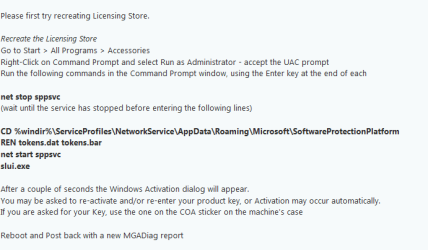
Ok lets try a reset of the file, see screenshot.
then run
sfc /scannow and chkdsk.

Roy
 

Attachments

  • licence store new.PNG
    licence store new.PNG
    10.5 KB · Views: 44

My Computer

Computer type
PC/Desktop
Computer Manufacturer/Model Number
medionl/Aspire 6930G/acer x55a
OS
W7 home premium 32bit/W7HP 64bit/w10 tp insider ring
CPU
E5300 dual core
Motherboard
medion MS7366
Memory
3gb
Graphics Card(s)
Nvidia Geforce 7100 Nforce 630i
Monitor(s) Displays
avixc
Internet Speed
n (isp resticted to 72)
Antivirus
mse/pands
Browser
palemoon
Other Info
Belkin Fd7050 n USB using Railink RT2870 drivers, more upto date
Hi,
I reset the file as instructed - it validated Windows automatically I didn't need to re-enter the key.
I then ran sfc /scannow - Windows Resource Protection did not find any integrity violations.
I then ran chkdsk and reboot.

But when I try to run the Mgadiag now, I get the below error message when I try to click 'copy' to copy the results: "Failed to create output files, hr = 0x80070002. Please contact support." I've tried rebooting a few times but still get this message it won't let me click 'copy'.
If I scroll along to the Licensing tab, its still saying same error as before: C:\Windows\system32\slmgr.vbs(22, 1) Microsoft VBScript runtime error: ActiveX component can't create object: 'Scripting.Dictionary'.

Thanks,
 

My Computer

Computer type
PC/Desktop
OS
Windows 7 Home Premium 64bit
Actually, I've just checked and even though Mgadiag is now giving me that error each time I click 'copy', it is still copying to clipboard anyway despite the error - here is latest log:

Diagnostic Report (1.9.0027.0):
-----------------------------------------
Windows Validation Data-->

Validation Code: 0
Cached Online Validation Code: 0x0
Windows Product Key: *****-*****-73CQT-WMF7J-3Q6C9
Windows Product Key Hash: KaFG+RmurcM3ZxzWyfEP9WtPUJw=
Windows Product ID: 00359-OEM-8992687-00010
Windows Product ID Type: 2
Windows License Type: OEM SLP
Windows OS version: 6.1.7601.2.00010300.1.0.003
ID: {B50D5D6F-395F-477D-BA32-D72C9480B327}(3)
Is Admin: Yes
TestCab: 0x0
LegitcheckControl ActiveX: N/A, hr = 0x80070002
Signed By: N/A, hr = 0x80070002
Product Name: Windows 7 Home Premium
Architecture: 0x00000009
Build lab: 7601.win7sp1_gdr.160211-0600
TTS Error:
Validation Diagnostic:
Resolution Status: N/A

Vista WgaER Data-->
ThreatID(s): N/A, hr = 0x80070002
Version: N/A, hr = 0x80070002

Windows XP Notifications Data-->
Cached Result: N/A, hr = 0x80070002
File Exists: No
Version: N/A, hr = 0x80070002
WgaTray.exe Signed By: N/A, hr = 0x80070002
WgaLogon.dll Signed By: N/A, hr = 0x80070002

OGA Notifications Data-->
Cached Result: N/A, hr = 0x80070002
Version: N/A, hr = 0x80070002
OGAExec.exe Signed By: N/A, hr = 0x80070002
OGAAddin.dll Signed By: N/A, hr = 0x80070002

OGA Data-->
Office Status: 109 N/A
OGA Version: N/A, 0x80070002
Signed By: N/A, hr = 0x80070002
Office Diagnostics: 025D1FF3-364-80041010_025D1FF3-229-80041010_025D1FF3-230-1_025D1FF3-517-80040154_025D1FF3-237-80040154_025D1FF3-238-2_025D1FF3-244-80070002_025D1FF3-258-3

Browser Data-->
Proxy settings: N/A
User Agent: Mozilla/4.0 (compatible; MSIE 8.0; Win32)
Default Browser: C:\Program Files (x86)\Mozilla Firefox\firefox.exe
Download signed ActiveX controls: Prompt
Download unsigned ActiveX controls: Disabled
Run ActiveX controls and plug-ins: Allowed
Initialize and script ActiveX controls not marked as safe: Disabled
Allow scripting of Internet Explorer Webbrowser control: Disabled
Active scripting: Allowed
Script ActiveX controls marked as safe for scripting: Allowed

File Scan Data-->

Other data-->
Office Details: <GenuineResults><MachineData><UGUID>{B50D5D6F-395F-477D-BA32-D72C9480B327}</UGUID><Version>1.9.0027.0</Version><OS>6.1.7601.2.00010300.1.0.003</OS><Architecture>x64</Architecture><PKey>*****-*****-*****-*****-3Q6C9</PKey><PID>00359-OEM-8992687-00010</PID><PIDType>2</PIDType><SID>S-1-5-21-1327127725-3850345040-2025450725</SID><SYSTEM><Manufacturer>Hewlett-Packard</Manufacturer><Model>Presario CQ57 Notebook PC</Model></SYSTEM><BIOS><Manufacturer>Hewlett-Packard</Manufacturer><Version>F.43</Version><SMBIOSVersion major="2" minor="7"/><Date>20111213000000.000000+000</Date></BIOS><HWID>5C303D07018400F2</HWID><UserLCID>0809</UserLCID><SystemLCID>0409</SystemLCID><TimeZone>GMT Standard Time(GMT+00:00)</TimeZone><iJoin>0</iJoin><SBID><stat>3</stat><msppid></msppid><name></name><model></model></SBID><OEM><OEMID>HPQOEM</OEMID><OEMTableID>SLIC-MPC</OEMTableID></OEM><GANotification/></MachineData><Software><Office><Result>109</Result><Products/><Applications/></Office></Software></GenuineResults>

Spsys.log Content: 0x80070002

Licensing Data-->
C:\Windows\system32\slmgr.vbs(22, 1) Microsoft VBScript runtime error: ActiveX component can't create object: 'Scripting.Dictionary'

Windows Activation Technologies-->
HrOffline: 0x00000000
HrOnline: 0x00000000
HealthStatus: 0x0000000000000000
Event Time Stamp: 5:18:2016 20:25
ActiveX: Registered, Version: 7.1.7600.16395
Admin Service: Registered, Version: 7.1.7600.16395
HealthStatus Bitmask Output:


HWID Data-->
HWID Hash Current: LAAAAAEAAQABAAEAAAABAAAAAgABAAEA6GFYRgB3jBvqnJqGHhxw/4IvUF4=

OEM Activation 1.0 Data-->
N/A

OEM Activation 2.0 Data-->
BIOS valid for OA 2.0: yes
Windows marker version: 0x20001
OEMID and OEMTableID Consistent: yes
BIOS Information:
ACPI Table Name OEMID Value OEMTableID Value
APIC HP INSYDE
FACP HPQOEM SLIC-MPC
HPET HP INSYDE
BOOT HP INSYDE
MCFG HP INSYDE
ASF! HP INSYDE
SLIC HPQOEM SLIC-MPC
SSDT HP INSYDE
SSDT HP INSYDE
 

My Computer

Computer type
PC/Desktop
OS
Windows 7 Home Premium 64bit
Hi Hopey,
Getting to the end of the fix's.
final option is your Bios upto date.
That just leaves me with a couple of thoughts
Have you just installed/used any tune-up/registry/script denial programmes installed, these may have changed/interferred with the file.
note that includes any browser add-ons

Roy
 

My Computer

Computer type
PC/Desktop
Computer Manufacturer/Model Number
medionl/Aspire 6930G/acer x55a
OS
W7 home premium 32bit/W7HP 64bit/w10 tp insider ring
CPU
E5300 dual core
Motherboard
medion MS7366
Memory
3gb
Graphics Card(s)
Nvidia Geforce 7100 Nforce 630i
Monitor(s) Displays
avixc
Internet Speed
n (isp resticted to 72)
Antivirus
mse/pands
Browser
palemoon
Other Info
Belkin Fd7050 n USB using Railink RT2870 drivers, more upto date
Hi Roy,
I'm not sure about the BIOS - I don't think I've ever updated that since I bought the laptop 3 or 4 years ago and I wouldn't know how to without reading up on it.

I did install MyDefrag-v4.3.1 (3rd party defragmenter) and did a full run against the C drive, that was in early April. I didn't think to mention that as it was a few weeks before I started having issues. I know registry cleaners can cause issues (i haven't used one of those) but not sure if defragmenters can.

But when I look in installed Windows updates using Control panel - programs and features - it shows that the last Windows updates I got were 25/03/16 which was before I ran the defragmenter so I haven't successfully used Windows update since.

I'm considering plan B now - the Windows 10 free upgrade icon in my system tray, do you think this will work even if there is a problem with W7 now? But if you have any other ideas on fixing W7 first I'd prefer to try that.

Thanks,
 

My Computer

Computer type
PC/Desktop
OS
Windows 7 Home Premium 64bit
Hi Hopey,
The exact matching error i found was corrected with the commands below

Please open an Elevated Command Prompt, and run the following commands...

C:\Windows\SysWOW64\REGSVR32 C:\Windows\SysWOW64\wshcon.dll
C:\Windows\SysWOW64\REGSVR32 C:\Windows\SysWOW64\scrrun.dll

reboot and run another MGADiag report.

BUT we've tried that allready

I did find some references to Bios updates causing this problem after a system restore, (HP forum),
but not for yours, F43, cant get the correct version for yours as there are to many models.
You could try updating, via the Insyde function on your comp.

Could you disconnect from the net
Dissable ESET
Turn off >>ALL<< add-ons/plug-ins/excelartors in Firefox/IE/any other browser

RERUN the above commands
REBOOT
rerun Mgadiag

if that works,:party:
if not then i think a W10 install is the way to go:eek:

Roy
 

My Computer

Computer type
PC/Desktop
Computer Manufacturer/Model Number
medionl/Aspire 6930G/acer x55a
OS
W7 home premium 32bit/W7HP 64bit/w10 tp insider ring
CPU
E5300 dual core
Motherboard
medion MS7366
Memory
3gb
Graphics Card(s)
Nvidia Geforce 7100 Nforce 630i
Monitor(s) Displays
avixc
Internet Speed
n (isp resticted to 72)
Antivirus
mse/pands
Browser
palemoon
Other Info
Belkin Fd7050 n USB using Railink RT2870 drivers, more upto date
Hi Roy,
I've tried the instructions above - disabled AV, disconnected internet and disabled browser add-ons. Unfortunately its the same as before, those 2 dll's both register successfully but the error persists.

When I was googling this issue before I came here for help, I found another thread where someone had a similar problem not quite the same, however one of their symptoms is the same as mine - thread link:

ALCPU Forums ? View topic - Need Help Please. Load Library Failed.

There is one part of that below which is identical to what happens when I try to register those files including the exact same error -

"Everything registers OK except those last two in the syswow64 folder, wshext.dll and wshom.ocx. I get:
0x80040201 wshext.dll was loaded but the call the DllRegisterServer failed."

The person in that thread fixed it themselves - the fix is on that page, they imported it into the registry.

Do you think this may be worth trying here or is it a different issue? I've never imported anything into the registry before so not sure myself, i wouldn't know where to start.

Thanks,
 

My Computer

Computer type
PC/Desktop
OS
Windows 7 Home Premium 64bit
I have also ran the Microsoft Fixit 50202 in both normal and aggressive mode several times.

Remove all existing WUC's from your machine and run advanced disk cleanup to include WU cleanup.

Reboot.

When you run MS Fix it 50202 - it requires running it more than once.

1) Run it when connected to the internet
2) Disconnect from internet and reconfigure Windows Update settings.
3) Disable Windows Update Service.
4) Reboot.
5) Disconnect from internet.
6) Run MS 50202
7) Reboot (with no internet)
8) Reconfigure Windows Update Settings. (Let me choose - no auto download)
9) Disable Windows Update Service.
10) Reboot.
11) Wait 24 hours. Use your computer as normal in the meantime. You can switch it off when finished.
12) Next day - Boot and re-enable Windows Update Service.
13) Check Windows Update Settings.
14) Run a manual check for updates. The first check might take hours.

I am still getting the windows 10 update icon in the system tray. But I'm reluctant to try and upgrade until Windows 7 is fixed in case i want to revert back or the windows 10 upgrade fails and forces it to revert back.

Those Windows 10 Upgrade Updates (including Windows Update Client upgrades) are known to cause high RAM usage problems. If you're not ready to upgrade - remove them.
 

My Computer

Computer type
Laptop
Computer Manufacturer/Model Number
ASUS
OS
Microsoft Windows 7 Home Premium 64-bit 7601 Multiprocessor Free Service Pack 1
CPU
AMD C-60 APU with Radeon(tm) HD Graphics
Motherboard
ASUSTeK COMPUTER INC. X501U
Memory
4.00 GB
Graphics Card(s)
AMD Radeon HD 6290 Graphics
Sound Card
(1) AMD High Definition Audio Device (2) Realtek High Defi
Screen Resolution
1366 x 768 x 32 bits (4294967296 colors) @ 60 Hz
Hard Drives
Hitachi HTS545050A7E380 SATA Disk Device
Antivirus
Comodo CIS & FW, SecureAplus App Whitelisting, Threatfire
Browser
Cyberfox 64bit, Opera 64bit, Airfox
Other Info
Spy-The-Spy, HitmanPro.Alert, Norton Connect Safe, MJRegWatcher, BitDefender TrafficLight, Voodoo Shield, Zemana AntiMalware
Hi Hopey,

Thanks for popping in Callender.

The choice is yours Hopey, id try Callenders first,
nothing to lose everything to gain

Roy
 

My Computer

Computer type
PC/Desktop
Computer Manufacturer/Model Number
medionl/Aspire 6930G/acer x55a
OS
W7 home premium 32bit/W7HP 64bit/w10 tp insider ring
CPU
E5300 dual core
Motherboard
medion MS7366
Memory
3gb
Graphics Card(s)
Nvidia Geforce 7100 Nforce 630i
Monitor(s) Displays
avixc
Internet Speed
n (isp resticted to 72)
Antivirus
mse/pands
Browser
palemoon
Other Info
Belkin Fd7050 n USB using Railink RT2870 drivers, more upto date
Back
Top