Windows update failre / endless search for updates

Just posted in this thread as the OP used MS Fixit 50202 but it doesn't actually work if only run once. Additionally it might be necessary to manually deleted certain files and folders after running the Fixit as there can be some leftovers after running the Fixit.
 

My Computer My Computer

Computer type
Laptop
Computer Manufacturer/Model Number
ASUS
OS
Microsoft Windows 7 Home Premium 64-bit 7601 Multiprocessor Free Service Pack 1
CPU
AMD C-60 APU with Radeon(tm) HD Graphics
Motherboard
ASUSTeK COMPUTER INC. X501U
Memory
4.00 GB
Graphics Card(s)
AMD Radeon HD 6290 Graphics
Sound Card
(1) AMD High Definition Audio Device (2) Realtek High Defi
Screen Resolution
1366 x 768 x 32 bits (4294967296 colors) @ 60 Hz
Hard Drives
Hitachi HTS545050A7E380 SATA Disk Device
Antivirus
Comodo CIS & FW, SecureAplus App Whitelisting, Threatfire
Browser
Cyberfox 64bit, Opera 64bit, Airfox
Other Info
Spy-The-Spy, HitmanPro.Alert, Norton Connect Safe, MJRegWatcher, BitDefender TrafficLight, Voodoo Shield, Zemana AntiMalware
Hi Roy / Callender,

Callender - I've followed all your actions over the past day or so, finally tonight after running windows update for over 5 hours, its picked up 25 important updates to install. Success I think!

The only thing is, I am getting a message on the bottom right corner of the desktop just above the system tray saying - "Windows 7, Build 7601, This copy of Windows is not genuine".

And my desktop background has disappeared to a black screen..


I haven't downloaded or installed the 25 available updates yet - should I go ahead and try or do i need to resolve this new issue/warning first?

thanks
 

My Computer My Computer

Computer type
PC/Desktop
OS
Windows 7 Home Premium 64bit
Well you could try re-activating using your license key. I'm no expert on licences but nothing I suggested would invalidate your license. Perhaps wait for advice from Roy or someone who knows about such things.
 

My Computer My Computer

Computer type
Laptop
Computer Manufacturer/Model Number
ASUS
OS
Microsoft Windows 7 Home Premium 64-bit 7601 Multiprocessor Free Service Pack 1
CPU
AMD C-60 APU with Radeon(tm) HD Graphics
Motherboard
ASUSTeK COMPUTER INC. X501U
Memory
4.00 GB
Graphics Card(s)
AMD Radeon HD 6290 Graphics
Sound Card
(1) AMD High Definition Audio Device (2) Realtek High Defi
Screen Resolution
1366 x 768 x 32 bits (4294967296 colors) @ 60 Hz
Hard Drives
Hitachi HTS545050A7E380 SATA Disk Device
Antivirus
Comodo CIS & FW, SecureAplus App Whitelisting, Threatfire
Browser
Cyberfox 64bit, Opera 64bit, Airfox
Other Info
Spy-The-Spy, HitmanPro.Alert, Norton Connect Safe, MJRegWatcher, BitDefender TrafficLight, Voodoo Shield, Zemana AntiMalware
Hi Hopey,
Try the downloads first

right havnt been touching Wshom,
lets give it a whirl, from this link
https://www.google.co.uk/url?sa=t&r...949140&usg=AFQjCNHHCEq6KKoSDcjm3GxW4WdALIvtSQ

run the 1st (for server 2003)

and the Fixit
REBOOT

(If i search wshom on my comp 12 entries)

As for the non-genuine/black screen, thats because your comp has not been able to reach the activation server for 90 days.
To be expected.

Roy
 

My Computer My Computer

Computer type
PC/Desktop
Computer Manufacturer/Model Number
medionl/Aspire 6930G/acer x55a
OS
W7 home premium 32bit/W7HP 64bit/w10 tp insider ring
CPU
E5300 dual core
Motherboard
medion MS7366
Memory
3gb
Graphics Card(s)
Nvidia Geforce 7100 Nforce 630i
Monitor(s) Displays
avixc
Internet Speed
n (isp resticted to 72)
Antivirus
mse/pands
Browser
palemoon
Other Info
Belkin Fd7050 n USB using Railink RT2870 drivers, more upto date
Hi Roy,
I successfully downloaded and installed 24 updates last night, WU is now just showing 2 important updates available KB3035583 and KB3150513, not sure why these didn't try to install the first time round.

I tried to install the setup file for script for Server 2003 in the link you gave me - it won't work as soon as I open the file I get error "Not enough storage is available to process this command".

I did manage to run the Microsoft fixit on that page fixit50181.

When I run MGADiag I am still getting the Scripting.Dictionary activex error that I have been all along, but not sure if this still matters if I am now updating OK?

thanks
 

My Computer My Computer

Computer type
PC/Desktop
OS
Windows 7 Home Premium 64bit
Hi Hopey,

Hide those 2 updates, they are W10 triggers.

been doing a bit more digging, can you uninstall KB971033
from an elevated command mode, (copy/paste it)

wusa /uninstall /kb:971033

REBOOT

REBOOT (again)

Download the KB 971033, as a stand alone update
http://go.microsoft.com/fwlink/?LinkID=152411

REBOOT

rerun Mgadiag.

If this does not correct the script error, as i suggested earlier update your Bios.

Roy
 

My Computer My Computer

Computer type
PC/Desktop
Computer Manufacturer/Model Number
medionl/Aspire 6930G/acer x55a
OS
W7 home premium 32bit/W7HP 64bit/w10 tp insider ring
CPU
E5300 dual core
Motherboard
medion MS7366
Memory
3gb
Graphics Card(s)
Nvidia Geforce 7100 Nforce 630i
Monitor(s) Displays
avixc
Internet Speed
n (isp resticted to 72)
Antivirus
mse/pands
Browser
palemoon
Other Info
Belkin Fd7050 n USB using Railink RT2870 drivers, more upto date
Hi Roy,
I uninstalled KB971033, rebooted (twice) then reinstalled as a standalone update without any errors or issues.

The scripting error was still there, so I've updated my BIOS from F43 to F48 which is the most recent.

I think the error is still there though - new MGADiag report below:

Not sure if this is relevant but in one of your earlier posts you asked me to download Script for Windows server 2003 - but this file wouldn't run. I notice in my windows update list in add / remove programs there are several updates mentioning Windows server 2008 - is there a version of Script for 2008 that might work instead?

Diagnostic Report (1.9.0027.0):
-----------------------------------------
Windows Validation Data-->

Validation Code: 0
Cached Online Validation Code: 0x0
Windows Product Key: *****-*****-73CQT-WMF7J-3Q6C9
Windows Product Key Hash: KaFG+RmurcM3ZxzWyfEP9WtPUJw=
Windows Product ID: 00359-OEM-8992687-00010
Windows Product ID Type: 2
Windows License Type: OEM SLP
Windows OS version: 6.1.7601.2.00010300.1.0.003
ID: {B50D5D6F-395F-477D-BA32-D72C9480B327}(3)
Is Admin: Yes
TestCab: 0x0
LegitcheckControl ActiveX: N/A, hr = 0x80070002
Signed By: N/A, hr = 0x80070002
Product Name: Windows 7 Home Premium
Architecture: 0x00000009
Build lab: 7601.win7sp1_ldr.160408-2045
TTS Error:
Validation Diagnostic:
Resolution Status: N/A

Vista WgaER Data-->
ThreatID(s): N/A, hr = 0x80070002
Version: N/A, hr = 0x80070002

Windows XP Notifications Data-->
Cached Result: N/A, hr = 0x80070002
File Exists: No
Version: N/A, hr = 0x80070002
WgaTray.exe Signed By: N/A, hr = 0x80070002
WgaLogon.dll Signed By: N/A, hr = 0x80070002

OGA Notifications Data-->
Cached Result: N/A, hr = 0x80070002
Version: N/A, hr = 0x80070002
OGAExec.exe Signed By: N/A, hr = 0x80070002
OGAAddin.dll Signed By: N/A, hr = 0x80070002

OGA Data-->
Office Status: 109 N/A
OGA Version: N/A, 0x80070002
Signed By: N/A, hr = 0x80070002
Office Diagnostics: 025D1FF3-364-80041010_025D1FF3-229-80041010_025D1FF3-230-1_025D1FF3-517-80040154_025D1FF3-237-80040154_025D1FF3-238-2_025D1FF3-244-80070002_025D1FF3-258-3

Browser Data-->
Proxy settings: N/A
User Agent: Mozilla/4.0 (compatible; MSIE 8.0; Win32)
Default Browser: C:\Program Files (x86)\Mozilla Firefox\firefox.exe
Download signed ActiveX controls: Prompt
Download unsigned ActiveX controls: Disabled
Run ActiveX controls and plug-ins: Allowed
Initialize and script ActiveX controls not marked as safe: Disabled
Allow scripting of Internet Explorer Webbrowser control: Disabled
Active scripting: Allowed
Script ActiveX controls marked as safe for scripting: Allowed

File Scan Data-->

Other data-->
Office Details: <GenuineResults><MachineData><UGUID>{B50D5D6F-395F-477D-BA32-D72C9480B327}</UGUID><Version>1.9.0027.0</Version><OS>6.1.7601.2.00010300.1.0.003</OS><Architecture>x64</Architecture><PKey>*****-*****-*****-*****-3Q6C9</PKey><PID>00359-OEM-8992687-00010</PID><PIDType>2</PIDType><SID>S-1-5-21-1327127725-3850345040-2025450725</SID><SYSTEM><Manufacturer>Hewlett-Packard</Manufacturer><Model>Presario CQ57 Notebook PC</Model></SYSTEM><BIOS><Manufacturer>Hewlett-Packard</Manufacturer><Version>F.48</Version><SMBIOSVersion major="2" minor="7"/><Date>20111218000000.000000+000</Date></BIOS><HWID>5C303D07018400F2</HWID><UserLCID>0809</UserLCID><SystemLCID>0409</SystemLCID><TimeZone>GMT Standard Time(GMT+00:00)</TimeZone><iJoin>0</iJoin><SBID><stat>3</stat><msppid></msppid><name></name><model></model></SBID><OEM><OEMID>HPQOEM</OEMID><OEMTableID>SLIC-MPC</OEMTableID></OEM><GANotification/></MachineData><Software><Office><Result>109</Result><Products/><Applications/></Office></Software></GenuineResults>

Spsys.log Content: 0x80070002

Licensing Data-->
C:\Windows\system32\slmgr.vbs(22, 1) Microsoft VBScript runtime error: ActiveX component can't create object: 'Scripting.Dictionary'

Windows Activation Technologies-->
HrOffline: 0x00000000
HrOnline: 0x00000000
HealthStatus: 0x0000000000000000
Event Time Stamp: 5:28:2016 09:19
ActiveX: Registered, Version: 7.1.7600.16395
Admin Service: Registered, Version: 7.1.7600.16395
HealthStatus Bitmask Output:


HWID Data-->
HWID Hash Current: LAAAAAEAAQABAAEAAAABAAAAAgABAAEA6GFYRgB3jBvqnJqGHhxw/4IvUF4=

OEM Activation 1.0 Data-->
N/A

OEM Activation 2.0 Data-->
BIOS valid for OA 2.0: yes
Windows marker version: 0x20001
OEMID and OEMTableID Consistent: yes
BIOS Information:
ACPI Table Name OEMID Value OEMTableID Value
APIC HP INSYDE
FACP HPQOEM SLIC-MPC
HPET HP INSYDE
BOOT HP INSYDE
MCFG HP INSYDE
ASF! HP INSYDE
SLIC HPQOEM SLIC-MPC
SSDT HP INSYDE
SSDT HP INSYDE

 

My Computer My Computer

Computer type
PC/Desktop
OS
Windows 7 Home Premium 64bit
Hi Hopey,
The server script D/L, was a stab in the dark, might have worked.
from an elevated command mode run this please.
slmgr /rilc,

It may ask you to re-input your product key.

Was this install from the recovery partition/ HP reinstallation disk/other (please specify)

Roy
 

My Computer My Computer

Computer type
PC/Desktop
Computer Manufacturer/Model Number
medionl/Aspire 6930G/acer x55a
OS
W7 home premium 32bit/W7HP 64bit/w10 tp insider ring
CPU
E5300 dual core
Motherboard
medion MS7366
Memory
3gb
Graphics Card(s)
Nvidia Geforce 7100 Nforce 630i
Monitor(s) Displays
avixc
Internet Speed
n (isp resticted to 72)
Antivirus
mse/pands
Browser
palemoon
Other Info
Belkin Fd7050 n USB using Railink RT2870 drivers, more upto date
Hi Roy,

I ran slmgr /rilc. It seemed to work - opened a file showing a list of successfully installed, it didn't prompt me to re-enter license key. But I ran MGAdiag and the error is still there.

The laptop is running on the factory installed version of Windows 7 - i haven't reformatted since I bought the laptop a few years ago. If i need to reformat I assume there will be a recovery partition on the drive
 

My Computer My Computer

Computer type
PC/Desktop
OS
Windows 7 Home Premium 64bit
Hello Hopey,
Having some fun with this, NOT,
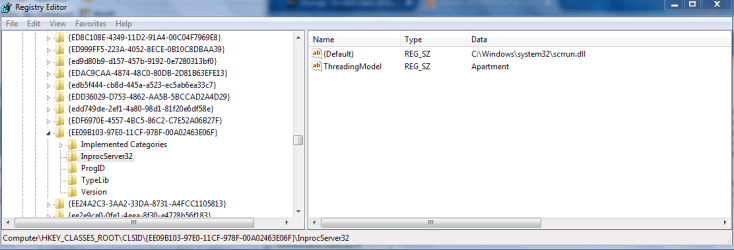
can you navigate to here, see screenshot, they should be identical, please confirm either way.
follow the dircetions on the bottom of the screenshot via regedit

Roy
 

Attachments

  • hopey1.PNG
    hopey1.PNG
    26.8 KB · Views: 2

My Computer My Computer

Computer type
PC/Desktop
Computer Manufacturer/Model Number
medionl/Aspire 6930G/acer x55a
OS
W7 home premium 32bit/W7HP 64bit/w10 tp insider ring
CPU
E5300 dual core
Motherboard
medion MS7366
Memory
3gb
Graphics Card(s)
Nvidia Geforce 7100 Nforce 630i
Monitor(s) Displays
avixc
Internet Speed
n (isp resticted to 72)
Antivirus
mse/pands
Browser
palemoon
Other Info
Belkin Fd7050 n USB using Railink RT2870 drivers, more upto date
Hi Roy,

Appreciate the time you've spent trying to help with this so far - thanks.

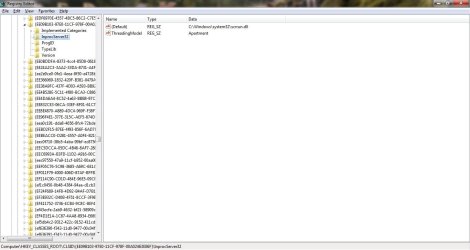
I've attached a screenshot of my regedit - i think its identical to yours.
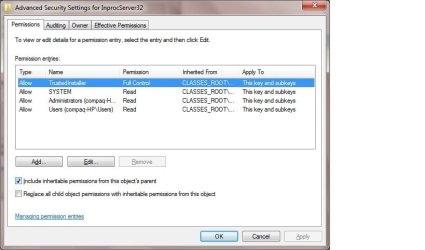
I've also attached a screenshot of permissions for Inprocserver32 in case this helps.
 

Attachments

  • Registry.jpg
    Registry.jpg
    82.8 KB · Views: 0
  • Permissions.jpg
    Permissions.jpg
    42 KB · Views: 0

My Computer My Computer

Computer type
PC/Desktop
OS
Windows 7 Home Premium 64bit
Hi Hopey,
in regard to post 18, i have those entries in my registry DO YOU??.
if not, can you import them and see if they clear the error.

Roy
 

My Computer My Computer

Computer type
PC/Desktop
Computer Manufacturer/Model Number
medionl/Aspire 6930G/acer x55a
OS
W7 home premium 32bit/W7HP 64bit/w10 tp insider ring
CPU
E5300 dual core
Motherboard
medion MS7366
Memory
3gb
Graphics Card(s)
Nvidia Geforce 7100 Nforce 630i
Monitor(s) Displays
avixc
Internet Speed
n (isp resticted to 72)
Antivirus
mse/pands
Browser
palemoon
Other Info
Belkin Fd7050 n USB using Railink RT2870 drivers, more upto date
Hi Roy,
I checked and I already have those registry entries, on post 18 it links to another forum where another person solved this error - i did what they did and also tried changing the permissions on that particular key so that my administrator account also has 'full control' instead of just trusted installer having full control, but the error remains.

I decided I'm going to try and upgrade to windows 10 now. But when i started the upgrade process just before, it gave an error saying Windows is not activated, and I need to do this now before proceeding with upgrade, otherwise I would have to purchase a new windows 10 key.

So I right clicked computer, clicked properties, and at the bottom in the Windows Activation field, it says "25 days to activate". Then it has a product key below - but this is not the same as the product key that is on the sticker on the bottom of my laptop. There is an option to 'change key' next to it - should I select this and input my key from the bottom of my laptop?

I don't understand why it's saying 25 days to activate - when did this start counting down? I did have that error last week where it said Windows wasn't genuine after running one of the fixes, but when I did the command prompt suggested here - that 'not genuine' message disappeared.
 

My Computer My Computer

Computer type
PC/Desktop
OS
Windows 7 Home Premium 64bit
Hi Hopey,
Not surprised at that error re W10 upgrade.
Its all linked to the scripting error, because your comp is CANT talk to the MS servers, hence the not activated reply..

Do you have any install/re-installation discs, from your OEM, or a factory reset option.
If so either way back up your data.
1st choice repair install
http://www.sevenforums.com/tutorials/3413-repair-install.html?ltr=R
2nd choice factory reset
3nd choice complete re-install 7 or 10, from either your OEM discs
or Windows 10 - Clean Install - Windows 10 Forums.

The key on the comp, is your back up, DO NOT POST IT,
you should have found this one
4FG99-BC3HD-73CQT-WMF7J-3Q6C9, basic HP W7 home premium key.

non of the above methods should requie your back-up key.

We should be able to get a W7 iso, if required.

Roy
 

My Computer My Computer

Computer type
PC/Desktop
Computer Manufacturer/Model Number
medionl/Aspire 6930G/acer x55a
OS
W7 home premium 32bit/W7HP 64bit/w10 tp insider ring
CPU
E5300 dual core
Motherboard
medion MS7366
Memory
3gb
Graphics Card(s)
Nvidia Geforce 7100 Nforce 630i
Monitor(s) Displays
avixc
Internet Speed
n (isp resticted to 72)
Antivirus
mse/pands
Browser
palemoon
Other Info
Belkin Fd7050 n USB using Railink RT2870 drivers, more upto date
Hi Roy,

Just read your last post - been offline for a couple of hours and managed to successfully upgrade to windows 10. :party:

I went ahead and reactivated W7 by right clicking My Computer - Properties, then going to the windows activation link at the bottom. I input the key from the bottom of my laptop and it successfully activated straight away. It then allowed me to upgrade to W10 which i did without a problem. W10 is now showing its still activated. Everything seems to be working fine.

thanks for all your help with this
 

My Computer My Computer

Computer type
PC/Desktop
OS
Windows 7 Home Premium 64bit
Back
Top