Windows update fails after reformat, multiple errors, svchost cpu

realist

New member
Local time
11:53 AM
Messages
6
Hello,

I'm having a hard time fixing Windows update after doing two clean installs. Having tried a lot of things after the first clean install, I did another one, this time installing sp1 offline, followed by the June 2015 windows agent update, also done offline. This didn't work either. At that point I had not reinstalled my antivirus or firewalls. I've been getting a variety of errors, by far the most frequent is 800b0100, but sometimes 80244004, 80072efe, 80096004, 80072f8f, 80244019.

- I have done full virus scans with an updated Trend Micro Titanium and no issues were found.
- I've run the Windows Update diagnostic tool several times. Sometimes it says all is fixed, and sometimes it says the 800b0100 error was not fixed.
- I've run SURT, the update FixIT, SFC scan reports no issues and CheckSUR logs shows no errors.
- I've done the stop/restart sequence for the update agent, bits, and cryptographic services.

Up to very recently I would just get the update errors (one of the above). At this point (and I have no idea what made it change), I'm having the issue where it does not report the error but stays forever checking for the updates, with svchost taking 50% of my CPU, 350M of RAM, via the management instrumentation and windows update agent, even though there is no network traffic at all while this is happening.

I've pretty much tried everything I can, and was hoping to get some help from the veterans here.

When I looked at the detailed report from the diagnostic tool my system was seen as x64 amd architecture. Maybe I'm misinterpreting the 'amd', but I thought it was odd to see that given my CPU is an Intel Dual core.

Let me know if more info is needed.

Thanks!
 

My Computer

Computer type
Laptop
Computer Manufacturer/Model Number
Sony VAIO VGN NW270D
OS
Windows 7 Home Premium SP1 x64
CPU
Intel Core Duo T6600 2.20Ghz
Memory
6GB
Hi Realist,
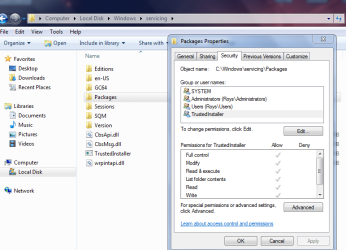
The major error relates to permissions can you check the properties here please
C:\windows\servicing\packages
(trusted installer)

Roy
 

Attachments

  • tiprop.PNG
    tiprop.PNG
    111.6 KB · Views: 0

My Computer

Computer type
PC/Desktop
Computer Manufacturer/Model Number
medionl/Aspire 6930G/acer x55a
OS
W7 home premium 32bit/W7HP 64bit/w10 tp insider ring
CPU
E5300 dual core
Motherboard
medion MS7366
Memory
3gb
Graphics Card(s)
Nvidia Geforce 7100 Nforce 630i
Monitor(s) Displays
avixc
Internet Speed
n (isp resticted to 72)
Antivirus
mse/pands
Browser
palemoon
Other Info
Belkin Fd7050 n USB using Railink RT2870 drivers, more upto date
Dear Roy,

Many thanks for replying. I've checked and all the permissions have check marks in allow (except special permissions at the end with nothing on either allow or deny).
I looked at the diagnostic report closer again and I see that an permission error comes up when it tries to rename the software distribution folder, even run from an elevated command prompt. However, I've successfully run the batch that renames that and catroot2, i.e.

net stop wuauserv
net stop cryptSvc
net stop bits
net stop msiserver
ren C:\Windows\SoftwareDistribution SoftwareDistribution.old
ren C:\Windows\System32\catroot2 catroot2.old
net start wuauserv
net start cryptSvc
net start bits
net start msiserver
pause

Yet nothing seems to fix the issue.

Cheers
 

My Computer

Computer type
Laptop
Computer Manufacturer/Model Number
Sony VAIO VGN NW270D
OS
Windows 7 Home Premium SP1 x64
CPU
Intel Core Duo T6600 2.20Ghz
Memory
6GB
Hi Realist,
Some very strange errors
Time and date incorrect
Components hive WRITE protected-- On E drive
Root Certificates out of date.

Can you confirm some things
Is this comp dual booting, if so is W7 set as the primary boot option.
What drive is the OS on, an external HD
Are you sure that the install media is not corrupt, where did you get it.

can you also run this tool and post the output
http://go.microsoft.com/fwlink/?LinkID=52012


Roy
 

My Computer

Computer type
PC/Desktop
Computer Manufacturer/Model Number
medionl/Aspire 6930G/acer x55a
OS
W7 home premium 32bit/W7HP 64bit/w10 tp insider ring
CPU
E5300 dual core
Motherboard
medion MS7366
Memory
3gb
Graphics Card(s)
Nvidia Geforce 7100 Nforce 630i
Monitor(s) Displays
avixc
Internet Speed
n (isp resticted to 72)
Antivirus
mse/pands
Browser
palemoon
Other Info
Belkin Fd7050 n USB using Railink RT2870 drivers, more upto date
Hi Roy

The time did get messed up at some point and the internet time updater was malfunctioning but after a couple of restarts it's fine now.

I am reinstalling from the recovery partition in my Sony Vaio (fairly old, around 2008), so it's supposed to be legitimate. At some point I had uninstalled and replaced with Windows 7 Pro, because the place where I worked had a licence they could share. I tried using that again before these rounds of reinstall but it wasn't working any more, so I went back to the old system files. Now, the recovery partition does not seem obviously corrupted, in the sense that all that original junkware they threw in with the OS is the same as when I first bought the laptop.

Currently I also have Ubuntu dual-booting, with ubuntu being the default. However the issues started before this, back when it was just the original factory setting OS.

The OS is on the regular C drive of my laptop.

Here's the output of the MGA diagnostic:

Diagnostic Report (1.9.0027.0):
-----------------------------------------
Windows Validation Data-->

Validation Code: 0
Cached Online Validation Code: N/A, hr = 0xc004f012
Windows Product Key: *****-*****-VGV87-C7XPK-CGKHQ
Windows Product Key Hash: sdEjrEJjW0FuXAhegYxl8GAkBYg=
Windows Product ID: 00359-OEM-8992687-00016
Windows Product ID Type: 2
Windows License Type: OEM SLP
Windows OS version: 6.1.7601.2.00010300.1.0.003
ID: {B819AEE7-4B9C-48B6-8E7D-3AD39B90E810}(1)
Is Admin: Yes
TestCab: 0x0
LegitcheckControl ActiveX: N/A, hr = 0x80070002
Signed By: N/A, hr = 0x80070002
Product Name: Windows 7 Home Premium
Architecture: 0x00000009
Build lab: 7601.win7sp1_rtm.101119-1850
TTS Error:
Validation Diagnostic:
Resolution Status: N/A

Vista WgaER Data-->
ThreatID(s): N/A, hr = 0x80070002
Version: N/A, hr = 0x80070002

Windows XP Notifications Data-->
Cached Result: N/A, hr = 0x80070002
File Exists: No
Version: N/A, hr = 0x80070002
WgaTray.exe Signed By: N/A, hr = 0x80070002
WgaLogon.dll Signed By: N/A, hr = 0x80070002

OGA Notifications Data-->
Cached Result: N/A, hr = 0x80070002
Version: N/A, hr = 0x80070002
OGAExec.exe Signed By: N/A, hr = 0x80070002
OGAAddin.dll Signed By: N/A, hr = 0x80070002

OGA Data-->
Office Status: 109 N/A
OGA Version: N/A, 0x80070002
Signed By: N/A, hr = 0x80070002
Office Diagnostics: B4D0AA8B-604-645_025D1FF3-364-80041010_025D1FF3-229-80041010_025D1FF3-230-1_025D1FF3-517-80040154_025D1FF3-237-80040154_025D1FF3-238-2_025D1FF3-244-80070002_025D1FF3-258-3

Browser Data-->
Proxy settings: N/A
User Agent: Mozilla/4.0 (compatible; MSIE 8.0; Win32)
Default Browser: C:\Program Files (x86)\Google\Chrome\Application\chrome.exe
Download signed ActiveX controls: Prompt
Download unsigned ActiveX controls: Disabled
Run ActiveX controls and plug-ins: Allowed
Initialize and script ActiveX controls not marked as safe: Disabled
Allow scripting of Internet Explorer Webbrowser control: Disabled
Active scripting: Allowed
Script ActiveX controls marked as safe for scripting: Allowed

File Scan Data-->
File Mismatch: C:\Windows\system32\wat\watadminsvc.exe[Hr = 0x80070003]
File Mismatch: C:\Windows\system32\wat\npwatweb.dll[Hr = 0x80070003]
File Mismatch: C:\Windows\system32\wat\watux.exe[Hr = 0x80070003]
File Mismatch: C:\Windows\system32\wat\watweb.dll[Hr = 0x80070003]

Other data-->
Office Details: <GenuineResults><MachineData><UGUID>{B819AEE7-4B9C-48B6-8E7D-3AD39B90E810}</UGUID><Version>1.9.0027.0</Version><OS>6.1.7601.2.00010300.1.0.003</OS><Architecture>x64</Architecture><PKey>*****-*****-*****-*****-CGKHQ</PKey><PID>00359-OEM-8992687-00016</PID><PIDType>2</PIDType><SID>S-1-5-21-4132614581-689495770-111919625</SID><SYSTEM><Manufacturer>Sony Corporation</Manufacturer><Model>VGN-NW270D</Model></SYSTEM><BIOS><Manufacturer>American Megatrends Inc.</Manufacturer><Version>R1120Y4</Version><SMBIOSVersion major="2" minor="4"/><Date>20090820000000.000000+000</Date></BIOS><HWID>B0AA3907018400F8</HWID><UserLCID>1009</UserLCID><SystemLCID>0409</SystemLCID><TimeZone>Eastern Standard Time(GMT-05:00)</TimeZone><iJoin>0</iJoin><SBID><stat>3</stat><msppid></msppid><name></name><model></model></SBID><OEM><OEMID>Sony</OEMID><OEMTableID>VAIO</OEMTableID></OEM><GANotification/></MachineData><Software><Office><Result>109</Result><Products/><Applications/></Office></Software></GenuineResults>

Spsys.log Content: 0x80070002

Licensing Data-->
Software licensing service version: 6.1.7601.17514

Name: Windows(R) 7, HomePremium edition
Description: Windows Operating System - Windows(R) 7, OEM_SLP channel
Activation ID: d2c04e90-c3dd-4260-b0f3-f845f5d27d64
Application ID: 55c92734-d682-4d71-983e-d6ec3f16059f
Extended PID: 00359-00178-926-800016-02-4105-7600.0000-1422016
Installation ID: 007653611323114722632894278292539626111956118314051416
Processor Certificate URL: SpcService Web Service
Machine Certificate URL: RacService Web Service
Use License URL: UseLicenseService Web Service
Product Key Certificate URL: PkcService Web Service
Partial Product Key: CGKHQ
License Status: Licensed
Remaining Windows rearm count: 4
Trusted time: 27/05/2016 6:55:19 PM

Windows Activation Technologies-->
HrOffline: 0x00000000
HrOnline: N/A
HealthStatus: 0x0000000000000000
Event Time Stamp: N/A
ActiveX: Not Registered - 0x80040154
Admin Service: Not Registered - 0x80040154
HealthStatus Bitmask Output:


HWID Data-->
HWID Hash Current: MgAAAAEAAwABAAIAAAABAAAAAgABAAEAonYwt7Y8MsG+lSBAJExEUeihzkeMrGJnRso=

OEM Activation 1.0 Data-->
N/A

OEM Activation 2.0 Data-->
BIOS valid for OA 2.0: yes
Windows marker version: 0x20001
OEMID and OEMTableID Consistent: yes
BIOS Information:
ACPI Table Name OEMID Value OEMTableID Value
APIC Sony VAIO
FACP Sony VAIO
HPET Sony VAIO
MCFG Sony VAIO
SLIC Sony VAIO
SSDT Sony VAIO
SSDT Sony VAIO
 

My Computer

Computer type
Laptop
Computer Manufacturer/Model Number
Sony VAIO VGN NW270D
OS
Windows 7 Home Premium SP1 x64
CPU
Intel Core Duo T6600 2.20Ghz
Memory
6GB
By the way, if you think it'll make it easier for you to help me if I do another reinstall from scratch, wiping out the drive fully and getting rid of linux, and follow any offline update path you think it's best, I'll be happy to start that. I have all my important files clouded anyway.

Thanks again
 

My Computer

Computer type
Laptop
Computer Manufacturer/Model Number
Sony VAIO VGN NW270D
OS
Windows 7 Home Premium SP1 x64
CPU
Intel Core Duo T6600 2.20Ghz
Memory
6GB
Hi Realist,
Just run KB971033, it should activate then,
these errors should be gone on your Mgadiag

File Scan Data-->
File Mismatch: C:\Windows\system32\wat\watadminsvc.exe[Hr = 0x80070003]
File Mismatch: C:\Windows\system32\wat\npwatweb.dll[Hr = 0x80070003]
File Mismatch: C:\Windows\system32\wat\watux.exe[Hr = 0x80070003]
File Mismatch: C:\Windows\system32\wat\watweb.dll[Hr = 0x80070003]

You MAY still experience update problems as W7 hates to be the secondary OS.

Roy
 

My Computer

Computer type
PC/Desktop
Computer Manufacturer/Model Number
medionl/Aspire 6930G/acer x55a
OS
W7 home premium 32bit/W7HP 64bit/w10 tp insider ring
CPU
E5300 dual core
Motherboard
medion MS7366
Memory
3gb
Graphics Card(s)
Nvidia Geforce 7100 Nforce 630i
Monitor(s) Displays
avixc
Internet Speed
n (isp resticted to 72)
Antivirus
mse/pands
Browser
palemoon
Other Info
Belkin Fd7050 n USB using Railink RT2870 drivers, more upto date
Hi Roy,

Thanks, I applied KB971033 and those Mgadiag errors are indeed gone. However I still can't run the updates, getting one of the errors I mentioned in my first post.

Any idea of what would be a good offline installation sequence if I did it all from scratch again?

Thanks
 

My Computer

Computer type
Laptop
Computer Manufacturer/Model Number
Sony VAIO VGN NW270D
OS
Windows 7 Home Premium SP1 x64
CPU
Intel Core Duo T6600 2.20Ghz
Memory
6GB
Thanks, I'll try that. To be sure, that would be after an SP1 install, right? But before or after also installing SURT?
 

My Computer

Computer type
Laptop
Computer Manufacturer/Model Number
Sony VAIO VGN NW270D
OS
Windows 7 Home Premium SP1 x64
CPU
Intel Core Duo T6600 2.20Ghz
Memory
6GB
Back
Top