Solved Windows Update fails Error - 80246008

Great!
now all we have to do is wait - I think ;)
What happens with Windows Update now?
Do a Check for Updates - it could take a long time and look like it's stuck, but be patient and leave it for AT LEAST 24 hours!
If it comes back with an error message, post that.
 

My Computer

Computer type
Laptop
Computer Manufacturer/Model Number
Asus K52F or Lenovo B51-80
OS
Win 7 x64 Home Premium (and x86 VirtualBox VM)/Win10
CPU
i3 370M/i7 6500U
Motherboard
Asus/Lenovo
Memory
8GB - finally :)/8GB
Graphics Card(s)
it's an i3, dude!/dual Intel&nVidia
Sound Card
onboard
Monitor(s) Displays
15.6" built-in
Screen Resolution
1366x768/1920x1080
Hard Drives
750GB Seagate internal
Sundry external drives attached to other computers on the local network
1TB SSD on the Lenovo
PSU
n/a
Internet Speed
as much as I can get - usually on a dongle/phone, so <1MB/s
Antivirus
MSE/Defender
Browser
IE11/12/Edge/Chrome/FF(if I must)
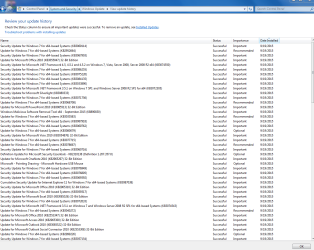
Thanks Noel, here's the message I got after searching for the updates
 

Attachments

  • Win_updates.PNG
    Win_updates.PNG
    48 KB · Views: 2

My Computer

Computer type
PC/Desktop
Computer Manufacturer/Model Number
Custom build
OS
Windows 7 Home Premium 64 bit
CPU
Intel i5-4670K
Motherboard
Gigabyte Z87X-UD4H
Memory
Crucial Ballistix 16GB (PC3-12800)
Graphics Card(s)
EVGA NVIDIA GeForce GTX 750
Sound Card
ASUS Xonar DGX PCI-E GX2.5
Monitor(s) Displays
Dell U2311H
Screen Resolution
1920 x 1080
Hard Drives
Crucial M500 240GB SSD ( Primary),
WD Blue 500 GB,
WD Caviar Black 1 TB
PSU
Corsair HX750
Cooling
ZALMAN CNPS9500 (CPU) , Three cooling case fans.
Antivirus
Microsoft Security Essentials
Browser
Firefox, Chrome
Looks like everything installed OK?
No failures?
 

My Computer

Computer type
Laptop
Computer Manufacturer/Model Number
Asus K52F or Lenovo B51-80
OS
Win 7 x64 Home Premium (and x86 VirtualBox VM)/Win10
CPU
i3 370M/i7 6500U
Motherboard
Asus/Lenovo
Memory
8GB - finally :)/8GB
Graphics Card(s)
it's an i3, dude!/dual Intel&nVidia
Sound Card
onboard
Monitor(s) Displays
15.6" built-in
Screen Resolution
1366x768/1920x1080
Hard Drives
750GB Seagate internal
Sundry external drives attached to other computers on the local network
1TB SSD on the Lenovo
PSU
n/a
Internet Speed
as much as I can get - usually on a dongle/phone, so <1MB/s
Antivirus
MSE/Defender
Browser
IE11/12/Edge/Chrome/FF(if I must)
Nope, no failures. I guess it was the problem with the downloader directory which was fixed by CHKDSK which inturn fixed BITS and rest of the update. Thanks a ton. I wouldn't have solved it without your help.
 
Last edited:

My Computer

Computer type
PC/Desktop
Computer Manufacturer/Model Number
Custom build
OS
Windows 7 Home Premium 64 bit
CPU
Intel i5-4670K
Motherboard
Gigabyte Z87X-UD4H
Memory
Crucial Ballistix 16GB (PC3-12800)
Graphics Card(s)
EVGA NVIDIA GeForce GTX 750
Sound Card
ASUS Xonar DGX PCI-E GX2.5
Monitor(s) Displays
Dell U2311H
Screen Resolution
1920 x 1080
Hard Drives
Crucial M500 240GB SSD ( Primary),
WD Blue 500 GB,
WD Caviar Black 1 TB
PSU
Corsair HX750
Cooling
ZALMAN CNPS9500 (CPU) , Three cooling case fans.
Antivirus
Microsoft Security Essentials
Browser
Firefox, Chrome
Thank YOU - for teaching me a new cause for this problem!

Good luck!
 

My Computer

Computer type
Laptop
Computer Manufacturer/Model Number
Asus K52F or Lenovo B51-80
OS
Win 7 x64 Home Premium (and x86 VirtualBox VM)/Win10
CPU
i3 370M/i7 6500U
Motherboard
Asus/Lenovo
Memory
8GB - finally :)/8GB
Graphics Card(s)
it's an i3, dude!/dual Intel&nVidia
Sound Card
onboard
Monitor(s) Displays
15.6" built-in
Screen Resolution
1366x768/1920x1080
Hard Drives
750GB Seagate internal
Sundry external drives attached to other computers on the local network
1TB SSD on the Lenovo
PSU
n/a
Internet Speed
as much as I can get - usually on a dongle/phone, so <1MB/s
Antivirus
MSE/Defender
Browser
IE11/12/Edge/Chrome/FF(if I must)
Back
Top