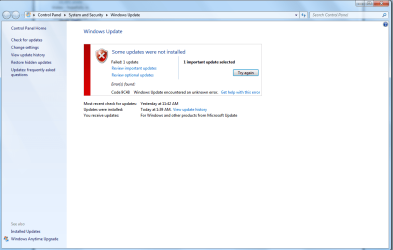
Windows Update fails IE 11, error 80070005, 70002, 70057 + 9C48
Hello,
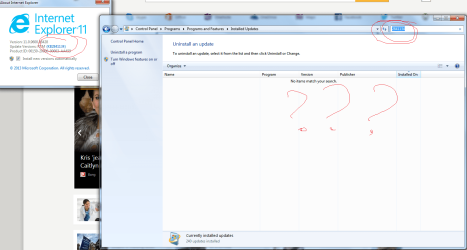
I have the version of IE 11 kb2841134. (opened the browser)
When I try to reinstall it by looking in view updates - it was not there.
My windows update - the IE 11 keeps failing, giving me an error of 9C48.
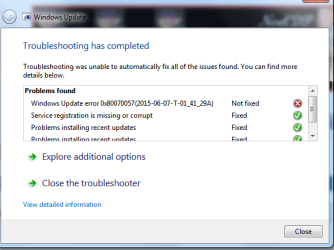
I've used a Windows Update Diagnostic.
I have an error of 70005, 70002 (when installing IE11 as well), 70057 (during the diagnostic). I've tried the toolkit from windows.
I'm not sure which CBS file it is.
The first CBS file. This is the second CBS file.
Here is the Windowslog file.
I've also included this which was in the log file.
Technically what i'm asking is - How do I fix this error and how to download IE11.
Hello,
I have the version of IE 11 kb2841134. (opened the browser)
When I try to reinstall it by looking in view updates - it was not there.
My windows update - the IE 11 keeps failing, giving me an error of 9C48.
I've used a Windows Update Diagnostic.
I have an error of 70005, 70002 (when installing IE11 as well), 70057 (during the diagnostic). I've tried the toolkit from windows.
I'm not sure which CBS file it is.
The first CBS file. This is the second CBS file.
Here is the Windowslog file.
I've also included this which was in the log file.
Code:
00:00.000: ====================================================================
00:00.172: Started: 2015/06/06 (Y/M/D) 00:14:27.516 (local)
00:00.234: Time Format in this log: MM:ss.mmm (minutes:seconds.milliseconds)
00:00.734: Command line: "C:\Windows\SoftwareDistribution\Download\Install\WU-Windows6.1-KB2888049-x64.exe"
00:00.905: INFO:    Windows Update Install: Cleaning up old registry entry: KB2888049
00:01.186: INFO:    Windows Update Install: Trying to extract package as: "C:\Windows\TEMP\IEF161.tmp\Windows6.1-KB2888049-x64.cab"
00:01.311: INFO:    Windows Update Install: Extracted new file to: C:\Windows\TEMP\IEF161.tmp\Windows6.1-KB2888049-x64.cab
00:02.606: INFO:    Windows Update Install: Setup return code: 0x00000000 (0)
00:00.000: ====================================================================
00:00.109: Started: 2015/06/06 (Y/M/D) 00:14:36.799 (local)
00:00.156: Time Format in this log: MM:ss.mmm (minutes:seconds.milliseconds)
00:00.187: Command line: "C:\Windows\SoftwareDistribution\Download\Install\WU-Windows6.1-KB2849696-en.exe"
00:00.234: INFO:    Windows Update Install: Cleaning up old registry entry: IE-Spelling-en.cab
00:00.468: INFO:    Windows Update Install: Trying to extract package as: "C:\Windows\TEMP\IE1333.tmp\IE-Spelling-en.cab"
00:00.639: INFO:    Windows Update Install: Extracted new file to: C:\Windows\TEMP\IE1333.tmp\IE-Spelling-en.cab
00:01.201: INFO:    Windows Update Install: Setup return code: 0x00000000 (0)
00:00.000: ====================================================================
00:00.094: Started: 2015/06/06 (Y/M/D) 00:14:42.315 (local)
00:00.141: Time Format in this log: MM:ss.mmm (minutes:seconds.milliseconds)
00:00.297: Command line: "C:\Windows\SoftwareDistribution\Download\Install\WU-Windows6.1-KB2849697-en.exe"
00:00.344: INFO:    Windows Update Install: Cleaning up old registry entry: IE-Hyphenation-en.cab
00:00.453: INFO:    Windows Update Install: Trying to extract package as: "C:\Windows\TEMP\IE28A6.tmp\IE-Hyphenation-en.cab"
00:00.562: INFO:    Windows Update Install: Extracted new file to: C:\Windows\TEMP\IE28A6.tmp\IE-Hyphenation-en.cab
00:01.358: INFO:    Windows Update Install: Setup return code: 0x00000000 (0)
00:00.000: ====================================================================
00:00.109: Started: 2015/06/06 (Y/M/D) 00:41:29.587 (local)
00:00.187: Time Format in this log: MM:ss.mmm (minutes:seconds.milliseconds)
00:00.234: Command line: "C:\Windows\SoftwareDistribution\Download\Install\WU-Windows6.1-KB2888049-x64.exe"
00:00.296: INFO:    Windows Update Install: Cleaning up old registry entry: KB2888049
00:00.405: INFO:    Windows Update Install: Trying to extract package as: "C:\Windows\TEMP\IEAEC6.tmp\Windows6.1-KB2888049-x64.cab"
00:00.499: INFO:    Windows Update Install: Extracted new file to: C:\Windows\TEMP\IEAEC6.tmp\Windows6.1-KB2888049-x64.cab
00:01.092: INFO:    Windows Update Install: Setup return code: 0x00000000 (0)
00:00.000: ====================================================================
00:00.094: Started: 2015/06/06 (Y/M/D) 00:41:32.231 (local)
00:00.140: Time Format in this log: MM:ss.mmm (minutes:seconds.milliseconds)
00:00.203: Command line: "C:\Windows\SoftwareDistribution\Download\Install\WU-Windows6.1-KB2849696-en.exe"
00:00.234: INFO:    Windows Update Install: Cleaning up old registry entry: IE-Spelling-en.cab
00:00.281: INFO:    Windows Update Install: Trying to extract package as: "C:\Windows\TEMP\IEB8B5.tmp\IE-Spelling-en.cab"
00:00.343: INFO:    Windows Update Install: Extracted new file to: C:\Windows\TEMP\IEB8B5.tmp\IE-Spelling-en.cab
00:00.764: INFO:    Windows Update Install: Setup return code: 0x00000000 (0)
00:00.000: ====================================================================
00:00.093: Started: 2015/06/06 (Y/M/D) 00:41:34.538 (local)
00:00.156: Time Format in this log: MM:ss.mmm (minutes:seconds.milliseconds)
00:00.203: Command line: "C:\Windows\SoftwareDistribution\Download\Install\WU-Windows6.1-KB2849697-en.exe"
00:00.234: INFO:    Windows Update Install: Cleaning up old registry entry: IE-Hyphenation-en.cab
00:00.359: INFO:    Windows Update Install: Trying to extract package as: "C:\Windows\TEMP\IEC208.tmp\IE-Hyphenation-en.cab"
00:00.686: INFO:    Windows Update Install: Extracted new file to: C:\Windows\TEMP\IEC208.tmp\IE-Hyphenation-en.cab
00:01.030: INFO:    Windows Update Install: Setup return code: 0x00000000 (0)
00:00.000: ====================================================================
00:00.110: Started: 2015/06/06 (Y/M/D) 01:00:17.017 (local)
00:00.141: Time Format in this log: MM:ss.mmm (minutes:seconds.milliseconds)
00:00.188: Command line: "C:\Windows\SoftwareDistribution\Download\Install\WU-Windows6.1-KB2888049-x64.exe"
00:00.219: INFO:    Windows Update Install: Cleaning up old registry entry: KB2888049
00:00.281: INFO:    Windows Update Install: Trying to extract package as: "C:\Windows\TEMP\IEE264.tmp\Windows6.1-KB2888049-x64.cab"
00:00.359: INFO:    Windows Update Install: Extracted new file to: C:\Windows\TEMP\IEE264.tmp\Windows6.1-KB2888049-x64.cab
00:00.796: INFO:    Windows Update Install: Setup return code: 0x00000000 (0)
00:00.000: ====================================================================
00:00.046: Started: 2015/06/06 (Y/M/D) 01:00:18.577 (local)
00:00.078: Time Format in this log: MM:ss.mmm (minutes:seconds.milliseconds)
00:00.109: Command line: "C:\Windows\SoftwareDistribution\Download\Install\WU-Windows6.1-KB2849696-en.exe"
00:00.140: INFO:    Windows Update Install: Cleaning up old registry entry: IE-Spelling-en.cab
00:00.187: INFO:    Windows Update Install: Trying to extract package as: "C:\Windows\TEMP\IEE82E.tmp\IE-Spelling-en.cab"
00:00.265: INFO:    Windows Update Install: Extracted new file to: C:\Windows\TEMP\IEE82E.tmp\IE-Spelling-en.cab
00:00.670: INFO:    Windows Update Install: Setup return code: 0x00000000 (0)
00:00.000: ====================================================================
00:00.063: Started: 2015/06/06 (Y/M/D) 01:00:20.087 (local)
00:00.109: Time Format in this log: MM:ss.mmm (minutes:seconds.milliseconds)
00:00.141: Command line: "C:\Windows\SoftwareDistribution\Download\Install\WU-Windows6.1-KB2849697-en.exe"
00:00.187: INFO:    Windows Update Install: Cleaning up old registry entry: IE-Hyphenation-en.cab
00:00.250: INFO:    Windows Update Install: Trying to extract package as: "C:\Windows\TEMP\IEEE37.tmp\IE-Hyphenation-en.cab"
00:00.312: INFO:    Windows Update Install: Extracted new file to: C:\Windows\TEMP\IEEE37.tmp\IE-Hyphenation-en.cab
00:00.609: INFO:    Windows Update Install: Setup return code: 0x00000000 (0)
00:00.000: ====================================================================
00:00.062: Started: 2015/06/06 (Y/M/D) 01:09:47.417 (local)
00:00.078: Time Format in this log: MM:ss.mmm (minutes:seconds.milliseconds)
00:00.109: Command line: "C:\Windows\SoftwareDistribution\Download\Install\WU-Windows6.1-KB2888049-x64.exe"
00:00.140: INFO:    Windows Update Install: Cleaning up old registry entry: KB2888049
00:00.187: INFO:    Windows Update Install: Trying to extract package as: "C:\Windows\TEMP\IE9629.tmp\Windows6.1-KB2888049-x64.cab"
00:00.234: INFO:    Windows Update Install: Extracted new file to: C:\Windows\TEMP\IE9629.tmp\Windows6.1-KB2888049-x64.cab
00:00.733: INFO:    Windows Update Install: Setup return code: 0x00000000 (0)
00:00.000: ====================================================================
00:00.031: Started: 2015/06/06 (Y/M/D) 01:09:48.736 (local)
00:00.062: Time Format in this log: MM:ss.mmm (minutes:seconds.milliseconds)
00:00.094: Command line: "C:\Windows\SoftwareDistribution\Download\Install\WU-Windows6.1-KB2849696-en.exe"
00:00.265: INFO:    Windows Update Install: Cleaning up old registry entry: IE-Spelling-en.cab
00:00.406: INFO:    Windows Update Install: Trying to extract package as: "C:\Windows\TEMP\IE9C31.tmp\IE-Spelling-en.cab"
00:00.624: INFO:    Windows Update Install: Extracted new file to: C:\Windows\TEMP\IE9C31.tmp\IE-Spelling-en.cab
00:01.123: INFO:    Windows Update Install: Setup return code: 0x00000000 (0)
00:00.000: ====================================================================
00:00.047: Started: 2015/06/06 (Y/M/D) 01:09:52.281 (local)
00:00.109: Time Format in this log: MM:ss.mmm (minutes:seconds.milliseconds)
00:00.156: Command line: "C:\Windows\SoftwareDistribution\Download\Install\WU-Windows6.1-KB2849697-en.exe"
00:00.187: INFO:    Windows Update Install: Cleaning up old registry entry: IE-Hyphenation-en.cab
00:00.281: INFO:    Windows Update Install: Trying to extract package as: "C:\Windows\TEMP\IEA989.tmp\IE-Hyphenation-en.cab"
00:00.312: INFO:    Windows Update Install: Extracted new file to: C:\Windows\TEMP\IEA989.tmp\IE-Hyphenation-en.cab
00:00.874: INFO:    Windows Update Install: Setup return code: 0x00000000 (0)
Code:
2015-06-06 01:20:52, Info                  CBS    Scavenge: Begin CSI Store
2015-06-06 01:20:53, Info                  CSI    00000026 Performing 1 operations; 1 are not lock/unlock and follow:
  Scavenge (8): flags: 00000017
2015-06-06 01:20:53, Info                  CSI    00000027 Store coherency cookie matches last scavenge cookie, skipping scavenge.
2015-06-06 01:20:53, Info                  CSI    00000028 ICSITransaction::Commit calling IStorePendingTransaction::Apply - coldpatching=FALSE applyflags=7
2015-06-06 01:20:53, Info                  CSI    00000029 Creating NT transaction (seq 2), objectname [6]"(null)"
2015-06-06 01:20:53, Info                  CSI    0000002a Created NT transaction (seq 2) result 0x00000000, handle @0x280
2015-06-06 01:20:54, Info                  CSI    0000002b@2015/6/6:05:20:54.459 CSI perf trace:
CSIPERF:TXCOMMIT;525919
2015-06-06 01:20:54, Info                  CBS    Scavenge: Completed, disposition: 0X1
2015-06-06 01:20:54, Info                  CSI    0000002c@2015/6/6:05:20:54.494 CSI Transaction @0x894b20 destroyed
2015-06-06 01:20:54, Info                  CBS    Failed change service configuration. [HRESULT = 0x80070005 - E_ACCESSDENIED]
2015-06-06 01:20:54, Info                  CBS    Failed to change the Trusted Installer to a demand start service [HRESULT = 0x80070005 - E_ACCESSDENIED]
2015-06-06 01:20:54, Info                  CBS    Reboot mark refs: 0
2015-06-06 01:20:54, Info                  CBS    Idle processing thread terminated normally
2015-06-06 01:20:54, Info                  CBS    Ending the TrustedInstaller main loop.
2015-06-06 01:20:54, Info                  CBS    Starting TrustedInstaller finalization.
2015-06-06 01:20:56, Info                  CBS    Ending TrustedInstaller finalization.
Technically what i'm asking is - How do I fix this error and how to download IE11.
Last edited:
My Computer
At a glance
Windows 7 Home premium x86/64
- Computer type
- PC/Desktop
- OS
- Windows 7 Home premium x86/64