Windows update fails to install IE11, error 9C57

dan222

New member
Local time
1:04 PM
Messages
15
This is on a friends Lenovo B520 running Windows Home Premium 64 bit.

I've found that this PC has been failing to install updates for some time now. It's still running IE9 - I can see previous failed attempts at installing IE10 and now it's failing to install IE11 in the Windows update control panel.

I've run the SURT and sfc /scannow

The CHECKSUR.log lists 127 corrupt MUM and Cat files but I'm unable to locate good versions of these to start attempting repairs. I've attached just the log files from the CBS folder as including the CABs meant the attachment was too large.

Thanks for any help you can give.

View attachment 347335
 

My Computer My Computer

At a glance

Windows 7 Home Premium 64 bit
Computer type
PC/Desktop
Computer Manufacturer/Model Number
Lenovo B520
OS
Windows 7 Home Premium 64 bit
Here's the summary from the CheckSUR log...
Code:
Summary:
Seconds executed: 4517
 Found 254 errors
  CBS MUM Corrupt Total count: 127
  CBS Catalog Corrupt Total count: 127
Luckily, they all appear to relate to one update - or I'd have been reluctant to attempt anything short of a repair install.

The SFC results appear to have rolled off into the Persist files - please post the two latest CBSPersist files so I can take a look at them.

I'll post a fix for these file later (maybe tomorrow, though)
 

My Computer My Computer

At a glance

Win 7 x64 Home Premium (and x86 VirtualBox VM...i3 370M/i7 6500U8GB - finally :)/8GBit's an i3, dude!/dual Intel&nVidia
Computer type
Laptop
Computer Manufacturer/Model Number
Asus K52F or Lenovo B51-80
OS
Win 7 x64 Home Premium (and x86 VirtualBox VM)/Win10
CPU
i3 370M/i7 6500U
Motherboard
Asus/Lenovo
Memory
8GB - finally :)/8GB
Graphics Card(s)
it's an i3, dude!/dual Intel&nVidia
Sound Card
onboard
Monitor(s) Displays
15.6" built-in
Screen Resolution
1366x768/1920x1080
Hard Drives
750GB Seagate internal
Sundry external drives attached to other computers on the local network
1TB SSD on the Lenovo
PSU
n/a
Internet Speed
as much as I can get - usually on a dongle/phone, so <1MB/s
Antivirus
MSE/Defender
Browser
IE11/12/Edge/Chrome/FF(if I must)
OK, thanks very much.

I had a look at the last 2 CBSPersist files and they looked very similar. Probably because I had previously run the SURT a few times, so I've just run SFC again now and have uploaded the new log file. Hope that will be OK.

Code:
C:\windows\system32>sfc /scannow

Beginning system scan.  This process will take some time.

Beginning verification phase of system scan.
Verification 100% complete.

Windows Resource Protection did not find any integrity violations.

View attachment 347336
 

My Computer My Computer

At a glance

Windows 7 Home Premium 64 bit
Computer type
PC/Desktop
Computer Manufacturer/Model Number
Lenovo B520
OS
Windows 7 Home Premium 64 bit
The background CBS log shows these errors...
Code:
 Line 88: 2015-01-23 14:22:32, Error                 CBS    Failed to verify if catalog file [URL="file://\\?\C:\windows\Servicing\Packages\Microsoft-Windows-PlatformUpdate-Win7-SRV08R2-Package~31bf3856ad364e35~amd64~nl-NL~7.1.7601.16492.cat"]\\?\C:\windows\Servicing\Packages\Microsoft-Windows-PlatformUpdate-Win7-SRV08R2-Package~31bf3856ad364e35~amd64~nl-NL~7.1.7601.16492.cat[/URL] is valid. [HRESULT = 0x800b0100 - TRUST_E_NOSIGNATURE]
 Line 95: 2015-01-23 14:22:32, Error                 CBS    Delay Initialization Failed [HRESULT = 0x800b0100 - TRUST_E_NOSIGNATURE]
 Line 98: 2015-01-23 14:22:32, Error                 CBS    Failed to verify if catalog file [URL="file://\\?\C:\windows\Servicing\Packages\Microsoft-Windows-PlatformUpdate-Win7-SRV08R2-Package~31bf3856ad364e35~amd64~nl-NL~7.1.7601.16492.cat"]\\?\C:\windows\Servicing\Packages\Microsoft-Windows-PlatformUpdate-Win7-SRV08R2-Package~31bf3856ad364e35~amd64~nl-NL~7.1.7601.16492.cat[/URL] is valid. [HRESULT = 0x800b0100 - TRUST_E_NOSIGNATURE]
 Line 105: 2015-01-23 14:22:32, Error                 CBS    Delay Initialization Failed [HRESULT = 0x800b0100 - TRUST_E_NOSIGNATURE]
 Line 108: 2015-01-23 14:22:32, Error                 CBS    Failed to verify if catalog file [URL="file://\\?\C:\windows\Servicing\Packages\Microsoft-Windows-PlatformUpdate-Win7-SRV08R2-Package~31bf3856ad364e35~amd64~nl-NL~7.1.7601.16492.cat"]\\?\C:\windows\Servicing\Packages\Microsoft-Windows-PlatformUpdate-Win7-SRV08R2-Package~31bf3856ad364e35~amd64~nl-NL~7.1.7601.16492.cat[/URL] is valid. [HRESULT = 0x800b0100 - TRUST_E_NOSIGNATURE]
 Line 115: 2015-01-23 14:22:32, Error                 CBS    Delay Initialization Failed [HRESULT = 0x800b0100 - TRUST_E_NOSIGNATURE]
and nothing more.

I'll get working on the fix this morning - promise!
 

My Computer My Computer

At a glance

Win 7 x64 Home Premium (and x86 VirtualBox VM...i3 370M/i7 6500U8GB - finally :)/8GBit's an i3, dude!/dual Intel&nVidia
Computer type
Laptop
Computer Manufacturer/Model Number
Asus K52F or Lenovo B51-80
OS
Win 7 x64 Home Premium (and x86 VirtualBox VM)/Win10
CPU
i3 370M/i7 6500U
Motherboard
Asus/Lenovo
Memory
8GB - finally :)/8GB
Graphics Card(s)
it's an i3, dude!/dual Intel&nVidia
Sound Card
onboard
Monitor(s) Displays
15.6" built-in
Screen Resolution
1366x768/1920x1080
Hard Drives
750GB Seagate internal
Sundry external drives attached to other computers on the local network
1TB SSD on the Lenovo
PSU
n/a
Internet Speed
as much as I can get - usually on a dongle/phone, so <1MB/s
Antivirus
MSE/Defender
Browser
IE11/12/Edge/Chrome/FF(if I must)
I've uploaded a file - d22aa.zip - to my OneDrive at Noel's OneDrive
Please download and save it.
Right-click on the downloaded file, and select Extract all…
Extract to the default location - which will create a new folder d22aa in the same place.
Open this folder - there should be one folder inside it (Packages)

Copy the content of the Packages folder to the folder
C:\Windows\Temp\CheckSur\Servicing\Packages

Now run the CheckSUR tool again (it may take a while)

Post the new CheckSUR.log file, and the CheckSUR.persist.log file.
 

My Computer My Computer

At a glance

Win 7 x64 Home Premium (and x86 VirtualBox VM...i3 370M/i7 6500U8GB - finally :)/8GBit's an i3, dude!/dual Intel&nVidia
Computer type
Laptop
Computer Manufacturer/Model Number
Asus K52F or Lenovo B51-80
OS
Win 7 x64 Home Premium (and x86 VirtualBox VM)/Win10
CPU
i3 370M/i7 6500U
Motherboard
Asus/Lenovo
Memory
8GB - finally :)/8GB
Graphics Card(s)
it's an i3, dude!/dual Intel&nVidia
Sound Card
onboard
Monitor(s) Displays
15.6" built-in
Screen Resolution
1366x768/1920x1080
Hard Drives
750GB Seagate internal
Sundry external drives attached to other computers on the local network
1TB SSD on the Lenovo
PSU
n/a
Internet Speed
as much as I can get - usually on a dongle/phone, so <1MB/s
Antivirus
MSE/Defender
Browser
IE11/12/Edge/Chrome/FF(if I must)
2/3s of the way there ;)
Code:
Summary:
Seconds executed: 3178
 Found 155 errors
 Fixed 101 errors
  CBS MUM Corrupt Total count: 127
  Fixed: CBS MUM Corrupt.  Total count: 100
  CBS Catalog Corrupt Total count: 28
  Fixed: CBS Catalog Corrupt.  Total count: 1
  Fixed: CBS Paired File.  Total count: 101

I'll post another fix protocol later.
 

My Computer My Computer

At a glance

Win 7 x64 Home Premium (and x86 VirtualBox VM...i3 370M/i7 6500U8GB - finally :)/8GBit's an i3, dude!/dual Intel&nVidia
Computer type
Laptop
Computer Manufacturer/Model Number
Asus K52F or Lenovo B51-80
OS
Win 7 x64 Home Premium (and x86 VirtualBox VM)/Win10
CPU
i3 370M/i7 6500U
Motherboard
Asus/Lenovo
Memory
8GB - finally :)/8GB
Graphics Card(s)
it's an i3, dude!/dual Intel&nVidia
Sound Card
onboard
Monitor(s) Displays
15.6" built-in
Screen Resolution
1366x768/1920x1080
Hard Drives
750GB Seagate internal
Sundry external drives attached to other computers on the local network
1TB SSD on the Lenovo
PSU
n/a
Internet Speed
as much as I can get - usually on a dongle/phone, so <1MB/s
Antivirus
MSE/Defender
Browser
IE11/12/Edge/Chrome/FF(if I must)
I've uploaded a file - d22ab.zip - to my OneDrive at Noel's OneDrive
Please download and save it.
Right-click on the downloaded file, and select Extract all…
Extract to the default location - which will create a new folder d22ab in the same place.
Open this folder - there should be one folders inside it (Packages)

Copy the content of the Packages folder to the folder
C:\Windows\Temp\CheckSur\Servicing\Packages

Now run the CheckSUR tool again (it may take a while)

Post the new CheckSUR.log file, and the CheckSUR.persist.log file.
 

My Computer My Computer

At a glance

Win 7 x64 Home Premium (and x86 VirtualBox VM...i3 370M/i7 6500U8GB - finally :)/8GBit's an i3, dude!/dual Intel&nVidia
Computer type
Laptop
Computer Manufacturer/Model Number
Asus K52F or Lenovo B51-80
OS
Win 7 x64 Home Premium (and x86 VirtualBox VM)/Win10
CPU
i3 370M/i7 6500U
Motherboard
Asus/Lenovo
Memory
8GB - finally :)/8GB
Graphics Card(s)
it's an i3, dude!/dual Intel&nVidia
Sound Card
onboard
Monitor(s) Displays
15.6" built-in
Screen Resolution
1366x768/1920x1080
Hard Drives
750GB Seagate internal
Sundry external drives attached to other computers on the local network
1TB SSD on the Lenovo
PSU
n/a
Internet Speed
as much as I can get - usually on a dongle/phone, so <1MB/s
Antivirus
MSE/Defender
Browser
IE11/12/Edge/Chrome/FF(if I must)
Thanks again. Looks much better now. Will wait for your reply before trying to install IE11 again.

Code:
Found 28 errors
 Fixed 28 errors
  CBS MUM Corrupt Total count: 27
  Fixed: CBS MUM Corrupt.  Total count: 27
  CBS Catalog Corrupt Total count: 1
  Fixed: CBS Catalog Corrupt.  Total count: 1
  Fixed: CBS Paired File.  Total count: 28

View attachment CheckSUR.log
View attachment 348035
 

My Computer My Computer

At a glance

Windows 7 Home Premium 64 bit
Computer type
PC/Desktop
Computer Manufacturer/Model Number
Lenovo B520
OS
Windows 7 Home Premium 64 bit
Great - now run another SFC /SCANNOW, and post the new CBS.log
If it shows no problems, do a Check for Updates, and attempt to install ONLY the oldest update found - if that goes in OK, try the rest.
 

My Computer My Computer

At a glance

Win 7 x64 Home Premium (and x86 VirtualBox VM...i3 370M/i7 6500U8GB - finally :)/8GBit's an i3, dude!/dual Intel&nVidia
Computer type
Laptop
Computer Manufacturer/Model Number
Asus K52F or Lenovo B51-80
OS
Win 7 x64 Home Premium (and x86 VirtualBox VM)/Win10
CPU
i3 370M/i7 6500U
Motherboard
Asus/Lenovo
Memory
8GB - finally :)/8GB
Graphics Card(s)
it's an i3, dude!/dual Intel&nVidia
Sound Card
onboard
Monitor(s) Displays
15.6" built-in
Screen Resolution
1366x768/1920x1080
Hard Drives
750GB Seagate internal
Sundry external drives attached to other computers on the local network
1TB SSD on the Lenovo
PSU
n/a
Internet Speed
as much as I can get - usually on a dongle/phone, so <1MB/s
Antivirus
MSE/Defender
Browser
IE11/12/Edge/Chrome/FF(if I must)
Thanks.
Code:
sfc /scannow
Beginning system scan.  This process will take some time.
Beginning verification phase of system scan.
Verification 100% complete.
Windows Resource Protection did not find any integrity violations.
CBS log is attached.

A scan for updates found 1 additional update under 'optional' (apart from IE11 which has been there a while): Platform Update for Windows 7 x64-Edition (KB2670838) 12/03/2013

I haven't attempted to install that optional update yet.
View attachment 348051
 

My Computer My Computer

At a glance

Windows 7 Home Premium 64 bit
Computer type
PC/Desktop
Computer Manufacturer/Model Number
Lenovo B520
OS
Windows 7 Home Premium 64 bit
That 'optional' update is a pre-requisite for IE11, I believe - please try installing it on its own - what happens?
 

My Computer My Computer

At a glance

Win 7 x64 Home Premium (and x86 VirtualBox VM...i3 370M/i7 6500U8GB - finally :)/8GBit's an i3, dude!/dual Intel&nVidia
Computer type
Laptop
Computer Manufacturer/Model Number
Asus K52F or Lenovo B51-80
OS
Win 7 x64 Home Premium (and x86 VirtualBox VM)/Win10
CPU
i3 370M/i7 6500U
Motherboard
Asus/Lenovo
Memory
8GB - finally :)/8GB
Graphics Card(s)
it's an i3, dude!/dual Intel&nVidia
Sound Card
onboard
Monitor(s) Displays
15.6" built-in
Screen Resolution
1366x768/1920x1080
Hard Drives
750GB Seagate internal
Sundry external drives attached to other computers on the local network
1TB SSD on the Lenovo
PSU
n/a
Internet Speed
as much as I can get - usually on a dongle/phone, so <1MB/s
Antivirus
MSE/Defender
Browser
IE11/12/Edge/Chrome/FF(if I must)
Thanks for your continued help with this.

That update initially appeared to install correctly (as shown in the Windows Update control panel) and asked for a restart to finish, but there were issues afterwards.

During the boot process there was a dialog shown that said:
C:\Windows\system32\WindowsCodecs.dll is either not designed to run on Windows or it contains an error. Try installing the program again using the original installation media or contact your system administrator or the software vendor for support.

After clicking OK on that (the only choice), there was a larger progress message that said:
Failure configuring Windows updates. Reverting changes. Do not turn off your computer.
 

My Computer My Computer

At a glance

Windows 7 Home Premium 64 bit
Computer type
PC/Desktop
Computer Manufacturer/Model Number
Lenovo B520
OS
Windows 7 Home Premium 64 bit

My Computer My Computer

At a glance

Windows 7 Home Premium 64 bit
Computer type
PC/Desktop
Computer Manufacturer/Model Number
Lenovo B520
OS
Windows 7 Home Premium 64 bit
This error appears repeatedly...
Code:
2015-01-30 11:12:19, Info                  CSI    00000009 CSI Store 185463152 (0x000000000b0df170) initialized
2015-01-30 11:12:19, Info                  CBS    Session: 1984_3085013 initialized by client SPP.
2015-01-30 11:12:59, Info                  CBS    Failed to peek next token (status=0xc0000161) [HRESULT = 0x800f0900 - CBS_E_XML_PARSER_FAILURE]
2015-01-30 11:12:59, Info                  CBS    Failed to get next Token [HRESULT = 0x800f0900 - CBS_E_XML_PARSER_FAILURE]
2015-01-30 11:12:59, Info                  CBS    Wrong XML DECL [HRESULT = 0x800f0900 - CBS_E_XML_PARSER_FAILURE]
2015-01-30 11:12:59, Info                  CBS    Invalid xml format [HRESULT = 0x800f0900 - CBS_E_XML_PARSER_FAILURE]
2015-01-30 11:12:59, Info                  CBS    Manifest parsing error at line: 1, context: 
 [HRESULT = 0x800f0900 - CBS_E_XML_PARSER_FAILURE]
2015-01-30 11:12:59, Info                  CBS    Failed to parse the manifest from the buffer. [HRESULT = 0x800f0900 - CBS_E_XML_PARSER_FAILURE]
2015-01-30 11:12:59, Error                 CBS    Failed to parse package manifest: [URL="file://\\?\GLOBALROOT\Device\HarddiskVolumeShadowCopy13\windows\Servicing\Packages\Microsoft-Windows-PlatformUpdate-Win7-SRV08R2-Package-MiniLP~31bf3856ad364e35~amd64~nl-NL~7.1.7601.16492.mum"]\\?\GLOBALROOT\Device\HarddiskVolumeShadowCopy13\windows\Servicing\Packages\Microsoft-Windows-PlatformUpdate-Win7-SRV08R2-Package-MiniLP~31bf3856ad364e35~amd64~nl-NL~7.1.7601.16492.mum[/URL] [HRESULT = 0x800f0900 - CBS_E_XML_PARSER_FAILURE]
2015-01-30 11:12:59, Info                  CBS    Mark store corruption flag because of package: Microsoft-Windows-PlatformUpdate-Win7-SRV08R2-Package-MiniLP~31bf3856ad364e35~amd64~nl-NL~7.1.7601.16492. [HRESULT = 0x800f0900 - CBS_E_XML_PARSER_FAILURE]
2015-01-30 11:12:59, Info                  CBS    Failed to initialize package: Microsoft-Windows-PlatformUpdate-Win7-SRV08R2-Package-MiniLP~31bf3856ad364e35~amd64~nl-NL~7.1.7601.16492, from path: [URL="file://\\?\GLOBALROOT\Device\HarddiskVolumeShadowCopy13\windows\Servicing\Packages\Microsoft-Windows-PlatformUpdate-Win7-SRV08R2-Package-MiniLP~31bf3856ad364e35~amd64~nl-NL~7.1.7601.16492.mum"]\\?\GLOBALROOT\Device\HarddiskVolumeShadowCopy13\windows\Servicing\Packages\Microsoft-Windows-PlatformUpdate-Win7-SRV08R2-Package-MiniLP~31bf3856ad364e35~amd64~nl-NL~7.1.7601.16492.mum[/URL], existing package: 1 [HRESULT = 0x800f0900 - CBS_E_XML_PARSER_FAILURE]

Please try installing the patch from a standalone... Download Platform Update for Windows 7 from Official Microsoft Download Center
 

My Computer My Computer

At a glance

Win 7 x64 Home Premium (and x86 VirtualBox VM...i3 370M/i7 6500U8GB - finally :)/8GBit's an i3, dude!/dual Intel&nVidia
Computer type
Laptop
Computer Manufacturer/Model Number
Asus K52F or Lenovo B51-80
OS
Win 7 x64 Home Premium (and x86 VirtualBox VM)/Win10
CPU
i3 370M/i7 6500U
Motherboard
Asus/Lenovo
Memory
8GB - finally :)/8GB
Graphics Card(s)
it's an i3, dude!/dual Intel&nVidia
Sound Card
onboard
Monitor(s) Displays
15.6" built-in
Screen Resolution
1366x768/1920x1080
Hard Drives
750GB Seagate internal
Sundry external drives attached to other computers on the local network
1TB SSD on the Lenovo
PSU
n/a
Internet Speed
as much as I can get - usually on a dongle/phone, so <1MB/s
Antivirus
MSE/Defender
Browser
IE11/12/Edge/Chrome/FF(if I must)
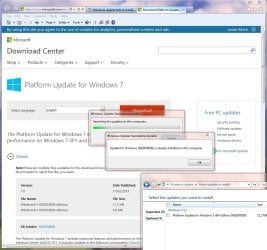
OK, thanks. I've now tried that, but the standalone update won't install as it says it's already installed on this computer. I've attached a screen shot (and the usual logs) to show you that the Windows Update control panel still shows that update as being required.

Status.JPG

I've also noticed today that a further critical update is showing now in the updates control panel (KB2977728) but haven't attempted to install that yet.

Thanks for any further advice you can give.

View attachment 348417
View attachment CheckSUR logs.zip
 

My Computer My Computer

At a glance

Windows 7 Home Premium 64 bit
Computer type
PC/Desktop
Computer Manufacturer/Model Number
Lenovo B520
OS
Windows 7 Home Premium 64 bit
Hmmm - one thing I hadn't noticed before is that you've run (or somebody has run) CheckSUR 14 times since the machine apparently started having problems, way back in July 2013.
KB2670838 is actually a pre-requisite for IE10, as well as for IE11 (and is supposed to uninstall IE10 as well if uninstalled)

Please try and find KB2670838 in the list of installed updates - if found, try uninstalling it (what happens?).

It may be that the initial problem - which was considerable - was the result of major problems.
Here's the summary of that first log...
Code:
Summary:
Seconds executed: 3208
 Found 484 errors
 Fixed 230 errors
  CSI F Mark Missing Total count: 230
  Fixed: CSI F Mark Missing.  Total count: 230
  CBS MUM Corrupt Total count: 127
  CBS Catalog Corrupt Total count: 127

Another run with a newer CheckSUR achieved the following...
Code:
Summary:
Seconds executed: 3178
 Found 155 errors
 Fixed 101 errors
  CBS MUM Corrupt Total count: 127
  Fixed: CBS MUM Corrupt.  Total count: 100
  CBS Catalog Corrupt Total count: 28
  Fixed: CBS Catalog Corrupt.  Total count: 1
  Fixed: CBS Paired File.  Total count: 101
Note that a new corruption had appeared in the meantime.

I'm beginning to suspect hardware problems - with hard drive or RAM are most likely.

Let's see if the Event Viewer logs can help...

Open Event Viewer
click on the Windows logs entry in the left pane to expand it.
Now click on the Application entry - wait while it loads.
Click on 'File' in the menu bar and select Save...
Save the file as Appevt.evtx
Repeat for the System log
then zip both, and upload them.
 

My Computer My Computer

At a glance

Win 7 x64 Home Premium (and x86 VirtualBox VM...i3 370M/i7 6500U8GB - finally :)/8GBit's an i3, dude!/dual Intel&nVidia
Computer type
Laptop
Computer Manufacturer/Model Number
Asus K52F or Lenovo B51-80
OS
Win 7 x64 Home Premium (and x86 VirtualBox VM)/Win10
CPU
i3 370M/i7 6500U
Motherboard
Asus/Lenovo
Memory
8GB - finally :)/8GB
Graphics Card(s)
it's an i3, dude!/dual Intel&nVidia
Sound Card
onboard
Monitor(s) Displays
15.6" built-in
Screen Resolution
1366x768/1920x1080
Hard Drives
750GB Seagate internal
Sundry external drives attached to other computers on the local network
1TB SSD on the Lenovo
PSU
n/a
Internet Speed
as much as I can get - usually on a dongle/phone, so <1MB/s
Antivirus
MSE/Defender
Browser
IE11/12/Edge/Chrome/FF(if I must)
I know that some repair work was carried out on this PC in the past but it had been given a clean bill of health after that. Clearly that wasn't the case!

I've checked the list of installed updates and unfortunately KB2670838 is not in that list so I couldn't attempt the removal.

I've attached the event logs now for you. Thanks again.

View attachment Appevt.zip
View attachment Sysevt.zip
 

My Computer My Computer

At a glance

Windows 7 Home Premium 64 bit
Computer type
PC/Desktop
Computer Manufacturer/Model Number
Lenovo B520
OS
Windows 7 Home Premium 64 bit
You never mentioned you were also getting non-genuine notifications? - or at least demands to re-activate Windows?
Update Windows license and product key tokens failed with 0x80049F2F.
C:\windows\system32\spp\tokens\ppdlic\msmpeg2vdec-ppdlic.xrm-ms


we need to see a full copy of the report produced by the MGADiag tool
(download and save to desktop - http://go.microsoft.com/fwlink/?linkid=52012 )
Once saved, run the tool.
Click on the Continue button, which will produce the report.
To copy the report to your response, click on the Copy button in the tool (ignore any error messages at this point), and then paste (using either r-click/Paste, or Ctrl+V ) into your response.
- in your own thread, please

Please also state the Version and Edition of Windows quoted on your COA sticker (if you have one) on the case of your machine (or inside the battery compartment), but do NOT quote the Key on the sticker!
http://www.microsoft.com/en-us/howtotell/Hardware.aspx
 

My Computer My Computer

At a glance

Win 7 x64 Home Premium (and x86 VirtualBox VM...i3 370M/i7 6500U8GB - finally :)/8GBit's an i3, dude!/dual Intel&nVidia
Computer type
Laptop
Computer Manufacturer/Model Number
Asus K52F or Lenovo B51-80
OS
Win 7 x64 Home Premium (and x86 VirtualBox VM)/Win10
CPU
i3 370M/i7 6500U
Motherboard
Asus/Lenovo
Memory
8GB - finally :)/8GB
Graphics Card(s)
it's an i3, dude!/dual Intel&nVidia
Sound Card
onboard
Monitor(s) Displays
15.6" built-in
Screen Resolution
1366x768/1920x1080
Hard Drives
750GB Seagate internal
Sundry external drives attached to other computers on the local network
1TB SSD on the Lenovo
PSU
n/a
Internet Speed
as much as I can get - usually on a dongle/phone, so <1MB/s
Antivirus
MSE/Defender
Browser
IE11/12/Edge/Chrome/FF(if I must)
I haven't seen any activation or non-genuine notifications and the owner says he hasn't seen any either. Would have definitely mentioned it.

The PC was left powered on this afternoon (idle) but had restarted itself and launched the Startup Repair screen. There was a dialog giving the option to restore the computer using System Restore, or cancel so I chose cancel and it tried to complete some repairs but failed with the following errors

Code:
Problem Event Name: StartupRepairOffline
Problem Signature 01: 6.1.7600.16385
Problem Signature 02: 6.1.7600.16385
Problem Signature 03: unknown
Problem Signature 04: 21200059
Problem Signature 05: AutoFailover
Problem Signature 06: 2
Problem Signature 07: NoRootCause
OS Version: 6.1.7601.2.1.0.256.1

I could try to power on and do a Startup Repair again but choose a System Restore point - would that be worthwhile? I'll have to do something before I can run the MGADiag tool.
 

My Computer My Computer

At a glance

Windows 7 Home Premium 64 bit
Computer type
PC/Desktop
Computer Manufacturer/Model Number
Lenovo B520
OS
Windows 7 Home Premium 64 bit
Back
Top