Windows update for IE and SP1

steveeyes

New member
Local time
5:20 AM
Messages
19
I'm so sick of windows update problems that it is starting to make me think MAC :cry:

For weeks when I did sfc /scannow I got corrupted files and much research and effort I could not fix. I suspected that windows update was causing the issues. Finally I just did a Repair Install and installed window updates 3 or 4 at a time. After each update I would do a sfc /scannow to make sure no issues.


I have 3 updates not installed yet and have questions (see image attached -- updated.png)

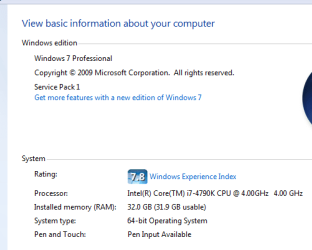
Also I have windows 7 sp1 (see image attached -- servicePack1.png) already installed on my computer (sp1 came installed with the computer and my windows installation disk has sp1 on it)

First question -- why is windows asking me to update SP1 when I already have it installed? Am I missing something? Confusing.

Second question -- from the research I have done, to get the IE10 update installed you have to install SP1 as a prerequisite. But I already have SP1 installed but every time I try to install the IE10 update it fails

Third question -- I thought about just ignoring these updates. Especially since I have SP1 installed and never use IE, but most of my virus issues somehow attach to IE.

I thought maybe I need to make sure it is safe to ignore the update. Also it is just bugging the hell out of me that I can't update IE.

The sp1 update when I have sp1 (it came installed with the computer and sp1 is on the installation disk) installed is just confusing.

That's it. Hopefully I can get some help. Windows is a real pain or at least it has been lately.

Thanks

updates.png
 

Attachments

  • updates.png
    updates.png
    4.7 KB · Views: 1
  • servicePack1.png
    servicePack1.png
    8.9 KB · Views: 9

My Computer My Computer

Computer type
PC/Desktop
Computer Manufacturer/Model Number
cpu solutions
OS
windows 7
Memory
32GB
Monitor(s) Displays
ASUS
Hard Drives
1TB HDD
380 SDD
Cooling
Liquid
Keyboard
Logitech
Mouse
Logitech
Internet Speed
Cable
Antivirus
Norton
Browser
Firefox

My Computer My Computer

Computer type
PC/Desktop
Computer Manufacturer/Model Number
Skylake Special #666
OS
Windows 10 Pro x64
CPU
Intel Core i7 6700K
Motherboard
Asus Sabertooth Z170 Mark 1
Memory
GSkill TridentZ RGB 16GB 3600 16-16-16-36
Graphics Card(s)
EVGA GTX 980 Ti SC x2
Sound Card
Realtek High Definition
Monitor(s) Displays
AOC G2460PG
Screen Resolution
1920 x 1080 144Hz
Hard Drives
Samsung 860 Pro 256GB, Seagate Barracuda 4TB x2
PSU
EVGA 1000 P2, EVGA White Custom Braided Cables
Case
Corsair Vengeance C70 Gunmetal Black
Cooling
Corsair H100i v2, Corsair ML120 x2, Thermal Grizzly Kryonaut
Keyboard
Logitech G910 Orion Spectrum
Mouse
Logitech G700s
Internet Speed
Verizon Fios Quantum Gateway 75/75
Antivirus
Windows Defender, Malwarebytes Free 3.8.3
Browser
Chrome
Other Info
Corsair SP120 x4, LG Blu-ray Drive, Durabrand HT-395 100 Watt Dolby Digital Amp, Corsair H2100 Wireless 7.1 Headset

My Computer My Computer

Computer type
PC/Desktop
Computer Manufacturer/Model Number
Home made Desktop
OS
Windows 10 Pro. 64/ version 1709 Windows 7 Pro/64
CPU
Intel i7-6800K @ 4.3
Motherboard
ASUS X-99 Deluxe II
Memory
Corsair Platinum 16 gig @2400
Graphics Card(s)
EVGA GTX 1070 OC
Monitor(s) Displays
Asus 27" LED LCD/VE278Q
Screen Resolution
1920-1080 or 1280-720 HDMI
Hard Drives
INTEL SSD 730-240 Gb Sata 3.0/
PSU
EVGA Platium 1200W
Case
Phanteks Luxe Tempered Glass 8 fans/ one radiator
Cooling
XSPC/ Water Cooled CPU
Keyboard
Das 4 Professional
Mouse
Logitech M705/MX Anywhere 2-S
Internet Speed
100 mbits
Antivirus
Microsoft Security Essentials/ Malwarebytes Premium 3.0/ SAS
Browser
I.E. 11 default/Firefox/ ISP Time Warner Cable/Spectrum
Other Info
LG BluRay Burner/
Sound system-KLipsch-THX/
Icy Dock ssd Hot Swap bays.
Just hide the IE 10 update.

The one Labeled Service Pack 1 is just a small update, it`s not Service Pack 1. It`s only 9.1 MB

I believe that one`s safe to install, but not positive.

I don`t have it installed, so someone else will have to let you know if it`s safe to install or not.
 

My Computer My Computer

Computer type
PC/Desktop
Computer Manufacturer/Model Number
Skylake Special #666
OS
Windows 10 Pro x64
CPU
Intel Core i7 6700K
Motherboard
Asus Sabertooth Z170 Mark 1
Memory
GSkill TridentZ RGB 16GB 3600 16-16-16-36
Graphics Card(s)
EVGA GTX 980 Ti SC x2
Sound Card
Realtek High Definition
Monitor(s) Displays
AOC G2460PG
Screen Resolution
1920 x 1080 144Hz
Hard Drives
Samsung 860 Pro 256GB, Seagate Barracuda 4TB x2
PSU
EVGA 1000 P2, EVGA White Custom Braided Cables
Case
Corsair Vengeance C70 Gunmetal Black
Cooling
Corsair H100i v2, Corsair ML120 x2, Thermal Grizzly Kryonaut
Keyboard
Logitech G910 Orion Spectrum
Mouse
Logitech G700s
Internet Speed
Verizon Fios Quantum Gateway 75/75
Antivirus
Windows Defender, Malwarebytes Free 3.8.3
Browser
Chrome
Other Info
Corsair SP120 x4, LG Blu-ray Drive, Durabrand HT-395 100 Watt Dolby Digital Amp, Corsair H2100 Wireless 7.1 Headset
Where have you been ? This is old news that started a few moths ago.

There are threads that list the updates that cause the problem.

Try to post your image again, use the paperclip icon in your reply to post the image.

Update KB3022345 is one of the problem updates.

http://www.sevenforums.com/windows-...7-update-kb3022345-causing-corrupt-files.html

It was in my screen shot because it was in-between the two udpates I had questions. I never mention KB3022345 in my question because I was aware of the problem and never intended to install it. So I have been there and is why I never addressed any concern for KB3022345 in my post. Thanks anyways.

Small update to SP1...ok...thanks for that...I will have to check into it. Any other input on this would be appreciated

TO Layback Bear -- hmmmm, not sure why you don't see. I see the images and I did follow the instruction posted about adding images to your post.

Does anyone else not see my images?
 

My Computer My Computer

Computer type
PC/Desktop
Computer Manufacturer/Model Number
cpu solutions
OS
windows 7
Memory
32GB
Monitor(s) Displays
ASUS
Hard Drives
1TB HDD
380 SDD
Cooling
Liquid
Keyboard
Logitech
Mouse
Logitech
Internet Speed
Cable
Antivirus
Norton
Browser
Firefox
That little tiny thing under the word Thanks was the only pic when you 1st posted, but everything is fine now.
 

My Computer My Computer

Computer type
PC/Desktop
Computer Manufacturer/Model Number
Skylake Special #666
OS
Windows 10 Pro x64
CPU
Intel Core i7 6700K
Motherboard
Asus Sabertooth Z170 Mark 1
Memory
GSkill TridentZ RGB 16GB 3600 16-16-16-36
Graphics Card(s)
EVGA GTX 980 Ti SC x2
Sound Card
Realtek High Definition
Monitor(s) Displays
AOC G2460PG
Screen Resolution
1920 x 1080 144Hz
Hard Drives
Samsung 860 Pro 256GB, Seagate Barracuda 4TB x2
PSU
EVGA 1000 P2, EVGA White Custom Braided Cables
Case
Corsair Vengeance C70 Gunmetal Black
Cooling
Corsair H100i v2, Corsair ML120 x2, Thermal Grizzly Kryonaut
Keyboard
Logitech G910 Orion Spectrum
Mouse
Logitech G700s
Internet Speed
Verizon Fios Quantum Gateway 75/75
Antivirus
Windows Defender, Malwarebytes Free 3.8.3
Browser
Chrome
Other Info
Corsair SP120 x4, LG Blu-ray Drive, Durabrand HT-395 100 Watt Dolby Digital Amp, Corsair H2100 Wireless 7.1 Headset
Back
Top