
Windows Update Problems

aw56001

New member
Local time
11:21 PM
Messages
10
Hello
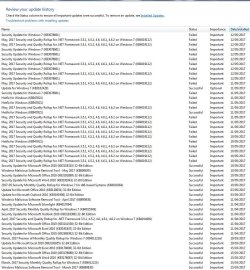
I have had a couple of Windows Update failures in the past but the latest .NET update failed so I thought I'd try and get it sorted. I managed to install one of the old updates that wouldn't run at the time but still left with two. KB3078101 from 11/08/15 and the latest one KB4019112 from 9/5/17. I get error Code 80073712 with these two when tring to install.
I've run the System Update Readiness Tool and after a couple of failures it finally ran and installed.
I've done about 10 SFC /Scannows and everytime says that there are corrupt files but can't fix them.
I've done a log colection and have attached it together with other files.
Hope you can help.
Many thanks
aw56001
PS CBS.zip is too big to upload (12.4MB) what do I do please?
 

Attachments
My Computer

Computer type
PC/Desktop
Computer Manufacturer/Model Number
Zoostorm
OS
Windows 7 Enterprise Edition 32bit
You need to run the CheckSUR tool -
Please download and save the CheckSUR tool from http://support.microsoft.com/kb/947821
(you'll need to look in the details for Windows 7, downloading from the Microsoft Download Center)

Run it - The tool can take anywhere from 5 mins to a couple of hours to run (or 'Install') depending on how much it has to do, and may exit silently - it may appear to freeze for most of that time, but be patient.
The result is logged in the C:\Windows\Logs\CBS\CheckSUR.log file - and an archive …\checksur.persist.log file

Then zip the CheckSUR.log and upload it to your reply.
 

My Computer

Computer type
Laptop
Computer Manufacturer/Model Number
Asus K52F or Lenovo B51-80
OS
Win 7 x64 Home Premium (and x86 VirtualBox VM)/Win10
CPU
i3 370M/i7 6500U
Motherboard
Asus/Lenovo
Memory
8GB - finally :)/8GB
Graphics Card(s)
it's an i3, dude!/dual Intel&nVidia
Sound Card
onboard
Monitor(s) Displays
15.6" built-in
Screen Resolution
1366x768/1920x1080
Hard Drives
750GB Seagate internal
Sundry external drives attached to other computers on the local network
1TB SSD on the Lenovo
PSU
n/a
Internet Speed
as much as I can get - usually on a dongle/phone, so <1MB/s
Antivirus
MSE/Defender
Browser
IE11/12/Edge/Chrome/FF(if I must)
Thanks. I've run this once but will do so again and report back.
aw56001
 

My Computer

Computer type
PC/Desktop
Computer Manufacturer/Model Number
Zoostorm
OS
Windows 7 Enterprise Edition 32bit
Log attached.
Thanks
aw56001
 

Attachments

My Computer

Computer type
PC/Desktop
Computer Manufacturer/Model Number
Zoostorm
OS
Windows 7 Enterprise Edition 32bit
Can anyone help with this please?
Many thanks
aw56001
 

My Computer

Computer type
PC/Desktop
Computer Manufacturer/Model Number
Zoostorm
OS
Windows 7 Enterprise Edition 32bit
Sorry about that - I missed the notifications!

There is a considerable about of corruption present - the CheckSUR result indicate that there are problems not only with the files, but also with the registry, and that the problems may also include your Avast! anti-virus.

Some of the file problems are easy enough to fix - but the registry problems may indicate more deeply-seated errors, and I wouldn't feel happy attempting to fix those.

I feel that your best way forward is going to be a repair install.

One other possibility is to uninstall Avast, then run their cleanup tool, and then run another CheckSUR scan and see if that eliminated the registry problems. If it does, then we may be able to fix the remaining problems
 

My Computer

Computer type
Laptop
Computer Manufacturer/Model Number
Asus K52F or Lenovo B51-80
OS
Win 7 x64 Home Premium (and x86 VirtualBox VM)/Win10
CPU
i3 370M/i7 6500U
Motherboard
Asus/Lenovo
Memory
8GB - finally :)/8GB
Graphics Card(s)
it's an i3, dude!/dual Intel&nVidia
Sound Card
onboard
Monitor(s) Displays
15.6" built-in
Screen Resolution
1366x768/1920x1080
Hard Drives
750GB Seagate internal
Sundry external drives attached to other computers on the local network
1TB SSD on the Lenovo
PSU
n/a
Internet Speed
as much as I can get - usually on a dongle/phone, so <1MB/s
Antivirus
MSE/Defender
Browser
IE11/12/Edge/Chrome/FF(if I must)
If I go for the repair install will all my files/folders/programs be left intact? Do you have a guide for the repair install please?
Thanks
aw56001
 

My Computer

Computer type
PC/Desktop
Computer Manufacturer/Model Number
Zoostorm
OS
Windows 7 Enterprise Edition 32bit
A repair install is otherwise known as an Upgrade Install - Theoretically everything should be pretty much the same as before, but as always, BACK UP before proceeding!
Repair Install - Windows 7 Help Forums
 

My Computer

Computer type
Laptop
Computer Manufacturer/Model Number
Asus K52F or Lenovo B51-80
OS
Win 7 x64 Home Premium (and x86 VirtualBox VM)/Win10
CPU
i3 370M/i7 6500U
Motherboard
Asus/Lenovo
Memory
8GB - finally :)/8GB
Graphics Card(s)
it's an i3, dude!/dual Intel&nVidia
Sound Card
onboard
Monitor(s) Displays
15.6" built-in
Screen Resolution
1366x768/1920x1080
Hard Drives
750GB Seagate internal
Sundry external drives attached to other computers on the local network
1TB SSD on the Lenovo
PSU
n/a
Internet Speed
as much as I can get - usually on a dongle/phone, so <1MB/s
Antivirus
MSE/Defender
Browser
IE11/12/Edge/Chrome/FF(if I must)
Thanks for this.
I know that I have SP1 installed but am not sure if the installation disc contains SP1 or if I downloaded it from Windows Update after install. How do I find out please?
Thanks
aw56001
 

My Computer

Computer type
PC/Desktop
Computer Manufacturer/Model Number
Zoostorm
OS
Windows 7 Enterprise Edition 32bit
Where did you get your Windows 7 Enterprise installation disk?

Jack
 

My Computer

Computer type
PC/Desktop
Computer Manufacturer/Model Number
Home made Desktop
OS
Windows 10 Pro. 64/ version 1709 Windows 7 Pro/64
CPU
Intel i7-6800K @ 4.3
Motherboard
ASUS X-99 Deluxe II
Memory
Corsair Platinum 16 gig @2400
Graphics Card(s)
EVGA GTX 1070 OC
Monitor(s) Displays
Asus 27" LED LCD/VE278Q
Screen Resolution
1920-1080 or 1280-720 HDMI
Hard Drives
INTEL SSD 730-240 Gb Sata 3.0/
PSU
EVGA Platium 1200W
Case
Phanteks Luxe Tempered Glass 8 fans/ one radiator
Cooling
XSPC/ Water Cooled CPU
Keyboard
Das 4 Professional
Mouse
Logitech M705/MX Anywhere 2-S
Internet Speed
100 mbits
Antivirus
Microsoft Security Essentials/ Malwarebytes Premium 3.0/ SAS
Browser
I.E. 11 default/Firefox/ ISP Time Warner Cable/Spectrum
Other Info
LG BluRay Burner/
Sound system-KLipsch-THX/
Icy Dock ssd Hot Swap bays.
It is a multi license copy from a school that I work at. As I do school work at home I was given a copy on a blank disc with working serial.
 

My Computer

Computer type
PC/Desktop
Computer Manufacturer/Model Number
Zoostorm
OS
Windows 7 Enterprise Edition 32bit
Could anyone answer my previous question please?
I take it that Windows 7 SP1 is update KB976932. If this isn't listed under the many windows updates on my system does this mean that SP1 must have been on the installation CD or isn't it as simple as this?
Thanks
aw56001
 

My Computer

Computer type
PC/Desktop
Computer Manufacturer/Model Number
Zoostorm
OS
Windows 7 Enterprise Edition 32bit
The fact that SP1 is installed means that you need media with SP1 already in it.
If you open the DVD in Explorer, check for the version of the file \boot\bootsect.exe - if the disk has SP1 embedded, then the file version will be 6.1.17514
 

My Computer

Computer type
Laptop
Computer Manufacturer/Model Number
Asus K52F or Lenovo B51-80
OS
Win 7 x64 Home Premium (and x86 VirtualBox VM)/Win10
CPU
i3 370M/i7 6500U
Motherboard
Asus/Lenovo
Memory
8GB - finally :)/8GB
Graphics Card(s)
it's an i3, dude!/dual Intel&nVidia
Sound Card
onboard
Monitor(s) Displays
15.6" built-in
Screen Resolution
1366x768/1920x1080
Hard Drives
750GB Seagate internal
Sundry external drives attached to other computers on the local network
1TB SSD on the Lenovo
PSU
n/a
Internet Speed
as much as I can get - usually on a dongle/phone, so <1MB/s
Antivirus
MSE/Defender
Browser
IE11/12/Edge/Chrome/FF(if I must)
File Version is indeed 6.1.7601.17514
Does this mean that the following is the way forward for the repair?

A) While in Windows 7 SP1 installed, insert your retail Windows 7 installation DVD into the DVD drive, or connect your Windows 7 installation USB thumb drive, and click on the Run setup.exe option in AutoPlay. (see screenshot below)
NOTE: If the AutoPlay window does not open, then open the drive folder in Computer and run the setup.exe file.
4038d1233616053-repair-install-autoplay.jpg

B) Go to Go to step 7 below.

Many thanks
aw56001
 

My Computer

Computer type
PC/Desktop
Computer Manufacturer/Model Number
Zoostorm
OS
Windows 7 Enterprise Edition 32bit
Yup - Good luck!
 

My Computer

Computer type
Laptop
Computer Manufacturer/Model Number
Asus K52F or Lenovo B51-80
OS
Win 7 x64 Home Premium (and x86 VirtualBox VM)/Win10
CPU
i3 370M/i7 6500U
Motherboard
Asus/Lenovo
Memory
8GB - finally :)/8GB
Graphics Card(s)
it's an i3, dude!/dual Intel&nVidia
Sound Card
onboard
Monitor(s) Displays
15.6" built-in
Screen Resolution
1366x768/1920x1080
Hard Drives
750GB Seagate internal
Sundry external drives attached to other computers on the local network
1TB SSD on the Lenovo
PSU
n/a
Internet Speed
as much as I can get - usually on a dongle/phone, so <1MB/s
Antivirus
MSE/Defender
Browser
IE11/12/Edge/Chrome/FF(if I must)
Tried it but it caused all sorts of problems with Office 2010 and other programs so I've done a clean install :(
Many thanks for your help with this.
Regards
aw56001
 

My Computer

Computer type
PC/Desktop
Computer Manufacturer/Model Number
Zoostorm
OS
Windows 7 Enterprise Edition 32bit
Back
Top