Solved Windows Update spins "checking for updates"; SURT installer spins

BillRW

New member
Local time
7:47 PM
Messages
6
Windows Update spins "checking for updates"; SURT installer spins

Windows Update spins forever on "checking for updatse". The Win Update Troubleshooter gives error 0x8024402C. I have tried numerous fixes including some KBs - no success.

Today I tried steps 1 and 2 that you recommend should be run before posting on this problem.

1. The SURT installer has been spinning > 3 hrs on "searching for updates on this computer".

2. I ran "sfc /scannow". It says "Windows Resource Protection found corrupt files but was unable to fix some of them" and refers to CBS.log - but that is an empty file.

Can anyone advise me?
 

My Computer My Computer

At a glance

WIndows 7 Pro 64bit3Gb
Computer type
PC/Desktop
Computer Manufacturer/Model Number
Dell Latitude D360
OS
WIndows 7 Pro 64bit
Memory
3Gb
Antivirus
Windows Security Essentials
Browser
Chrome and IE

My Computer My Computer

At a glance

W7 home premium 32bit/W7HP 64bit/w10 tp insid...E5300 dual core3gbNvidia Geforce 7100 Nforce 630i
Computer type
PC/Desktop
Computer Manufacturer/Model Number
medionl/Aspire 6930G/acer x55a
OS
W7 home premium 32bit/W7HP 64bit/w10 tp insider ring
CPU
E5300 dual core
Motherboard
medion MS7366
Memory
3gb
Graphics Card(s)
Nvidia Geforce 7100 Nforce 630i
Monitor(s) Displays
avixc
Internet Speed
n (isp resticted to 72)
Antivirus
mse/pands
Browser
palemoon
Other Info
Belkin Fd7050 n USB using Railink RT2870 drivers, more upto date
Yes thanks but no proxy set

Thanks Roy; however that's the first of many fixes I tried. The auto fixer will not run, and on trying the manual way, the command proxycfg is not recognised. I never had set up any proxy and there is none showing up in the properties of the network connection.
 

My Computer My Computer

At a glance

WIndows 7 Pro 64bit3Gb
Computer type
PC/Desktop
Computer Manufacturer/Model Number
Dell Latitude D360
OS
WIndows 7 Pro 64bit
Memory
3Gb
Antivirus
Windows Security Essentials
Browser
Chrome and IE
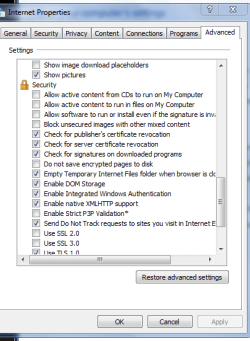
OK Dokey,
Lets try reseting it via IE.


Roy
 

Attachments

  • iesec.PNG
    iesec.PNG
    15.9 KB · Views: 22

My Computer My Computer

At a glance

W7 home premium 32bit/W7HP 64bit/w10 tp insid...E5300 dual core3gbNvidia Geforce 7100 Nforce 630i
Computer type
PC/Desktop
Computer Manufacturer/Model Number
medionl/Aspire 6930G/acer x55a
OS
W7 home premium 32bit/W7HP 64bit/w10 tp insider ring
CPU
E5300 dual core
Motherboard
medion MS7366
Memory
3gb
Graphics Card(s)
Nvidia Geforce 7100 Nforce 630i
Monitor(s) Displays
avixc
Internet Speed
n (isp resticted to 72)
Antivirus
mse/pands
Browser
palemoon
Other Info
Belkin Fd7050 n USB using Railink RT2870 drivers, more upto date
Hello Roy. I assume you meant click the "Restore advanced settings" button, so I have. It didn't seem to change any settings and has not solved the problem.
 

My Computer My Computer

At a glance

WIndows 7 Pro 64bit3Gb
Computer type
PC/Desktop
Computer Manufacturer/Model Number
Dell Latitude D360
OS
WIndows 7 Pro 64bit
Memory
3Gb
Antivirus
Windows Security Essentials
Browser
Chrome and IE
Hi Bill,
the error code points towards an internet connection problem.

can you run these commands
Copy and paste these lines in Note pad.

@Echo on
pushd\windows\system32\drivers\etc
attrib -h -s -r hosts
echo 127.0.0.1 localhost>HOSTS
attrib +r +h +s hosts
popd
ipconfig /release
ipconfig /renew
ipconfig /flushdns
netsh winsock reset all
netsh int ip reset all
shutdown -r -t 1
del %0


Save as flush.bat to your desktop.
Right click the .bat file and choose to run as Administrator. Your computer will reboot itself.

Roy
 

My Computer My Computer

At a glance

W7 home premium 32bit/W7HP 64bit/w10 tp insid...E5300 dual core3gbNvidia Geforce 7100 Nforce 630i
Computer type
PC/Desktop
Computer Manufacturer/Model Number
medionl/Aspire 6930G/acer x55a
OS
W7 home premium 32bit/W7HP 64bit/w10 tp insider ring
CPU
E5300 dual core
Motherboard
medion MS7366
Memory
3gb
Graphics Card(s)
Nvidia Geforce 7100 Nforce 630i
Monitor(s) Displays
avixc
Internet Speed
n (isp resticted to 72)
Antivirus
mse/pands
Browser
palemoon
Other Info
Belkin Fd7050 n USB using Railink RT2870 drivers, more upto date
I ran that but there was a message to the effect that one of the operations couldn't be performed on a local area connection because it wasn't connected (I was on wireless at the time). Re-ran with wired connection, seemed to run OK. Then left machine on all night but no change - Windows Update still not working.
It's maybe worth clarifying that all other Internet connectivity has been perfect throughout - it's only WU that seems to have a problem.
 

My Computer My Computer

At a glance

WIndows 7 Pro 64bit3Gb
Computer type
PC/Desktop
Computer Manufacturer/Model Number
Dell Latitude D360
OS
WIndows 7 Pro 64bit
Memory
3Gb
Antivirus
Windows Security Essentials
Browser
Chrome and IE
I left WU "running" for some hours and it stopped with error C80003FA. I'm about to google for that but posting here in case it is one you know.
 

My Computer My Computer

At a glance

WIndows 7 Pro 64bit3Gb
Computer type
PC/Desktop
Computer Manufacturer/Model Number
Dell Latitude D360
OS
WIndows 7 Pro 64bit
Memory
3Gb
Antivirus
Windows Security Essentials
Browser
Chrome and IE
Update - I thought I'd made progress because when I went to do a restart after the C80003FA, the little shield appeared beside the "shutdown" selection - but there was no message about updates during shutdown or restart, and nothing in WU history (which had been wiped by one of the previous "fixes". I saw in another thread that CF80003FA indicates a memory problem - and since installing an extra 1GB I have had the odd blue-screen - so we'll see what Memtest finds. Nothing so far...
 

My Computer My Computer

At a glance

WIndows 7 Pro 64bit3Gb
Computer type
PC/Desktop
Computer Manufacturer/Model Number
Dell Latitude D360
OS
WIndows 7 Pro 64bit
Memory
3Gb
Antivirus
Windows Security Essentials
Browser
Chrome and IE
Back
Top