Solved Windows update hangs when checking for updates

kevinm21

New member
Local time
8:29 PM
Messages
4
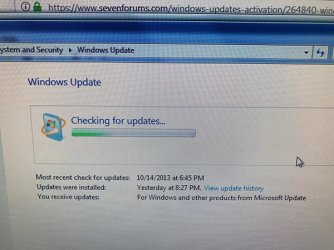
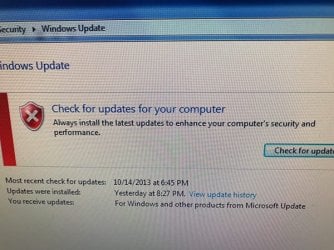
When updating Windows 7 it hangs looking for updates!

I have read the sticky notes on updates and try everything i Knew with out any luck!

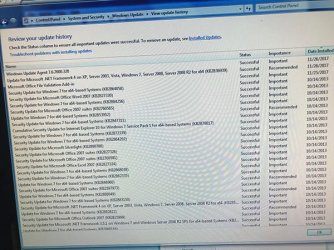
I have an old PC that was not turned on since 2013. So I turned it on an wanted to run an update on the system. It started running but it hanged searching for updates. I left it going for 24 hours. After that I restarted the PC. It installed the following:

1. Windows Update Agent 7.6.7600.320 (date installed 11/25/2017)

After another try it installed the following:
1. Microsoft Office File Validation Add-in (date installed 11/26/2017)
2. Update for Microsoft .NET Framework 4 om XP, Server 2033, Vista, Windows 7, Server 2008, Server 2008 R2 for x64(KB2836939) (date installed 11/26/2017)

Your help is greatly appreciated.
.
.
.
 

Attachments
  • IMG_3760.jpg
    IMG_3760.jpg
    62.3 KB · Views: 38
  • IMG_3761.jpg
    IMG_3761.jpg
    83.7 KB · Views: 37
  • IMG_3762.jpg
    IMG_3762.jpg
    59.4 KB · Views: 37
  • IMG_3759.jpg
    IMG_3759.jpg
    61.5 KB · Views: 37

My Computer

Computer type
PC/Desktop
OS
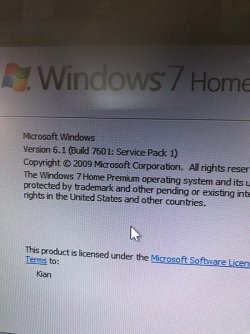
Windows 7 Home
Welcome to Seven Forums.

Try this wizard "Fix: Windows 7 Update stuck on "Checking for updates" https://answers.microsoft.com/en-us/windows/forum/windows_7-update/fix-windows-7-update-stuck-on-checking-for-updates/ad6cfeef-232a-49b4-a57b-39978eea6630?auth=1
Note:
The Wizard works very well but only on windows 7 SP1.So if you want to run it on Windows 7, you must first install the SP1-update manually.


I see that you have Windows SP1 already installed.. I added this note that may be useful for others without SP1.
 

My Computer

OS
Windows 7 Home Premium 32 bit
After 5 days of trying with out any results…

Your method worked flawlessly. It deleted old updates and installed 166 new ones.

Thank you, thank you and thank you jumanji.
 

My Computer

Computer type
PC/Desktop
OS
Windows 7 Home
Thank you, thank you and thank you kevinm21 :) but thank aakkam22, the author of that excellent wizard. It is indeed a beautiful piece of work.
 

My Computer

OS
Windows 7 Home Premium 32 bit
First things first, Thank you aakkam22, but you pointed the fix to me!

I wanted to bring it to you attention, that during the process two of the updates failed to install and another said that it was not necessary.

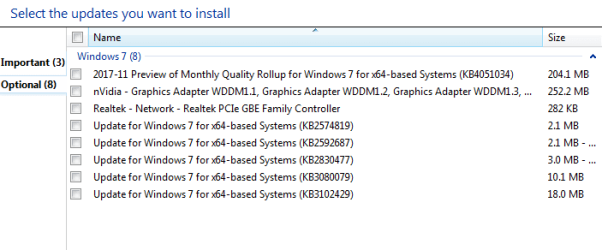
And now when I run the update, under the Optional section (as seen in the screen capture), I see some more older updates for "Windows 7 x64-based Systems". Should I be installing those or just hide them?

Please let me know. Thank you.
 

Attachments

  • Capture-2.PNG
    Capture-2.PNG
    8.1 KB · Views: 25

My Computer

Computer type
PC/Desktop
OS
Windows 7 Home
1. I wouldn't bother about the failed updates. If those are indeed necessary updates Windows update will list those again to be installed. Nevertheless you can manually download those failed updates and try to install . See what happens. If those install, well and good. If those fail, just forget.

2. As a policy, I do not install the drivers that come up in the optional updates.( In the past, I had had problems installing such a display driver.) You may prefer to download and install the latest drivers from manufacturer's/software vendor's website, if you so desire..( nVidia can scan your PC and install the appropriate driver. Use that facility) Rest of the Windows optional updates you can install.
 

My Computer

OS
Windows 7 Home Premium 32 bit
Will do. Thank you
 

My Computer

Computer type
PC/Desktop
OS
Windows 7 Home
If everything is working fine, I advise against installing the "optional" updates. For sure, don't install the "Preview of Monthly Quality Rollup", unless you like the idea of being an unpaid beta tester for Microsoft. The real "Monthly Quality Rollup" will come out soon, and it will be listed with the "Important" updates. At that point it will be safe to install.
 

My Computer

Computer type
PC/Desktop
Computer Manufacturer/Model Number
Dell
OS
Linux Mint 18.2 xfce 64-bit (VMWare host) / Windows 8.1 Pro 32-bit (VMWare guest)
CPU
Haswell
Memory
4 GB
Monitor(s) Displays
Acer 23"
Screen Resolution
1920 x 1080
Hard Drives
Two hard drives, 1TB each: One for Linux, one for my data.
Keyboard
IBM Model M
Antivirus
Sophos (Linux), Trend Micro (Windows)
Browser
Firefox, Opera
Other Info
I use Samba to share my data drive with the other computers at my house and with my guest session in VMWare Workstation Player.
aakkam22's batch file

When I execute aakkam22's Wizard_64.bat it immediately opens the help file and then the Command screen starts flashing. I am unable to input any choice into the command line. If I close the help file, it immediately re-opens. I have been unable to determine why the .bat gets into this loop.
 

My Computer

Computer type
PC/Desktop
Computer Manufacturer/Model Number
Custom build
OS
Windows 7 x64
CPU
Intel i7
Motherboard
MSI
Did you run the batch file from a command prompt window, or did you choose Start / Run / [batch file]?

You have to run it from a command prompt window.
 

My Computer

Computer type
PC/Desktop
Computer Manufacturer/Model Number
Dell
OS
Linux Mint 18.2 xfce 64-bit (VMWare host) / Windows 8.1 Pro 32-bit (VMWare guest)
CPU
Haswell
Memory
4 GB
Monitor(s) Displays
Acer 23"
Screen Resolution
1920 x 1080
Hard Drives
Two hard drives, 1TB each: One for Linux, one for my data.
Keyboard
IBM Model M
Antivirus
Sophos (Linux), Trend Micro (Windows)
Browser
Firefox, Opera
Other Info
I use Samba to share my data drive with the other computers at my house and with my guest session in VMWare Workstation Player.
Batch File

I did run the file from the Command Prompt window. I also had selected "run as administrator" when I opened the command prompt.

I just tried it again and the batch file opens, sits quietly for a few seconds, then opens the help file and the batch window starts flashing.
 

My Computer

Computer type
PC/Desktop
Computer Manufacturer/Model Number
Custom build
OS
Windows 7 x64
CPU
Intel i7
Motherboard
MSI
Edit the batch file. Put the word PAUSE all by itself on a line, that is, between other lines. Whenever it sees that word, it will pause and tell you to hit any key so it can continue. You can even put stuff like this:

ECHO Now copying the file...
PAUSE

Put that right before a file is copied; it will display "Now copying the file..." and "press any key to continue". In this way, it will be easier to figure out where the error is occurring.

Or, you could put ECHO ON as the first line of the batch file, then put PAUSE after each line. It would tell you what command it was running, and then tell you to hit any key to continue.
 

My Computer

Computer type
PC/Desktop
Computer Manufacturer/Model Number
Dell
OS
Linux Mint 18.2 xfce 64-bit (VMWare host) / Windows 8.1 Pro 32-bit (VMWare guest)
CPU
Haswell
Memory
4 GB
Monitor(s) Displays
Acer 23"
Screen Resolution
1920 x 1080
Hard Drives
Two hard drives, 1TB each: One for Linux, one for my data.
Keyboard
IBM Model M
Antivirus
Sophos (Linux), Trend Micro (Windows)
Browser
Firefox, Opera
Other Info
I use Samba to share my data drive with the other computers at my house and with my guest session in VMWare Workstation Player.
Back
Top