Windows Update (System updates) Multiple Failures

culture

New member
Local time
12:35 AM
Messages
17
Hi.
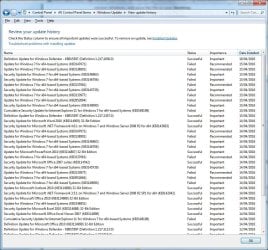
I am having problems with windows when it tries to update the OS but apparently not when it tries to do Apps like Office as demonstrated by this screenshot:
UpdateFail.jpg

Having looked through the error codes they are as follows:
KB3147071 - 800F0826
KB3138901 - 800F0826
KB3146963 - 800F0826
KB3146706 - 80073AA2
KB3137061 - 800F0826
KB3145739 - 800F0826
KB3133977 - 800F0826
KB2952664 - 800F0826
KB3149090 - 800F0826
KB3148198 - 80073AA2

I have tried the various fixes of un-registering/registering the windows update components as well as clearing the cache locally. I even tried straight out upgrading to Windows 10 which didn't work either :)

Ran SURT and it installed KB947821 (it has done this before)
Ran sfc /scannow (no integrity violations)

The logs are linked below although I did remove CbsPersist_*.cab and CbsPersist_*.log as these were massive and, I imagine, archives.

https://drive.google.com/file/d/0B5d2a9hChJNmNk9PYUZVZG11bXc/view?usp=sharing

Any help is appreciated as I have now run out of ideas :(
 

My Computer

Computer type
PC/Desktop
Computer Manufacturer/Model Number
Custom Build
OS
Windows 7 Ultimate x64
CPU
Intel i7 920 @ 2.67Ghz
Motherboard
Asus H81I-PLUS
Memory
Corsair DDR3 (24GB)
Graphics Card(s)
Nvidia Geforce GTX 780
Hard Drives
3 x Samsung SSD, 2 x 2TB Seagate Barracuda (RAID 1)
Antivirus
Kaspersky
Browser
Chrome
Hi and welcome to SevenForums,
I'd probably start by getting rid of Net 4.6.1 and use the offline installer for 4.5.2
https://www.microsoft.com/en-us/download/details.aspx?id=42642

Although I haven't had any issues with net 4.6.1 on 2 64 bit machine I did on a 32 bit system which it could just be new and weird ?

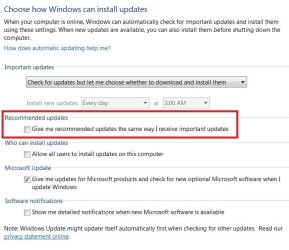
Also try excluding recommended updates from installing with Important updates this time by changing your windows updates settings
Then just attempt to install the important updates first.
update settings.JPG
 

My Computer

Computer type
PC/Desktop
Computer Manufacturer/Model Number
Custom assembled by me :}
OS
Win-7-Pro64bit 7-H-Prem-64bit
CPU
i7-5930K 2nd i9-9940x both water blocked VRM's too
Motherboard
ASUS SABERTOOTH X99 2nd ASUS x299 Apex
Memory
Trident-z 3200C14 2nd Trident-z 3600C16
Graphics Card(s)
EVGA 1080ti ftw3 2nd Titan Xp both water blocked
Sound Card
Built-in Realtek
Monitor(s) Displays
1-AOC G2460PG 24"G-Sync 144Hz/ 2nd 1-ASUS VG248QE 24" 144Hz
Screen Resolution
1920 x 1080 144Hz
Hard Drives
2-Samsung M.2 Evo & Evo Plus
2-Samsung 850 EVO 500GB SSD's/ 3-2.5 W.D. Black 1tb-&3-1tb/3-3.5 WD Black 1tb hdd's
PSU
EVGA SuperNOVA 1000-P2 2nd 1200-P2
Case
2-Corsair Obsidian Series 450D Black ATX Mid Tower
Cooling
Custom water loops
Keyboard
Logitech G710+/ 2nd Logitech G910
Mouse
2-RedDragon M901 Perdition 16400 dpi Gaming mouse = wired
Internet Speed
Comcast Ping 19ms 89.31mbps download speed 6.12mbps upload
Antivirus
Malwarebytes Pro/ Superantispyware Pro
Browser
FireFox & Pale moon
Other Info
2nd ASUS X299 Apex/Intel i9-9940x with Custom water loop/7H-Prem-x64/Corsair 450D case/Ram Trident-z 3600C16 4x8gb / Samsung970Evo plus 500gb SSD/Dual ssd EZ swap evo/PSU EVGA SuperNova 1200w-P2 80+Platinum/GPU Titan Xp /8-ML-140 on push-pull on 2-280GTX rads
Hi Again,
So I have followed your advice and uninstalled the existing .Net Framework and installing the slightly older one.

I then ran "check for updates" in Windows Updates (which took an hour!) and tried to install 5 of the security updates for windows 7. These all failed with the usual "Failure to Configure Windows Updates" at around 80-90% and rolled back.
I have, previously, tried only installing a single update but without success.

I would mention at this point that I used to have Sophos AV which I uninstalled and tried patching (didn't work) and have now moved to Kaspersky for this attempt.
 

My Computer

Computer type
PC/Desktop
Computer Manufacturer/Model Number
Custom Build
OS
Windows 7 Ultimate x64
CPU
Intel i7 920 @ 2.67Ghz
Motherboard
Asus H81I-PLUS
Memory
Corsair DDR3 (24GB)
Graphics Card(s)
Nvidia Geforce GTX 780
Hard Drives
3 x Samsung SSD, 2 x 2TB Seagate Barracuda (RAID 1)
Antivirus
Kaspersky
Browser
Chrome

My Computer

Computer type
PC/Desktop
Computer Manufacturer/Model Number
Custom assembled by me :}
OS
Win-7-Pro64bit 7-H-Prem-64bit
CPU
i7-5930K 2nd i9-9940x both water blocked VRM's too
Motherboard
ASUS SABERTOOTH X99 2nd ASUS x299 Apex
Memory
Trident-z 3200C14 2nd Trident-z 3600C16
Graphics Card(s)
EVGA 1080ti ftw3 2nd Titan Xp both water blocked
Sound Card
Built-in Realtek
Monitor(s) Displays
1-AOC G2460PG 24"G-Sync 144Hz/ 2nd 1-ASUS VG248QE 24" 144Hz
Screen Resolution
1920 x 1080 144Hz
Hard Drives
2-Samsung M.2 Evo & Evo Plus
2-Samsung 850 EVO 500GB SSD's/ 3-2.5 W.D. Black 1tb-&3-1tb/3-3.5 WD Black 1tb hdd's
PSU
EVGA SuperNOVA 1000-P2 2nd 1200-P2
Case
2-Corsair Obsidian Series 450D Black ATX Mid Tower
Cooling
Custom water loops
Keyboard
Logitech G710+/ 2nd Logitech G910
Mouse
2-RedDragon M901 Perdition 16400 dpi Gaming mouse = wired
Internet Speed
Comcast Ping 19ms 89.31mbps download speed 6.12mbps upload
Antivirus
Malwarebytes Pro/ Superantispyware Pro
Browser
FireFox & Pale moon
Other Info
2nd ASUS X299 Apex/Intel i9-9940x with Custom water loop/7H-Prem-x64/Corsair 450D case/Ram Trident-z 3600C16 4x8gb / Samsung970Evo plus 500gb SSD/Dual ssd EZ swap evo/PSU EVGA SuperNova 1200w-P2 80+Platinum/GPU Titan Xp /8-ML-140 on push-pull on 2-280GTX rads
Hello.
Have run sfc /scannow in an elevated session. It returned "Windows Resource Protection did not find any integrity violations".
I also ran findstr /c:"[SR]" %windir%\Logs\CBS\CBS.log > "%userprofile%\Desktop\sfcdetails.txt
which produced (slightly trimmed down)

2016-04-21 10:53:29, Info CSI 000005e6 [SR] Verifying 100 (0x0000000000000064) components
2016-04-21 10:53:29, Info CSI 000005e7 [SR] Beginning Verify and Repair transaction
2016-04-21 10:53:32, Info CSI 000005e9 [SR] Verify complete
2016-04-21 10:53:32, Info CSI 000005ea [SR] Verifying 73 (0x0000000000000049) components
2016-04-21 10:53:32, Info CSI 000005eb [SR] Beginning Verify and Repair transaction
2016-04-21 10:53:34, Info CSI 000005ed [SR] Verify complete
2016-04-21 10:53:34, Info CSI 000005ee [SR] Repairing 0 components
2016-04-21 10:53:34, Info CSI 000005ef [SR] Beginning Verify and Repair transaction
2016-04-21 10:53:34, Info CSI 000005f1 [SR] Repair complete


Attached as well.View attachment sfcdetails.txt
 

My Computer

Computer type
PC/Desktop
Computer Manufacturer/Model Number
Custom Build
OS
Windows 7 Ultimate x64
CPU
Intel i7 920 @ 2.67Ghz
Motherboard
Asus H81I-PLUS
Memory
Corsair DDR3 (24GB)
Graphics Card(s)
Nvidia Geforce GTX 780
Hard Drives
3 x Samsung SSD, 2 x 2TB Seagate Barracuda (RAID 1)
Antivirus
Kaspersky
Browser
Chrome
Hi,
Click Start and right click the Computer listing and select Properties
On the top does it say sp1 there ?

If so download the newest update client
Switch your windows update setting to Never check for updates first before installing it
https://support.microsoft.com/en-us/kb/3138612

Then see if the last part in the quoted area helps install April's updates
http://www.sevenforums.com/windows-...ut-windows-still-wont-update.html#post3237782

If still no joy post this info
http://www.sevenforums.com/windows-...ne-activation-issue-posting-instructions.html
 

My Computer

Computer type
PC/Desktop
Computer Manufacturer/Model Number
Custom assembled by me :}
OS
Win-7-Pro64bit 7-H-Prem-64bit
CPU
i7-5930K 2nd i9-9940x both water blocked VRM's too
Motherboard
ASUS SABERTOOTH X99 2nd ASUS x299 Apex
Memory
Trident-z 3200C14 2nd Trident-z 3600C16
Graphics Card(s)
EVGA 1080ti ftw3 2nd Titan Xp both water blocked
Sound Card
Built-in Realtek
Monitor(s) Displays
1-AOC G2460PG 24"G-Sync 144Hz/ 2nd 1-ASUS VG248QE 24" 144Hz
Screen Resolution
1920 x 1080 144Hz
Hard Drives
2-Samsung M.2 Evo & Evo Plus
2-Samsung 850 EVO 500GB SSD's/ 3-2.5 W.D. Black 1tb-&3-1tb/3-3.5 WD Black 1tb hdd's
PSU
EVGA SuperNOVA 1000-P2 2nd 1200-P2
Case
2-Corsair Obsidian Series 450D Black ATX Mid Tower
Cooling
Custom water loops
Keyboard
Logitech G710+/ 2nd Logitech G910
Mouse
2-RedDragon M901 Perdition 16400 dpi Gaming mouse = wired
Internet Speed
Comcast Ping 19ms 89.31mbps download speed 6.12mbps upload
Antivirus
Malwarebytes Pro/ Superantispyware Pro
Browser
FireFox & Pale moon
Other Info
2nd ASUS X299 Apex/Intel i9-9940x with Custom water loop/7H-Prem-x64/Corsair 450D case/Ram Trident-z 3600C16 4x8gb / Samsung970Evo plus 500gb SSD/Dual ssd EZ swap evo/PSU EVGA SuperNova 1200w-P2 80+Platinum/GPU Titan Xp /8-ML-140 on push-pull on 2-280GTX rads
Not sure what you mean about the quoted part?
I am already on SP1 (have been for some time) and have installed the latest update client but I am pretty sure I have already done that.

MGADiag:

Code:
Diagnostic Report (1.9.0027.0):
-----------------------------------------
Windows Validation Data-->

Validation Code: 0
Cached Online Validation Code: 0x0
Windows Product Key: *****-*****-QMHRG-TD9YB-XWW2R
Windows Product Key Hash: teb0ON5bHjUCkHiUPP2rVNTdr68=
Windows Product ID: 00426-OEM-9154216-53624
Windows Product ID Type: 3
Windows License Type: OEM System Builder
Windows OS version: 6.1.7601.2.00010100.1.0.001
ID: {2AAF61B9-2325-41CE-8A19-610F534665FE}(1)
Is Admin: Yes
TestCab: 0x0
LegitcheckControl ActiveX: N/A, hr = 0x80070002
Signed By: N/A, hr = 0x80070002
Product Name: Windows 7 Ultimate
Architecture: 0x00000009
Build lab: 7601.win7sp1_gdr.160211-0600
TTS Error: 
Validation Diagnostic: 
Resolution Status: N/A

Vista WgaER Data-->
ThreatID(s): N/A, hr = 0x80070002
Version: N/A, hr = 0x80070002

Windows XP Notifications Data-->
Cached Result: N/A, hr = 0x80070002
File Exists: No
Version: N/A, hr = 0x80070002
WgaTray.exe Signed By: N/A, hr = 0x80070002
WgaLogon.dll Signed By: N/A, hr = 0x80070002

OGA Notifications Data-->
Cached Result: N/A, hr = 0x80070002
Version: N/A, hr = 0x80070002
OGAExec.exe Signed By: N/A, hr = 0x80070002
OGAAddin.dll Signed By: N/A, hr = 0x80070002

OGA Data-->
Office Status: 100 Genuine
Microsoft Office Visio Professional 2007 - 100 Genuine
OGA Version: N/A, 0x80070002
Signed By: N/A, hr = 0x80070002
Office Diagnostics: 025D1FF3-364-80041010_025D1FF3-229-80041010_025D1FF3-230-1_025D1FF3-517-80040154_025D1FF3-237-80040154_025D1FF3-238-2_025D1FF3-244-80070002_025D1FF3-258-3

Browser Data-->
Proxy settings: N/A
User Agent: Mozilla/4.0 (compatible; MSIE 8.0; Win32)
Default Browser: C:\Users\Culture\AppData\Local\Google\Chrome\Application\chrome.exe
Download signed ActiveX controls: Prompt
Download unsigned ActiveX controls: Disabled
Run ActiveX controls and plug-ins: Allowed
Initialize and script ActiveX controls not marked as safe: Disabled
Allow scripting of Internet Explorer Webbrowser control: Disabled
Active scripting: Allowed
Script ActiveX controls marked as safe for scripting: Allowed

File Scan Data-->

Other data-->
Office Details: <GenuineResults><MachineData><UGUID>{2AAF61B9-2325-41CE-8A19-610F534665FE}</UGUID><Version>1.9.0027.0</Version><OS>6.1.7601.2.00010100.1.0.001</OS><Architecture>x64</Architecture><PKey>*****-*****-*****-*****-XWW2R</PKey><PID>00426-OEM-9154216-53624</PID><PIDType>3</PIDType><SID>S-1-5-21-257026138-3301555396-324860539</SID><SYSTEM><Manufacturer>System manufacturer</Manufacturer><Model>System Product Name</Model></SYSTEM><BIOS><Manufacturer>American Megatrends Inc.</Manufacturer><Version>0106   </Version><SMBIOSVersion major="2" minor="5"/><Date>20090715000000.000000+000</Date></BIOS><HWID>FB9E3107018400FE</HWID><UserLCID>0809</UserLCID><SystemLCID>0409</SystemLCID><TimeZone>GMT Standard Time(GMT+00:00)</TimeZone><iJoin>0</iJoin><SBID><stat>3</stat><msppid></msppid><name></name><model></model></SBID><OEM/><GANotification/></MachineData><Software><Office><Result>100</Result><Products><Product GUID="{90120000-0051-0000-0000-0000000FF1CE}"><LegitResult>100</LegitResult><Name>Microsoft Office Visio Professional 2007</Name><Ver>12</Ver><Val>AB3618603559588</Val><Hash>k8MEUVacnpvfq9IvHaS+srhUcX4=</Hash><Pid>89405-708-2335636-63053</Pid><PidType>14</PidType></Product></Products><Applications><App Id="53" Version="12" Result="100"/></Applications></Office></Software></GenuineResults>  

Spsys.log Content: 0x80070002

Licensing Data-->
Software licensing service version: 6.1.7601.17514

Name: Windows(R) 7, Ultimate edition
Description: Windows Operating System - Windows(R) 7, OEM_COA_NSLP channel
Activation ID: cfb3e52c-d707-4861-af51-11b27ee6169c
Application ID: 55c92734-d682-4d71-983e-d6ec3f16059f
Extended PID: 00426-00182-542-153624-02-2057-7600.0000-0032002
Installation ID: 008173386982876744148120104235102153350101678930305526
Processor Certificate URL: http://go.microsoft.com/fwlink/?LinkID=88338
Machine Certificate URL: http://go.microsoft.com/fwlink/?LinkID=88339
Use License URL: http://go.microsoft.com/fwlink/?LinkID=88341
Product Key Certificate URL: http://go.microsoft.com/fwlink/?LinkID=88340
Partial Product Key: XWW2R
License Status: Licensed
Remaining Windows rearm count: 4
Trusted time: 21/04/2016 16:15:11

Windows Activation Technologies-->
HrOffline: 0x00000000
HrOnline: 0x00000000
HealthStatus: 0x0000000000000000
Event Time Stamp: 4:12:2016 14:12
ActiveX: Registered, Version: 7.1.7600.16395
Admin Service: Registered, Version: 7.1.7600.16395
HealthStatus Bitmask Output:


HWID Data-->
HWID Hash Current: OgAAAAIAAAABAAEAAwADAAAABAABAAEA1gQKLGmpdi7IdCaUasiN7+7iktTgRX8NwP4ExcbkaqLqgg==

OEM Activation 1.0 Data-->
N/A

OEM Activation 2.0 Data-->
BIOS valid for OA 2.0: yes, but no SLIC table
Windows marker version: N/A
OEMID and OEMTableID Consistent: N/A
BIOS Information: 
  ACPI Table Name	OEMID Value	OEMTableID Value
  APIC			071509		APIC1009
  FACP			071509		FACP1009
  HPET			071509		OEMHPET 
  MCFG			071509		OEMMCFG 
  OEMB			071509		OEMB1009
  DMAR			AMI		OEMDMAR
  OSFR			071509		OEMOSFR 
  SSDT			DpgPmm		CpuPm

 

My Computer

Computer type
PC/Desktop
Computer Manufacturer/Model Number
Custom Build
OS
Windows 7 Ultimate x64
CPU
Intel i7 920 @ 2.67Ghz
Motherboard
Asus H81I-PLUS
Memory
Corsair DDR3 (24GB)
Graphics Card(s)
Nvidia Geforce GTX 780
Hard Drives
3 x Samsung SSD, 2 x 2TB Seagate Barracuda (RAID 1)
Antivirus
Kaspersky
Browser
Chrome
Sorry, think I understand - am doing all of the quoted section.
 

My Computer

Computer type
PC/Desktop
Computer Manufacturer/Model Number
Custom Build
OS
Windows 7 Ultimate x64
CPU
Intel i7 920 @ 2.67Ghz
Motherboard
Asus H81I-PLUS
Memory
Corsair DDR3 (24GB)
Graphics Card(s)
Nvidia Geforce GTX 780
Hard Drives
3 x Samsung SSD, 2 x 2TB Seagate Barracuda (RAID 1)
Antivirus
Kaspersky
Browser
Chrome
Hi,
Okay lets see what happens after removing and installing net 4.5.2 again and follow the rest too :)
 

My Computer

Computer type
PC/Desktop
Computer Manufacturer/Model Number
Custom assembled by me :}
OS
Win-7-Pro64bit 7-H-Prem-64bit
CPU
i7-5930K 2nd i9-9940x both water blocked VRM's too
Motherboard
ASUS SABERTOOTH X99 2nd ASUS x299 Apex
Memory
Trident-z 3200C14 2nd Trident-z 3600C16
Graphics Card(s)
EVGA 1080ti ftw3 2nd Titan Xp both water blocked
Sound Card
Built-in Realtek
Monitor(s) Displays
1-AOC G2460PG 24"G-Sync 144Hz/ 2nd 1-ASUS VG248QE 24" 144Hz
Screen Resolution
1920 x 1080 144Hz
Hard Drives
2-Samsung M.2 Evo & Evo Plus
2-Samsung 850 EVO 500GB SSD's/ 3-2.5 W.D. Black 1tb-&3-1tb/3-3.5 WD Black 1tb hdd's
PSU
EVGA SuperNOVA 1000-P2 2nd 1200-P2
Case
2-Corsair Obsidian Series 450D Black ATX Mid Tower
Cooling
Custom water loops
Keyboard
Logitech G710+/ 2nd Logitech G910
Mouse
2-RedDragon M901 Perdition 16400 dpi Gaming mouse = wired
Internet Speed
Comcast Ping 19ms 89.31mbps download speed 6.12mbps upload
Antivirus
Malwarebytes Pro/ Superantispyware Pro
Browser
FireFox & Pale moon
Other Info
2nd ASUS X299 Apex/Intel i9-9940x with Custom water loop/7H-Prem-x64/Corsair 450D case/Ram Trident-z 3600C16 4x8gb / Samsung970Evo plus 500gb SSD/Dual ssd EZ swap evo/PSU EVGA SuperNova 1200w-P2 80+Platinum/GPU Titan Xp /8-ML-140 on push-pull on 2-280GTX rads
So i have:
Changed Windows Updates to "never" and therefore am selectively installing.
Installed the KB mentioned in the "quoted part".
Rebooted.
Accidentally installed 19 updates (they all rolled back) :(

Un-installed 4.5.2 and the re-installed it. Rebooted.
I managed to install a tiny update (1MB) KB3145739 and then thought "oooo maybe" so tried installing the others. These all failed and rolled back.

The one that installed was a Security Update for Windows and all others were a Security Update for Windows 7 for x64-based systems. All are failing with 80073AA2 or 800F0826
 

My Computer

Computer type
PC/Desktop
Computer Manufacturer/Model Number
Custom Build
OS
Windows 7 Ultimate x64
CPU
Intel i7 920 @ 2.67Ghz
Motherboard
Asus H81I-PLUS
Memory
Corsair DDR3 (24GB)
Graphics Card(s)
Nvidia Geforce GTX 780
Hard Drives
3 x Samsung SSD, 2 x 2TB Seagate Barracuda (RAID 1)
Antivirus
Kaspersky
Browser
Chrome
Then if you feel up to it as a last resort,
Use winkey+R
Type in the Run box,
eventvwr
Windows logs on the left column and expanded them and right click and click on clear on the 4 entries below,
Applications
Security
Setup
System
Exit and restart the machine again


https://support.microsoft.com/en-us/kb/971033
 

My Computer

Computer type
PC/Desktop
Computer Manufacturer/Model Number
Custom assembled by me :}
OS
Win-7-Pro64bit 7-H-Prem-64bit
CPU
i7-5930K 2nd i9-9940x both water blocked VRM's too
Motherboard
ASUS SABERTOOTH X99 2nd ASUS x299 Apex
Memory
Trident-z 3200C14 2nd Trident-z 3600C16
Graphics Card(s)
EVGA 1080ti ftw3 2nd Titan Xp both water blocked
Sound Card
Built-in Realtek
Monitor(s) Displays
1-AOC G2460PG 24"G-Sync 144Hz/ 2nd 1-ASUS VG248QE 24" 144Hz
Screen Resolution
1920 x 1080 144Hz
Hard Drives
2-Samsung M.2 Evo & Evo Plus
2-Samsung 850 EVO 500GB SSD's/ 3-2.5 W.D. Black 1tb-&3-1tb/3-3.5 WD Black 1tb hdd's
PSU
EVGA SuperNOVA 1000-P2 2nd 1200-P2
Case
2-Corsair Obsidian Series 450D Black ATX Mid Tower
Cooling
Custom water loops
Keyboard
Logitech G710+/ 2nd Logitech G910
Mouse
2-RedDragon M901 Perdition 16400 dpi Gaming mouse = wired
Internet Speed
Comcast Ping 19ms 89.31mbps download speed 6.12mbps upload
Antivirus
Malwarebytes Pro/ Superantispyware Pro
Browser
FireFox & Pale moon
Other Info
2nd ASUS X299 Apex/Intel i9-9940x with Custom water loop/7H-Prem-x64/Corsair 450D case/Ram Trident-z 3600C16 4x8gb / Samsung970Evo plus 500gb SSD/Dual ssd EZ swap evo/PSU EVGA SuperNova 1200w-P2 80+Platinum/GPU Titan Xp /8-ML-140 on push-pull on 2-280GTX rads
Do you want to look at the logs (or me to look at the logs) directly after reboot and no patching or after a patch has been done?
 

My Computer

Computer type
PC/Desktop
Computer Manufacturer/Model Number
Custom Build
OS
Windows 7 Ultimate x64
CPU
Intel i7 920 @ 2.67Ghz
Motherboard
Asus H81I-PLUS
Memory
Corsair DDR3 (24GB)
Graphics Card(s)
Nvidia Geforce GTX 780
Hard Drives
3 x Samsung SSD, 2 x 2TB Seagate Barracuda (RAID 1)
Antivirus
Kaspersky
Browser
Chrome
I ran that update and received "Update for Windows (KB971033) is already installed on this computer.

I can see "The Windows Search service hung on starting." in the eventvwr a
as well as "The server {752073A1-23F2-4396-85F0-8FDB879ED0ED} did not register with DCOM within the required timeout." afterwards which I assume is going to be the Windows Search service.

Other than that there are a few:
"The winlogon notification subscriber <TrustedInstaller> took 694 second(s) to handle the notification event (CreateSession)."
and
"The winlogon notification subscriber <TrustedInstaller> is taking long time to handle the notification event (CreateSession)."

Everything else appears normal.
 

My Computer

Computer type
PC/Desktop
Computer Manufacturer/Model Number
Custom Build
OS
Windows 7 Ultimate x64
CPU
Intel i7 920 @ 2.67Ghz
Motherboard
Asus H81I-PLUS
Memory
Corsair DDR3 (24GB)
Graphics Card(s)
Nvidia Geforce GTX 780
Hard Drives
3 x Samsung SSD, 2 x 2TB Seagate Barracuda (RAID 1)
Antivirus
Kaspersky
Browser
Chrome
Hi,
I would uninstall it and reinstall it as the prior instruction suggest if you don't mind.
 

My Computer

Computer type
PC/Desktop
Computer Manufacturer/Model Number
Custom assembled by me :}
OS
Win-7-Pro64bit 7-H-Prem-64bit
CPU
i7-5930K 2nd i9-9940x both water blocked VRM's too
Motherboard
ASUS SABERTOOTH X99 2nd ASUS x299 Apex
Memory
Trident-z 3200C14 2nd Trident-z 3600C16
Graphics Card(s)
EVGA 1080ti ftw3 2nd Titan Xp both water blocked
Sound Card
Built-in Realtek
Monitor(s) Displays
1-AOC G2460PG 24"G-Sync 144Hz/ 2nd 1-ASUS VG248QE 24" 144Hz
Screen Resolution
1920 x 1080 144Hz
Hard Drives
2-Samsung M.2 Evo & Evo Plus
2-Samsung 850 EVO 500GB SSD's/ 3-2.5 W.D. Black 1tb-&3-1tb/3-3.5 WD Black 1tb hdd's
PSU
EVGA SuperNOVA 1000-P2 2nd 1200-P2
Case
2-Corsair Obsidian Series 450D Black ATX Mid Tower
Cooling
Custom water loops
Keyboard
Logitech G710+/ 2nd Logitech G910
Mouse
2-RedDragon M901 Perdition 16400 dpi Gaming mouse = wired
Internet Speed
Comcast Ping 19ms 89.31mbps download speed 6.12mbps upload
Antivirus
Malwarebytes Pro/ Superantispyware Pro
Browser
FireFox & Pale moon
Other Info
2nd ASUS X299 Apex/Intel i9-9940x with Custom water loop/7H-Prem-x64/Corsair 450D case/Ram Trident-z 3600C16 4x8gb / Samsung970Evo plus 500gb SSD/Dual ssd EZ swap evo/PSU EVGA SuperNova 1200w-P2 80+Platinum/GPU Titan Xp /8-ML-140 on push-pull on 2-280GTX rads
Ah OK. So i have un-installed KB971033, rebooted and then re-installed it.
It did not produce any errors and in the System Event viewer it says:
"Installation Successful: Windows successfully installed the following update: Update for Windows (KB971033)"
 

My Computer

Computer type
PC/Desktop
Computer Manufacturer/Model Number
Custom Build
OS
Windows 7 Ultimate x64
CPU
Intel i7 920 @ 2.67Ghz
Motherboard
Asus H81I-PLUS
Memory
Corsair DDR3 (24GB)
Graphics Card(s)
Nvidia Geforce GTX 780
Hard Drives
3 x Samsung SSD, 2 x 2TB Seagate Barracuda (RAID 1)
Antivirus
Kaspersky
Browser
Chrome
Hi,
Yea but you want to disable the update system and manually install that update
Then manually check for updates after a restart,
it's weird it works but it does for an odd reason :)
 

My Computer

Computer type
PC/Desktop
Computer Manufacturer/Model Number
Custom assembled by me :}
OS
Win-7-Pro64bit 7-H-Prem-64bit
CPU
i7-5930K 2nd i9-9940x both water blocked VRM's too
Motherboard
ASUS SABERTOOTH X99 2nd ASUS x299 Apex
Memory
Trident-z 3200C14 2nd Trident-z 3600C16
Graphics Card(s)
EVGA 1080ti ftw3 2nd Titan Xp both water blocked
Sound Card
Built-in Realtek
Monitor(s) Displays
1-AOC G2460PG 24"G-Sync 144Hz/ 2nd 1-ASUS VG248QE 24" 144Hz
Screen Resolution
1920 x 1080 144Hz
Hard Drives
2-Samsung M.2 Evo & Evo Plus
2-Samsung 850 EVO 500GB SSD's/ 3-2.5 W.D. Black 1tb-&3-1tb/3-3.5 WD Black 1tb hdd's
PSU
EVGA SuperNOVA 1000-P2 2nd 1200-P2
Case
2-Corsair Obsidian Series 450D Black ATX Mid Tower
Cooling
Custom water loops
Keyboard
Logitech G710+/ 2nd Logitech G910
Mouse
2-RedDragon M901 Perdition 16400 dpi Gaming mouse = wired
Internet Speed
Comcast Ping 19ms 89.31mbps download speed 6.12mbps upload
Antivirus
Malwarebytes Pro/ Superantispyware Pro
Browser
FireFox & Pale moon
Other Info
2nd ASUS X299 Apex/Intel i9-9940x with Custom water loop/7H-Prem-x64/Corsair 450D case/Ram Trident-z 3600C16 4x8gb / Samsung970Evo plus 500gb SSD/Dual ssd EZ swap evo/PSU EVGA SuperNova 1200w-P2 80+Platinum/GPU Titan Xp /8-ML-140 on push-pull on 2-280GTX rads
Ah right. So I have just installed the update (manually) and the update system is currently disabled.
I will reboot and the check for updates manually and install 1.....
 

My Computer

Computer type
PC/Desktop
Computer Manufacturer/Model Number
Custom Build
OS
Windows 7 Ultimate x64
CPU
Intel i7 920 @ 2.67Ghz
Motherboard
Asus H81I-PLUS
Memory
Corsair DDR3 (24GB)
Graphics Card(s)
Nvidia Geforce GTX 780
Hard Drives
3 x Samsung SSD, 2 x 2TB Seagate Barracuda (RAID 1)
Antivirus
Kaspersky
Browser
Chrome
So I have tried installing a 20MB update (KB3149090) which failed.
It took about an hour to do as it sits at 85% and then 90% for about 20-30 mins before rolling back and taking a further 30 mins to roll back.
Having looked in the event viewer I can see alot of "Windows Error Reporting" of variations: "WindowsWcpOtherFailure3" and "CbsPackageServicingFailure2"
 

My Computer

Computer type
PC/Desktop
Computer Manufacturer/Model Number
Custom Build
OS
Windows 7 Ultimate x64
CPU
Intel i7 920 @ 2.67Ghz
Motherboard
Asus H81I-PLUS
Memory
Corsair DDR3 (24GB)
Graphics Card(s)
Nvidia Geforce GTX 780
Hard Drives
3 x Samsung SSD, 2 x 2TB Seagate Barracuda (RAID 1)
Antivirus
Kaspersky
Browser
Chrome

My Computer

Computer type
PC/Desktop
Computer Manufacturer/Model Number
Custom assembled by me :}
OS
Win-7-Pro64bit 7-H-Prem-64bit
CPU
i7-5930K 2nd i9-9940x both water blocked VRM's too
Motherboard
ASUS SABERTOOTH X99 2nd ASUS x299 Apex
Memory
Trident-z 3200C14 2nd Trident-z 3600C16
Graphics Card(s)
EVGA 1080ti ftw3 2nd Titan Xp both water blocked
Sound Card
Built-in Realtek
Monitor(s) Displays
1-AOC G2460PG 24"G-Sync 144Hz/ 2nd 1-ASUS VG248QE 24" 144Hz
Screen Resolution
1920 x 1080 144Hz
Hard Drives
2-Samsung M.2 Evo & Evo Plus
2-Samsung 850 EVO 500GB SSD's/ 3-2.5 W.D. Black 1tb-&3-1tb/3-3.5 WD Black 1tb hdd's
PSU
EVGA SuperNOVA 1000-P2 2nd 1200-P2
Case
2-Corsair Obsidian Series 450D Black ATX Mid Tower
Cooling
Custom water loops
Keyboard
Logitech G710+/ 2nd Logitech G910
Mouse
2-RedDragon M901 Perdition 16400 dpi Gaming mouse = wired
Internet Speed
Comcast Ping 19ms 89.31mbps download speed 6.12mbps upload
Antivirus
Malwarebytes Pro/ Superantispyware Pro
Browser
FireFox & Pale moon
Other Info
2nd ASUS X299 Apex/Intel i9-9940x with Custom water loop/7H-Prem-x64/Corsair 450D case/Ram Trident-z 3600C16 4x8gb / Samsung970Evo plus 500gb SSD/Dual ssd EZ swap evo/PSU EVGA SuperNova 1200w-P2 80+Platinum/GPU Titan Xp /8-ML-140 on push-pull on 2-280GTX rads
That one is not installed (and does not appear in the recent failed list) but it is also for Windows 8.1 and this is a windows 7 machine.... ?
 

My Computer

Computer type
PC/Desktop
Computer Manufacturer/Model Number
Custom Build
OS
Windows 7 Ultimate x64
CPU
Intel i7 920 @ 2.67Ghz
Motherboard
Asus H81I-PLUS
Memory
Corsair DDR3 (24GB)
Graphics Card(s)
Nvidia Geforce GTX 780
Hard Drives
3 x Samsung SSD, 2 x 2TB Seagate Barracuda (RAID 1)
Antivirus
Kaspersky
Browser
Chrome
Back
Top