Windows Update trying to upgrade to Win10 by itself?

Computer0304

RIP Britton30
Guru
Gold Member
VIP
Local time
4:29 AM
Messages
2,295
Location
S:/Earth/Asia/
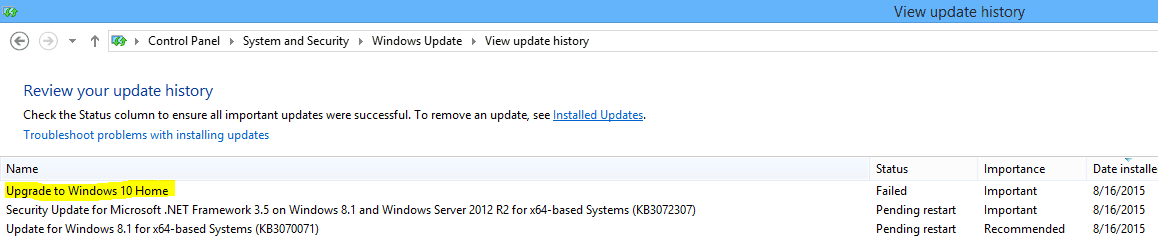
WXUpgradeByItself.PNG
It seems according to the update history, my computer is trying to upgrade itself to Windows 10 automatically. Can it actually do this without asking me? I didn't reserve the upgrade so it shouldn't be trying to upgrade. Did it fail noticing that I didn't reserve the upgrade?
 

My Computer My Computer

At a glance

Windows 7 Professional 32-bit/Windows 8 64-bi...Intel Core 2 Quad Q6600/Intel Core i7 4790/In...2GB/16GB/4GBIntel G33/G31 Express(Vostro)/NVIDIA GeForce ...
Computer type
PC/Desktop
Computer Manufacturer/Model Number
Dell Vostro 400/Dell XPS 8700(Slightly Customized for me by Dell)/Toshiba Satellite T135
OS
Windows 7 Professional 32-bit/Windows 8 64-bit/Win7 Pro64-bit
CPU
Intel Core 2 Quad Q6600/Intel Core i7 4790/Intel Pentium
Memory
2GB/16GB/4GB
Graphics Card(s)
Intel G33/G31 Express(Vostro)/NVIDIA GeForce GTX 745(XPS)
Monitor(s) Displays
HP 2009m(Vostro)/ViewSonic VX2250wm-LED(XPS)
Screen Resolution
1600x900(Vostro)/1920x1080(XPS)
Hard Drives
Seagate ST3160815AS(Vostro)/Western Digital Blue(Satellite)
External:
Western Digital My Passport 0748
Samsung HM121HC
Keyboard
Dell L100)(Vostro)/Dell KB2133p(XPS)
Mouse
Dell M-UAV-DEL8(XPS)
Internet Speed
100 Mbit/s(Only when IPTV is plugged out)
Antivirus
Avast, Malwarebytes PRO
Browser
Internet Explorer 11
Other Info
Note: Names with slashes between two different parts mean that the left is my old desktop and the right is my old laptop and the middle is my new desktop.(Unless specified)
Ping is horrible for servers overseas in US and Europe.
New laptop:LG Gram(Not available in US) Processor:Intel Core i3 4th Gen Ultra Low Power RAM:4GB Hard Drive:SK Hynix OEM MSATA or M.2 Graphics:Intel HD

My Computer My Computer

At a glance

Win-7-Pro64bit 7-H-Prem-64biti7-5930K 2nd i9-9940x both water blocked VRM'...Trident-z 3200C14 2nd Trident-z 3600C16EVGA 1080ti ftw3 2nd Titan Xp both water blocked
Computer type
PC/Desktop
Computer Manufacturer/Model Number
Custom assembled by me :}
OS
Win-7-Pro64bit 7-H-Prem-64bit
CPU
i7-5930K 2nd i9-9940x both water blocked VRM's too
Motherboard
ASUS SABERTOOTH X99 2nd ASUS x299 Apex
Memory
Trident-z 3200C14 2nd Trident-z 3600C16
Graphics Card(s)
EVGA 1080ti ftw3 2nd Titan Xp both water blocked
Sound Card
Built-in Realtek
Monitor(s) Displays
1-AOC G2460PG 24"G-Sync 144Hz/ 2nd 1-ASUS VG248QE 24" 144Hz
Screen Resolution
1920 x 1080 144Hz
Hard Drives
2-Samsung M.2 Evo & Evo Plus
2-Samsung 850 EVO 500GB SSD's/ 3-2.5 W.D. Black 1tb-&3-1tb/3-3.5 WD Black 1tb hdd's
PSU
EVGA SuperNOVA 1000-P2 2nd 1200-P2
Case
2-Corsair Obsidian Series 450D Black ATX Mid Tower
Cooling
Custom water loops
Keyboard
Logitech G710+/ 2nd Logitech G910
Mouse
2-RedDragon M901 Perdition 16400 dpi Gaming mouse = wired
Internet Speed
Comcast Ping 19ms 89.31mbps download speed 6.12mbps upload
Antivirus
Malwarebytes Pro/ Superantispyware Pro
Browser
FireFox & Pale moon
Other Info
2nd ASUS X299 Apex/Intel i9-9940x with Custom water loop/7H-Prem-x64/Corsair 450D case/Ram Trident-z 3600C16 4x8gb / Samsung970Evo plus 500gb SSD/Dual ssd EZ swap evo/PSU EVGA SuperNova 1200w-P2 80+Platinum/GPU Titan Xp /8-ML-140 on push-pull on 2-280GTX rads
Hmm, it never even gave me a notification that it's ready... maybe I should change the Windows Update setting to manually update. It doesn't even seem to attempt a installation though.

Edit: It also seems like GWX is not running at all suddenly on my laptop. The tray icon is gone and the process doesn't show up on Task Manager. I'll have to check again tommorow.

Edit 2: I also tried checking for updates on my laptop and it's been a few minutes but it's still checking. I can just shutdown it, right? Background checks seem to work though since updates do download automatically correctly.

Edit 3: I just turned it off because I have to go to sleep. The update check was still going though. No errors while shutting down. I hope it's ok.
 
Last edited:

My Computer My Computer

At a glance

Windows 7 Professional 32-bit/Windows 8 64-bi...Intel Core 2 Quad Q6600/Intel Core i7 4790/In...2GB/16GB/4GBIntel G33/G31 Express(Vostro)/NVIDIA GeForce ...
Computer type
PC/Desktop
Computer Manufacturer/Model Number
Dell Vostro 400/Dell XPS 8700(Slightly Customized for me by Dell)/Toshiba Satellite T135
OS
Windows 7 Professional 32-bit/Windows 8 64-bit/Win7 Pro64-bit
CPU
Intel Core 2 Quad Q6600/Intel Core i7 4790/Intel Pentium
Memory
2GB/16GB/4GB
Graphics Card(s)
Intel G33/G31 Express(Vostro)/NVIDIA GeForce GTX 745(XPS)
Monitor(s) Displays
HP 2009m(Vostro)/ViewSonic VX2250wm-LED(XPS)
Screen Resolution
1600x900(Vostro)/1920x1080(XPS)
Hard Drives
Seagate ST3160815AS(Vostro)/Western Digital Blue(Satellite)
External:
Western Digital My Passport 0748
Samsung HM121HC
Keyboard
Dell L100)(Vostro)/Dell KB2133p(XPS)
Mouse
Dell M-UAV-DEL8(XPS)
Internet Speed
100 Mbit/s(Only when IPTV is plugged out)
Antivirus
Avast, Malwarebytes PRO
Browser
Internet Explorer 11
Other Info
Note: Names with slashes between two different parts mean that the left is my old desktop and the right is my old laptop and the middle is my new desktop.(Unless specified)
Ping is horrible for servers overseas in US and Europe.
New laptop:LG Gram(Not available in US) Processor:Intel Core i3 4th Gen Ultra Low Power RAM:4GB Hard Drive:SK Hynix OEM MSATA or M.2 Graphics:Intel HD
Hi,
If windows update checking looks stalled it's most likely installing some updates
win-10 update has been failing and repeating for quite a few people
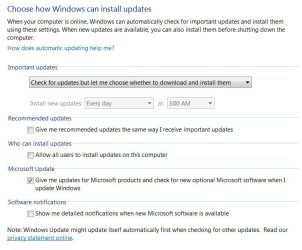
I wouldn't say switching to manual but switch to these settings should at least stop anything from auto updating repeatedly ?
Otherwise review the tenforums post again.
win update settings.JPG
 

My Computer My Computer

At a glance

Win-7-Pro64bit 7-H-Prem-64biti7-5930K 2nd i9-9940x both water blocked VRM'...Trident-z 3200C14 2nd Trident-z 3600C16EVGA 1080ti ftw3 2nd Titan Xp both water blocked
Computer type
PC/Desktop
Computer Manufacturer/Model Number
Custom assembled by me :}
OS
Win-7-Pro64bit 7-H-Prem-64bit
CPU
i7-5930K 2nd i9-9940x both water blocked VRM's too
Motherboard
ASUS SABERTOOTH X99 2nd ASUS x299 Apex
Memory
Trident-z 3200C14 2nd Trident-z 3600C16
Graphics Card(s)
EVGA 1080ti ftw3 2nd Titan Xp both water blocked
Sound Card
Built-in Realtek
Monitor(s) Displays
1-AOC G2460PG 24"G-Sync 144Hz/ 2nd 1-ASUS VG248QE 24" 144Hz
Screen Resolution
1920 x 1080 144Hz
Hard Drives
2-Samsung M.2 Evo & Evo Plus
2-Samsung 850 EVO 500GB SSD's/ 3-2.5 W.D. Black 1tb-&3-1tb/3-3.5 WD Black 1tb hdd's
PSU
EVGA SuperNOVA 1000-P2 2nd 1200-P2
Case
2-Corsair Obsidian Series 450D Black ATX Mid Tower
Cooling
Custom water loops
Keyboard
Logitech G710+/ 2nd Logitech G910
Mouse
2-RedDragon M901 Perdition 16400 dpi Gaming mouse = wired
Internet Speed
Comcast Ping 19ms 89.31mbps download speed 6.12mbps upload
Antivirus
Malwarebytes Pro/ Superantispyware Pro
Browser
FireFox & Pale moon
Other Info
2nd ASUS X299 Apex/Intel i9-9940x with Custom water loop/7H-Prem-x64/Corsair 450D case/Ram Trident-z 3600C16 4x8gb / Samsung970Evo plus 500gb SSD/Dual ssd EZ swap evo/PSU EVGA SuperNova 1200w-P2 80+Platinum/GPU Titan Xp /8-ML-140 on push-pull on 2-280GTX rads
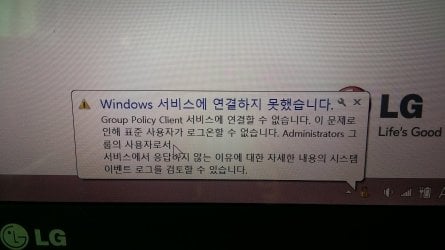
I just turned my laptop on again, and the GWX icon is still gone and now a notification even popped up saying
Failed to connect to a windows service
Windows could not connect to the Group Policy Client service. This problem prevents standard users from logging on to the system. As an administrative user, you can review the System Event Log for details about why the service didn't respond.
(I'm not sure if this is the right notification since this computer displays Korean, but I think this notification I found people getting after a search online is correct.)

Event Viewer seems to have a bunch of errors about services that could not start which was apparently happening before today too but a notification never popped up about it before. The computer seems to work normally though and I only have one admin account I use anyway. I might have to start another thread if this continues.
(This is a Windows 8.1 laptop)
Edit:Picture of error (Korean)
20150817_101752.jpg
Edit 2: Also, there was an error when opening administrative events in Event Viewer:
20150817_105302.jpg
It says it couldn't find Microsoft-Windows-DxpTaskRingtone/Analytic log file.
 
Last edited:

My Computer My Computer

At a glance

Windows 7 Professional 32-bit/Windows 8 64-bi...Intel Core 2 Quad Q6600/Intel Core i7 4790/In...2GB/16GB/4GBIntel G33/G31 Express(Vostro)/NVIDIA GeForce ...
Computer type
PC/Desktop
Computer Manufacturer/Model Number
Dell Vostro 400/Dell XPS 8700(Slightly Customized for me by Dell)/Toshiba Satellite T135
OS
Windows 7 Professional 32-bit/Windows 8 64-bit/Win7 Pro64-bit
CPU
Intel Core 2 Quad Q6600/Intel Core i7 4790/Intel Pentium
Memory
2GB/16GB/4GB
Graphics Card(s)
Intel G33/G31 Express(Vostro)/NVIDIA GeForce GTX 745(XPS)
Monitor(s) Displays
HP 2009m(Vostro)/ViewSonic VX2250wm-LED(XPS)
Screen Resolution
1600x900(Vostro)/1920x1080(XPS)
Hard Drives
Seagate ST3160815AS(Vostro)/Western Digital Blue(Satellite)
External:
Western Digital My Passport 0748
Samsung HM121HC
Keyboard
Dell L100)(Vostro)/Dell KB2133p(XPS)
Mouse
Dell M-UAV-DEL8(XPS)
Internet Speed
100 Mbit/s(Only when IPTV is plugged out)
Antivirus
Avast, Malwarebytes PRO
Browser
Internet Explorer 11
Other Info
Note: Names with slashes between two different parts mean that the left is my old desktop and the right is my old laptop and the middle is my new desktop.(Unless specified)
Ping is horrible for servers overseas in US and Europe.
New laptop:LG Gram(Not available in US) Processor:Intel Core i3 4th Gen Ultra Low Power RAM:4GB Hard Drive:SK Hynix OEM MSATA or M.2 Graphics:Intel HD
My laptop is scaring me... I came back to it after not using it for a bit and first closed all the internet explorer windows, and then tried changing the volume just because and the volume meter took a few seconds to update. The "ding" sound effect for the volume came late too. I tried shutting down and it took few more seconds for it to change to the shutting down screen and then the screen and the hard drive light turned off but the f5 key that can disable the touchpad if pressed with Fn' s light and the power button light stayed on so I forced it off. Should I have waited for it? I'm going to try System restore if it turns on.
Edit: Startup is taking a while too. Maybe the same program that caused another problem before is causing this problem?
Edit 2: Well it's on now and GWX is back and no error notification! I'll start another thread if this problem continues.
Edit 3: Startup speed is normal and GWX is working and the volume changer (whatever it's called) is not lagging. Maybe this was just a little hiccup?
Edit 4: Event Viewer has a critical for me forcing it off even after it seemed to be just turned off except with the power and keyboard lights on, some kind of DeviceSetupManager error (event ID 131), an error about the Windows 10 Home upgrade update failed (event ID 20, 0x80240020), PowerManagerSvc service went to an wrong state of 0 (guessed the translation myself) (event ID 7016), two event ID 257 Defrag errors; one says a volume is not optimized(?) (0x80070057); the other saying the WinRE volume did not optimize and some kind of number or count is wrong(?)(another 0x80070057), and another of the same Windows 10 upgrade errors. Most of these seem like your everyday event log errors. But event viewer did take a longer time than usual to open and the same error about an event log not found did appear but I'll ignore it for now since everything else is fine and the slow opening could be a coincidence. I opened it again and it opened faster. There were 1 critical, 17,999 errors, and 15 warnings in the last 24 hours. Is this normal? The extra errors could be because of the service errors that happened starting yesterday but is now not happening.
Edit 4: It shutdown properly too so maybe it's ok. Just a random issue that is now gone? I'll start another thread if I'm getting too off topic from the original thread topic. I'm going on vacation tommorow and I'll be back on Thursday/Friday depending on where you live.
 
Last edited:

My Computer My Computer

At a glance

Windows 7 Professional 32-bit/Windows 8 64-bi...Intel Core 2 Quad Q6600/Intel Core i7 4790/In...2GB/16GB/4GBIntel G33/G31 Express(Vostro)/NVIDIA GeForce ...
Computer type
PC/Desktop
Computer Manufacturer/Model Number
Dell Vostro 400/Dell XPS 8700(Slightly Customized for me by Dell)/Toshiba Satellite T135
OS
Windows 7 Professional 32-bit/Windows 8 64-bit/Win7 Pro64-bit
CPU
Intel Core 2 Quad Q6600/Intel Core i7 4790/Intel Pentium
Memory
2GB/16GB/4GB
Graphics Card(s)
Intel G33/G31 Express(Vostro)/NVIDIA GeForce GTX 745(XPS)
Monitor(s) Displays
HP 2009m(Vostro)/ViewSonic VX2250wm-LED(XPS)
Screen Resolution
1600x900(Vostro)/1920x1080(XPS)
Hard Drives
Seagate ST3160815AS(Vostro)/Western Digital Blue(Satellite)
External:
Western Digital My Passport 0748
Samsung HM121HC
Keyboard
Dell L100)(Vostro)/Dell KB2133p(XPS)
Mouse
Dell M-UAV-DEL8(XPS)
Internet Speed
100 Mbit/s(Only when IPTV is plugged out)
Antivirus
Avast, Malwarebytes PRO
Browser
Internet Explorer 11
Other Info
Note: Names with slashes between two different parts mean that the left is my old desktop and the right is my old laptop and the middle is my new desktop.(Unless specified)
Ping is horrible for servers overseas in US and Europe.
New laptop:LG Gram(Not available in US) Processor:Intel Core i3 4th Gen Ultra Low Power RAM:4GB Hard Drive:SK Hynix OEM MSATA or M.2 Graphics:Intel HD
Hi,
If windows update checking looks stalled it's most likely installing some updates
win-10 update has been failing and repeating for quite a few people
I wouldn't say switching to manual but switch to these settings should at least stop anything from auto updating repeatedly ?
Otherwise review the tenforums post again.
View attachment 369198

Hmm, but I never even saw the upgrade in available updates and I like to get security updates as soon as possible so I'm going to leave it on automatically install updates. It's not like it's causing any other problems other than spamming the update history with the fails. And, I'm scared about deleting and renaming files and folders and disabling processes and services.
 

My Computer My Computer

At a glance

Windows 7 Professional 32-bit/Windows 8 64-bi...Intel Core 2 Quad Q6600/Intel Core i7 4790/In...2GB/16GB/4GBIntel G33/G31 Express(Vostro)/NVIDIA GeForce ...
Computer type
PC/Desktop
Computer Manufacturer/Model Number
Dell Vostro 400/Dell XPS 8700(Slightly Customized for me by Dell)/Toshiba Satellite T135
OS
Windows 7 Professional 32-bit/Windows 8 64-bit/Win7 Pro64-bit
CPU
Intel Core 2 Quad Q6600/Intel Core i7 4790/Intel Pentium
Memory
2GB/16GB/4GB
Graphics Card(s)
Intel G33/G31 Express(Vostro)/NVIDIA GeForce GTX 745(XPS)
Monitor(s) Displays
HP 2009m(Vostro)/ViewSonic VX2250wm-LED(XPS)
Screen Resolution
1600x900(Vostro)/1920x1080(XPS)
Hard Drives
Seagate ST3160815AS(Vostro)/Western Digital Blue(Satellite)
External:
Western Digital My Passport 0748
Samsung HM121HC
Keyboard
Dell L100)(Vostro)/Dell KB2133p(XPS)
Mouse
Dell M-UAV-DEL8(XPS)
Internet Speed
100 Mbit/s(Only when IPTV is plugged out)
Antivirus
Avast, Malwarebytes PRO
Browser
Internet Explorer 11
Other Info
Note: Names with slashes between two different parts mean that the left is my old desktop and the right is my old laptop and the middle is my new desktop.(Unless specified)
Ping is horrible for servers overseas in US and Europe.
New laptop:LG Gram(Not available in US) Processor:Intel Core i3 4th Gen Ultra Low Power RAM:4GB Hard Drive:SK Hynix OEM MSATA or M.2 Graphics:Intel HD
So should I just not worry about it since it won't upgrade by itself without asking me first? The fails in the update history don't annoy me that much anyway.
 

My Computer My Computer

At a glance

Windows 7 Professional 32-bit/Windows 8 64-bi...Intel Core 2 Quad Q6600/Intel Core i7 4790/In...2GB/16GB/4GBIntel G33/G31 Express(Vostro)/NVIDIA GeForce ...
Computer type
PC/Desktop
Computer Manufacturer/Model Number
Dell Vostro 400/Dell XPS 8700(Slightly Customized for me by Dell)/Toshiba Satellite T135
OS
Windows 7 Professional 32-bit/Windows 8 64-bit/Win7 Pro64-bit
CPU
Intel Core 2 Quad Q6600/Intel Core i7 4790/Intel Pentium
Memory
2GB/16GB/4GB
Graphics Card(s)
Intel G33/G31 Express(Vostro)/NVIDIA GeForce GTX 745(XPS)
Monitor(s) Displays
HP 2009m(Vostro)/ViewSonic VX2250wm-LED(XPS)
Screen Resolution
1600x900(Vostro)/1920x1080(XPS)
Hard Drives
Seagate ST3160815AS(Vostro)/Western Digital Blue(Satellite)
External:
Western Digital My Passport 0748
Samsung HM121HC
Keyboard
Dell L100)(Vostro)/Dell KB2133p(XPS)
Mouse
Dell M-UAV-DEL8(XPS)
Internet Speed
100 Mbit/s(Only when IPTV is plugged out)
Antivirus
Avast, Malwarebytes PRO
Browser
Internet Explorer 11
Other Info
Note: Names with slashes between two different parts mean that the left is my old desktop and the right is my old laptop and the middle is my new desktop.(Unless specified)
Ping is horrible for servers overseas in US and Europe.
New laptop:LG Gram(Not available in US) Processor:Intel Core i3 4th Gen Ultra Low Power RAM:4GB Hard Drive:SK Hynix OEM MSATA or M.2 Graphics:Intel HD
Back
Top