Windows UpdateS Fail Fresh Win 7 64bit Install

blitzkrieg3002

New member
Local time
3:14 PM
Messages
10
Hello, Quick recap

Thursday I reformatted my pc due to long time issues that finally piled up. I installed windows 7 home 64bit from my original legit windows 7 upgrade disc I got when windows 7 was released. I've used this disc for this before and worked fine. The install went smooth and windows activation worked perfectly right when I booted up I was able to activate no problem. I installed my drivers and enabled automatic updates. Windows went through a series of 5-10 updates installing at a time then it had one big spurt of about 120 updates. All were installing fine, but a few were failing and kept re trying during the next update.

Finally I'm at a point now where the same 9 updates keep failing. I've tried running Fix it, SFC/ Scan shows no problems. System update readiness tool installs and finishes and still The updates fail. Attached is the CBS folder.

Error(s) found:
Code 8007065E
Code 800B0100
Code 80070490

The 9 Failing updates are

KB3068708
KB3033929
KB2676562
KB2871997
KB3045999
KB2882822
KB2506014
KB3004375
KB3031432


I've read online someone suggested to reformat again, turn off automatic updates. install the Service Pack 1 from the iso from microsofts website. then manually install updates like 5 or so at a time until you're all caught up. Seems like a hassle but I'm willing to do this if this means it will solve my issue.

so I'm trying to upload the cbs.zip folder. and my .zip is 96.2mb. when I try to upload it just times out and gives me a 404 error. is there a way I can lower this file size by deleting some of its contents, it says the .zip limit is only 9 mb but my file is over 10 times that....

Edit* So I tried to make a zip of just the cbs text file inside the cbs folder but that file is still 16.9mb when I open the cbs text file thinking I could select half of it and make two separate zip files from two separate text files. the problem is this text file is so massive its got to be like over 10,000 pages long, when I drag to select only half of it to copy and paste to a new file I will be here for hours just spinning my mouse wheel. hmm.

Edit** okay I think I got it, I told WinRAR to split to maximum file size and I think it worked

CBS.rar
 
Last edited:

My Computer

Computer type
PC/Desktop
OS
Windows 7 Home Premium 64bit
CPU
i7 980x
Motherboard
evga x58 classified 3way
Memory
ddr3
Graphics Card(s)
gtx570 x2
Hard Drives
ocz vertex 2
Antivirus
avast
Browser
ie
Pleasefollow the WindowsUpdate Posting Instructions and postthe requested data


If thefile is too large (8MB compressed), remove the older CBSPersist cab files untilthe final file is below the limit - you can always post them separately afterzipping them. (the forum doesn't allow the upload of bare CAB files, for anumber of reasons)


Pleasealso post the C:\Windows\windowsudpate.log file


My Computer

Computer type
Laptop
Computer Manufacturer/Model Number
Asus K52F or Lenovo B51-80
OS
Win 7 x64 Home Premium (and x86 VirtualBox VM)/Win10
CPU
i3 370M/i7 6500U
Motherboard
Asus/Lenovo
Memory
8GB - finally :)/8GB
Graphics Card(s)
it's an i3, dude!/dual Intel&nVidia
Sound Card
onboard
Monitor(s) Displays
15.6" built-in
Screen Resolution
1366x768/1920x1080
Hard Drives
750GB Seagate internal
Sundry external drives attached to other computers on the local network
1TB SSD on the Lenovo
PSU
n/a
Internet Speed
as much as I can get - usually on a dongle/phone, so <1MB/s
Antivirus
MSE/Defender
Browser
IE11/12/Edge/Chrome/FF(if I must)
Not sure if you read my post, but. the cbs text file alone zipped inside the cbs folder is bigger than the file size limit of the forum at 16+ mb... I found a way using .rar that it says split and creates multiple .rar files and lets me manually set the file size limit, not sure if this is sufficient or if you have any other suggestions on how to lower these file sizes or zip them.

rar.gif
CBS.part01.rar (7.00 MB)
rar.gif
CBS.part02.rar (7.00 MB)

rar.gif
CBS.part03.rar (7.00 MB)

rar.gif
CBS.part04.rar (7.00 MB)

rar.gif
CBS.part05.rar (7.00 MB)

rar.gif
CBS.part06.rar (7.00 MB)

rar.gif
CBS.part07.rar (7.00 MB)

rar.gif
CBS.part08.rar (4.23 MB)

rar.gif
WindowsUpdate.rar (61.1 KB)
 

My Computer

Computer type
PC/Desktop
OS
Windows 7 Home Premium 64bit
CPU
i7 980x
Motherboard
evga x58 classified 3way
Memory
ddr3
Graphics Card(s)
gtx570 x2
Hard Drives
ocz vertex 2
Antivirus
avast
Browser
ie
I did read the post - but was hoping that another run of the SFC would force the archiving of the huge CBS file.(which it appears to have done - you can delete the overlarge CBSPersist file now, as it's no use to anybody)

Anyhow - here's the error-list from the CheckSUR log...
Code:
Summary:
Seconds executed: 719
 Found 90 errors
  CSI Manifest All Zeros Total count: 19
  CBS MUM Corrupt Total count: 10
  CBS Catalog Corrupt Total count: 10
  CBS Watchlist Package Missing Total count: 1
  CBS Watchlist Component Missing Total count: 50
Unavailable repair files:
 winsxs\manifests\amd64_microsoft-windows-b..os-loader.resources_31bf3856ad364e35_6.1.7601.22921_en-us_d53a7a6013cbe180.manifest
 winsxs\manifests\amd64_microsoft-windows-b..t-windows.resources_31bf3856ad364e35_6.1.7601.22921_en-us_7b1eb90e5ff15563.manifest
 winsxs\manifests\wow64_microsoft-windows-systemrestore-main_31bf3856ad364e35_6.1.7601.22921_none_afd63a941767cb31.manifest
 winsxs\manifests\amd64_microsoft-windows-systemrestore-main_31bf3856ad364e35_6.1.7601.22921_none_a5819041e3070936.manifest
 winsxs\manifests\amd64_microsoft-windows-c..integrity.resources_31bf3856ad364e35_6.1.7601.22921_en-us_57d640fb7d2291ba.manifest
 winsxs\manifests\amd64_microsoft-windows-smss_31bf3856ad364e35_6.1.7601.22921_none_0adc685748f9aac7.manifest
 winsxs\manifests\wow64_microsoft-windows-smss_31bf3856ad364e35_6.1.7601.22921_none_153112a97d5a6cc2.manifest
 winsxs\manifests\amd64_microsoft-windows-csrsrv_31bf3856ad364e35_6.1.7601.22921_none_2828f75fd525acd6.manifest
 winsxs\manifests\amd64_microsoft-windows-os-kernel_31bf3856ad364e35_6.1.7601.22921_none_cad221fae3eb1d75.manifest
 winsxs\manifests\wow64_microsoft-windows-csrsrv_31bf3856ad364e35_6.1.7601.22921_none_327da1b209866ed1.manifest
 winsxs\manifests\amd64_microsoft-windows-codeintegrity_31bf3856ad364e35_6.1.7601.22921_none_ff19b1983487ef53.manifest
 winsxs\manifests\amd64_microsoft-windows-b..vironment-os-loader_31bf3856ad364e35_6.1.7601.22921_none_b9c87a8c9c6eeb55.manifest
 winsxs\manifests\amd64_microsoft-windows-b..environment-windows_31bf3856ad364e35_6.1.7601.22921_none_c7da5784bc92a926.manifest
 winsxs\manifests\wow64_microsoft-windows-appid_31bf3856ad364e35_6.1.7601.22921_none_c0427af81650190e.manifest
 winsxs\manifests\amd64_microsoft-windows-appid_31bf3856ad364e35_6.1.7601.22921_none_b5edd0a5e1ef5713.manifest
 winsxs\manifests\amd64_microsoft-windows-os-kernel_31bf3856ad364e35_6.1.7601.18715_none_ca57545dcac1c9ef.manifest
 winsxs\manifests\x86_microsoft-windows-os-kernel_31bf3856ad364e35_6.1.7601.18715_none_6e38b8da126458b9.manifest
 winsxs\manifests\amd64_microsoft-windows-systemrestore-main_31bf3856ad364e35_6.1.7601.18715_none_a506c2a4c9ddb5b0.manifest
 winsxs\manifests\wow64_microsoft-windows-systemrestore-main_31bf3856ad364e35_6.1.7601.18715_none_af5b6cf6fe3e77ab.manifest
 servicing\packages\Package_29_for_KB3031432~31bf3856ad364e35~amd64~~6.1.1.0.mum
 servicing\packages\Package_29_for_KB3031432~31bf3856ad364e35~amd64~~6.1.1.0.mum
 servicing\packages\Package_30_for_KB3031432~31bf3856ad364e35~amd64~~6.1.1.0.mum
 servicing\packages\Package_30_for_KB3031432~31bf3856ad364e35~amd64~~6.1.1.0.mum
 servicing\packages\Package_31_for_KB3031432~31bf3856ad364e35~amd64~~6.1.1.0.mum
 servicing\packages\Package_31_for_KB3031432~31bf3856ad364e35~amd64~~6.1.1.0.mum
 servicing\packages\Package_32_for_KB3031432~31bf3856ad364e35~amd64~~6.1.1.0.mum
 servicing\packages\Package_32_for_KB3031432~31bf3856ad364e35~amd64~~6.1.1.0.mum
 servicing\packages\Package_33_for_KB3031432~31bf3856ad364e35~amd64~~6.1.1.0.mum
 servicing\packages\Package_33_for_KB3031432~31bf3856ad364e35~amd64~~6.1.1.0.mum
 servicing\packages\Package_56_for_KB3031432~31bf3856ad364e35~amd64~~6.1.1.0.mum
 servicing\packages\Package_56_for_KB3031432~31bf3856ad364e35~amd64~~6.1.1.0.mum
 servicing\packages\Package_57_for_KB3031432~31bf3856ad364e35~amd64~~6.1.1.0.mum
 servicing\packages\Package_57_for_KB3031432~31bf3856ad364e35~amd64~~6.1.1.0.mum
 servicing\packages\Package_58_for_KB3031432~31bf3856ad364e35~amd64~~6.1.1.0.mum
 servicing\packages\Package_58_for_KB3031432~31bf3856ad364e35~amd64~~6.1.1.0.mum
 servicing\packages\Package_for_KB3031432_SP1~31bf3856ad364e35~amd64~~6.1.1.0.mum
 servicing\packages\Package_for_KB3031432_SP1~31bf3856ad364e35~amd64~~6.1.1.0.mum
 servicing\packages\Package_for_KB3031432~31bf3856ad364e35~amd64~~6.1.1.0.mum
 servicing\packages\Package_for_KB3031432~31bf3856ad364e35~amd64~~6.1.1.0.mum
 servicing\packages\Package_29_for_KB3031432~31bf3856ad364e35~amd64~~6.1.1.0.cat
 servicing\packages\Package_29_for_KB3031432~31bf3856ad364e35~amd64~~6.1.1.0.cat
 servicing\packages\Package_30_for_KB3031432~31bf3856ad364e35~amd64~~6.1.1.0.cat
 servicing\packages\Package_30_for_KB3031432~31bf3856ad364e35~amd64~~6.1.1.0.cat
 servicing\packages\Package_31_for_KB3031432~31bf3856ad364e35~amd64~~6.1.1.0.cat
 servicing\packages\Package_31_for_KB3031432~31bf3856ad364e35~amd64~~6.1.1.0.cat
 servicing\packages\Package_32_for_KB3031432~31bf3856ad364e35~amd64~~6.1.1.0.cat
 servicing\packages\Package_32_for_KB3031432~31bf3856ad364e35~amd64~~6.1.1.0.cat
 servicing\packages\Package_33_for_KB3031432~31bf3856ad364e35~amd64~~6.1.1.0.cat
 servicing\packages\Package_33_for_KB3031432~31bf3856ad364e35~amd64~~6.1.1.0.cat
 servicing\packages\Package_56_for_KB3031432~31bf3856ad364e35~amd64~~6.1.1.0.cat
 servicing\packages\Package_56_for_KB3031432~31bf3856ad364e35~amd64~~6.1.1.0.cat
 servicing\packages\Package_57_for_KB3031432~31bf3856ad364e35~amd64~~6.1.1.0.cat
 servicing\packages\Package_57_for_KB3031432~31bf3856ad364e35~amd64~~6.1.1.0.cat
 servicing\packages\Package_58_for_KB3031432~31bf3856ad364e35~amd64~~6.1.1.0.cat
 servicing\packages\Package_58_for_KB3031432~31bf3856ad364e35~amd64~~6.1.1.0.cat
 servicing\packages\Package_for_KB3031432_SP1~31bf3856ad364e35~amd64~~6.1.1.0.cat
 servicing\packages\Package_for_KB3031432_SP1~31bf3856ad364e35~amd64~~6.1.1.0.cat
 servicing\packages\Package_for_KB3031432~31bf3856ad364e35~amd64~~6.1.1.0.cat
 servicing\packages\Package_for_KB3031432~31bf3856ad364e35~amd64~~6.1.1.0.cat

However, before that, there's another error that requires attention (and may reduce the amount of work needed!).

I need to have alook at your COMPONENTS registry hive


Please copy theC:\Windows\System32\config\COMPONENTS file (no extension) to your desktop andthen compress it - upload the compressed file to your favoured fileshare site(preferably Dropbox or OneDrive) and post a link.
 

My Computer

Computer type
Laptop
Computer Manufacturer/Model Number
Asus K52F or Lenovo B51-80
OS
Win 7 x64 Home Premium (and x86 VirtualBox VM)/Win10
CPU
i3 370M/i7 6500U
Motherboard
Asus/Lenovo
Memory
8GB - finally :)/8GB
Graphics Card(s)
it's an i3, dude!/dual Intel&nVidia
Sound Card
onboard
Monitor(s) Displays
15.6" built-in
Screen Resolution
1366x768/1920x1080
Hard Drives
750GB Seagate internal
Sundry external drives attached to other computers on the local network
1TB SSD on the Lenovo
PSU
n/a
Internet Speed
as much as I can get - usually on a dongle/phone, so <1MB/s
Antivirus
MSE/Defender
Browser
IE11/12/Edge/Chrome/FF(if I must)
Thx Noel, glad that worked. I will post those files you need tonight when I get home from work.
 

My Computer

Computer type
PC/Desktop
OS
Windows 7 Home Premium 64bit
CPU
i7 980x
Motherboard
evga x58 classified 3way
Memory
ddr3
Graphics Card(s)
gtx570 x2
Hard Drives
ocz vertex 2
Antivirus
avast
Browser
ie
I did read the post - but was hoping that another run of the SFC would force the archiving of the huge CBS file.(which it appears to have done - you can delete the overlarge CBSPersist file now, as it's no use to anybody)

Anyhow - here's the error-list from the CheckSUR log...
Code:
Summary:
Seconds executed: 719
 Found 90 errors
  CSI Manifest All Zeros Total count: 19
  CBS MUM Corrupt Total count: 10
  CBS Catalog Corrupt Total count: 10
  CBS Watchlist Package Missing Total count: 1
  CBS Watchlist Component Missing Total count: 50
Unavailable repair files:
 winsxs\manifests\amd64_microsoft-windows-b..os-loader.resources_31bf3856ad364e35_6.1.7601.22921_en-us_d53a7a6013cbe180.manifest
 winsxs\manifests\amd64_microsoft-windows-b..t-windows.resources_31bf3856ad364e35_6.1.7601.22921_en-us_7b1eb90e5ff15563.manifest
 winsxs\manifests\wow64_microsoft-windows-systemrestore-main_31bf3856ad364e35_6.1.7601.22921_none_afd63a941767cb31.manifest
 winsxs\manifests\amd64_microsoft-windows-systemrestore-main_31bf3856ad364e35_6.1.7601.22921_none_a5819041e3070936.manifest
 winsxs\manifests\amd64_microsoft-windows-c..integrity.resources_31bf3856ad364e35_6.1.7601.22921_en-us_57d640fb7d2291ba.manifest
 winsxs\manifests\amd64_microsoft-windows-smss_31bf3856ad364e35_6.1.7601.22921_none_0adc685748f9aac7.manifest
 winsxs\manifests\wow64_microsoft-windows-smss_31bf3856ad364e35_6.1.7601.22921_none_153112a97d5a6cc2.manifest
 winsxs\manifests\amd64_microsoft-windows-csrsrv_31bf3856ad364e35_6.1.7601.22921_none_2828f75fd525acd6.manifest
 winsxs\manifests\amd64_microsoft-windows-os-kernel_31bf3856ad364e35_6.1.7601.22921_none_cad221fae3eb1d75.manifest
 winsxs\manifests\wow64_microsoft-windows-csrsrv_31bf3856ad364e35_6.1.7601.22921_none_327da1b209866ed1.manifest
 winsxs\manifests\amd64_microsoft-windows-codeintegrity_31bf3856ad364e35_6.1.7601.22921_none_ff19b1983487ef53.manifest
 winsxs\manifests\amd64_microsoft-windows-b..vironment-os-loader_31bf3856ad364e35_6.1.7601.22921_none_b9c87a8c9c6eeb55.manifest
 winsxs\manifests\amd64_microsoft-windows-b..environment-windows_31bf3856ad364e35_6.1.7601.22921_none_c7da5784bc92a926.manifest
 winsxs\manifests\wow64_microsoft-windows-appid_31bf3856ad364e35_6.1.7601.22921_none_c0427af81650190e.manifest
 winsxs\manifests\amd64_microsoft-windows-appid_31bf3856ad364e35_6.1.7601.22921_none_b5edd0a5e1ef5713.manifest
 winsxs\manifests\amd64_microsoft-windows-os-kernel_31bf3856ad364e35_6.1.7601.18715_none_ca57545dcac1c9ef.manifest
 winsxs\manifests\x86_microsoft-windows-os-kernel_31bf3856ad364e35_6.1.7601.18715_none_6e38b8da126458b9.manifest
 winsxs\manifests\amd64_microsoft-windows-systemrestore-main_31bf3856ad364e35_6.1.7601.18715_none_a506c2a4c9ddb5b0.manifest
 winsxs\manifests\wow64_microsoft-windows-systemrestore-main_31bf3856ad364e35_6.1.7601.18715_none_af5b6cf6fe3e77ab.manifest
 servicing\packages\Package_29_for_KB3031432~31bf3856ad364e35~amd64~~6.1.1.0.mum
 servicing\packages\Package_29_for_KB3031432~31bf3856ad364e35~amd64~~6.1.1.0.mum
 servicing\packages\Package_30_for_KB3031432~31bf3856ad364e35~amd64~~6.1.1.0.mum
 servicing\packages\Package_30_for_KB3031432~31bf3856ad364e35~amd64~~6.1.1.0.mum
 servicing\packages\Package_31_for_KB3031432~31bf3856ad364e35~amd64~~6.1.1.0.mum
 servicing\packages\Package_31_for_KB3031432~31bf3856ad364e35~amd64~~6.1.1.0.mum
 servicing\packages\Package_32_for_KB3031432~31bf3856ad364e35~amd64~~6.1.1.0.mum
 servicing\packages\Package_32_for_KB3031432~31bf3856ad364e35~amd64~~6.1.1.0.mum
 servicing\packages\Package_33_for_KB3031432~31bf3856ad364e35~amd64~~6.1.1.0.mum
 servicing\packages\Package_33_for_KB3031432~31bf3856ad364e35~amd64~~6.1.1.0.mum
 servicing\packages\Package_56_for_KB3031432~31bf3856ad364e35~amd64~~6.1.1.0.mum
 servicing\packages\Package_56_for_KB3031432~31bf3856ad364e35~amd64~~6.1.1.0.mum
 servicing\packages\Package_57_for_KB3031432~31bf3856ad364e35~amd64~~6.1.1.0.mum
 servicing\packages\Package_57_for_KB3031432~31bf3856ad364e35~amd64~~6.1.1.0.mum
 servicing\packages\Package_58_for_KB3031432~31bf3856ad364e35~amd64~~6.1.1.0.mum
 servicing\packages\Package_58_for_KB3031432~31bf3856ad364e35~amd64~~6.1.1.0.mum
 servicing\packages\Package_for_KB3031432_SP1~31bf3856ad364e35~amd64~~6.1.1.0.mum
 servicing\packages\Package_for_KB3031432_SP1~31bf3856ad364e35~amd64~~6.1.1.0.mum
 servicing\packages\Package_for_KB3031432~31bf3856ad364e35~amd64~~6.1.1.0.mum
 servicing\packages\Package_for_KB3031432~31bf3856ad364e35~amd64~~6.1.1.0.mum
 servicing\packages\Package_29_for_KB3031432~31bf3856ad364e35~amd64~~6.1.1.0.cat
 servicing\packages\Package_29_for_KB3031432~31bf3856ad364e35~amd64~~6.1.1.0.cat
 servicing\packages\Package_30_for_KB3031432~31bf3856ad364e35~amd64~~6.1.1.0.cat
 servicing\packages\Package_30_for_KB3031432~31bf3856ad364e35~amd64~~6.1.1.0.cat
 servicing\packages\Package_31_for_KB3031432~31bf3856ad364e35~amd64~~6.1.1.0.cat
 servicing\packages\Package_31_for_KB3031432~31bf3856ad364e35~amd64~~6.1.1.0.cat
 servicing\packages\Package_32_for_KB3031432~31bf3856ad364e35~amd64~~6.1.1.0.cat
 servicing\packages\Package_32_for_KB3031432~31bf3856ad364e35~amd64~~6.1.1.0.cat
 servicing\packages\Package_33_for_KB3031432~31bf3856ad364e35~amd64~~6.1.1.0.cat
 servicing\packages\Package_33_for_KB3031432~31bf3856ad364e35~amd64~~6.1.1.0.cat
 servicing\packages\Package_56_for_KB3031432~31bf3856ad364e35~amd64~~6.1.1.0.cat
 servicing\packages\Package_56_for_KB3031432~31bf3856ad364e35~amd64~~6.1.1.0.cat
 servicing\packages\Package_57_for_KB3031432~31bf3856ad364e35~amd64~~6.1.1.0.cat
 servicing\packages\Package_57_for_KB3031432~31bf3856ad364e35~amd64~~6.1.1.0.cat
 servicing\packages\Package_58_for_KB3031432~31bf3856ad364e35~amd64~~6.1.1.0.cat
 servicing\packages\Package_58_for_KB3031432~31bf3856ad364e35~amd64~~6.1.1.0.cat
 servicing\packages\Package_for_KB3031432_SP1~31bf3856ad364e35~amd64~~6.1.1.0.cat
 servicing\packages\Package_for_KB3031432_SP1~31bf3856ad364e35~amd64~~6.1.1.0.cat
 servicing\packages\Package_for_KB3031432~31bf3856ad364e35~amd64~~6.1.1.0.cat
 servicing\packages\Package_for_KB3031432~31bf3856ad364e35~amd64~~6.1.1.0.cat

However, before that, there's another error that requires attention (and may reduce the amount of work needed!).

I need to have alook at your COMPONENTS registry hive


Please copy theC:\Windows\System32\config\COMPONENTS file (no extension) to your desktop andthen compress it - upload the compressed file to your favoured fileshare site(preferably Dropbox or OneDrive) and post a link.


Okay Noel, I uploaded to dropbox the components file here's the link

https://www.dropbox.com/s/oe6qs6qa35am75x/components.rar?dl=0


I also uploaded the CBS full file to Dropbox instead of splitting it into multiple on the forum if that will help. the link is

https://www.dropbox.com/s/ujxwpl8qhr8aw91/CBS.rar?dl=0

Are you thinking there may be an issue with a component in my pc? I have had issues where the pc won't post from time to time and have to restart. But, when it does boot up it runs fine and renders out video files quickly in premiere. I've also recently run Prime95 for over 24 hours stable. Dunno if this is relative info or would have any affect on windows update. also, when I installed windows I unplugged my 4 hdd's. I plugged them back in after windows 7 was installed on the 1 ssd. I was always told this is a good practice to follow. Again not sure if that's relative info, but just thought it may help.

Thanks for the help
 
Last edited:

My Computer

Computer type
PC/Desktop
OS
Windows 7 Home Premium 64bit
CPU
i7 980x
Motherboard
evga x58 classified 3way
Memory
ddr3
Graphics Card(s)
gtx570 x2
Hard Drives
ocz vertex 2
Antivirus
avast
Browser
ie
What do you think Noel? Think this is normal without installing programs after a fresh install and just letting windows auto update? Think I should get my hands on a windows seven with sp1 integrated disc and reformat since I'm so new into this install?
 

My Computer

Computer type
PC/Desktop
OS
Windows 7 Home Premium 64bit
CPU
i7 980x
Motherboard
evga x58 classified 3way
Memory
ddr3
Graphics Card(s)
gtx570 x2
Hard Drives
ocz vertex 2
Antivirus
avast
Browser
ie
Sorry - real life got in the way :(

I'm going to try something which may fix it in one - or may make it a lot worse, so make sure that you follow the instructions closely!


I've uploaded a file - bk3aa.zip - to my OneDrive at Noel's OneDrive
Please download and save it to your desktop.

Right-click on the file and select Extract All, andsave to the default destination (which should be a folder on the desktop)

Create a new System Restore point

Open an Elevated Command Prompt, and run the followingcommands.

Code:
[COLOR=black][FONT=Segoe UI]IF EXIST C:\Windows\System32\config\COMPONENTS.OLD1 DEL C:\Windows\System32\config\COMPONENTS.OLD1[/FONT][/COLOR]
[COLOR=black][FONT=Segoe UI]REN C:\Windows\System32\config\COMPONENTS  COMPONENTS.OLD1[/FONT][/COLOR]
[COLOR=black][FONT=Segoe UI]COPY "%userprofile%\desktop\bk3aa\COMPONENTS" C:\Windows\System32\config[/FONT][/COLOR]
 
[COLOR=black][FONT=Segoe UI].[/FONT][/COLOR]

If you get an error with any command, STOP THERE - donot reboot! - post for instructions.

Assuming all commands go OK, reboot, and run anotherCheckSUR scan - post the new CheckSUR.log file.
 
Last edited:

My Computer

Computer type
Laptop
Computer Manufacturer/Model Number
Asus K52F or Lenovo B51-80
OS
Win 7 x64 Home Premium (and x86 VirtualBox VM)/Win10
CPU
i3 370M/i7 6500U
Motherboard
Asus/Lenovo
Memory
8GB - finally :)/8GB
Graphics Card(s)
it's an i3, dude!/dual Intel&nVidia
Sound Card
onboard
Monitor(s) Displays
15.6" built-in
Screen Resolution
1366x768/1920x1080
Hard Drives
750GB Seagate internal
Sundry external drives attached to other computers on the local network
1TB SSD on the Lenovo
PSU
n/a
Internet Speed
as much as I can get - usually on a dongle/phone, so <1MB/s
Antivirus
MSE/Defender
Browser
IE11/12/Edge/Chrome/FF(if I must)
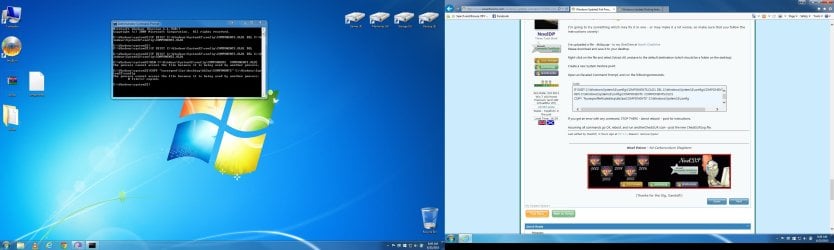
okay I'm standing by here with elevated command prompt. not sure if I'm running the commands properly. like when does one command end and when does another start as far as copying what you posted and pasting it into the command prompt. I tried a couple ways and not sure anything has happened yet. heres a screen shot of my command prompt

Untitled.jpg

I also wasn't sure if the components file should still be inside the bk3aa folder it created on the desktop or on the desktop not in that folder so I made a copy and put one on the desktop and one in the bk3aa folder
 

Attachments

  • Untitled.jpg
    Untitled.jpg
    258.3 KB · Views: 4

My Computer

Computer type
PC/Desktop
OS
Windows 7 Home Premium 64bit
CPU
i7 980x
Motherboard
evga x58 classified 3way
Memory
ddr3
Graphics Card(s)
gtx570 x2
Hard Drives
ocz vertex 2
Antivirus
avast
Browser
ie
Okay, I just closed the command prompt and rebooted as I didn't get any error and didn't seem like it just wasn't working. windows booted up, I followed your instructions again and it said the file copied successfully.

Ran the system update readiness tool and here's the log file

https://www.dropbox.com/s/1jokod6gidn4l12/CBS.rar?dl=0
 

My Computer

Computer type
PC/Desktop
OS
Windows 7 Home Premium 64bit
CPU
i7 980x
Motherboard
evga x58 classified 3way
Memory
ddr3
Graphics Card(s)
gtx570 x2
Hard Drives
ocz vertex 2
Antivirus
avast
Browser
ie
Reboot to Safe Mode, and try again from there.
 

My Computer

Computer type
Laptop
Computer Manufacturer/Model Number
Asus K52F or Lenovo B51-80
OS
Win 7 x64 Home Premium (and x86 VirtualBox VM)/Win10
CPU
i3 370M/i7 6500U
Motherboard
Asus/Lenovo
Memory
8GB - finally :)/8GB
Graphics Card(s)
it's an i3, dude!/dual Intel&nVidia
Sound Card
onboard
Monitor(s) Displays
15.6" built-in
Screen Resolution
1366x768/1920x1080
Hard Drives
750GB Seagate internal
Sundry external drives attached to other computers on the local network
1TB SSD on the Lenovo
PSU
n/a
Internet Speed
as much as I can get - usually on a dongle/phone, so <1MB/s
Antivirus
MSE/Defender
Browser
IE11/12/Edge/Chrome/FF(if I must)

My Computer

Computer type
PC/Desktop
OS
Windows 7 Home Premium 64bit
CPU
i7 980x
Motherboard
evga x58 classified 3way
Memory
ddr3
Graphics Card(s)
gtx570 x2
Hard Drives
ocz vertex 2
Antivirus
avast
Browser
ie
Here's the new CheckSUR summary...
Code:
Summary:
Seconds executed: 758
 Found 91 errors
 Fixed 1 errors
  CSI Manifest All Zeros Total count: 19
  CSI Catalog Corrupt Total count: 1
  Fixed: CSI Catalog Corrupt.  Total count: 1
  CBS MUM Corrupt Total count: 10
  CBS Catalog Corrupt Total count: 10
  CBS Watchlist Package Missing Total count: 1
  CBS Watchlist Component Missing Total count: 50

One thing that may be worth trying is this...

Please download SFCFix from here... http://www.sysnative.com/niemiro/apps/SFCFix.exe and save it to your desktop (we'llneed it later anyhow, I think)


Once saved, double-click on it andaccept the warnings. It'll run, and create a file SFCFix.log on the desktop -please upload it to your reply.


My Computer

Computer type
Laptop
Computer Manufacturer/Model Number
Asus K52F or Lenovo B51-80
OS
Win 7 x64 Home Premium (and x86 VirtualBox VM)/Win10
CPU
i3 370M/i7 6500U
Motherboard
Asus/Lenovo
Memory
8GB - finally :)/8GB
Graphics Card(s)
it's an i3, dude!/dual Intel&nVidia
Sound Card
onboard
Monitor(s) Displays
15.6" built-in
Screen Resolution
1366x768/1920x1080
Hard Drives
750GB Seagate internal
Sundry external drives attached to other computers on the local network
1TB SSD on the Lenovo
PSU
n/a
Internet Speed
as much as I can get - usually on a dongle/phone, so <1MB/s
Antivirus
MSE/Defender
Browser
IE11/12/Edge/Chrome/FF(if I must)
Done. It asked me to allow it to download a file and hit y for yes n for no, I hit y. it then said it detected like 89? sur errors all others were at 0. It said some files cannot be repaired and need human analysis. it created the log. Here it is.

https://www.dropbox.com/s/pnxidpztxm1opj3/SFCFix.txt?dl=0
 

My Computer

Computer type
PC/Desktop
OS
Windows 7 Home Premium 64bit
CPU
i7 980x
Motherboard
evga x58 classified 3way
Memory
ddr3
Graphics Card(s)
gtx570 x2
Hard Drives
ocz vertex 2
Antivirus
avast
Browser
ie
That doesn't bode well - but I've had a few scoops (:)) and I'll review in the morning to see if it makes more sense then.
 

My Computer

Computer type
Laptop
Computer Manufacturer/Model Number
Asus K52F or Lenovo B51-80
OS
Win 7 x64 Home Premium (and x86 VirtualBox VM)/Win10
CPU
i3 370M/i7 6500U
Motherboard
Asus/Lenovo
Memory
8GB - finally :)/8GB
Graphics Card(s)
it's an i3, dude!/dual Intel&nVidia
Sound Card
onboard
Monitor(s) Displays
15.6" built-in
Screen Resolution
1366x768/1920x1080
Hard Drives
750GB Seagate internal
Sundry external drives attached to other computers on the local network
1TB SSD on the Lenovo
PSU
n/a
Internet Speed
as much as I can get - usually on a dongle/phone, so <1MB/s
Antivirus
MSE/Defender
Browser
IE11/12/Edge/Chrome/FF(if I must)
Lookin like another reformat with a different Seven disk with SP1 integrated? or anything else I should try?
 

My Computer

Computer type
PC/Desktop
OS
Windows 7 Home Premium 64bit
CPU
i7 980x
Motherboard
evga x58 classified 3way
Memory
ddr3
Graphics Card(s)
gtx570 x2
Hard Drives
ocz vertex 2
Antivirus
avast
Browser
ie
Back
Top