windows using 3gb of ram

awhir

New member
Local time
9:22 AM
Messages
2
hey guys , im having a problem with 7 .After about 2-3 hours from a cold boot windows will start using loads of memory on ideal , the problem is that i cant find whats using the memory ! when looking at task manager and adding up what all the programs are using it does not match with high amount being used .

im just wondering if anyone knows how to fix this probelm ?

cheers andrew
 

My Computer My Computer

OS
7 unlimited
CPU
e8400
Motherboard
asus x38
Memory
4gb
Graphics Card(s)
ati 4850
Monitor(s) Displays
lg 20"
Screen Resolution
1680x1280
Did you look at the memory tab of resource monitor?

You can access resource monitor from task manager. There is a link to it at the bottom of the performance tab.
 

My Computer My Computer

Computer type
PC/Desktop
Computer Manufacturer/Model Number
Ignatz Special; 4 speed manual gearbox; factory air conditioning; one of one
OS
Windows 7 Home Premium SP1, 64-bit
CPU
Intel Skylake i5-6600K, not overclocked
Motherboard
AsRock Z170M Extreme 4, micro ATX
Memory
8 GB HyperX DDR4-2666 (2 x 4 GB)
Graphics Card(s)
none; graphics are integrated on CPU
Sound Card
onboard: Realtek ALC1150; external: USB Behringer UF0-202
Monitor(s) Displays
Dell S2340M 23 inch IPS
Screen Resolution
1600 x 900
Hard Drives
System: Crucial MX100 series SSD, 128 GB;
Data: Samsung Spinpoint 103SJ, 1 TB;
Backup: WD Caviar Green WD30EZRX-00D8PB0, 3 TB
PSU
Rosewill SilentNight 500 watt fanless, semi-modular
Case
Antec Solo II
Cooling
Noctua NH-U12S; Noctua F12 intake, Noctua S12A exhaust
Keyboard
Microsoft 200 6JH-00001 USB
Mouse
Dell or Microsoft optical wired; USB
Antivirus
Microsoft Security Essentials and Malwarebytes Premium
Browser
Pale Moon
Other Info
All fans PWM; speeds at idle: CPU circa 500 rpm; intake circa 600 rpm; exhaust circa 600 rpm; CPU temps 27 idle and 47 C load in a warm room (27 C/81 F) when running Intel Extreme Tuning Utility stress test.
Hello awhir, can you help us out my filling out your system specs in your userCP and taking a few screen shots of the taskmanager to post up here so we all can take a look and help out more.
 

My Computer My Computer

Computer Manufacturer/Model Number
Custom Build
OS
Windows 7 Ultimate x64 SP1
CPU
AMD Phenom II 1090 3.2 six core
Motherboard
MSI 890FXA-GD65
Memory
16 gig DDR3
Graphics Card(s)
MSI R6950 2gig
Sound Card
on board
Monitor(s) Displays
Acer 23inch led
Screen Resolution
1900x1080 widescreen
Hard Drives
Seagate 1tb SATA6
2x 1tb HITACHI Deskstar
PSU
CORSAIR Enthusiast Series TX750 V2 750W
Case
CoolMaster HAF 922
Cooling
Box AMD Heatsink/Fan
Internet Speed
Cable 12Mbps/3Mbps
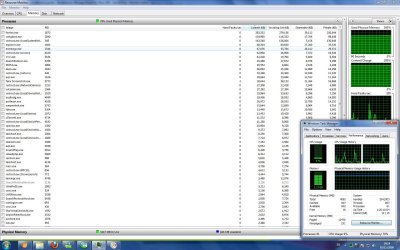
uploaded a shot and updated my specs , chhers
 

Attachments

  • mem.jpg
    mem.jpg
    206 KB · Views: 106

My Computer My Computer

OS
7 unlimited
CPU
e8400
Motherboard
asus x38
Memory
4gb
Graphics Card(s)
ati 4850
Monitor(s) Displays
lg 20"
Screen Resolution
1680x1280
What antivirus are you running? Gah I ask that a lot...but it is the first thing to strike off, IMO.
 

My Computer My Computer

Computer type
PC/Desktop
Computer Manufacturer/Model Number
Alienware Aurora ALX R4
OS
Windows 10 Pro (x64)
CPU
Intel Core i7-3930K (3.2GHz - 4.5GHz)
Motherboard
Alienware Aurora-R4 x79
Memory
4x Samsung 4GB PC3-12800 DDR3 (16GB 1600MHz)
Graphics Card(s)
Nvidia Geforce GTX 690
Sound Card
SteelSeries Siberia Elite
Monitor(s) Displays
Dell UltraSharp U3011
Screen Resolution
2560x1600
Hard Drives
Samsung 850 Pro 256 GB, Seagate 1TB Desktop Hybrid HDD, 2x Western Digital 4TB Green HDD
PSU
875W Some Dell PSU <.<
Case
Alienware Aurora ALX
Cooling
Custom Liquid Cooling (EK CPU & GPU blocks) dual EK 480RAD
Keyboard
Logitech G710+ Mechanical
Mouse
Logitech G700s
Internet Speed
Verizon Fios (50 mbps average)
Other Info
Server: Intel NUC D54250WYK: i5-4250U, 16GB, 256 GB mSATA, Windows Server 2012 R2
61 processes is quite a lot also
 

My Computer My Computer

Computer type
PC/Desktop
Computer Manufacturer/Model Number
Me
OS
Windows 7 Home Premium x64
CPU
AMD Bulldozer FX-8 8120 Black Edition @ 4GHz
Motherboard
Asus Crosshair V Formula 990FX
Memory
Corsair Vengeance 16GB DDR3 PC3-12800C9 1600MHz
Graphics Card(s)
MSI nVidia Geforce GTX 670 OC 2048MB GDDR5
Sound Card
Sound Blaster X-Fi 2 MB 2
Monitor(s) Displays
Samsung SyncMaster SA350 22" LED HDMI
Screen Resolution
1920x1080
Hard Drives
Seagate Barracuda SATA II 500GB 16MB Cache 7200.12
PSU
Corsair Professional Series Gold AX1200 (1200Watts)
Case
Antec 1200 Ultimate Gaming Case
Cooling
Antec Kuhler H20 620
Keyboard
Logitech G510
Mouse
Microsoft Wireless 3000
Internet Speed
Upto 40Mb/s Fibre Optic Broadband
One or more of your programs may be leaking resources (look at the task manager "handles" and "paged" entries). Perhaps it would be a good idea to cut down on the amount of running processes, as Fluffy has hinted.
 

My Computer My Computer

Computer Manufacturer/Model Number
Too many to list.
OS
XP, Seven, 2008R2
CPU
AMD, Intel, VIA
Motherboard
Various
Memory
Corsair, Kingston, etc.
Graphics Card(s)
ATI, NVIDIA
Monitor(s) Displays
Samsung
Hard Drives
Maxtor, Western Digital
Keyboard
qwerty
Internet Speed
22 Mb/s @ home, 1 Gb/s @ server
Other Info
All of my systems still run fastest on XP 32-bit for the most part. Win7 is fun to play with, but I still prefer XP for raw speed, security, and functionality.
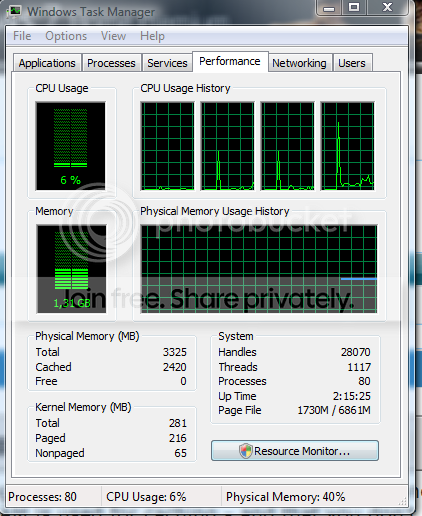
There is absolutely nothing wrong judging from your snips. You cannot just add up the processes. Most of your RAM is used for caching - and that you don't see anywhere. Be glad all RAM is used. I assume it's all paid for - lol.

BTW: have a look at mine which is completely normal - there is zero free:

ram.png
 

My Computer My Computer

Computer Manufacturer/Model Number
HP, Dell, Gateway, Toshiba - 4 laptops and 2 desktops
OS
Vista, Windows7, Mint Mate, Zorin, Windows 8
CPU
from 1.6GHz Duo to i7
Monitor(s) Displays
2x HP w2207
Hard Drives
5x HDD, 7x SSD, 12x Externals
Keyboard
with trackball - no mices
Mouse
Trackball mice
Internet Speed
DSL 6000

My Computer My Computer

Computer Manufacturer/Model Number
Too many to list.
OS
XP, Seven, 2008R2
CPU
AMD, Intel, VIA
Motherboard
Various
Memory
Corsair, Kingston, etc.
Graphics Card(s)
ATI, NVIDIA
Monitor(s) Displays
Samsung
Hard Drives
Maxtor, Western Digital
Keyboard
qwerty
Internet Speed
22 Mb/s @ home, 1 Gb/s @ server
Other Info
All of my systems still run fastest on XP 32-bit for the most part. Win7 is fun to play with, but I still prefer XP for raw speed, security, and functionality.
There is absolutely nothing wrong judging from your snips.

I beg to differ.

FWIW, I agree with sup3rsprt - there's so much wrong that it's a testament to his hardware and Windows that the thing is still managing to "run" at all.

Close to 3 million handles, if eyesight serves, an insane amount of paged pool.... it's possible that the AV (or another filter driver) is the cause, as logicearth said, though it may also be one or more handle leaks in process instances.

The gargantuan paged pool size is a side-effect of the handle leak. The handles themselves, plus potentially the kernel objects they're pointing to, are obviously residing in paged pool.

@Fluffy: the number of processes has nothing to do with it until you get into quadruple digits ;)
 

My Computer My Computer

Computer Manufacturer/Model Number
Multiple machines in various stages of decomposition.
OS
Win7x64
What run's at startup in the msconfig tab, or use Autoruns. What have you installed? That isn't right. Scan with superantispyware too.
 

My Computer My Computer

Computer Manufacturer/Model Number
Sony Vaio Z46GDU
OS
Windows 7 Ultimate x86-64
CPU
[email protected] 1066MHz FSB
Motherboard
Sony branded
Memory
6GB DDR3 1066MHz
Graphics Card(s)
9300M GS 256MB Dedicated (Speed) + Intel4500MHD (Stamina)
Sound Card
Realtek HD Audio
Monitor(s) Displays
13.1' WXGA
Screen Resolution
1600x900
Hard Drives
320GB 7200RPM w/ 16MB cache
Internet Speed
1MB/s
Back
Top