
Windows Virtual PC - Delete a Virtual Machine

How to Delete a Virtual Machine Created with Windows Virtual PC

   Information
This will show how to delete or uninstall a Virtual Machine created with Windows Virtual PC.
   Note
This will delete the .vmcx (Virtual Machine settings) and .vhd (Virtual Hard Drive) files to completely remove the virtual machine and regain the hard drive space used by it.
   Warning
Be sure to back up anything that you do not want to lose in the virtual machine first. When you delete the virtual machine, it will be gone for good.


Here's How:
1. If you have the virtual machine that you want to delete running, then you must close or shut down the virtual machine first.

2. Open the Windows 7 Start Menu, and click on All Programs, expand Windows Virtual PC folder, and double click on the Virtual Machines shortcut. (See screenshot below)
NOTE: You can also open the Virtual Machines folder at C:\Users\(User Name)\Virtual Machines.
Start_Menu.jpg
3. Right click on the virtual machine that you want to delete, then click on Settings. (See screenshot below)
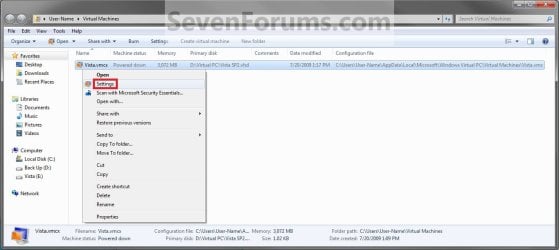
Settings.jpg
4. In the left pane, click on the Hard Disk (ex: Hard Disk 1) that has a .VHD file (ex: Vista SP2.vhd) listed under "Current Value" to select it. (See screenshot below)
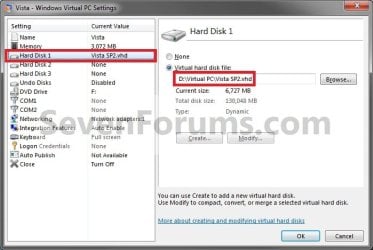
StepC.jpg
5. In the right pane, click on the Browse button. (See screenshot above)
NOTE: You could also just navigate to that location for the .vhd file in Windows Explorer.

6. Right click on the .vhd file (ex: Vista SP2.vhd) for the virtual machine that you want to delete, and click on Delete. (See screenshot below)
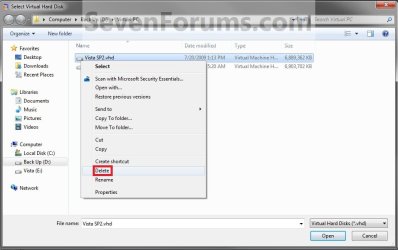
VHD.jpg
7. Click on Yes to approve. (See screenshot below)
StepD.jpg
8. Close the window under step 6 and under step 5.

9. Right click on the .vmcx file for the virtual machine that you want to delete, then click on Delete. (See screenshot below)
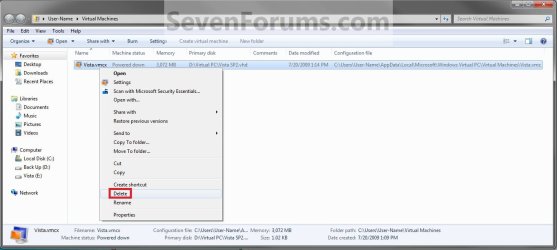
StepA.jpg
10. Click on Yes to approve. (See screenshot below)
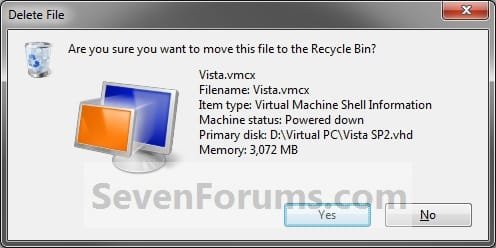
StepB.jpg
11. Close the window under step 9.

12. Empty the Recycle Bin.
That's it,
Shawn


Last edited:
Thanks for the tutorial very nicely done.

Greg
 

My Computer

Computer Manufacturer/Model Number
Acer ASpire 6920
OS
Windows 7N
You're most welcome Greg, and welcome to Seven Forums. :)
 

My Computer

Computer type
PC/Desktop
Computer Manufacturer/Model Number
Self built custom
OS
64-bit Windows 11 Pro for Workstations
CPU
Intel i7-8700K OC'd to 5 GHz
Motherboard
ASUS ROG Maximus XI Formula Z390
Memory
64 GB (4x16GB) G.SKILL TridentZ RGB DDR4 3600 MHz
Graphics Card(s)
ASUS ROG-STRIX-GTX1080TI-O11G-GAMING
Sound Card
Integrated
Monitor(s) Displays
2 x Samsung Odyssey G7 27"
Screen Resolution
2560x1440
Hard Drives
1TB Samsung 990 PRO M.2,
4TB Samsung 990 PRO PRO M.2,
TerraMaster F8 SSD Plus NAS
PSU
Seasonic Prime Titanium 850W
Case
Thermaltake Core P3
Cooling
Corsair Hydro H115i
Keyboard
Logitech wireless K800
Mouse
Logitech MX Master 4
Internet Speed
2 Gb/s Download and 100 Mb/s Upload
Antivirus
Malwarebyte Anti-Malware Premium
Browser
Google Chrome
Other Info
Logitech Z625 speaker system,
Logitech BRIO 4K Pro webcam,
HP Color LaserJet Pro MFP M477fdn,
APC SMART-UPS RT 1000 XL - SURT1000XLI,
Galaxy S23 Plus phone
When i try your instructions i have the following problem

When i click on Settings as you indicate i am presented with the windows that says choose the program you want to open this file (Typical windows when a file is not associated with a program). I dont know what to choose there. Can you help me plz?

Regards,
Dionisis Falireas
 

My Computer

Computer Manufacturer/Model Number
Sony VGN-NW21SF
OS
Windows 7 Home Premium 64 Bit
CPU
Intel Core 2 Duo P7450 2.13 Ghz
Hello Dionisis,

Reinstalling Windows Virtual PC should be able to repair that. :)
 

My Computer

Computer type
PC/Desktop
Computer Manufacturer/Model Number
Self built custom
OS
64-bit Windows 11 Pro for Workstations
CPU
Intel i7-8700K OC'd to 5 GHz
Motherboard
ASUS ROG Maximus XI Formula Z390
Memory
64 GB (4x16GB) G.SKILL TridentZ RGB DDR4 3600 MHz
Graphics Card(s)
ASUS ROG-STRIX-GTX1080TI-O11G-GAMING
Sound Card
Integrated
Monitor(s) Displays
2 x Samsung Odyssey G7 27"
Screen Resolution
2560x1440
Hard Drives
1TB Samsung 990 PRO M.2,
4TB Samsung 990 PRO PRO M.2,
TerraMaster F8 SSD Plus NAS
PSU
Seasonic Prime Titanium 850W
Case
Thermaltake Core P3
Cooling
Corsair Hydro H115i
Keyboard
Logitech wireless K800
Mouse
Logitech MX Master 4
Internet Speed
2 Gb/s Download and 100 Mb/s Upload
Antivirus
Malwarebyte Anti-Malware Premium
Browser
Google Chrome
Other Info
Logitech Z625 speaker system,
Logitech BRIO 4K Pro webcam,
HP Color LaserJet Pro MFP M477fdn,
APC SMART-UPS RT 1000 XL - SURT1000XLI,
Galaxy S23 Plus phone
You could pretend that it was a bit more complicated than this, so that i dont feel like an idiot.. :D Probably i am getting old. In my defence i was confused because when i run Windows XP mode i was presented with the logon screen so i assumed everything was installed... Thank you very much, i will proceed!
 

My Computer

Computer Manufacturer/Model Number
Sony VGN-NW21SF
OS
Windows 7 Home Premium 64 Bit
CPU
Intel Core 2 Duo P7450 2.13 Ghz
There's nothing to feel silly about. There's an issue with the association of that context menu and Windows Virtual PC. Reinstalling Windows Virtual PC should restore the association without to much fuss for you. :)
 

My Computer

Computer type
PC/Desktop
Computer Manufacturer/Model Number
Self built custom
OS
64-bit Windows 11 Pro for Workstations
CPU
Intel i7-8700K OC'd to 5 GHz
Motherboard
ASUS ROG Maximus XI Formula Z390
Memory
64 GB (4x16GB) G.SKILL TridentZ RGB DDR4 3600 MHz
Graphics Card(s)
ASUS ROG-STRIX-GTX1080TI-O11G-GAMING
Sound Card
Integrated
Monitor(s) Displays
2 x Samsung Odyssey G7 27"
Screen Resolution
2560x1440
Hard Drives
1TB Samsung 990 PRO M.2,
4TB Samsung 990 PRO PRO M.2,
TerraMaster F8 SSD Plus NAS
PSU
Seasonic Prime Titanium 850W
Case
Thermaltake Core P3
Cooling
Corsair Hydro H115i
Keyboard
Logitech wireless K800
Mouse
Logitech MX Master 4
Internet Speed
2 Gb/s Download and 100 Mb/s Upload
Antivirus
Malwarebyte Anti-Malware Premium
Browser
Google Chrome
Other Info
Logitech Z625 speaker system,
Logitech BRIO 4K Pro webcam,
HP Color LaserJet Pro MFP M477fdn,
APC SMART-UPS RT 1000 XL - SURT1000XLI,
Galaxy S23 Plus phone
Repairing Windows Virtual PC administrator

Brink thank you very much for the answer.

I would like to ask you one more question, but please instruct me wether i should open a new thread / question as it is idirectly related to my problem.

On the 2 virtual machines i have created (XP with i.e 8 and the 2nd is XP with i.e 7), i deleted the user accounts i had created thinking i could log in as administrator. The result is that i can no longer log in. i think this is a common problem with virtuale machines created with windows virtual pc.

My question is wether it is easier to fix this by some way, or to completely uninstall the whole Windows Virtual PC in and reinstall it, or just the virtual machines, or anything else you might propose.

Can you help me with this? What should i do?

Regards,
Dionisis Falireas
 

My Computer

Computer Manufacturer/Model Number
Sony VGN-NW21SF
OS
Windows 7 Home Premium 64 Bit
CPU
Intel Core 2 Duo P7450 2.13 Ghz
Dionisis,

A virtual machine, like any other installed Windows, will require an user account to be able to log on to it.

Unless you have something in the virtual machines you really need, it may be best to delete the virtual machines, uninstall and reinstall Windows Virtual PC, then create new virtual machines. :(
 

My Computer

Computer type
PC/Desktop
Computer Manufacturer/Model Number
Self built custom
OS
64-bit Windows 11 Pro for Workstations
CPU
Intel i7-8700K OC'd to 5 GHz
Motherboard
ASUS ROG Maximus XI Formula Z390
Memory
64 GB (4x16GB) G.SKILL TridentZ RGB DDR4 3600 MHz
Graphics Card(s)
ASUS ROG-STRIX-GTX1080TI-O11G-GAMING
Sound Card
Integrated
Monitor(s) Displays
2 x Samsung Odyssey G7 27"
Screen Resolution
2560x1440
Hard Drives
1TB Samsung 990 PRO M.2,
4TB Samsung 990 PRO PRO M.2,
TerraMaster F8 SSD Plus NAS
PSU
Seasonic Prime Titanium 850W
Case
Thermaltake Core P3
Cooling
Corsair Hydro H115i
Keyboard
Logitech wireless K800
Mouse
Logitech MX Master 4
Internet Speed
2 Gb/s Download and 100 Mb/s Upload
Antivirus
Malwarebyte Anti-Malware Premium
Browser
Google Chrome
Other Info
Logitech Z625 speaker system,
Logitech BRIO 4K Pro webcam,
HP Color LaserJet Pro MFP M477fdn,
APC SMART-UPS RT 1000 XL - SURT1000XLI,
Galaxy S23 Plus phone
If the built-in administrator account is active (enabled) but has no password set, you can login to it by first disabling Integration Features.

When Integration is enabled you cannot login to a VPC virtual machine to an account which has no password but this is possible when Integration is disabled.

Kari
 

My Computer

Computer type
Laptop
Computer Manufacturer/Model Number
HP ENVY 17-1150eg
OS
Windows 10 Pro x64 EN-GB
CPU
1.6 GHz Intel Core i7-720QM Processor
Memory
6 GB
Graphics Card(s)
ATI Mobility Radeon HD 5850 Graphics
Sound Card
Beats sound system with integrated subwoofer
Monitor(s) Displays
17" laptop display, 22" LED and 32" Full HD TV through HDMI
Screen Resolution
1600*900 (1), 1920*1080 (2&3)
Hard Drives
Internal: 2 x 500 GB SATA Hard Disk Drive 7200 rpm
External: 2TB for backups, 3TB USB3 network drive for media
Cooling
As Envy runs a bit warm, I have it on a Cooler Master pad
Keyboard
Logitech diNovo Media Desktop Laser (bluetooth)
Mouse
Logitech Performance Mouse MX
Internet Speed
50/10 Mbps VDSL
Antivirus
Windows Defender 4.3.9431.0
Browser
Maxthon 3.5.2., IE11
Back
Top