Windows will not start after power outage during update

bvw6

New member
Local time
7:01 PM
Messages
9
Hey all

Today I experienced a power outage while windows was installing an update.
Now whenever I try to start up my computer it gets to the Windows logo, a BSOD flashes for a split second, and the system restarts.
Booting in safe mode also gives the same problem.

System restore cannot find my C:/ partition with my operating system, what seems quite weird since I first tried with the system restore on my hdd before using the one on the Windows disk. I tried a startup repair, but without any success. The logs show it performed a chkdsk so that will not work either.

I tried accessing my C partion through a couple live CDs but it doesnt seem readable.

What options do I have left to recover my system?

Thanks in advance
bvw6
 

My Computer My Computer

At a glance

Windows 7 Ultimate x64
Computer type
PC/Desktop
OS
Windows 7 Ultimate x64

My Computer My Computer

At a glance

Vista, Windows7, Mint Mate, Zorin, Windows 8from 1.6GHz Duo to i7
Computer Manufacturer/Model Number
HP, Dell, Gateway, Toshiba - 4 laptops and 2 desktops
OS
Vista, Windows7, Mint Mate, Zorin, Windows 8
CPU
from 1.6GHz Duo to i7
Monitor(s) Displays
2x HP w2207
Hard Drives
5x HDD, 7x SSD, 12x Externals
Keyboard
with trackball - no mices
Mouse
Trackball mice
Internet Speed
DSL 6000
I already tried to do that, but than a message pops up telling me I first need to select an OS I wish to restore and system restore can't find my C: partition with my OS.
 

My Computer My Computer

At a glance

Windows 7 Ultimate x64
Computer type
PC/Desktop
OS
Windows 7 Ultimate x64
Use the bootable CD of partition Wizard. Download the .iso from the last entry on the website and burn that to CD. Then boot with that CD and have a look in what condition your disk is.
 

My Computer My Computer

At a glance

Vista, Windows7, Mint Mate, Zorin, Windows 8from 1.6GHz Duo to i7
Computer Manufacturer/Model Number
HP, Dell, Gateway, Toshiba - 4 laptops and 2 desktops
OS
Vista, Windows7, Mint Mate, Zorin, Windows 8
CPU
from 1.6GHz Duo to i7
Monitor(s) Displays
2x HP w2207
Hard Drives
5x HDD, 7x SSD, 12x Externals
Keyboard
with trackball - no mices
Mouse
Trackball mice
Internet Speed
DSL 6000
Ok, so I'm not entirely sure what I should do in partition wizard.

It finds my drive and it's the first program that can access my C partition and files. (No idea why other live CD's couldn't)
But it does show however that my drive is 100% full, what isn't the case.

So what do I do now?
Do I try to back-up everything and reformat?
 

My Computer My Computer

At a glance

Windows 7 Ultimate x64
Computer type
PC/Desktop
OS
Windows 7 Ultimate x64
Take a good picture of the screen with your camera (not phone) and post it here. We'll have a look at it.
 

My Computer My Computer

At a glance

Vista, Windows7, Mint Mate, Zorin, Windows 8from 1.6GHz Duo to i7
Computer Manufacturer/Model Number
HP, Dell, Gateway, Toshiba - 4 laptops and 2 desktops
OS
Vista, Windows7, Mint Mate, Zorin, Windows 8
CPU
from 1.6GHz Duo to i7
Monitor(s) Displays
2x HP w2207
Hard Drives
5x HDD, 7x SSD, 12x Externals
Keyboard
with trackball - no mices
Mouse
Trackball mice
Internet Speed
DSL 6000
A picture of what?
There isn't any usefull information showing on partition wizard, it's just the main screen.
No errors either, the only weird thing is that according to partition wizard I have no space left on my disk.
 

My Computer My Computer

At a glance

Windows 7 Ultimate x64
Computer type
PC/Desktop
OS
Windows 7 Ultimate x64
I think you need to run chkdsk then if that doesn't fix it, run sfc.


How to run chkdsk or System File Checker (SFC) from the Recovery Console


  • Boot your Vista or Windows 7 installation DVD
  • When you see "Press any key to boot from CD or DVD", press Enter
  • At the "Install Windows" screen, click on Repair your computer at lower left
  • At the System Recovery Options screen, make note of the drive letter assigned to your boot drive (normally C:) and click Next
  • At the Chose a Recovery Tool window, click on Command Prompt. You will be sitting at X:\Sources directory
  • Run chkdsk or SFC
  • If you did not note the drive letter of your boot disk, you can enter bcdedit and look at the osdevice line to see what it is.
  • For chkdsk, type chkdsk c: /r and press Enter (use the letter from above if not C:).
  • For sfc, type sfc /scannow /offbootdir=c:\ /offwindir=c:\windows and press Enter (use the letter from above)
Let either run to completion undisturbed.

Vista or Windows 7: If you don't have a install DVD, you can download a legal copy here:
Windows 7 Direct Download Links
Download Official Windows Vista RTM with SP1 Setup Files (32-bit and 64-bit)

Make sure you get the same version you have installed: 32 or 64 bit; Home Premium, Pro or Ultimate.
 

My Computer My Computer

At a glance

Windows 10 Pro X64Intel Quad Core i7-4770 @ 3.4Ghz16.0GB PC3-12800 DDR3 SDRAM 1600 MHzIntel Integrated HD Graphics
Computer type
PC/Desktop
Computer Manufacturer/Model Number
Lenovo IdeaCenter 450
OS
Windows 10 Pro X64
CPU
Intel Quad Core i7-4770 @ 3.4Ghz
Memory
16.0GB PC3-12800 DDR3 SDRAM 1600 MHz
Graphics Card(s)
Intel Integrated HD Graphics
Sound Card
Realtek HD Audio
Monitor(s) Displays
HP 22" LCD
Screen Resolution
1680 x 1050
Hard Drives
250GB Samsung EVO SATA-3 SSD
2TB Seagate ST2000DM001 SATA-2
1.5TB Seagate ST3150041AS SATA
Keyboard
Dell USB
Mouse
Lenovo USB
Internet Speed
Cable via Road Runner 3MB Upload, 30MB Download
Antivirus
Windows Defender, MBAM Pro, MBAE
Browser
Seamonkey
Other Info
UEFI/GPT
PLDS DVD-RW DH16AERSH
Ztruker I already did those things but without success. The system recovery screen will not let me pick a boot drive it's just blank. Anyway, I'm now trying to copy the files to an external hdd. Hopefully that will work...
 

My Computer My Computer

At a glance

Windows 7 Ultimate x64
Computer type
PC/Desktop
OS
Windows 7 Ultimate x64
Live Linux CD/DVD

:eek: You should create a backup HDD/SSD image before attempting any repairs. :eek:
You will need to use something like a Macrium Reflect PE disc to do this.

Do you have access to a Live Linux CD/DVD (e.g. Ubuntu)?

If so, does it run on your PC?

If it runs, can you view your Windows partition contents?

If you can view the contents, try using the Disk Space Analyser to determine what is using up all of your HDD space.
You may be able to delete the offending file(s).
 

My Computer My Computer

At a glance

W7 Ultimate SP1, LM19.2 MATE, W10 Home 1703, ...AMD Phenom II x6 1100T, 3.3 GHz12GB DDR3 1333 G-Skill (4GB x 2), G-Skill (2G...NVIDIA GeForce GTX 660
Computer type
PC/Desktop
Computer Manufacturer/Model Number
n/a
OS
W7 Ultimate SP1, LM19.2 MATE, W10 Home 1703, W10 Pro 1703 VM, #All 64 bit
CPU
AMD Phenom II x6 1100T, 3.3 GHz
Motherboard
ASUS M4A88T-M/USB3 (AM3)
Memory
12GB DDR3 1333 G-Skill (4GB x 2), G-Skill (2GB x 2)
Graphics Card(s)
NVIDIA GeForce GTX 660
Sound Card
Realtek?
Monitor(s) Displays
Samsung S23B350
Screen Resolution
1920x1080
Hard Drives
WD Green 2TB (SATA), WD Green 3TB (SATA), WD Blue 4TB (SATA), WD Blue 6TB (SATA)
PSU
Cooler Master
Case
Antec GX300 Tower
Cooling
3x Antec TRICOOL 120mm Fans
Mouse
Wired Optical
Internet Speed
DSL
Antivirus
Avast
Browser
Pale Moon (64 bit)
Other Info
2018-12-27 Upgraded HDDs
2015-12-10 Upgraded case, graphics card, storage
2015-08-15 Upgraded motherboard & RAM
2015-07-15 Upgraded LM17.1 to LM17.2
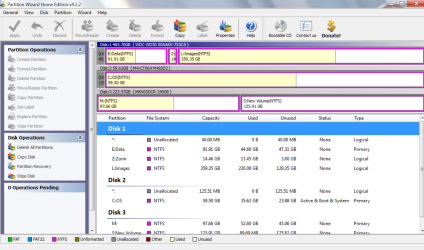
I just wanted to see the Partition Wizard screen. Something like this:
 

Attachments

  • 2013-12-14_2107.png
    2013-12-14_2107.png
    139.8 KB · Views: 0

My Computer My Computer

At a glance

Vista, Windows7, Mint Mate, Zorin, Windows 8from 1.6GHz Duo to i7
Computer Manufacturer/Model Number
HP, Dell, Gateway, Toshiba - 4 laptops and 2 desktops
OS
Vista, Windows7, Mint Mate, Zorin, Windows 8
CPU
from 1.6GHz Duo to i7
Monitor(s) Displays
2x HP w2207
Hard Drives
5x HDD, 7x SSD, 12x Externals
Keyboard
with trackball - no mices
Mouse
Trackball mice
Internet Speed
DSL 6000
@lehnerus2000

I know I should and i've tried, but I couldn't open my partition. I've tried with two different live CD's.
So now I'm using partition wizard to copy the whole possibly corrupt windows partition to an external hdd and I'm hoping that I will be able to recover at least some of the files latter on.
 

My Computer My Computer

At a glance

Windows 7 Ultimate x64
Computer type
PC/Desktop
OS
Windows 7 Ultimate x64
@WHS

Ok, sorry, I wasn't sure that was what you wanted. It seemed a bit uninformative to me.
Anyway it's busy now, copying my partition, but I'll post a picture tomorrow if my problems aren't resolved by then.
My screen looks almost exactly the same though, the only differences are that I just have one disk with only one NTFS partition and my partition doesn't seem to have a label.
Instead of showing 'C:boot' like it should, it just shows '*:'.
 

My Computer My Computer

At a glance

Windows 7 Ultimate x64
Computer type
PC/Desktop
OS
Windows 7 Ultimate x64
I hope the recovery works with the PW. I think the free edition copies only 1GB. If it does not work, post back - there are other ways.
 

My Computer My Computer

At a glance

Vista, Windows7, Mint Mate, Zorin, Windows 8from 1.6GHz Duo to i7
Computer Manufacturer/Model Number
HP, Dell, Gateway, Toshiba - 4 laptops and 2 desktops
OS
Vista, Windows7, Mint Mate, Zorin, Windows 8
CPU
from 1.6GHz Duo to i7
Monitor(s) Displays
2x HP w2207
Hard Drives
5x HDD, 7x SSD, 12x Externals
Keyboard
with trackball - no mices
Mouse
Trackball mice
Internet Speed
DSL 6000
@WHS

Ok, sorry, I wasn't sure that was what you wanted. It seemed a bit uninformative to me.
Anyway it's busy now, copying my partition, but I'll post a picture tomorrow if my problems aren't resolved by then.
My screen looks almost exactly the same though, the only differences are that I just have one disk with only one NTFS partition and my partition doesn't seem to have a label.
Instead of showing 'C:boot' like it should, it just shows '*:'.
That does not look too good for C. Keep us posted whether you could recover your stuff. Maybe then it would be best to reinnstall the OS. But first you need your files in a safe place.
 

My Computer My Computer

At a glance

Vista, Windows7, Mint Mate, Zorin, Windows 8from 1.6GHz Duo to i7
Computer Manufacturer/Model Number
HP, Dell, Gateway, Toshiba - 4 laptops and 2 desktops
OS
Vista, Windows7, Mint Mate, Zorin, Windows 8
CPU
from 1.6GHz Duo to i7
Monitor(s) Displays
2x HP w2207
Hard Drives
5x HDD, 7x SSD, 12x Externals
Keyboard
with trackball - no mices
Mouse
Trackball mice
Internet Speed
DSL 6000
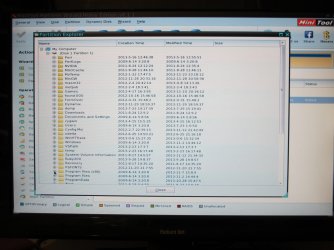
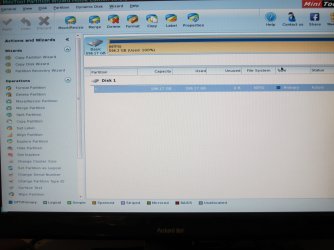
Ok, my C partion still is unreadable. Only Partition Wizard could browse my files and folders so far. Sadly PW doesn't seem to have an option to copy seperate files and folders (or I just haven't found such an option). So I've copied the entire partition to an external hdd, but this just resulted in a corrupt partition on my external hdd. (I should have expected that)
But since PW can actually browse the corrupted partition it should be possible retrieve at least part of the files on it?

Here are some pictures of PW, like you can see, my disk seems to be 100% full what shouldn't be right and it isn't able to read the name of the partition.

So does anyone know how I could recover my files?
 

Attachments

  • IMG_0061_2.jpg
    IMG_0061_2.jpg
    291.3 KB · Views: 2
  • IMG_0062_2.jpg
    IMG_0062_2.jpg
    278.7 KB · Views: 2

My Computer My Computer

At a glance

Windows 7 Ultimate x64
Computer type
PC/Desktop
OS
Windows 7 Ultimate x64
Let's try to make an image of the partition. Then we can mount the image and try to retrieve the files. There are different methods.

1. The easiest would be with command prompt at startup - Option 2 in the tutorial. For that, however, the partition needs a letter. See whether you can assign the letter C with partition Wizard. You then run the following commands:

To find the letter to which you want to store the image, run

Diskpart
List volume

That shows you all the disks and remember the letter of the disk to where you will write the image.

To write the image, use this command

WBADMIN START BACKUP -backupTarget:X: -include:C:

Where X is the disk you found in List Volume

That disk X we will later connect to another PC and attach the VHD of that image.

2. If you have a live Linux CD and know how to use it, you can try to retrieve the data with that. If you have no Linux, you can use my method:

http://www.sevenforums.com/tutorials/287439-emergency-kit-save-your-files-dead-os.html

3. You can try to make an image with Macrium. For that you have to burn the macrium .iso to CD. The .iso you find on my Skydrive. You boot the system with that CD. To operate Macrium you can refer to this tutorial.

http://www.sevenforums.com/tutorials/73828-imaging-free-macrium.html?ltr=I
 

My Computer My Computer

At a glance

Vista, Windows7, Mint Mate, Zorin, Windows 8from 1.6GHz Duo to i7
Computer Manufacturer/Model Number
HP, Dell, Gateway, Toshiba - 4 laptops and 2 desktops
OS
Vista, Windows7, Mint Mate, Zorin, Windows 8
CPU
from 1.6GHz Duo to i7
Monitor(s) Displays
2x HP w2207
Hard Drives
5x HDD, 7x SSD, 12x Externals
Keyboard
with trackball - no mices
Mouse
Trackball mice
Internet Speed
DSL 6000
Thanks again for the quick reply WHS!
I'll try that, but will an image be any different from the copied partition? Won't it also be unreadable?
 

My Computer My Computer

At a glance

Windows 7 Ultimate x64
Computer type
PC/Desktop
OS
Windows 7 Ultimate x64
The image may be readable because it is a completely new file. Matter of trying.
 

My Computer My Computer

At a glance

Vista, Windows7, Mint Mate, Zorin, Windows 8from 1.6GHz Duo to i7
Computer Manufacturer/Model Number
HP, Dell, Gateway, Toshiba - 4 laptops and 2 desktops
OS
Vista, Windows7, Mint Mate, Zorin, Windows 8
CPU
from 1.6GHz Duo to i7
Monitor(s) Displays
2x HP w2207
Hard Drives
5x HDD, 7x SSD, 12x Externals
Keyboard
with trackball - no mices
Mouse
Trackball mice
Internet Speed
DSL 6000
Back
Top