Windows will not update!

Brokenwing

New member
Local time
10:43 AM
Messages
12
Location
Maryland
I did a clean install after my computer was getting slow, and I wanted to clean it up. I am now unable to get the Windows to do updates. I ran the Microsoft repair and it did the following,

Service registration is missing or corrupt. (Fixed)

Problems installing recent updates (fixed)

Windows update error 0x8024402c (2016-07-11-T-09_29_06P). (Failed)

Under update history I see the following downloads,

Windows Update Agent 7.6.7600.320
Hot fix for Windows (KB2505454)
 

My Computer

Computer type
PC/Desktop
Computer Manufacturer/Model Number
Custom Built
OS
Windows 7
CPU
AMD A8 3870K
Motherboard
Asus F1A75M-Pro
Keyboard
Logitech
Mouse
Wireless Logitech
Antivirus
Microsoft security Essentials
Browser
Firefox
Ok I missed these instructions during my search my apology! I am now running the Windows update standalone installer and it says searching for updates on this computer is that normal?
 

My Computer

Computer type
PC/Desktop
Computer Manufacturer/Model Number
Custom Built
OS
Windows 7
CPU
AMD A8 3870K
Motherboard
Asus F1A75M-Pro
Keyboard
Logitech
Mouse
Wireless Logitech
Antivirus
Microsoft security Essentials
Browser
Firefox
I ran the (SURT) tool, but after 2 hours I forced it to shutdown, as it was not doing anything. The error codes I am getting is written above, and windows update still just spins. Scan now did not find anything but I will post the log!
 

My Computer

Computer type
PC/Desktop
Computer Manufacturer/Model Number
Custom Built
OS
Windows 7
CPU
AMD A8 3870K
Motherboard
Asus F1A75M-Pro
Keyboard
Logitech
Mouse
Wireless Logitech
Antivirus
Microsoft security Essentials
Browser
Firefox
Hi,
Manually install these updates
As always it helps if you switch your update settings to Never check for updates first and restart the machine or the search will hang,

Main download page KB3161664 if it doesn't already exist,
https://technet.microsoft.com/library/security/MS16-073

Win 7 32 bit
https://www.microsoft.com/en-us/download/details.aspx?id=52823
Win 7 64 bit
https://www.microsoft.com/en-us/download/details.aspx?id=52794

June update client included in this rollup,
https://support.microsoft.com/en-us/kb/3161647
Main download page,
https://support.microsoft.com/en-us/kb/3161608

Win-7 32bit
https://www.microsoft.com/en-us/download/details.aspx?id=52976
Win-7 64bit
https://www.microsoft.com/en-us/download/details.aspx?id=52974
 

My Computer

Computer type
PC/Desktop
Computer Manufacturer/Model Number
Custom assembled by me :}
OS
Win-7-Pro64bit 7-H-Prem-64bit
CPU
i7-5930K 2nd i9-9940x both water blocked VRM's too
Motherboard
ASUS SABERTOOTH X99 2nd ASUS x299 Apex
Memory
Trident-z 3200C14 2nd Trident-z 3600C16
Graphics Card(s)
EVGA 1080ti ftw3 2nd Titan Xp both water blocked
Sound Card
Built-in Realtek
Monitor(s) Displays
1-AOC G2460PG 24"G-Sync 144Hz/ 2nd 1-ASUS VG248QE 24" 144Hz
Screen Resolution
1920 x 1080 144Hz
Hard Drives
2-Samsung M.2 Evo & Evo Plus
2-Samsung 850 EVO 500GB SSD's/ 3-2.5 W.D. Black 1tb-&3-1tb/3-3.5 WD Black 1tb hdd's
PSU
EVGA SuperNOVA 1000-P2 2nd 1200-P2
Case
2-Corsair Obsidian Series 450D Black ATX Mid Tower
Cooling
Custom water loops
Keyboard
Logitech G710+/ 2nd Logitech G910
Mouse
2-RedDragon M901 Perdition 16400 dpi Gaming mouse = wired
Internet Speed
Comcast Ping 19ms 89.31mbps download speed 6.12mbps upload
Antivirus
Malwarebytes Pro/ Superantispyware Pro
Browser
FireFox & Pale moon
Other Info
2nd ASUS X299 Apex/Intel i9-9940x with Custom water loop/7H-Prem-x64/Corsair 450D case/Ram Trident-z 3600C16 4x8gb / Samsung970Evo plus 500gb SSD/Dual ssd EZ swap evo/PSU EVGA SuperNova 1200w-P2 80+Platinum/GPU Titan Xp /8-ML-140 on push-pull on 2-280GTX rads
Hi,
Manually install these updates
As always it helps if you switch your update settings to Never check for updates first and restart the machine or the search will hang,

Main download page KB3161664 if it doesn't already exist,
https://technet.microsoft.com/library/security/MS16-073

Win 7 32 bit
https://www.microsoft.com/en-us/download/details.aspx?id=52823
Win 7 64 bit
https://www.microsoft.com/en-us/download/details.aspx?id=52794

June update client included in this rollup,
https://support.microsoft.com/en-us/kb/3161647
Main download page,
https://support.microsoft.com/en-us/kb/3161608

Win-7 32bit
https://www.microsoft.com/en-us/download/details.aspx?id=52976
Win-7 64bit
https://www.microsoft.com/en-us/download/details.aspx?id=52974


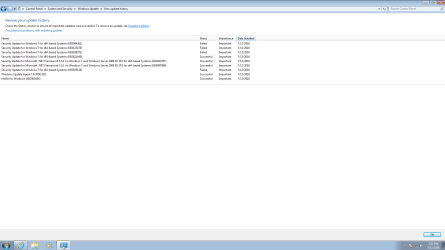
When I finally turned off the computer last night, it said installing updates upon shutting the computer down. I am going to post two screen shots of what It found before I continue with your suggestion. It sat there for hours saying searching for updates, so I do not know how it found the following! I also attempted to download Microsoft Security Essentials, but it will not update, that keeps telling me it has failed as well. Should I continue with the above downloads?
 

Attachments

  • updates 1.png
    updates 1.png
    58.5 KB · Views: 3
  • updates.png
    updates.png
    29.7 KB · Views: 3

My Computer

Computer type
PC/Desktop
Computer Manufacturer/Model Number
Custom Built
OS
Windows 7
CPU
AMD A8 3870K
Motherboard
Asus F1A75M-Pro
Keyboard
Logitech
Mouse
Wireless Logitech
Antivirus
Microsoft security Essentials
Browser
Firefox

My Computers

System One System Two

  • Computer type
    PC/Desktop
    OS
    7 X64
    CPU
    i5 8400
    Motherboard
    gigabyte b365m ds3h
    Memory
    2x8gb 3200mhz
    Hard Drives
    various
    PSU
    pure power 11 400w cm
    Case
    Coolermaster
    Cooling
    cryorig m9i
  • Computer type
    PC/Desktop
    OS
    7x64
    CPU
    g5400
    Motherboard
    ga b365m ds3h
    Memory
    8gb ddr4 2400
    PSU
    xfx pro 450w

My Computer

Computer type
PC/Desktop
Computer Manufacturer/Model Number
Custom Built
OS
Windows 7
CPU
AMD A8 3870K
Motherboard
Asus F1A75M-Pro
Keyboard
Logitech
Mouse
Wireless Logitech
Antivirus
Microsoft security Essentials
Browser
Firefox
Hi,
I would also suggest downloading Microsoft net framework 4.5.2 if it's not already installed yet
Go to uninstall a program and see if it exists the updates you showed doesn't list any updates for it,
This is a off line installer just run it from your downloads folder after it fully downloads,
https://www.microsoft.com/en-us/download/details.aspx?id=42642
 

My Computer

Computer type
PC/Desktop
Computer Manufacturer/Model Number
Custom assembled by me :}
OS
Win-7-Pro64bit 7-H-Prem-64bit
CPU
i7-5930K 2nd i9-9940x both water blocked VRM's too
Motherboard
ASUS SABERTOOTH X99 2nd ASUS x299 Apex
Memory
Trident-z 3200C14 2nd Trident-z 3600C16
Graphics Card(s)
EVGA 1080ti ftw3 2nd Titan Xp both water blocked
Sound Card
Built-in Realtek
Monitor(s) Displays
1-AOC G2460PG 24"G-Sync 144Hz/ 2nd 1-ASUS VG248QE 24" 144Hz
Screen Resolution
1920 x 1080 144Hz
Hard Drives
2-Samsung M.2 Evo & Evo Plus
2-Samsung 850 EVO 500GB SSD's/ 3-2.5 W.D. Black 1tb-&3-1tb/3-3.5 WD Black 1tb hdd's
PSU
EVGA SuperNOVA 1000-P2 2nd 1200-P2
Case
2-Corsair Obsidian Series 450D Black ATX Mid Tower
Cooling
Custom water loops
Keyboard
Logitech G710+/ 2nd Logitech G910
Mouse
2-RedDragon M901 Perdition 16400 dpi Gaming mouse = wired
Internet Speed
Comcast Ping 19ms 89.31mbps download speed 6.12mbps upload
Antivirus
Malwarebytes Pro/ Superantispyware Pro
Browser
FireFox & Pale moon
Other Info
2nd ASUS X299 Apex/Intel i9-9940x with Custom water loop/7H-Prem-x64/Corsair 450D case/Ram Trident-z 3600C16 4x8gb / Samsung970Evo plus 500gb SSD/Dual ssd EZ swap evo/PSU EVGA SuperNova 1200w-P2 80+Platinum/GPU Titan Xp /8-ML-140 on push-pull on 2-280GTX rads
Ok I have installed the framework, The updates still say there not applicable to the computer!
 

My Computer

Computer type
PC/Desktop
Computer Manufacturer/Model Number
Custom Built
OS
Windows 7
CPU
AMD A8 3870K
Motherboard
Asus F1A75M-Pro
Keyboard
Logitech
Mouse
Wireless Logitech
Antivirus
Microsoft security Essentials
Browser
Firefox
Hi,
So KB3161608 failed ?

Win-7 32bit
https://www.microsoft.com/en-us/download/details.aspx?id=52976
Win-7 64bit
https://www.microsoft.com/en-us/download/details.aspx?id=52974

See if this one is installed it should be it was released in 2015 KB3020369
Since you don't have any real history
Go to Uninstall a program and on the top left click on View installed updates
On the top right paste KB3020369 in the search box and the enter key
It might take a few minutes to show it as a single listing.
Win-7 32 bit
https://www.microsoft.com/en-us/download/details.aspx?id=46827
Win-7 64 bit
https://www.microsoft.com/en-us/download/details.aspx?id=46817
 

My Computer

Computer type
PC/Desktop
Computer Manufacturer/Model Number
Custom assembled by me :}
OS
Win-7-Pro64bit 7-H-Prem-64bit
CPU
i7-5930K 2nd i9-9940x both water blocked VRM's too
Motherboard
ASUS SABERTOOTH X99 2nd ASUS x299 Apex
Memory
Trident-z 3200C14 2nd Trident-z 3600C16
Graphics Card(s)
EVGA 1080ti ftw3 2nd Titan Xp both water blocked
Sound Card
Built-in Realtek
Monitor(s) Displays
1-AOC G2460PG 24"G-Sync 144Hz/ 2nd 1-ASUS VG248QE 24" 144Hz
Screen Resolution
1920 x 1080 144Hz
Hard Drives
2-Samsung M.2 Evo & Evo Plus
2-Samsung 850 EVO 500GB SSD's/ 3-2.5 W.D. Black 1tb-&3-1tb/3-3.5 WD Black 1tb hdd's
PSU
EVGA SuperNOVA 1000-P2 2nd 1200-P2
Case
2-Corsair Obsidian Series 450D Black ATX Mid Tower
Cooling
Custom water loops
Keyboard
Logitech G710+/ 2nd Logitech G910
Mouse
2-RedDragon M901 Perdition 16400 dpi Gaming mouse = wired
Internet Speed
Comcast Ping 19ms 89.31mbps download speed 6.12mbps upload
Antivirus
Malwarebytes Pro/ Superantispyware Pro
Browser
FireFox & Pale moon
Other Info
2nd ASUS X299 Apex/Intel i9-9940x with Custom water loop/7H-Prem-x64/Corsair 450D case/Ram Trident-z 3600C16 4x8gb / Samsung970Evo plus 500gb SSD/Dual ssd EZ swap evo/PSU EVGA SuperNova 1200w-P2 80+Platinum/GPU Titan Xp /8-ML-140 on push-pull on 2-280GTX rads
Correct KB3161608 states it is not applicable to this computer. The only update that you listed that installed was KB3161664. I searched for KB3020369, and no results were found.
 

My Computer

Computer type
PC/Desktop
Computer Manufacturer/Model Number
Custom Built
OS
Windows 7
CPU
AMD A8 3870K
Motherboard
Asus F1A75M-Pro
Keyboard
Logitech
Mouse
Wireless Logitech
Antivirus
Microsoft security Essentials
Browser
Firefox
Hi,
Okay make sure your updates settings are on Never check for updates and try 3020369 then.
Then after if it installs try 3161608 again.
 

My Computer

Computer type
PC/Desktop
Computer Manufacturer/Model Number
Custom assembled by me :}
OS
Win-7-Pro64bit 7-H-Prem-64bit
CPU
i7-5930K 2nd i9-9940x both water blocked VRM's too
Motherboard
ASUS SABERTOOTH X99 2nd ASUS x299 Apex
Memory
Trident-z 3200C14 2nd Trident-z 3600C16
Graphics Card(s)
EVGA 1080ti ftw3 2nd Titan Xp both water blocked
Sound Card
Built-in Realtek
Monitor(s) Displays
1-AOC G2460PG 24"G-Sync 144Hz/ 2nd 1-ASUS VG248QE 24" 144Hz
Screen Resolution
1920 x 1080 144Hz
Hard Drives
2-Samsung M.2 Evo & Evo Plus
2-Samsung 850 EVO 500GB SSD's/ 3-2.5 W.D. Black 1tb-&3-1tb/3-3.5 WD Black 1tb hdd's
PSU
EVGA SuperNOVA 1000-P2 2nd 1200-P2
Case
2-Corsair Obsidian Series 450D Black ATX Mid Tower
Cooling
Custom water loops
Keyboard
Logitech G710+/ 2nd Logitech G910
Mouse
2-RedDragon M901 Perdition 16400 dpi Gaming mouse = wired
Internet Speed
Comcast Ping 19ms 89.31mbps download speed 6.12mbps upload
Antivirus
Malwarebytes Pro/ Superantispyware Pro
Browser
FireFox & Pale moon
Other Info
2nd ASUS X299 Apex/Intel i9-9940x with Custom water loop/7H-Prem-x64/Corsair 450D case/Ram Trident-z 3600C16 4x8gb / Samsung970Evo plus 500gb SSD/Dual ssd EZ swap evo/PSU EVGA SuperNova 1200w-P2 80+Platinum/GPU Titan Xp /8-ML-140 on push-pull on 2-280GTX rads
Just a thought that came to me now, when I originally ran the (SURT) tool, I did not have windows updates turned off. I really do not understand the (Surt) Tool but would that have made any difference. I am really curious as to what is making this so difficult. I have installed operating systems numerous times for family and friends, and I have never been hung up like this on getting updates to install! I am curious as to what you are thinking could be causing this to be so difficult?
 

My Computer

Computer type
PC/Desktop
Computer Manufacturer/Model Number
Custom Built
OS
Windows 7
CPU
AMD A8 3870K
Motherboard
Asus F1A75M-Pro
Keyboard
Logitech
Mouse
Wireless Logitech
Antivirus
Microsoft security Essentials
Browser
Firefox
Hi,
Yes it would make a difference
You'd do KB3020369 first
Sorry I missed that man :o
Then you shouldn't have any issues with installing 3161608

It's just a update system it gets whacked by Microsoft at first checking and pretty much stalls.
 

My Computer

Computer type
PC/Desktop
Computer Manufacturer/Model Number
Custom assembled by me :}
OS
Win-7-Pro64bit 7-H-Prem-64bit
CPU
i7-5930K 2nd i9-9940x both water blocked VRM's too
Motherboard
ASUS SABERTOOTH X99 2nd ASUS x299 Apex
Memory
Trident-z 3200C14 2nd Trident-z 3600C16
Graphics Card(s)
EVGA 1080ti ftw3 2nd Titan Xp both water blocked
Sound Card
Built-in Realtek
Monitor(s) Displays
1-AOC G2460PG 24"G-Sync 144Hz/ 2nd 1-ASUS VG248QE 24" 144Hz
Screen Resolution
1920 x 1080 144Hz
Hard Drives
2-Samsung M.2 Evo & Evo Plus
2-Samsung 850 EVO 500GB SSD's/ 3-2.5 W.D. Black 1tb-&3-1tb/3-3.5 WD Black 1tb hdd's
PSU
EVGA SuperNOVA 1000-P2 2nd 1200-P2
Case
2-Corsair Obsidian Series 450D Black ATX Mid Tower
Cooling
Custom water loops
Keyboard
Logitech G710+/ 2nd Logitech G910
Mouse
2-RedDragon M901 Perdition 16400 dpi Gaming mouse = wired
Internet Speed
Comcast Ping 19ms 89.31mbps download speed 6.12mbps upload
Antivirus
Malwarebytes Pro/ Superantispyware Pro
Browser
FireFox & Pale moon
Other Info
2nd ASUS X299 Apex/Intel i9-9940x with Custom water loop/7H-Prem-x64/Corsair 450D case/Ram Trident-z 3600C16 4x8gb / Samsung970Evo plus 500gb SSD/Dual ssd EZ swap evo/PSU EVGA SuperNova 1200w-P2 80+Platinum/GPU Titan Xp /8-ML-140 on push-pull on 2-280GTX rads
Hi,
Yes it would make a difference
You'd do KB3020369 first
Sorry I missed that man :o
Then you shouldn't have any issues with installing 3161608

It's just a update system it gets whacked by Microsoft at first checking and pretty much stalls.

I just appreciate your help more then you can imagine, no big deal! I got both updates KB3020369 and KB3161608 to finally install! :party: Now that has been done, should I be able to turn back on updates and it will finally sail, or am I jumping to far ahead! Again Thank you for your help thus far!
 

My Computer

Computer type
PC/Desktop
Computer Manufacturer/Model Number
Custom Built
OS
Windows 7
CPU
AMD A8 3870K
Motherboard
Asus F1A75M-Pro
Keyboard
Logitech
Mouse
Wireless Logitech
Antivirus
Microsoft security Essentials
Browser
Firefox
Hi.
Yes switch the update setting to your preference and the new updates client should kick in and bring up some other updates,
I would exclude Recommended updates from installing with the first round of Important updates.
 

My Computer

Computer type
PC/Desktop
Computer Manufacturer/Model Number
Custom assembled by me :}
OS
Win-7-Pro64bit 7-H-Prem-64bit
CPU
i7-5930K 2nd i9-9940x both water blocked VRM's too
Motherboard
ASUS SABERTOOTH X99 2nd ASUS x299 Apex
Memory
Trident-z 3200C14 2nd Trident-z 3600C16
Graphics Card(s)
EVGA 1080ti ftw3 2nd Titan Xp both water blocked
Sound Card
Built-in Realtek
Monitor(s) Displays
1-AOC G2460PG 24"G-Sync 144Hz/ 2nd 1-ASUS VG248QE 24" 144Hz
Screen Resolution
1920 x 1080 144Hz
Hard Drives
2-Samsung M.2 Evo & Evo Plus
2-Samsung 850 EVO 500GB SSD's/ 3-2.5 W.D. Black 1tb-&3-1tb/3-3.5 WD Black 1tb hdd's
PSU
EVGA SuperNOVA 1000-P2 2nd 1200-P2
Case
2-Corsair Obsidian Series 450D Black ATX Mid Tower
Cooling
Custom water loops
Keyboard
Logitech G710+/ 2nd Logitech G910
Mouse
2-RedDragon M901 Perdition 16400 dpi Gaming mouse = wired
Internet Speed
Comcast Ping 19ms 89.31mbps download speed 6.12mbps upload
Antivirus
Malwarebytes Pro/ Superantispyware Pro
Browser
FireFox & Pale moon
Other Info
2nd ASUS X299 Apex/Intel i9-9940x with Custom water loop/7H-Prem-x64/Corsair 450D case/Ram Trident-z 3600C16 4x8gb / Samsung970Evo plus 500gb SSD/Dual ssd EZ swap evo/PSU EVGA SuperNova 1200w-P2 80+Platinum/GPU Titan Xp /8-ML-140 on push-pull on 2-280GTX rads
Hi.
Yes switch the update setting to your preference and the new updates client should kick in and bring up some other updates,
I would exclude Recommended updates from installing with the first round of Important updates.

That is the thing that always stumped me over the past year. I had it set to only install the important updates, and so I had a long list of recommended updates, but I do not know enough to pick out which ones should be installed.
 

My Computer

Computer type
PC/Desktop
Computer Manufacturer/Model Number
Custom Built
OS
Windows 7
CPU
AMD A8 3870K
Motherboard
Asus F1A75M-Pro
Keyboard
Logitech
Mouse
Wireless Logitech
Antivirus
Microsoft security Essentials
Browser
Firefox
Hi,
All i can say is what is your intention :)
Sticking with win-7 or upgrading to windows 10 ?
There are many update lists around that people avoid I believe mine is the shortest :D
KB2952664
KB2999226
KB3035583
KB3075249
KB3013531
KB3021917
KB3068708
KB3080149
KB3123862
KB3150513
KB3173040
KB3133977
 

My Computer

Computer type
PC/Desktop
Computer Manufacturer/Model Number
Custom assembled by me :}
OS
Win-7-Pro64bit 7-H-Prem-64bit
CPU
i7-5930K 2nd i9-9940x both water blocked VRM's too
Motherboard
ASUS SABERTOOTH X99 2nd ASUS x299 Apex
Memory
Trident-z 3200C14 2nd Trident-z 3600C16
Graphics Card(s)
EVGA 1080ti ftw3 2nd Titan Xp both water blocked
Sound Card
Built-in Realtek
Monitor(s) Displays
1-AOC G2460PG 24"G-Sync 144Hz/ 2nd 1-ASUS VG248QE 24" 144Hz
Screen Resolution
1920 x 1080 144Hz
Hard Drives
2-Samsung M.2 Evo & Evo Plus
2-Samsung 850 EVO 500GB SSD's/ 3-2.5 W.D. Black 1tb-&3-1tb/3-3.5 WD Black 1tb hdd's
PSU
EVGA SuperNOVA 1000-P2 2nd 1200-P2
Case
2-Corsair Obsidian Series 450D Black ATX Mid Tower
Cooling
Custom water loops
Keyboard
Logitech G710+/ 2nd Logitech G910
Mouse
2-RedDragon M901 Perdition 16400 dpi Gaming mouse = wired
Internet Speed
Comcast Ping 19ms 89.31mbps download speed 6.12mbps upload
Antivirus
Malwarebytes Pro/ Superantispyware Pro
Browser
FireFox & Pale moon
Other Info
2nd ASUS X299 Apex/Intel i9-9940x with Custom water loop/7H-Prem-x64/Corsair 450D case/Ram Trident-z 3600C16 4x8gb / Samsung970Evo plus 500gb SSD/Dual ssd EZ swap evo/PSU EVGA SuperNova 1200w-P2 80+Platinum/GPU Titan Xp /8-ML-140 on push-pull on 2-280GTX rads
So the windows finally ran almost 300 updates which is great. I messed up the setting and it installed the important as well as the recommended updates. Should I install Microsoft Silver Light Update? I run Firefox as my browser and everything is running good, except at times at the top of the browser it just spins, and I have to stop and refresh the page. It did this before so I think it is something on there end. Last but not least, I get this error off and on over the past few years, and could never find a fix. I will post the error log. Again thank you for all your help!
 

Attachments

My Computer

Computer type
PC/Desktop
Computer Manufacturer/Model Number
Custom Built
OS
Windows 7
CPU
AMD A8 3870K
Motherboard
Asus F1A75M-Pro
Keyboard
Logitech
Mouse
Wireless Logitech
Antivirus
Microsoft security Essentials
Browser
Firefox
Back
Top