
Windows wont boot unless it's been off for a decent amount of time

Olly88

New member
Local time
6:23 PM
Messages
3
Hi, I'm having a very annoying problem with my computer and hope someone can help me.

Basically, if I turn my computer off, if I turn it back on it wont boot unless it's been turned off/unplugged for (usually) at least an hour and a half/two hours. What happens when I turn it on within that time, is my monitor just says "No Signal" and the light stays orange instead of blue like it should be. The computer still sounds like it's coming on, but nothing goes through to the monitor.

It used to happen occasionally when I tried to resume from sleep or hibernate mode, but now it seems to happen any time I turn it off. When I turn it off at night, it's always alright when I turn it on the next day (touch wood), so it seems to need a rest of a specific length for some reason.

Does anyone know what might be causing this? Thanks! :)
 

My Computer My Computer

At a glance

Windows 7 Ultimate 64-bitAMD A10-5800KAdata XPG Xtreme 8GB DDR3 PC3-17100C10 2133MHz
Computer type
PC/Desktop
Computer Manufacturer/Model Number
Custom.
OS
Windows 7 Ultimate 64-bit
CPU
AMD A10-5800K
Motherboard
Gigabyte F2A85X-D3H AMD A85X
Memory
Adata XPG Xtreme 8GB DDR3 PC3-17100C10 2133MHz
Is this a HP computer? Try turning it off and then unplug the power, hold in the power button for 15 seconds. Plug back in and start up the computer. Does it boot normally?
 

My Computer My Computer

At a glance

Windows 7 64 bit ProfessionalAMD A 816gbOn board
Computer type
PC/Desktop
Computer Manufacturer/Model Number
Hp
OS
Windows 7 64 bit Professional
CPU
AMD A 8
Motherboard
Amd
Memory
16gb
Graphics Card(s)
On board
Hard Drives
Se agate 1 tv
Antivirus
Security
Is this a HP computer? Try turning it off and then unplug the power, hold in the power button for 15 seconds. Plug back in and start up the computer. Does it boot normally?
No it's not an HP, it's a custom build.

I tried your suggestion last night but unfortunately it still didn't boot afterwards.
 

My Computer My Computer

At a glance

Windows 7 Ultimate 64-bitAMD A10-5800KAdata XPG Xtreme 8GB DDR3 PC3-17100C10 2133MHz
Computer type
PC/Desktop
Computer Manufacturer/Model Number
Custom.
OS
Windows 7 Ultimate 64-bit
CPU
AMD A10-5800K
Motherboard
Gigabyte F2A85X-D3H AMD A85X
Memory
Adata XPG Xtreme 8GB DDR3 PC3-17100C10 2133MHz
This could be a video issue rather than a boot issue. Serious video hardware problems should cause the board to issue a beep error code, provided it has an onboard speaker or a chassis speaker is connected. But it's also possible the issue isn't of a sort that would cause that and the system is actually booting. Try replacing your video card, or installing one if you're using onboard video. That's probably the easiest option if you have the hardware.

Otherwise, watch the HDD activity light during good boots and failed boots. If the behaviour is similar, that's a good indication it's actually booting. To see if it's actually booting to Windows, you could try pinging it from another machine. By default Windows Firewall prevents your computer responding to a ping, so you may have to change that setting.
 

My Computer My Computer

At a glance

Windows 7 Professional x64, Arch Linux
Computer type
PC/Desktop
OS
Windows 7 Professional x64, Arch Linux
I agree that it sounds like a video problem and is heat related. Once the video adapter has cooled it behaves normally. Do you see any video anomalies before shutdown? Does your video card (if not onboard) have a fan and is it working? If you have a video card (not onboard), remove it from its slot and then re-insert it.
 

My Computer My Computer

At a glance

Windows 7 Ultimate x86 and x64
Computer type
PC/Desktop
Computer Manufacturer/Model Number
Dell, HP, Toshiba, Compaq
OS
Windows 7 Ultimate x86 and x64
Sorry for not replying sooner, haven't been able to get online for a while.

Yesterday the problem appeared when I turned it on after it had been off all night. I noticed that the HDD light doesn't flash at all.

The only video card I have is one from an old computer, which is from around 2004, would I be able to install that one alright?
 

My Computer My Computer

At a glance

Windows 7 Ultimate 64-bitAMD A10-5800KAdata XPG Xtreme 8GB DDR3 PC3-17100C10 2133MHz
Computer type
PC/Desktop
Computer Manufacturer/Model Number
Custom.
OS
Windows 7 Ultimate 64-bit
CPU
AMD A10-5800K
Motherboard
Gigabyte F2A85X-D3H AMD A85X
Memory
Adata XPG Xtreme 8GB DDR3 PC3-17100C10 2133MHz
A video card from that time frame could be AGP, PCI or PCIe. If it fits properly into one of the slots in your motherboard, it's safe to try. If you're uncomfortable making that determination, give us the model number or post a picture.

You never indicated if you're using onboard video or a video card. If you're using a video card, and the replacement will go into the same slot, it should be plug'n'play. If you're using onboard video, or the replacement card goes into a different slot than the original, you may need to reset the BIOS via a switch or jumper on the motherboard.

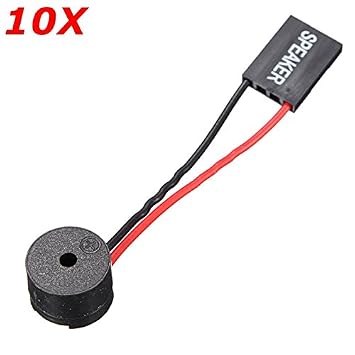
But the fact that the HDD light doesn't flash at all suggests to me this isn't a video issue. If you don't have a speaker* connected you should do so in case the board is trying to tell you something.

* Not talking hi-fi here. It's really more of a buzzer or beeper. In the past they looked like this:
speaker.jpg

These days they tend to look like this:
2Q==
41WjyUnnNgL._SY355_.jpg

and may be built into the motherboard:
speakers-to-a-motherboard.jpg

2Q==
 

My Computer My Computer

At a glance

Windows 7 Professional x64, Arch Linux
Computer type
PC/Desktop
OS
Windows 7 Professional x64, Arch Linux
Back
Top