Solved Windows wont update error-8024402C

countkenshin

New member
Local time
10:55 AM
Messages
1
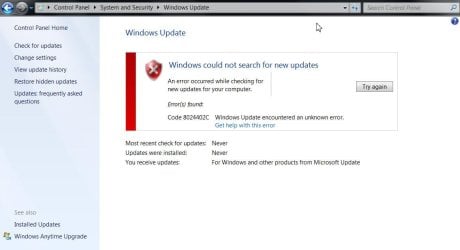
hello guys I'm new here I found this forum while searching on how to fix my Window 7 Professional x64 bit, because it wont update and gives an error code 8024402C

I've already tried disabling my windows firewall and AV and still wont update
I've tried different kinds of stuffs I found on the web and still can't fix it

I've also tried doing what I read in web like uninstall all windows updates and security updates hoping that in rebooting it would fix itself but still failed.

I'm hoping some kind experts could help me with my problem just tell me what kind of screenshots do you need regarding on this issue.

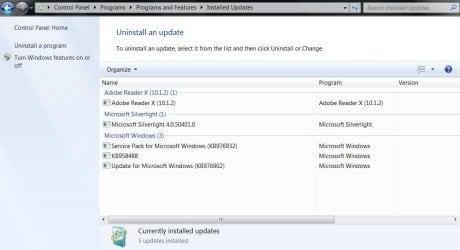
here's some screenshots

please help


edit:oh wait its downloading now thanks for Mr Brink
http://www.sevenforums.com/tutorials/91738-windows-update-reset.html

thank you!!!!
 

Attachments
  • explorer#001111.jpg
    explorer#001111.jpg
    48 KB · Views: 814
  • explorer#002222.jpg
    explorer#002222.jpg
    55.2 KB · Views: 1,233
Last edited:

My Computer

Computer Manufacturer/Model Number
Sony Vaio E series
OS
Windows 7 Professional X64
CPU
core i3-330m
Memory
4
Graphics Card(s)
ATI radeon
I've hit this error several times in the past year. The easiest way to fix this is to let Windows fix itself.

1. Go to Administrative Tools/Services and find the Windows Update service. Stop it.
2. Go to C:\Windows\ and rename the SoftwareDistribution folder to something like SoftwareDistribution.old
3. Restart the Windows Update service.
4. Click the Check for Updates button on the Windows Update screen.
5. Windows will perform the check - it may take some time, so leave it running. Eventually it will successfully complete.
6. You can then delete the SoftwareSistribution.old folder.
 

My Computer

Computer Manufacturer/Model Number
Home built
OS
Windows 7 Ultimate x64
CPU
i7 920 2.67GHz
Memory
6GB
Graphics Card(s)
Nvidia GTX580

My Computer

Computer type
Laptop
Computer Manufacturer/Model Number
Asus K52F or Lenovo B51-80
OS
Win 7 x64 Home Premium (and x86 VirtualBox VM)/Win10
CPU
i3 370M/i7 6500U
Motherboard
Asus/Lenovo
Memory
8GB - finally :)/8GB
Graphics Card(s)
it's an i3, dude!/dual Intel&nVidia
Sound Card
onboard
Monitor(s) Displays
15.6" built-in
Screen Resolution
1366x768/1920x1080
Hard Drives
750GB Seagate internal
Sundry external drives attached to other computers on the local network
1TB SSD on the Lenovo
PSU
n/a
Internet Speed
as much as I can get - usually on a dongle/phone, so <1MB/s
Antivirus
MSE/Defender
Browser
IE11/12/Edge/Chrome/FF(if I must)
I've hit this error several times in the past year. The easiest way to fix this is to let Windows fix itself.

1. Go to Administrative Tools/Services and find the Windows Update service. Stop it.
2. Go to C:\Windows\ and rename the SoftwareDistribution folder to something like SoftwareDistribution.old
3. Restart the Windows Update service.
4. Click the Check for Updates button on the Windows Update screen.
5. Windows will perform the check - it may take some time, so leave it running. Eventually it will successfully complete.
6. You can then delete the SoftwareSistribution.old folder.

Hey, maomoondog!

Thank you, this helped me. It was the answer. I have searched for a couple of days and have tried many
solutions", but this was the one that worked, immediately! I had to restart the computer before I renamed the folder, but other than that it worked! THANK YOU!
 

My Computer

Computer type
PC/Desktop
OS
Win10 64bit
Back
Top