
Windows won't update to SP1, error Code 800B0100

ccookie66

New member
Local time
12:42 AM
Messages
4
Location
Maine
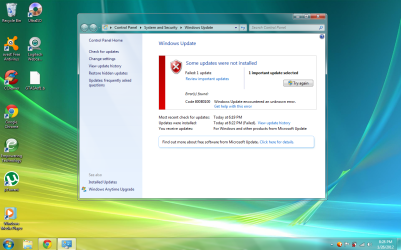
When I try to update Windows 7 to SP 1, it stops and says :Error Code 800B00100. I uploaded a screen shot. Capture.PNG
 

My Computer

Computer Manufacturer/Model Number
Acer Aspire 5315-2153
OS
Windows 7 Home Premium 32bit
CPU
Intel Celeron processor 530
Memory
1GB DDR2
Graphics Card(s)
252MB Mobile Intel GraphicsMedia
Monitor(s) Displays
15.4"
Hard Drives
80GB
Hello cookie,

First, restart the computer. Next, check updates and make sure all other important updates are installed first. Make sure you have installed all current drivers for your computer. Check devices and printers and device manager for any exclaimation points that you can right click and then select update.

Read Airbot's tutorial links on how you might try fixing it: http://www.sevenforums.com/windows-...1-faqs-installation-issues-helpful-links.html

Failing all of that, click in windows updates (the pic you just showed) where it says "get help with this error" and see if it leads you to anything informative. Post back how it goes.
 

My Computer

Computer type
PC/Desktop
Computer Manufacturer/Model Number
Custom Asus Build
OS
Microsoft Windows 8.1 Pro 64-bit
CPU
Intel(R) Core(TM) i3-4130 CPU @ 3.40GHz
Motherboard
B85M-E
Memory
8.00 GB
Graphics Card(s)
None
Sound Card
Realtek High Definition Audio
Monitor(s) Displays
Asus 23.6" Monitor
Screen Resolution
1920 x 1080 x 32 bits (4294967296 colors) @ 60 Hz
Hard Drives
INTEL SSDSC2BW180A4
Samsung SSD 840 PRO Series
PSU
Seasonic S12II-380Bronze
Case
Lian Li
Cooling
Fan, Passive
Keyboard
Logitech K120
Mouse
Microsoft Touch Mouse
Internet Speed
4ms Ping, 19.0 Mbps Download, 19.0 Mbps Upload
Antivirus
Eset Endpoint
Browser
Internet Explorer, Chrome

My Computer

Computer Manufacturer/Model Number
LAPTOP. HP Pavilion dv7-4010TX .
OS
Win 7 Ultimate 64-bit. SP1.
CPU
Intel i7 -720QM.[1.6GHz Turbo Boost 2.8GHz. 6MB Cache.]
Memory
8 DDR 3 RAM. 1066MHZ
Graphics Card(s)
ATI 1024 MB. DDR3. Radeon HD5650
Monitor(s) Displays
17.3" High Definition Brightview LCD. LED Backlit.
Screen Resolution
1600 x 900.
Hard Drives
640GB
Case
Laptop / notebook.
Mouse
Logitech Anywhere mouse. MX.
Internet Speed
ADSL [ but too slow ]
I'd like to add that the error codes are fairly generic and can be due to a number of things. Your Event Log will also have more details and help you narrow it down to a particular source of the error.

Click Start button type in eventvwr.msc press enter. In the left hand window select Windows Logs, then select System. Look for anything with a red exclamation that relates to a failed update.
 

My Computer

Computer Manufacturer/Model Number
Home built
OS
Windows 7 64bit Pro
CPU
Intel E8400
Motherboard
MSI 780i
Memory
8 gigz OCR
Graphics Card(s)
nVidia 560Ti
Sound Card
Creative Audigy Platinum
Monitor(s) Displays
Samsung
Hard Drives
2 WD 7200 rpm SATA 1 tb
PSU
700 watt
Case
Antec
Cooling
Thermaltake
  • Like
Reactions: JMH
Back
Top