
oxymoron93
New member
- Local time
- 2:54 PM
- Messages
- 2
Hi everyone.
I had a problem when tried to install Code Composer Studio. At some point an error occurs and message is displayed telling me, that installation cannot further be proceeded, because I am missing Windows patch KB2999226. Thus I tried to install it individually, from Microsoft Download Center.
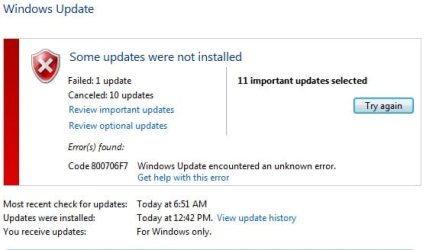
When trying to install it, I get message that patch is not applicable. I opened Windows Update to try to install currently pending updates, out of curiosity if that might solve problem. But updates fail to install, or installation lasts for hours before I cancel it. Here's the image:
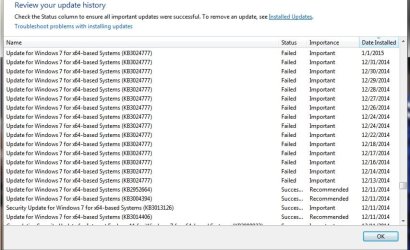
Entering Update History showed me that almost every update since end of the year 2014. failed to install. Another image:
sfc scan verified there are corrupted files but it couldn't fix them all. Here is the CBS zip file:
View attachment 398239
I am using Windows 7 Ultimate x64, Service Pack 1.
I had a problem when tried to install Code Composer Studio. At some point an error occurs and message is displayed telling me, that installation cannot further be proceeded, because I am missing Windows patch KB2999226. Thus I tried to install it individually, from Microsoft Download Center.
When trying to install it, I get message that patch is not applicable. I opened Windows Update to try to install currently pending updates, out of curiosity if that might solve problem. But updates fail to install, or installation lasts for hours before I cancel it. Here's the image:
Entering Update History showed me that almost every update since end of the year 2014. failed to install. Another image:
sfc scan verified there are corrupted files but it couldn't fix them all. Here is the CBS zip file:
View attachment 398239
I am using Windows 7 Ultimate x64, Service Pack 1.
My Computer
At a glance
Windows 7 Ultimate x64, Service Pack 1Intel B960, 2.2 GHz, 2MB L36GB DDR3Nvidia GeForce 710M
- Computer type
- Laptop
- Computer Manufacturer/Model Number
- Acer aspire e1-531g
- OS
- Windows 7 Ultimate x64, Service Pack 1
- CPU
- Intel B960, 2.2 GHz, 2MB L3
- Memory
- 6GB DDR3
- Graphics Card(s)
- Nvidia GeForce 710M
- Hard Drives
- 750 GB HDD
- Antivirus
- AVG
- Browser
- Chrome
 I'd suggest doing a Disc Cleanup and deleting everything in the C: Windows Softwaredistribution Download folder as well.

