Windows XP boot error when loading though GRUB2 bootloader

2haloes

New member
Local time
9:12 PM
Messages
3
On my PC I've just installed Windows XP along Win 7, Lubuntu and Debian (Windows and Linux are on separate HDDs) after sorting out some boot issues I tried to load Windows though GRUB 2, Windows 7 worked fine but Windows XP doesn't load at all, all it tells me is that it can't find the boot files and kicks me back to the POST screen and then back to GRUB.


However, if I boot directly into my Windows HDD Win XP loads fine so can anyone help, it's becoming a real hassle to constantly go into my BIOS and change the boot order just to run one OS


My system contains: 1 TB HDD with Windows 7, Windows XP (On a logical partition, need to go though Win 7 duel-boot to boot), and Lubuntu 13.04 (Just for GRUB booting and emergencies)
2 TB HDD GPT partition table (GRUB boot partition at the start) with Debian Wheezy (GRUB booting), Lubuntu 14.04, IQUNIX (Based on Ubuntu 12.04, barebones OS)
 

My Computer

Computer type
PC/Desktop
Computer Manufacturer/Model Number
Custom Build
OS
Win7 Ult 64-bit and WinXP 32-bit
CPU
i7-2600k
Motherboard
Biostar TZ77B
Memory
8GB
Graphics Card(s)
AMD radeon HD 5750
Hard Drives
Seagate 1TB
Seagate 2TB
Antivirus
Avast
Browser
Firefox/Chrome
In the root of the drive that has XP see if there are the files ntldr and ntdetect.com. They should be there since XP boots. Try copying them to the partition XP is actually on and retry the boot. This is the old "ntkdr missing or corrupt" error. The file copy should fix it.
 

My Computer

Computer Manufacturer/Model Number
HP Media Center
OS
Windows 7 32 bit
CPU
AMD 5200+ dual core
Memory
2 GB
Graphics Card(s)
NVidia GeForce 6150SE 128 MB
Monitor(s) Displays
CRT
Screen Resolution
1280x1024
Hard Drives
500 GB Sata internal :

SIIG USB 3.0 docking stations w/WD Caviar Black 6 Gb/s drives
Keyboard
PS/2
Mouse
PS/2 Wheel Mouse
Other Info
SIIG USB 3.0 PCIexpress card.
In the root of the drive that has XP see if there are the files ntldr and ntdetect.com. They should be there since XP boots. Try copying them to the partition XP is actually on and retry the boot. This is the old "ntkdr missing or corrupt" error. The file copy should fix it.

Well when I copied the ntkdr file over, I saw a screen that said that C:/Windows/boot.ini is broken and then my system rebooted :confused:
 

My Computer

Computer type
PC/Desktop
Computer Manufacturer/Model Number
Custom Build
OS
Win7 Ult 64-bit and WinXP 32-bit
CPU
i7-2600k
Motherboard
Biostar TZ77B
Memory
8GB
Graphics Card(s)
AMD radeon HD 5750
Hard Drives
Seagate 1TB
Seagate 2TB
Antivirus
Avast
Browser
Firefox/Chrome
Why not make it easier on yourself and just use virtual machines? 1,000 times better then a mess with multiple boot. And grub is absolutely horrible. It causes so many issues with loading windows it is not even funny.
 

My Computer

Computer type
PC/Desktop
Computer Manufacturer/Model Number
Custom Built
OS
Windows 10 Pro
CPU
AMD Ryzen 5 2400G Processor with Radeon RX Vega 11 Graphics
Motherboard
ASRock X470 Master SLI/AC AM4 AMD Promontory X470 SATA 6Gb/s
Memory
G.SKILL Ripjaws V Series 16GB (2 x 8GB) 288-Pin DDR4 SDRAM D
Graphics Card(s)
2047MB NVIDIA GeForce GTX 1060 6GB (EVGA)
Sound Card
Motherboard Built in
Monitor(s) Displays
Acer R240HY bidx 23.8-Inch IPS HDMI DVI VGA (1920 x 1080) Wi
Screen Resolution
1920 x 1080
Hard Drives
1TB Sandisk SSD PLUS (Main drive)
500 GB Seagate 7200 RPM (Games)
500 GB Western Digital 7200 RPM (Virtual Machines)
PSU
CORSAIR TX Series TX650M 650W 80+ Gold Modular Power Supply
Case
CORSAIR CARBIDE SPEC-02 Mid-Tower Gaming Case, Red LED Fan
Cooling
220mm, two 120mm, and four 60mm fans
Keyboard
Wired Dell keyboard
Mouse
Wireless Logitech mouse
Internet Speed
250mb down, 30mb up
Antivirus
Panda Cloud Antivirus
Browser
Chrome-ish x64
Other Info
Your awesome for reading this.
In the root of the drive that has XP see if there are the files ntldr and ntdetect.com. They should be there since XP boots. Try copying them to the partition XP is actually on and retry the boot. This is the old "ntkdr missing or corrupt" error. The file copy should fix it.

Well when I copied the ntkdr file over, I saw a screen that said that C:/Windows/boot.ini is broken and then my system rebooted :confused:

Try doing it according to thi video:
How to Repair NTLDR Missing or Corrupt on Bootup - YouTube

Note that you need to use the drive letter XP is on rather than C:\
and the drive lettr of the CDROM rather than X:\

Example if when booted to the CD as K: it sees XP on D: then
Copy Kz:\i386\ntldr D:\
Copy Kz:\i386\ntdetect.com D:\

Edit: You should search on "ntldr missing or corrupt" and find a detailed page how to boot the product CD, copy the boot files to the XP partition and fix the boot loader files. This is on many support sites and blogs. For me to duplicate all the details will just create confusion. To get it right takes several hours of verifying the step by step and it's already been done a dozen or more times on the web. When you install XP it thinks it is the only OS so it puts the loader files in the root of the drive, not the partition XP is on. That's the whole problem. When the boot.ini is made it has the loader files in the root of the drive. You have to change it to point to where they are now. The XP partition.

Most of the confusion is because every time you boot from a different device in Dos/Windows systems, the drive letters shuffle all around.
 

My Computer

Computer Manufacturer/Model Number
HP Media Center
OS
Windows 7 32 bit
CPU
AMD 5200+ dual core
Memory
2 GB
Graphics Card(s)
NVidia GeForce 6150SE 128 MB
Monitor(s) Displays
CRT
Screen Resolution
1280x1024
Hard Drives
500 GB Sata internal :

SIIG USB 3.0 docking stations w/WD Caviar Black 6 Gb/s drives
Keyboard
PS/2
Mouse
PS/2 Wheel Mouse
Other Info
SIIG USB 3.0 PCIexpress card.
Last edited:
The solution here is obvious: You said yourself you have Windows and Linux on separate HD's. So you should boot your choice of OS's via the BIOS Boot order or one-time Boot menu key.

To sort this for the Windows drive, unplug the Linux drive, Mark Win7 Partition Active
then run http://www.sevenforums.com/tutorials/105541-startup-repair-run-3-separate-times.html until Win7 starts and holds the System Active flag. Then install EasyBCD (click Download - no Name or Email required)to add XP to the Windows Dual Boot menu.

Then set Windows hard drive first to boot in BIOS setup. Trigger Linux drive to boot using one-time BIOS Boot menu key.

He'll still have "ntldr missing or corrupt" edit: when he tries to boot XP edit end: because the XP installer puts the boot files in the root instead of the XP partition. When you select with the boot manager it expects the boot loader files to be in the partition with the OS if you have multiple OS on the drive. So a combination of drive unplug and boot loader file copy is required.
 

My Computer

Computer Manufacturer/Model Number
HP Media Center
OS
Windows 7 32 bit
CPU
AMD 5200+ dual core
Memory
2 GB
Graphics Card(s)
NVidia GeForce 6150SE 128 MB
Monitor(s) Displays
CRT
Screen Resolution
1280x1024
Hard Drives
500 GB Sata internal :

SIIG USB 3.0 docking stations w/WD Caviar Black 6 Gb/s drives
Keyboard
PS/2
Mouse
PS/2 Wheel Mouse
Other Info
SIIG USB 3.0 PCIexpress card.
XP isn't smart enough to put its boot files on any but its own partition.

You have it backwards. XP copies ntldr and ntdetect.com to the root of the physical drive. That's what steals the boot. This has been endlessly documented already. I see no benefit to the OP in debate. The solution is already on the web in multiple locations.
 

My Computer

Computer Manufacturer/Model Number
HP Media Center
OS
Windows 7 32 bit
CPU
AMD 5200+ dual core
Memory
2 GB
Graphics Card(s)
NVidia GeForce 6150SE 128 MB
Monitor(s) Displays
CRT
Screen Resolution
1280x1024
Hard Drives
500 GB Sata internal :

SIIG USB 3.0 docking stations w/WD Caviar Black 6 Gb/s drives
Keyboard
PS/2
Mouse
PS/2 Wheel Mouse
Other Info
SIIG USB 3.0 PCIexpress card.
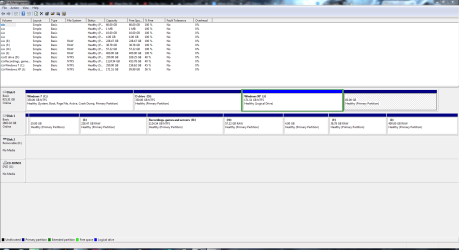
I've attached the image to this post (The partition with Win XP in is not the only logical drive, the drive to the right is also logical) and to answer some things

When I boot directly into my Win 7 duel-boot to load Windows XP, it works fine, only GRUB is giving me this issue
Also, It gives me an error saying that Windows XP couldn't find boot.ini when booted with GRUB, Win 7 is fine

I just found some locked folders on one of my drives (I'm admin on my PC and this wasn't a system drive) so they might be the files to boot Win XP
 

Attachments

  • Capture.PNG
    Capture.PNG
    47.3 KB · Views: 2
Last edited:

My Computer

Computer type
PC/Desktop
Computer Manufacturer/Model Number
Custom Build
OS
Win7 Ult 64-bit and WinXP 32-bit
CPU
i7-2600k
Motherboard
Biostar TZ77B
Memory
8GB
Graphics Card(s)
AMD radeon HD 5750
Hard Drives
Seagate 1TB
Seagate 2TB
Antivirus
Avast
Browser
Firefox/Chrome
Will both Windows OS"s boot as now if you unplug the second drive?

If so then I'd keep the GRUB booting only to the second drive when you choose it from BIOS Boot Menu key.

If this isn't to your liking then uninstall GRUB and add your Linux installs from Windows 7 using EasyBCD as described by Barman in Where to install ubuntu in my system?
 
Back
Top