Windows XP Mode in Windows 7

rk1033

New member
Local time
8:48 AM
Messages
4
I read that you need an additional gigabyte of ram to use the XP Mode feature in Windows 7. My pc is maxed out at 1 GB. (I haven't upgraded to windows 7 yet). Is it possible to run Windows 7 Professional in XP mode with 1 GB of RAM, or will it not even work? I'm just curious because of older software I use such as Microsoft Money 2006.

Thanks
 

My Computer My Computer

Computer type
PC/Desktop
Computer Manufacturer/Model Number
Dell Optiplex 790
OS
Windows 7 Enterprise SP1 (x86)
CPU
I5 3.40 GHZ
Memory
4 GB
Other Info
Work PC
Hi rk1033. Welcome to Seven forums.
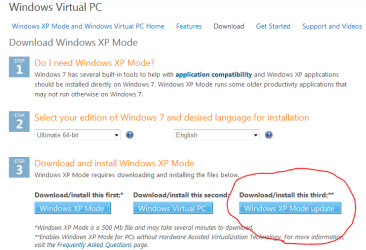
Yes you can install it. XP mode with new update fine working without processor visualization And 1 GB of RAM is good for running it.
image_2.png
See more in Microsoft
 

My Computer My Computer

OS
Windows 7 x32 Ultimate, Starter x32

My Computer My Computer

Computer type
PC/Desktop
Computer Manufacturer/Model Number
Dell Optiplex 790
OS
Windows 7 Enterprise SP1 (x86)
CPU
I5 3.40 GHZ
Memory
4 GB
Other Info
Work PC
The new update only removes the Virtualization requirement, and everything I've heard suggest that XP Mode without actual virtualization runs rough, even with twice the minimum amount of RAM. With only 1GB of RAM and no hardware virtualization, if it does run, it definitely won't run well.
 

My Computer My Computer

Computer type
Laptop
Computer Manufacturer/Model Number
Toshiba P775-S7100
OS
Windows 7 Professional SP1 64-bit
CPU
Intel Core i5-2450M @2.5 GHz
Memory
6 GB DDR3 1333MHz
Graphics Card(s)
Intel HD 3000
Monitor(s) Displays
Built-in 17.3" LED; 22" Insignia NS-L22Q-10A
Screen Resolution
1600x900; 1360x768
Hard Drives
750 GB Hitachi
1TB Seagate FreeAgent External
Internet Speed
Verizon DSL Speed(Down/Up): 3360 Kbps / 800 Kbps
Antivirus
MSE and MBAM Pro
Browser
IE10
System requirements
System requirements for Windows Virtual PC
1+ GHz processor (32- or 64-bit)
1.25 GB memory required (2 GB recommended)
Additional 15 GB of hard disk space per virtual Windows environment recommended
A Processor with Hardware Assisted Virtualization Technology AMD-V or Intel-VT is optional but will make the virtual machine perform slightly better.

Originally (Before March 19, 2010) Hardware Virtualization was a mandatory requirement.

See more.
 

My Computer My Computer

OS
Windows 7 x32 Ultimate, Starter x32
Okay. the OP still has less than the required amount. And 3 days ago, it said an addition GB was required. For all I know you edited that a few minutes ago. Please avoid giving people false information.
 

My Computer My Computer

Computer type
Laptop
Computer Manufacturer/Model Number
Toshiba P775-S7100
OS
Windows 7 Professional SP1 64-bit
CPU
Intel Core i5-2450M @2.5 GHz
Memory
6 GB DDR3 1333MHz
Graphics Card(s)
Intel HD 3000
Monitor(s) Displays
Built-in 17.3" LED; 22" Insignia NS-L22Q-10A
Screen Resolution
1600x900; 1360x768
Hard Drives
750 GB Hitachi
1TB Seagate FreeAgent External
Internet Speed
Verizon DSL Speed(Down/Up): 3360 Kbps / 800 Kbps
Antivirus
MSE and MBAM Pro
Browser
IE10
Well, when you run a virtual machine you have to dedicate RAM to it. So, if you dedicate 512MB to the virtual machine when you want to launch it and you only have 1GB of RAM...you will essentially be cutting your main machine to 512MB as well. So, both would likely function, but performance certainly would be abysmal and only suitable for the smallest of tasks.
 

My Computer My Computer

Computer Manufacturer/Model Number
Self-Built in July 2009
OS
Windows 7 Ultimate x64
CPU
Intel Q9550 2.83Ghz OC'd to 3.40Ghz
Motherboard
Gigabyte GA-EP45-UD3R rev. 1.1, F12 BIOS
Memory
8GB G.Skill PI DDR2-800, 4-4-4-12 timings
Graphics Card(s)
EVGA 1280MB Nvidia GeForce GTX570
Sound Card
Realtek ALC899A 8 channel onboard audio
Monitor(s) Displays
23" Acer x233H
Screen Resolution
1920x1080
Hard Drives
Intel X25-M 80GB Gen 2 SSD
Western Digital 1TB Caviar Black, 32MB cache. WD1001FALS
PSU
Corsair 620HX modular
Case
Antec P182
Cooling
stock
Keyboard
ABS M1 Mechanical
Mouse
Logitech G9 Laser Mouse
Internet Speed
15/2 cable modem
Other Info
Windows and Linux enthusiast. Logitech G35 Headset.
The new update only removes the Virtualization requirement, and everything I've heard suggest that XP Mode without actual virtualization runs rough, even with twice the minimum amount of RAM. With only 1GB of RAM and no hardware virtualization, if it does run, it definitely won't run well.

For example i downloaded the XP mode for Windows 7 and set in my netbook, it is working good.:huh:
 

My Computer My Computer

OS
Windows 7 x32 Ultimate, Starter x32
Hi rk1033. Welcome to Seven forums.
Yes you can install it. XP mode with new update fine working without processor visualization And 1 GB of RAM is good for running it.
View attachment 89805
See more in Microsoft

Hi all, I have done ass instructed on this guide

then it says

Once you have installed Windows XP Mode, click the Windows 7 Start button
Win7StartBtn-Icon.gif
, then select All Programs > Windows Virtual PC > Windows XP Mode to begin setup

this is not in my programs ??
 

My Computer My Computer

OS
Windows 7
With only 1 GB of system memory, don't bother with virtualization....of any kind. You'll be at the bare minimum of what's considered acceptable for Windows 7 by itself. You won't have enough system memory to share out with a VM.

As for your Microsoft Money 2006 point, download the Upgrade Advisor. If it isn't compatible, look into getting Money 2008, which was made to be free recently, since all support and dev for Money was cancelled.
 

My Computer My Computer

OS
Windows 7 Ultimate x64 SP1
CPU
Intel Core i7-2600
Motherboard
Gigabyte GA-P67A-UD3P-B3
Memory
12 GB Patriot Extreme DDR3-1333
Graphics Card(s)
Nvidia GTX 470
Monitor(s) Displays
Dell UltraSharp 2209WA
Hard Drives
OCZ Agility3 240 GB, WD5001AALS, WD7501AALS
PSU
OCZ ModStream 700W
Case
CoolerMaster HAF 912 Advanced
Cooling
CoolerMaster Hyper 212 Plus
Once you have installed Windows XP Mode, click the Windows 7 Start button
Win7StartBtn-Icon.gif
, then select All Programs > Windows Virtual PC > Windows XP Mode to begin setup

this is not in my programs ??

There are 2 components of Windows XP Mode

The first downloads a 400+MB file which is the hard drive and the blank starting point.

The second download is the actualy virtual PC application itself.

So, if you only downloaded the first part and didn't download and install the second part...you would see exactly what you are seeing.
 

My Computer My Computer

Computer Manufacturer/Model Number
Self-Built in July 2009
OS
Windows 7 Ultimate x64
CPU
Intel Q9550 2.83Ghz OC'd to 3.40Ghz
Motherboard
Gigabyte GA-EP45-UD3R rev. 1.1, F12 BIOS
Memory
8GB G.Skill PI DDR2-800, 4-4-4-12 timings
Graphics Card(s)
EVGA 1280MB Nvidia GeForce GTX570
Sound Card
Realtek ALC899A 8 channel onboard audio
Monitor(s) Displays
23" Acer x233H
Screen Resolution
1920x1080
Hard Drives
Intel X25-M 80GB Gen 2 SSD
Western Digital 1TB Caviar Black, 32MB cache. WD1001FALS
PSU
Corsair 620HX modular
Case
Antec P182
Cooling
stock
Keyboard
ABS M1 Mechanical
Mouse
Logitech G9 Laser Mouse
Internet Speed
15/2 cable modem
Other Info
Windows and Linux enthusiast. Logitech G35 Headset.
I read that you need an additional gigabyte of ram to use the XP Mode feature in Windows 7. My pc is maxed out at 1 GB. (I haven't upgraded to windows 7 yet). Is it possible to run Windows 7 Professional in XP mode with 1 GB of RAM, or will it not even work? I'm just curious because of older software I use such as Microsoft Money 2006.

OP states his RAM is maxed out at 1GB. Sounds like a fairly old machine (or one of the netbooks that had minimal specs.) If that's the case, wouldn't RAM be just one of several possible problems along with CPU, graphics card, etc.? I'm certainly not an expert but Microsoft always seems to under-estimate what the minimums are to run any operating system. For example, does anybody really believe that XP out of the box gives optimum performance with only 64MB RAM - the minimum recommended by MS?

Sometimes a newer machine with improved specs isn't just "nice to have". It's a necessity in order to take full advantage of newer software as well as minimizing the probability of other hardware incompatibilities. IMHO.
 

My Computer My Computer

Computer type
Laptop
Computer Manufacturer/Model Number
Sony Vaio VPCEB47GM Laptop
OS
Win 7 Pro 64-bit
CPU
Intel i5 2.4 Ghz
Memory
8GB DDR3
Graphics Card(s)
Intel HD 3000
Sound Card
IDT High Definition
Monitor(s) Displays
15.6 WGXA Anti-Glare LED
Screen Resolution
1280x800
Hard Drives
640Gb 7200rpm
Antivirus
MSE
Browser
Opera (primary) with IE9 backup
For example, does anybody really believe that XP out of the box gives optimum performance with only 64MB RAM - the minimum recommended by MS?
I thougth 64MB was the mimimum recommended RAM...meaning that if you have that much RAM, you will have minimum performance...not optimum
 

My Computer My Computer

Computer Manufacturer/Model Number
Self-Built in July 2009
OS
Windows 7 Ultimate x64
CPU
Intel Q9550 2.83Ghz OC'd to 3.40Ghz
Motherboard
Gigabyte GA-EP45-UD3R rev. 1.1, F12 BIOS
Memory
8GB G.Skill PI DDR2-800, 4-4-4-12 timings
Graphics Card(s)
EVGA 1280MB Nvidia GeForce GTX570
Sound Card
Realtek ALC899A 8 channel onboard audio
Monitor(s) Displays
23" Acer x233H
Screen Resolution
1920x1080
Hard Drives
Intel X25-M 80GB Gen 2 SSD
Western Digital 1TB Caviar Black, 32MB cache. WD1001FALS
PSU
Corsair 620HX modular
Case
Antec P182
Cooling
stock
Keyboard
ABS M1 Mechanical
Mouse
Logitech G9 Laser Mouse
Internet Speed
15/2 cable modem
Other Info
Windows and Linux enthusiast. Logitech G35 Headset.

My Computer My Computer

Computer type
Laptop
Computer Manufacturer/Model Number
ASUS G60-RBBX05
OS
Win7 Home Premium 64x
CPU
Intel Core 2 Duo P7450 / 2.13 GHz (2.29 with Extreme Turbo)
Memory
4 GB PC-6400 Hyundai (2X2) at 800Mhz
Graphics Card(s)
NVIDIA GeForce GTX 260M 1GB DDR3 VRAM
Monitor(s) Displays
16" LED Backlit
Screen Resolution
1366 x 768 on laptop 1600x1050 max res on 22" external mon
Hard Drives
OCZ Agility 3 60GB SSD / 320 GB - Serial ATA-150 - 7200 rpm
PSU
6-cell Lithium ion { lasts 1.5 hours }
Case
ASUS G60 Laptop
Keyboard
Chicklet type back-lit (white light) keyboard
Mouse
Logitech G9 Laser Mouse 3200dpi and 1000 reports per minute
Internet Speed
Comcast 8.60mb/s up - 3.11mb/s down
Antivirus
MSE
Browser
Firefox
Other Info
General mid-budget gaming Comp. Low batterylife - High FrameRates - currently overheating problems :(

2nd Rig: Case: Rosewill BLACKHAWK Gaming ATX Mid Tower Computer Case

Mobo: GIGABYTE GA-990FXA-UD3
CPU: AMD FX-6200 Zambezi 3.8GHz (4.1GHz Turbo)
Heatsink: COOLER MASTER V8 CPU Cooler
RAM: Patriot Viper 3 8GB (2 x 4GB) 240-Pin DDR3 SDRAM 1866 (PC3 15000)
GPU: SAPPHIRE Radeon HD 6850 1GB 2
For example, does anybody really believe that XP out of the box gives optimum performance with only 64MB RAM - the minimum recommended by MS?
I thougth 64MB was the mimimum recommended RAM...meaning that if you have that much RAM, you will have minimum performance...not optimum

Exactly my point. I was merely saying that I don't believe I could realistically expect to achieve even mimimal performance out of XP Mode (or any software I'm trying to run in XP Mode) if my machine has minimum Microsoft recommended specs.
 

My Computer My Computer

Computer type
Laptop
Computer Manufacturer/Model Number
Sony Vaio VPCEB47GM Laptop
OS
Win 7 Pro 64-bit
CPU
Intel i5 2.4 Ghz
Memory
8GB DDR3
Graphics Card(s)
Intel HD 3000
Sound Card
IDT High Definition
Monitor(s) Displays
15.6 WGXA Anti-Glare LED
Screen Resolution
1280x800
Hard Drives
640Gb 7200rpm
Antivirus
MSE
Browser
Opera (primary) with IE9 backup
Oh I tried a physical machine with 64 MB of RAM and Windows XP once. Technically, it worked. I could read every single command prompt instance during the Windows XP Install and needless to say that everything took half a century to launch. With 1 GB of RAM, I wouldn't recommend XP Mode, your computer will slow down far too much.
 

My Computer My Computer

OS
Windows 7 Ultimate x64 SP1
CPU
Intel Core i3 530 2.93 Ghz Clarkdale
Motherboard
ASRock P55 PRO/USB3 LGA 1156
Memory
4 GB OCZ DDR3 1600 (PC12800) Low Voltage Desktop Memory
Graphics Card(s)
Nvidia GeForce GTX 550 Ti with 1 GB of RAM
Sound Card
Realtek HD ALC892
Monitor(s) Displays
20'' eMachines E202HDbmd Glare Panel Widescreen
Screen Resolution
1600 x 900
Hard Drives
Western Digital 1 TB Caviar Black Edition (7200 RPM) SATA
Hitachi Deskstar 500 GB (7200 RPM) SATA
Samsung SpinPoint 400 GB (7200 RPM) SATA
PSU
Rosewill Xtreme Series RX750-D-B ATX12V v2.2 & EPS12V (750W)
Case
Cooler Master Centurion 534 RC-534-KKN2-GP Mid-Tower
Cooling
Standard Case Fans and Stock CPU Heatsink
Keyboard
Microsoft Wireless Optical Desktop Elite
Mouse
Microsoft Wireless Optical Desktop Elite
Internet Speed
7.1 Mbps Verizon DSL
Back
Top