Windows XP Mode - Install and Setup

How to Install and Setup Windows XP Mode in Windows 7


   Information
Windows XP Mode is 32-bit XP Pro SP3 virtual machine.

Windows XP Mode for Windows 7 makes it easy to install and run your applications for 32-bit Windows XP directly from your Windows 7 32-bit or 64-bit based PC. It utilizes virtualization technology such as Windows Virtual PC to provide a Virtual Windows XP environment for Windows 7. Windows XP Mode provides only Windows 7 Professional, Ultimate, or Enterprise users the flexibility to run many older productivity applications in a virtual Windows XP environment on a Windows 7-based PC.

UPDATE: Windows XP Mode now accessible to more PCs | Blogging Windows

   Note
Windows Virtual PC (step 1 below) is the latest Microsoft virtualization technology for Windows 7. It is the runtime engine for Windows XP Mode to provide a virtual Windows environment for Windows 7. With Windows Virtual PC, Windows XP mode applications can be seen and accessed from a Windows 7-based PC. For more detailed information about Windows Virtual PC, see Windows Virtual PC: Documentation

To find out whether your computer's CPU is capable of hardware-assisted virtualization. To check, download and run the Hardware-Assisted Virtualization Detection Tool.
  • If you receive the message “This computer is configured with hardware-assisted virtualization,” you can run Windows Virtual PC and Windows XP Mode. See the instructions below.
  • If you receive the error message "There is no hardware-assisted virtualization support in the system," your computer's CPU doesn't support hardware-assisted virtualization. You can still use Windows XP Mode by installing an update to Windows 7. See Why am I receiving errors about hardware-assisted virtualization (HAV) when I try to use Windows XP Mode and Windows Virtual PC?. Be aware that XP Mode will run much better if hardware-assisted virtualization can be enabled.
   Tip


   Warning
Windows Virtual PC Requirements:
  • 1 GHz 32-bit / 64-bit processor required
  • Memory (RAM)
    • 1.25 GB required, 2 GB memory recommended
  • Recommended 15 GB hard disk space per virtual Windows environment
  • Supported host (your computer) operating system:
    NOTE: Windows XP Mode can only be installed on Windows 7 Professional, Windows 7 Ultimate, and Windows 7 Enterprise.
    • Windows 7 Home Premium (32-bit or 64-bit)
    • Windows 7 Professional (32-bit and 64-bit)
    • Windows 7 Ultimate (32-bit and 64-bit)
    • Windows 7 Enterprise (32-bit and 64-bit)
  • Supported guest (virtual machine) 32-bit only operating system:
    • Windows XP
      • Virtual Applications feature is supported only on Windows XP Service Pack 3 (SP3) Professional
    • Windows Vista
      • Virtual Applications feature is supported only on Windows Vista Enterprise and Windows Vista Ultimate
    • Windows 7
      • Virtual Applications feature is supported only on Windows 7 Enterprise and Windows 7 Ultimate
EXAMPLE: Windows XP Mode
Example.jpg
Here's How:
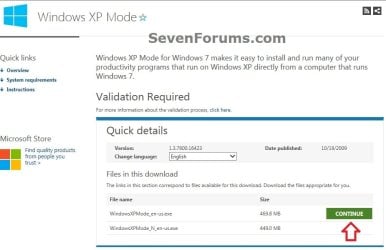
1. Go to the Windows XP Mode webpage, select your language, and click on the Continue button. (see screenshot below)
XP-Mode-1.jpg
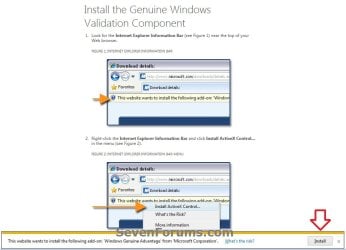
2. If you have not already, you will need to validate your Windows 7 first. Click on Install to install the Genuine Windows Validation Component, or follow on screen instructions. (see screenshot below)
NOTE: You will need to have Windows 7 activated and cookies enabled to be able to do this.
Validate-1.jpg
3. Download and Install Windows XP Mode
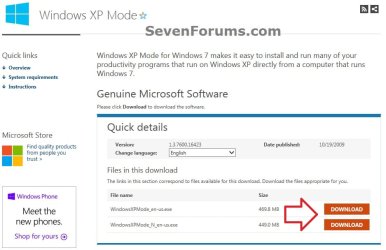
A) Select your language, and click on the Download button for the version (ex: WindowsXPMode_en-us.exe) you want to download. (see screenshot below)
NOTE: The "N" version of Windows XP is for the European version of Windows.
XP-Mode-2.jpg
B) Save the WindowsXPMode_en-us.exe file to your desktop.
C) Double click on the downloaded WindowsXPMode_en-us.exe installation file to start installing it.
NOTE: The part of the name in red will vary for you depending on what language you selected (step 1).

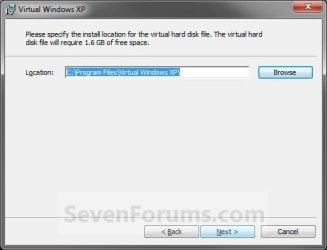
D) Click on the Next button. (see screenshot below)
NOTE: If you like, you could click on Browse and select another location to save the VHD file for XP Mode to instead of the default location in the screenshot below.
Install_VXP-1.jpg
E) Click on the Next button. (see screenshot below)
Install_VXP-UAC-2.jpg
F) If prompted by UAC, click on Yes.

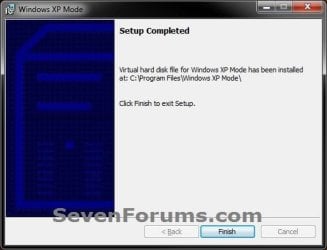
G) When Windows XP Mode is finished installing, click on the Finish button. (See screenshot below)
Install_VXP-3.jpg
4. Download and Install Windows Virtual PC
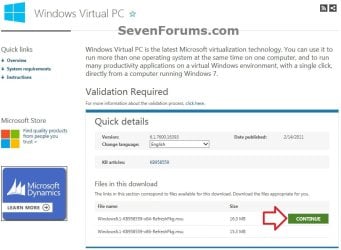
A) At the Windows Virtual PC webpage, select your language, and click on the Continue button. (see screenshot below)
Windows_Virtual-PC-1.jpg
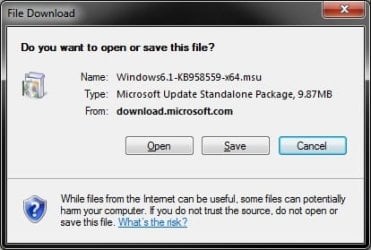
B) Select your language, and click on the Download button for either the Windows6.1-KB958559-x86-RefreshPkg.msu (32-bit) or Windows6.1-KB958559-x64-RefreshPkg.msu (64-bit) file for your same 32-bit or 64-bit Windows 7 version you have installed.

C) Save the Windows6.1-KB958559-x86-RefreshPkg.msu or Windows6.1-KB958559-x64-RefreshPkg.msu file to your desktop. (see screenshot below)
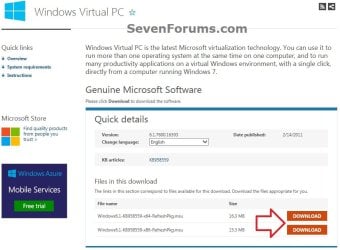
Windows_Virtual-PC-2.jpg
D) Double click on the downloaded Windows6.1-KB958559-x86-RefreshPkg.msu or Windows6.1-KB958559-x64-RefreshPkg.msu file to start installing it.

E) If prompted by UAC, click on Yes.
F) Click on Yes. (see screenshot below)
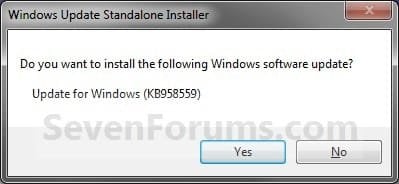
Install-1.jpg
G) Click on the I Accept button. (see screenshot below)
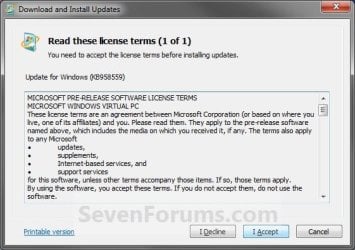
Install-2.jpg
H) When it is finished, click on the Restart Now button. (see screenshot below)
WARNING: This will restart your computer immediately. Be sure to save and close anything that you have open first.
Install-3.jpg
I) When the computer is finished restarting, continue on to step 6 below.
5. To Open and Run Windows XP Mode
A) Open the Start Menu, then click on All Programs, expand the Windows Virtual PC folder, and double click on the Windows XP Mode shortcut. (see screenshot below)
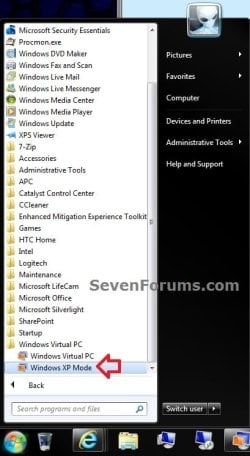
XP-1.jpg
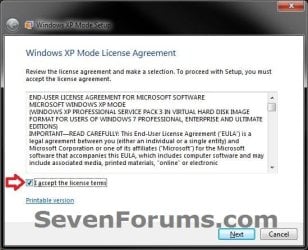
6. Check the I accept box, then click on the Next button. (see screenshot below)
Step1B.jpg
7. Type in a password and type it in again to confirm it, then click on the Next button. (see screenshot below)
NOTE: If you would like to be logged on automatically whenever you open Windows XP Mode (step 5), then check the Remember credentials box.
XP-2.jpg
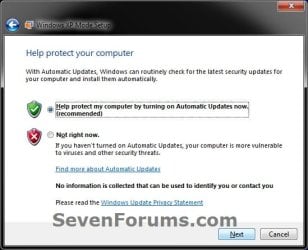
8. Select (dot) the Help protect my computer by turning on Automatic Updates now box, then click on the Next button. (see screenshot below)
XP-3.jpg
9. Click on the Start Setup button. (see screenshot below)
XP-4.jpg
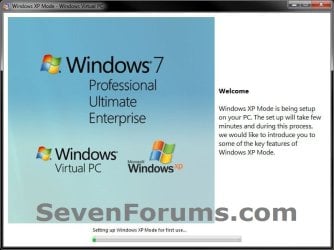
10. You will now see this for a few moments while Windows XP Mode is being setup. (see screeshot below)
Step4B.jpg
11. When setup is finished and you did not check the Remember credentials box in step 7 above, then you will need to enter your password entered and click on OK. If you did, then skip this and continue on to step 12. (see screenshot below)
XP-5.jpg
12. The Windows XP Mode - Windows Virtual PC window will now open. You are now in Windows XP Mode. (see screenshot below)
Example.jpg
13. Next, be sure to install Integration Components and enable Integration Features.
NOTE: Sometimes this will be enabled for you automatically during installation.

14. Set Windows XP Mode Settings
A) In the Windows XP Mode window, click on Tools (menu bar) and Settings. (see screenshot above)

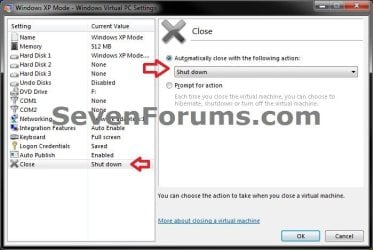
B) In the left pane, select Close/Shut Down. (see screenshot below)
Shut-Down.jpg
C) In the right pane, select (dot) Automatically close with the following action, then select Shut Down and click on OK. (see screenshot above)
15. To Close Windows XP Mode
A) Click on the X in the upper right corner of the Windows XP Mode window like you would any other window in Windows 7. (see screenshot below step 19)

OR

B) In the Windows XP Mode window, click on Action (menu bar) and Close. (see screenshot below step 16)
16. Installing a Program in Windows XP Mode
NOTE: You would install a program in Virtual Windows XP just like you would in Windows 7 with the same access to everything in Windows 7. For example, hard drives, DVD drives, USB drives, Windows 7 folders and files, etc.....
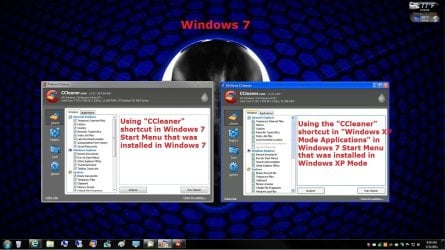
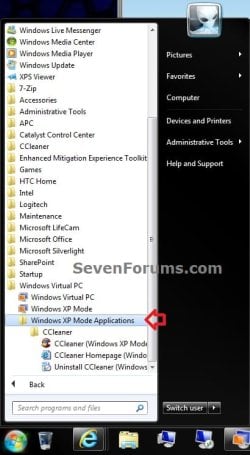
A) After you have installed any program (ex: CCleaner) in Windows XP Mode, you will notice that there will now also be a shortcut to it in the Windows 7 Start Menu in the Windows XP Mode Applications folder under Windows Virtual PC and Windows XP Mode. (see screenshot below)
NOTE: Double clicking on the program's shortcut (ex: CCleaner) in the Windows 7 Start Menu when Windows XP Mode is closed will open and run the program in Windows 7 but as if it you were running it in Windows XP Mode. You could also move or copy this Windows XP Mode Applications shortcut where you like in Windows 7 for easy use.
XP-6.jpg

Program_Example.jpg

That's it,
Shawn


Attachments

  • Virtual-PC_Save.jpg
    Virtual-PC_Save.jpg
    40 KB · Views: 2,157
Last edited:

My Computer

Computer type
Laptop
Computer Manufacturer/Model Number
HP Envy Dv7-7223cl
OS
Windows 10 Pro 64-Bit
CPU
AMD A8-4500M APU
Motherboard
I dunno, System Information won't tell me :P
Memory
8 GB
Graphics Card(s)
AMD Radeon HD Graphics 1.90 GHz
Sound Card
AMD High Definition Audio Device
Monitor(s) Displays
AMD Radeon HD 7640G
Screen Resolution
1600x900
Hard Drives
Hitachi HTS547575A9E384 ATA Device
PSU
HP/Compaq R33030 Charger
Case
Swiss Gear 17"
Cooling
HP CoolSense
Keyboard
Standard PS/2 Keyboard
Mouse
Microsoft Basic Optical Mouse v2.0
Internet Speed
135.0 Mbps
Antivirus
Microsoft Security Essentials
Browser
Internet Explorer 11, Google Chrome, Mozilla Firefox
Other Info
My spiritual successor to the Toshiba Satellite L645D-S2025 (my first laptop which died of mismanagement primarily involving food :( )
I'm also encountering another error in which some of the programs crash every time I launch them. Even some websites that I go to crash, including YouTube!
 

My Computer

Computer type
Laptop
Computer Manufacturer/Model Number
HP Envy Dv7-7223cl
OS
Windows 10 Pro 64-Bit
CPU
AMD A8-4500M APU
Motherboard
I dunno, System Information won't tell me :P
Memory
8 GB
Graphics Card(s)
AMD Radeon HD Graphics 1.90 GHz
Sound Card
AMD High Definition Audio Device
Monitor(s) Displays
AMD Radeon HD 7640G
Screen Resolution
1600x900
Hard Drives
Hitachi HTS547575A9E384 ATA Device
PSU
HP/Compaq R33030 Charger
Case
Swiss Gear 17"
Cooling
HP CoolSense
Keyboard
Standard PS/2 Keyboard
Mouse
Microsoft Basic Optical Mouse v2.0
Internet Speed
135.0 Mbps
Antivirus
Microsoft Security Essentials
Browser
Internet Explorer 11, Google Chrome, Mozilla Firefox
Other Info
My spiritual successor to the Toshiba Satellite L645D-S2025 (my first laptop which died of mismanagement primarily involving food :( )
Are you saying I must install Windows XP Mode before installing Windows Virtual PC? Am I having this problem because there are some steps in which I must install one program before installing another?
 

My Computer

Computer type
Laptop
Computer Manufacturer/Model Number
HP Envy Dv7-7223cl
OS
Windows 10 Pro 64-Bit
CPU
AMD A8-4500M APU
Motherboard
I dunno, System Information won't tell me :P
Memory
8 GB
Graphics Card(s)
AMD Radeon HD Graphics 1.90 GHz
Sound Card
AMD High Definition Audio Device
Monitor(s) Displays
AMD Radeon HD 7640G
Screen Resolution
1600x900
Hard Drives
Hitachi HTS547575A9E384 ATA Device
PSU
HP/Compaq R33030 Charger
Case
Swiss Gear 17"
Cooling
HP CoolSense
Keyboard
Standard PS/2 Keyboard
Mouse
Microsoft Basic Optical Mouse v2.0
Internet Speed
135.0 Mbps
Antivirus
Microsoft Security Essentials
Browser
Internet Explorer 11, Google Chrome, Mozilla Firefox
Other Info
My spiritual successor to the Toshiba Satellite L645D-S2025 (my first laptop which died of mismanagement primarily involving food :( )
Official instructions from Microsoft, as well as this tutorial both make it absolutely clear that you start installing XP Mode and when it is installed, you install the Virtual PC.
 

My Computer

Computer type
Laptop
Computer Manufacturer/Model Number
HP ENVY 17-1150eg
OS
Windows 10 Pro x64 EN-GB
CPU
1.6 GHz Intel Core i7-720QM Processor
Memory
6 GB
Graphics Card(s)
ATI Mobility Radeon HD 5850 Graphics
Sound Card
Beats sound system with integrated subwoofer
Monitor(s) Displays
17" laptop display, 22" LED and 32" Full HD TV through HDMI
Screen Resolution
1600*900 (1), 1920*1080 (2&3)
Hard Drives
Internal: 2 x 500 GB SATA Hard Disk Drive 7200 rpm
External: 2TB for backups, 3TB USB3 network drive for media
Cooling
As Envy runs a bit warm, I have it on a Cooler Master pad
Keyboard
Logitech diNovo Media Desktop Laser (bluetooth)
Mouse
Logitech Performance Mouse MX
Internet Speed
50/10 Mbps VDSL
Antivirus
Windows Defender 4.3.9431.0
Browser
Maxthon 3.5.2., IE11
What's the file with the capital N?

Hi!
When you are downloading XP mode, there are two files to choose from, what's the other one with the capital N?
 

My Computer

Computer type
Laptop
Computer Manufacturer/Model Number
Acer Aspire
OS
Windows 7 Ultimate x64
Microsoft is forced to offer European Union market an edition of Windows without Windows Media Player and other media features. These Windows editions are known as the N editions, so the Windows XP Mode N is a fully working Windows XP Service Pack 3 virtual machine without Windows Media Player.

Users of the Windows XP N and Windows XP Mode N can manually add the missing media features by installing the free Media Pack for Windows XP.

From Wikipedia:

Special-purpose editions

The main editions also can take the form of one of the following special editions: N and KN editions.

The features in the N and KN Editions are the same as their equivalent full versions, but do not include Windows Media Player or other Windows Media-related technologies, such as Windows Media Center and Windows DVD Maker. The cost of the N and KN Editions are the same as the full versions, as the Media Feature Pack for Windows 7 N or Windows 7 KN can be downloaded without charge from Microsoft.

Read more: What is a Windows 7 N edition? - Microsoft Windows (the article tells about Windows 7 N but applies also for XP N and 8 N editions).

Media Pack for Windows 7 N: http://www.microsoft.com/en-us/download/details.aspx?id=16546
Media Pack for Windows 8 N: http://www.microsoft.com/en-in/download/details.aspx?id=30685

Kari
 
Last edited:

My Computer

Computer type
Laptop
Computer Manufacturer/Model Number
HP ENVY 17-1150eg
OS
Windows 10 Pro x64 EN-GB
CPU
1.6 GHz Intel Core i7-720QM Processor
Memory
6 GB
Graphics Card(s)
ATI Mobility Radeon HD 5850 Graphics
Sound Card
Beats sound system with integrated subwoofer
Monitor(s) Displays
17" laptop display, 22" LED and 32" Full HD TV through HDMI
Screen Resolution
1600*900 (1), 1920*1080 (2&3)
Hard Drives
Internal: 2 x 500 GB SATA Hard Disk Drive 7200 rpm
External: 2TB for backups, 3TB USB3 network drive for media
Cooling
As Envy runs a bit warm, I have it on a Cooler Master pad
Keyboard
Logitech diNovo Media Desktop Laser (bluetooth)
Mouse
Logitech Performance Mouse MX
Internet Speed
50/10 Mbps VDSL
Antivirus
Windows Defender 4.3.9431.0
Browser
Maxthon 3.5.2., IE11
1 more time, I find myself turning to this great windows 7 community. Thanks for all your work, everybody.

The question:
Will windows xp mode install on my windows 7 home premium machine? I ask because of the following sections of this tutorial that are confusing to me...

The confusion:
"Windows XP Mode provides only Windows 7 Professional, Ultimate, or Enterprise users the flexibility to run many older productivity applications in a virtual Windows XP environment on a Windows 7-based PC.

UPDATE: Windows XP Mode now accessible to more PCs - Windows 7 Team Blog - The Windows Blog"

^the link is dead


"NOTE: Windows XP Mode can only be installed on Windows 7 Professional, Windows 7 Ultimate, and Windows 7 Enterprise.
  • <LI abp="452">Windows 7 Home Premium (32-bit or 64-bit) <LI abp="453">Windows 7 Professional (32-bit and 64-bit) <LI abp="454">Windows 7 Ultimate (32-bit and 64-bit)
  • Windows 7 Enterprise (32-bit and 64-bit) "
^This quote excludes windows 7 home premium from the "NOTE:" section, but includes windows 7 home premium in the bulleted list.


.... :sarc:?
 

My Computer

Computer type
PC/Desktop
OS
64bit win7

My Computer

Computer type
PC/Desktop
Computer Manufacturer/Model Number
Self built custom
OS
64-bit Windows 11 Pro for Workstations
CPU
Intel i7-8700K OC'd to 5 GHz
Motherboard
ASUS ROG Maximus XI Formula Z390
Memory
64 GB (4x16GB) G.SKILL TridentZ RGB DDR4 3600 MHz
Graphics Card(s)
ASUS ROG-STRIX-GTX1080TI-O11G-GAMING
Sound Card
Integrated
Monitor(s) Displays
2 x Samsung Odyssey G7 27"
Screen Resolution
2560x1440
Hard Drives
1TB Samsung 990 PRO M.2,
4TB Samsung 990 PRO PRO M.2,
TerraMaster F8 SSD Plus NAS
PSU
Seasonic Prime Titanium 850W
Case
Thermaltake Core P3
Cooling
Corsair Hydro H115i
Keyboard
Logitech wireless K800
Mouse
Logitech MX Master 4
Internet Speed
2 Gb/s Download and 100 Mb/s Upload
Antivirus
Malwarebyte Anti-Malware Premium
Browser
Google Chrome
Other Info
Logitech Z625 speaker system,
Logitech BRIO 4K Pro webcam,
HP Color LaserJet Pro MFP M477fdn,
APC SMART-UPS RT 1000 XL - SURT1000XLI,
Galaxy S23 Plus phone
You're most welcome. :)
 

My Computer

Computer type
PC/Desktop
Computer Manufacturer/Model Number
Self built custom
OS
64-bit Windows 11 Pro for Workstations
CPU
Intel i7-8700K OC'd to 5 GHz
Motherboard
ASUS ROG Maximus XI Formula Z390
Memory
64 GB (4x16GB) G.SKILL TridentZ RGB DDR4 3600 MHz
Graphics Card(s)
ASUS ROG-STRIX-GTX1080TI-O11G-GAMING
Sound Card
Integrated
Monitor(s) Displays
2 x Samsung Odyssey G7 27"
Screen Resolution
2560x1440
Hard Drives
1TB Samsung 990 PRO M.2,
4TB Samsung 990 PRO PRO M.2,
TerraMaster F8 SSD Plus NAS
PSU
Seasonic Prime Titanium 850W
Case
Thermaltake Core P3
Cooling
Corsair Hydro H115i
Keyboard
Logitech wireless K800
Mouse
Logitech MX Master 4
Internet Speed
2 Gb/s Download and 100 Mb/s Upload
Antivirus
Malwarebyte Anti-Malware Premium
Browser
Google Chrome
Other Info
Logitech Z625 speaker system,
Logitech BRIO 4K Pro webcam,
HP Color LaserJet Pro MFP M477fdn,
APC SMART-UPS RT 1000 XL - SURT1000XLI,
Galaxy S23 Plus phone
That is truly an omnibus post.
However before I get underway my local computer guru has told me that I should not follow this route as my SSD drive would not accept Win XP at all......of course, if you could reassure me, I shall roll up my sleeves.
Thanks. Am I happy to have found your site!
 

My Computer

Computer type
PC/Desktop
Computer Manufacturer/Model Number
Custom build
OS
Windows 7 Pro 64 bit
CPU
AMD Athlon 64 x 2 5000+
Motherboard
M2N-E SLI
Memory
DDR12
Graphics Card(s)
L1913P on AMD Radeon R9 200
Sound Card
SB Audigy
Monitor(s) Displays
LG 19"
Screen Resolution
1280 x 1024
Hard Drives
Corsair Force 3 SSD
Keyboard
Logitech Access 600
Mouse
Marble mouse
Internet Speed
1.5 mb
Antivirus
Norton
Browser
Goggle Chrome
Hello Stuggler, and welcome to Seven Forums.

While XP will not support the TRIM feature of an SSD, it really wouldn't matter since this would be a virtual machine. You won't have any issues with installing XP Mode if you like. :)
 

My Computer

Computer type
PC/Desktop
Computer Manufacturer/Model Number
Self built custom
OS
64-bit Windows 11 Pro for Workstations
CPU
Intel i7-8700K OC'd to 5 GHz
Motherboard
ASUS ROG Maximus XI Formula Z390
Memory
64 GB (4x16GB) G.SKILL TridentZ RGB DDR4 3600 MHz
Graphics Card(s)
ASUS ROG-STRIX-GTX1080TI-O11G-GAMING
Sound Card
Integrated
Monitor(s) Displays
2 x Samsung Odyssey G7 27"
Screen Resolution
2560x1440
Hard Drives
1TB Samsung 990 PRO M.2,
4TB Samsung 990 PRO PRO M.2,
TerraMaster F8 SSD Plus NAS
PSU
Seasonic Prime Titanium 850W
Case
Thermaltake Core P3
Cooling
Corsair Hydro H115i
Keyboard
Logitech wireless K800
Mouse
Logitech MX Master 4
Internet Speed
2 Gb/s Download and 100 Mb/s Upload
Antivirus
Malwarebyte Anti-Malware Premium
Browser
Google Chrome
Other Info
Logitech Z625 speaker system,
Logitech BRIO 4K Pro webcam,
HP Color LaserJet Pro MFP M477fdn,
APC SMART-UPS RT 1000 XL - SURT1000XLI,
Galaxy S23 Plus phone
Many thanks, Brink. A speedy response is always an added delight to a helpful reply.
Now to take the next step.
 

My Computer

Computer type
PC/Desktop
Computer Manufacturer/Model Number
Custom build
OS
Windows 7 Pro 64 bit
CPU
AMD Athlon 64 x 2 5000+
Motherboard
M2N-E SLI
Memory
DDR12
Graphics Card(s)
L1913P on AMD Radeon R9 200
Sound Card
SB Audigy
Monitor(s) Displays
LG 19"
Screen Resolution
1280 x 1024
Hard Drives
Corsair Force 3 SSD
Keyboard
Logitech Access 600
Mouse
Marble mouse
Internet Speed
1.5 mb
Antivirus
Norton
Browser
Goggle Chrome
You're welcome. I hope it goes smoothly for you. :)
 

My Computer

Computer type
PC/Desktop
Computer Manufacturer/Model Number
Self built custom
OS
64-bit Windows 11 Pro for Workstations
CPU
Intel i7-8700K OC'd to 5 GHz
Motherboard
ASUS ROG Maximus XI Formula Z390
Memory
64 GB (4x16GB) G.SKILL TridentZ RGB DDR4 3600 MHz
Graphics Card(s)
ASUS ROG-STRIX-GTX1080TI-O11G-GAMING
Sound Card
Integrated
Monitor(s) Displays
2 x Samsung Odyssey G7 27"
Screen Resolution
2560x1440
Hard Drives
1TB Samsung 990 PRO M.2,
4TB Samsung 990 PRO PRO M.2,
TerraMaster F8 SSD Plus NAS
PSU
Seasonic Prime Titanium 850W
Case
Thermaltake Core P3
Cooling
Corsair Hydro H115i
Keyboard
Logitech wireless K800
Mouse
Logitech MX Master 4
Internet Speed
2 Gb/s Download and 100 Mb/s Upload
Antivirus
Malwarebyte Anti-Malware Premium
Browser
Google Chrome
Other Info
Logitech Z625 speaker system,
Logitech BRIO 4K Pro webcam,
HP Color LaserJet Pro MFP M477fdn,
APC SMART-UPS RT 1000 XL - SURT1000XLI,
Galaxy S23 Plus phone
I have not read all 36 pages of this thread, but would've thought my question would be answered in Post #1 so here goes: what are the considerations for using XP Mode over simply running a program in Compatibility Mode? I understand that if the program is 16 bit, then XP Mode is the only way possible if one's W7 is 64-bit, but are there other reasons that XP Mode is superior to Compatibility Mode?

I have an old XP SP3 computer that I run for a couple of programs alone, and while I don't think any are 16-bit, it seems to me that I did in at least one case try running one of these on W7 years ago without success, hence that I've kept the XP machine for it. Does "XP Mode" virtualization always work in every XP case?
 

My Computer

Computer type
Laptop
Computer Manufacturer/Model Number
Dell Latitude E6540 Laptop
OS
Windows 7 Professional 64bit
CPU
Intel Core i7 4600M @ 2.90GHz
Motherboard
Dell Inc. 0CYT5F (SOCKET 0)
Memory
16.0GB Dual-Channel DDR3 @ 797MHz (11-11-11-28)
Graphics Card(s)
Intel HD Graphics 4600 (Dell) 2048MB ATI AMD Radeon HD 8790M
Sound Card
Realtek High Definition Audio
Monitor(s) Displays
HP ZR30w (2560x1600@60Hz)
Hard Drives
256GB LITEONIT LMT-256M6M-41 mm SATA (SSD)
1TB Samsung SSD 860 EVO mSATA SATA (SSD)
2TB USB 3.0 USB Device
115GB SanDisk Ultra Fit USB
Other Info
Multiple Dell E-Port Plus II Port Replicator/Docking Stations 0Y72NH USB 3.0 + 130W AC Adapters
Hello Max, :)

As for which one is superior, I'd say it would come down to what works best in your situation.

XP Mode would be perfect in your situation if the XP program will not run in compatibility mode since XP Mode is just a virtual machine running Windows XP.
 

My Computer

Computer type
PC/Desktop
Computer Manufacturer/Model Number
Self built custom
OS
64-bit Windows 11 Pro for Workstations
CPU
Intel i7-8700K OC'd to 5 GHz
Motherboard
ASUS ROG Maximus XI Formula Z390
Memory
64 GB (4x16GB) G.SKILL TridentZ RGB DDR4 3600 MHz
Graphics Card(s)
ASUS ROG-STRIX-GTX1080TI-O11G-GAMING
Sound Card
Integrated
Monitor(s) Displays
2 x Samsung Odyssey G7 27"
Screen Resolution
2560x1440
Hard Drives
1TB Samsung 990 PRO M.2,
4TB Samsung 990 PRO PRO M.2,
TerraMaster F8 SSD Plus NAS
PSU
Seasonic Prime Titanium 850W
Case
Thermaltake Core P3
Cooling
Corsair Hydro H115i
Keyboard
Logitech wireless K800
Mouse
Logitech MX Master 4
Internet Speed
2 Gb/s Download and 100 Mb/s Upload
Antivirus
Malwarebyte Anti-Malware Premium
Browser
Google Chrome
Other Info
Logitech Z625 speaker system,
Logitech BRIO 4K Pro webcam,
HP Color LaserJet Pro MFP M477fdn,
APC SMART-UPS RT 1000 XL - SURT1000XLI,
Galaxy S23 Plus phone
Hello Max, :)

As for which one is superior, I'd say it would come down to what works best in your situation.

XP Mode would be perfect in your situation if the XP program will not run in compatibility mode since XP Mode is just a virtual machine running Windows XP.

Thanks Brink! :cool:

Funny I had never heard of "XP Mode" till this tut was referenced in another thread. But now that I am running W7 Pro I may have to download and try it before MS decides it goes the way of W10!:confused:
 

My Computer

Computer type
Laptop
Computer Manufacturer/Model Number
Dell Latitude E6540 Laptop
OS
Windows 7 Professional 64bit
CPU
Intel Core i7 4600M @ 2.90GHz
Motherboard
Dell Inc. 0CYT5F (SOCKET 0)
Memory
16.0GB Dual-Channel DDR3 @ 797MHz (11-11-11-28)
Graphics Card(s)
Intel HD Graphics 4600 (Dell) 2048MB ATI AMD Radeon HD 8790M
Sound Card
Realtek High Definition Audio
Monitor(s) Displays
HP ZR30w (2560x1600@60Hz)
Hard Drives
256GB LITEONIT LMT-256M6M-41 mm SATA (SSD)
1TB Samsung SSD 860 EVO mSATA SATA (SSD)
2TB USB 3.0 USB Device
115GB SanDisk Ultra Fit USB
Other Info
Multiple Dell E-Port Plus II Port Replicator/Docking Stations 0Y72NH USB 3.0 + 130W AC Adapters
Please let us know how it went. :)
 

My Computer

Computer type
PC/Desktop
Computer Manufacturer/Model Number
Self built custom
OS
64-bit Windows 11 Pro for Workstations
CPU
Intel i7-8700K OC'd to 5 GHz
Motherboard
ASUS ROG Maximus XI Formula Z390
Memory
64 GB (4x16GB) G.SKILL TridentZ RGB DDR4 3600 MHz
Graphics Card(s)
ASUS ROG-STRIX-GTX1080TI-O11G-GAMING
Sound Card
Integrated
Monitor(s) Displays
2 x Samsung Odyssey G7 27"
Screen Resolution
2560x1440
Hard Drives
1TB Samsung 990 PRO M.2,
4TB Samsung 990 PRO PRO M.2,
TerraMaster F8 SSD Plus NAS
PSU
Seasonic Prime Titanium 850W
Case
Thermaltake Core P3
Cooling
Corsair Hydro H115i
Keyboard
Logitech wireless K800
Mouse
Logitech MX Master 4
Internet Speed
2 Gb/s Download and 100 Mb/s Upload
Antivirus
Malwarebyte Anti-Malware Premium
Browser
Google Chrome
Other Info
Logitech Z625 speaker system,
Logitech BRIO 4K Pro webcam,
HP Color LaserJet Pro MFP M477fdn,
APC SMART-UPS RT 1000 XL - SURT1000XLI,
Galaxy S23 Plus phone
Congratulations from Greece !

I am moving from XP Pro to Win 7 Pro this period of time, and this topic it did save my day.
I did manage to download all necessary Microsoft software today that they are still available.

MS website April of 2020 this is full of broken links about Win7 support and tools, even so the files they are still hosted and available.

I have MCSE windows 2000 Server education, now I am about to abandon XP Pro which I do know their whereabouts inside and outside.
I have too many legal software and they can go up to Win7, therefore I am in marriage with Win 7 for compatibility purposes.
 

My Computer

Computer type
PC/Desktop
Computer Manufacturer/Model Number
custom build
OS
Win 7 Professional x64 UK (Retail) SP1 & SP2
CPU
Q6600
Motherboard
ASUS P5QC
Memory
4GB DDR3
Graphics Card(s)
HD5770
Sound Card
X-Fi Extreme Audio
Monitor(s) Displays
DELL 23"
Hard Drives
RAID1 - WD RAPTOR
PSU
750W
Cooling
Prolimatech - ARMAGEDON
Browser
Firefox
Where can I find and download Windows XP Mode today for Windows 7?
 

My Computer

Computer type
PC/Desktop
Computer Manufacturer/Model Number
BIOS: BIOS Date: 08/20/18 12:33:01 Ver: 05.0000D.
OS
Windows 7
CPU
Processor: AMD Ryzen 7 - 1800X - 8 Core Processor - 3.6GHz.
Motherboard
AMD Ryzen 7 - 1800X - 8 Core Processor.
Memory
16 GB RAM.
Graphics Card(s)
NVIDIA GeForce GTX 1060 6GB.
Sound Card
NVIDIA/Realtek High Definition Audio.
Monitor(s) Displays
Generic PnP Monitor.
Screen Resolution
1920x1080
Hard Drives
8TB Hard Drives.
PSU
Current Setting: {5C67A112-A4C9-483F-B4A7-1D473BECAFDC}.
Case
Antec.
Cooling
N/A
Keyboard
HID Keyboard Device.
Mouse
HID Compliant Mouse.
Internet Speed
Broadband 20MB.
Antivirus
Microsoft Security Essentials, Win/MS Defender, Malwarebytes
Browser
Microsoft Edge, Internet Explorer, Google Chrome, Opera.
Other Info
Since I am using Windows 7 a lot for creating .themepack theme files, I need to have access to the SevenForums to view and download cursor packs for Windows 7 when I create fully customized themes. This website has many dazzling cursor packs available for download where users can apply them to suit the good mood look for Windows 7 to make it more attractive.
Back
Top